@arcgis/core
Version:
ArcGIS Maps SDK for JavaScript: A complete 2D and 3D mapping and data visualization API
63 lines (61 loc) • 3.96 kB
TypeScript
import type Graphic from "../../Graphic.js";
import type CreateFeaturesWorkflowData from "./CreateFeaturesWorkflowData.js";
import type Workflow from "./Workflow.js";
import type { ReadonlyCollection } from "../../core/Collection.js";
import type { CreateFeatureState, CreateFeaturesWorkflowStep } from "./types.js";
import type { WorkflowProperties } from "./Workflow.js";
export interface CreateFeaturesWorkflowProperties extends WorkflowProperties {}
/**
* A read-only class containing the logic used when creating features using
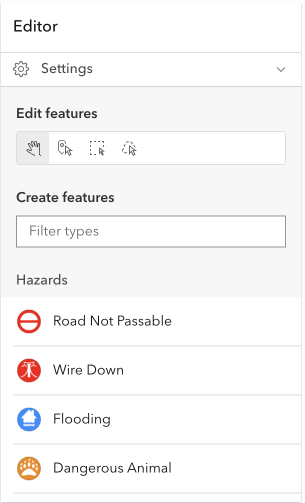
* the [Editor](https://developers.arcgis.com/javascript/latest/references/core/widgets/Editor/) widget. This workflow provides continuous creation of multiple features of the same type at once. After the initial sketch is created, the attribute form will display with the set field elements. These fields can be updated as the user creates new features. This workflow is designed for both individual and multiple feature creation.
*
*
* 
*
* > [!WARNING]
* >
* > This workflow is only enabled if the feature service allows this operation.
*
* @since 4.23
* @see [Editor](https://developers.arcgis.com/javascript/latest/references/core/widgets/Editor/)
* @see [Workflow](https://developers.arcgis.com/javascript/latest/references/core/widgets/Editor/Workflow/)
* @see [UpdateWorkflow](https://developers.arcgis.com/javascript/latest/references/core/widgets/Editor/UpdateWorkflow/)
* @see [Programming patterns: Widget viewModel pattern](https://developers.arcgis.com/javascript/latest/programming-patterns/#widget-viewmodel-pattern)
* @see [Sample - Edit features with the Editor widget](https://developers.arcgis.com/javascript/latest/sample-code/widgets-editor-basic/)
* @see [Sample - Edit features in 3D with the Editor widget](https://developers.arcgis.com/javascript/latest/sample-code/editor-3d/)
* @see [Sample - Editor widget with configurations](https://developers.arcgis.com/javascript/latest/sample-code/widgets-editor-configurable/)
*/
export default class CreateFeaturesWorkflow extends Workflow<CreateFeaturesWorkflowData, CreateFeaturesWorkflowStep> {
constructor(properties?: CreateFeaturesWorkflowProperties);
/**
* Indicates the current feature state during creation. This state is either 1) while creating a new feature, or 2) updating a pending feature while in the "creating-features" step.
*
* @default "create-new"
*/
get createFeatureState(): CreateFeatureState;
/**
* The shared workflow data.
*
* @since 4.30
*/
get data(): CreateFeaturesWorkflowData;
/**
* Returns the number of pending features of an active [CreateFeaturesWorkflow](https://developers.arcgis.com/javascript/latest/references/core/widgets/Editor/CreateFeaturesWorkflow/). Returns 0 (zero) if no workflow is active or the workflow type is not matching.
*
* @see [pendingFeatures](https://developers.arcgis.com/javascript/latest/references/core/widgets/Editor/CreateFeaturesWorkflow/#pendingFeatures)
*/
get numPendingFeatures(): number;
/**
* Returns a collection of [graphics](https://developers.arcgis.com/javascript/latest/references/core/Graphic/) representing features that are currently pending in the [CreateFeaturesWorkflowData](https://developers.arcgis.com/javascript/latest/references/core/widgets/Editor/CreateFeaturesWorkflowData/).
*
* @see [numPendingFeatures](https://developers.arcgis.com/javascript/latest/references/core/widgets/Editor/CreateFeaturesWorkflow/#numPendingFeatures)
*/
get pendingFeatures(): ReadonlyCollection<Graphic>;
/**
* Moves the pending feature into update mode.
*
* @param feature - The pending feature to be updated.
* @returns Resolves when successfully moves the pending feature into update mode.
*/
updatePendingFeature(feature: Graphic): Promise<void>;
}