@arcgis/core
Version:
ArcGIS Maps SDK for JavaScript: A complete 2D and 3D mapping and data visualization API
322 lines (318 loc) • 17.1 kB
TypeScript
import type Collection from "../core/Collection.js";
import type Point from "../geometry/Point.js";
import type CIMSymbol from "../symbols/CIMSymbol.js";
import type PictureMarkerSymbol from "../symbols/PictureMarkerSymbol.js";
import type PointSymbol3D from "../symbols/PointSymbol3D.js";
import type SimpleMarkerSymbol from "../symbols/SimpleMarkerSymbol.js";
import type Widget from "./Widget.js";
import type CoordinateViewModel from "./CoordinateConversion/CoordinateConversionViewModel.js";
import type CoordinateConversionViewModel from "./CoordinateConversion/CoordinateConversionViewModel.js";
import type Conversion from "./CoordinateConversion/support/Conversion.js";
import type Format from "./CoordinateConversion/support/Format.js";
import type { Icon } from "@esri/calcite-components/components/calcite-icon";
import type { ReadonlyArrayOrCollection } from "../core/Collection.js";
import type { MapViewOrSceneView } from "../views/MapViewOrSceneView.js";
import type { Mode } from "./types.js";
import type { WidgetProperties } from "./Widget.js";
import type { ConversionProperties } from "./CoordinateConversion/support/Conversion.js";
import type { HeadingLevel, GoToOverride } from "./support/types.js";
import type { FormatProperties } from "./CoordinateConversion/support/Format.js";
import type { CIMSymbolProperties } from "../symbols/CIMSymbol.js";
import type { PointSymbol3DProperties } from "../symbols/PointSymbol3D.js";
import type { PictureMarkerSymbolProperties } from "../symbols/PictureMarkerSymbol.js";
import type { SimpleMarkerSymbolProperties } from "../symbols/SimpleMarkerSymbol.js";
import type { CoordinateConversionViewModelProperties } from "./CoordinateConversion/CoordinateConversionViewModel.js";
export interface CoordinateConversionProperties extends WidgetProperties, Partial<Pick<CoordinateConversion, "currentLocation" | "goToOverride" | "headingLevel" | "mode" | "multipleConversions" | "orientation" | "storageEnabled" | "storageType" | "view" | "visibleElements">> {
/**
* A [Collection](https://developers.arcgis.com/javascript/latest/references/core/core/Collection/) containing every [Conversion](https://developers.arcgis.com/javascript/latest/references/core/widgets/CoordinateConversion/support/Conversion/)
* that the widget is currently displaying.
*
* @since 4.7
* @example
* // conversions can be set with an array of strings where each string is a format's name
* coordinateConversion.conversions = ["mgrs"];
*/
conversions?: ReadonlyArrayOrCollection<ConversionProperties>;
/**
* A [Collection](https://developers.arcgis.com/javascript/latest/references/core/core/Collection/) containing every [Format](https://developers.arcgis.com/javascript/latest/references/core/widgets/CoordinateConversion/support/Format/)
* that the widget is capable of displaying.
*
* The default formats are `basemap`, `dd`, `ddm`, `dms`, `mgrs`, `usng`, `utm`, and `xy`.
*
* @example
* // only show "xy" format
* let ccWidget = new CoordinateConversion({
* view: view
* });
* const toRemove = ccWidget.formats.filter(format => format.name !== "xy");
* ccWidget.formats.removeMany(toRemove);
* view.ui.add(ccWidget, "bottom-left");
* @example
* // show every format except "xy"
* let ccWidget = new CoordinateConversion({
* view: view
* });
* const toRemove = ccWidget.formats.filter(format => format.name == "xy");
* ccWidget.formats.removeMany(toRemove);
* view.ui.add(ccWidget, "bottom-left");
*/
formats?: ReadonlyArrayOrCollection<FormatProperties>;
/**
* Icon which represents the widget. It is typically used when the widget is controlled by another
* one (e.g. in the Expand widget).
*
* @default "coordinate-system"
* @since 4.27
* @see [Calcite Icon Search](https://developers.arcgis.com/calcite-design-system/icons/)
* @see [Calcite Icon Search](https://developers.arcgis.com/calcite-design-system/icons/)
*/
icon?: Icon["icon"] | null;
/**
* The widget's default label.
*
* @since 4.11
*/
label?: string | null;
/**
* This symbol is used to visualize the location currently described by the widget when `capture` mode
* is active.
*/
locationSymbol?: (SimpleMarkerSymbolProperties & { type: "simple-marker" }) | (PictureMarkerSymbolProperties & { type: "picture-marker" }) | (PointSymbol3DProperties & { type: "point-3d" }) | (CIMSymbolProperties & { type: "cim" });
/**
* The view model for this widget. The view model contains the logic that controls the Coordinate Widget's behavior. See the
* [CoordinateConversionViewModel](https://developers.arcgis.com/javascript/latest/references/core/widgets/CoordinateConversion/CoordinateConversionViewModel/) class to access all properties and methods on the widget.
*/
viewModel?: CoordinateConversionViewModelProperties;
}
export type CoordinateConversionOrientation = "expand-up" | "expand-down" | "auto";
/**
* The visible elements that are displayed within the widget.
* This provides the ability to turn individual elements of the widget's display on/off.
*/
export interface VisibleElements {
/** Indicates whether the settings button will be displayed. Default is `true`. */
settingsButton?: boolean;
/** Indicates whether the input coordinate button will be displayed. Default is `true`. */
inputButton?: boolean;
/** Indicates whether the capture mode button will be displayed. Default is `true`. */
captureButton?: boolean;
/** Indicates whether the expand and retract buttons will be displayed. Default is `true`. */
expandButton?: boolean;
}
/**
* The CoordinateConversion widget provides a way to display user cursor position either as map coordinates or
* as any of several popular coordinate notations. Additionally, the widget provides a way to convert
* user input coordinates into a [Point](https://developers.arcgis.com/javascript/latest/references/core/geometry/Point/).
*
* [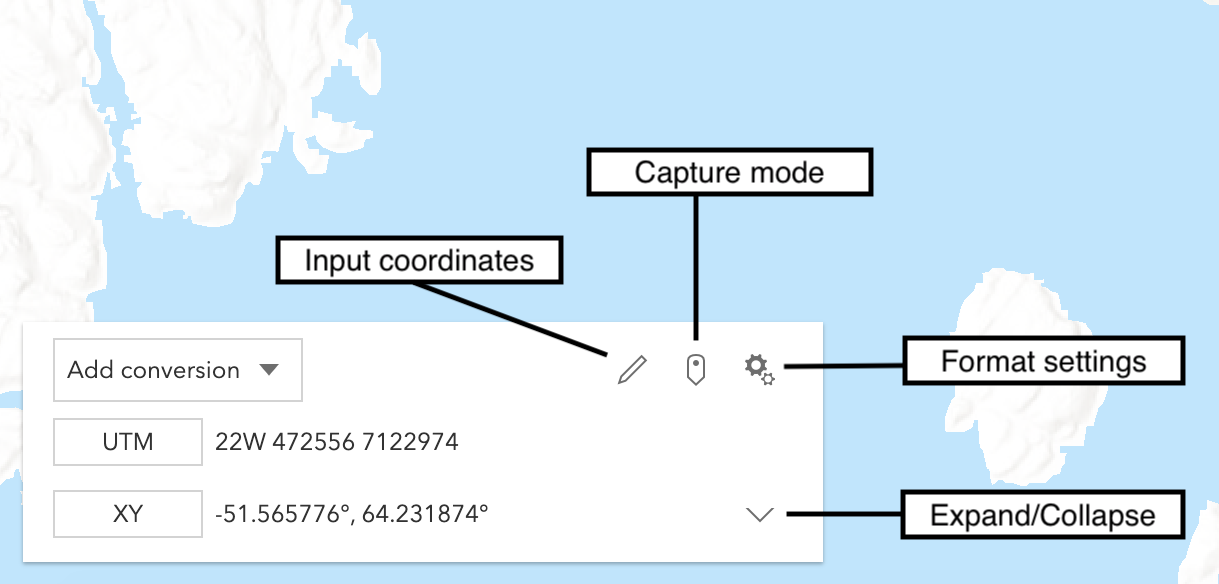](https://developers.arcgis.com/javascript/latest/sample-code/widgets-coordinateconversion/)
*
* Several common [formats](https://developers.arcgis.com/javascript/latest/references/core/widgets/CoordinateConversion/support/Format/) are included by default:
* * XY - Longitude, Latitude (WGS84)
* * MGRS - [Military Grid Reference System](https://earth-info.nga.mil/index.php?dir=coordsys&action=coordsys#mgrs)
* * UTM - [Universal Transverse Mercator](https://earth-info.nga.mil/index.php?dir=coordsys&action=coordsys#utm)
* * DD - Decimal Degrees
* * DDM - Degrees Decimal Minutes
* * DMS - Degrees Minutes Seconds
* * Basemap - X, Y in the coordinate system used by the current [Basemap](https://developers.arcgis.com/javascript/latest/references/core/Basemap/) in the units used by the [Basemap](https://developers.arcgis.com/javascript/latest/references/core/Basemap/).
* Web Mercator is the standard for Esri-provided [basemaps](https://developers.arcgis.com/javascript/latest/references/core/Map/#basemap).
*
* Additional [formats](https://developers.arcgis.com/javascript/latest/references/core/widgets/CoordinateConversion/support/Format/) can be created by a developer and made available
* through the widget.
*
* @deprecated since version 4.34. Use the [CoordinateConversion component](https://developers.arcgis.com/javascript/latest/references/map-components/components/arcgis-coordinate-conversion/) instead. For information on widget deprecation, read about [Esri's move to web components](https://developers.arcgis.com/javascript/latest/components-transition-plan/).
* @since 4.7
* @see [CoordinateConversion component](https://developers.arcgis.com/javascript/latest/references/map-components/components/arcgis-coordinate-conversion/)
* @see [Sample - CoordinateConversion component](https://developers.arcgis.com/javascript/latest/sample-code/coordinate-conversion/)
* @see [CoordinateConversionViewModel](https://developers.arcgis.com/javascript/latest/references/core/widgets/CoordinateConversion/CoordinateConversionViewModel/)
* @see [coordinateFormatter](https://developers.arcgis.com/javascript/latest/references/core/geometry/coordinateFormatter/)
* @example
* let ccWidget = new CoordinateConversion({
* view: view
* });
*
* // Adds widget in the bottom left corner of the view
* view.ui.add(ccWidget, "bottom-left");
*/
export default class CoordinateConversion extends Widget {
/**
* @example
* // typical usage
* let ccWidget = new CoordinateConversion({
* view: view
* });
*/
constructor(properties?: CoordinateConversionProperties);
/**
* A [Collection](https://developers.arcgis.com/javascript/latest/references/core/core/Collection/) containing every [Conversion](https://developers.arcgis.com/javascript/latest/references/core/widgets/CoordinateConversion/support/Conversion/)
* that the widget is currently displaying.
*
* @since 4.7
* @example
* // conversions can be set with an array of strings where each string is a format's name
* coordinateConversion.conversions = ["mgrs"];
*/
get conversions(): Collection<Conversion>;
set conversions(value: ReadonlyArrayOrCollection<ConversionProperties>);
/**
* Describes the location of the coordinates currently displayed by the widget as a [Point](https://developers.arcgis.com/javascript/latest/references/core/geometry/Point/).
* Setting this property will update all [conversions](https://developers.arcgis.com/javascript/latest/references/core/widgets/CoordinateConversion/#conversions).
*
* @since 4.7
*/
accessor currentLocation: Point | null | undefined;
/**
* A [Collection](https://developers.arcgis.com/javascript/latest/references/core/core/Collection/) containing every [Format](https://developers.arcgis.com/javascript/latest/references/core/widgets/CoordinateConversion/support/Format/)
* that the widget is capable of displaying.
*
* The default formats are `basemap`, `dd`, `ddm`, `dms`, `mgrs`, `usng`, `utm`, and `xy`.
*
* @example
* // only show "xy" format
* let ccWidget = new CoordinateConversion({
* view: view
* });
* const toRemove = ccWidget.formats.filter(format => format.name !== "xy");
* ccWidget.formats.removeMany(toRemove);
* view.ui.add(ccWidget, "bottom-left");
* @example
* // show every format except "xy"
* let ccWidget = new CoordinateConversion({
* view: view
* });
* const toRemove = ccWidget.formats.filter(format => format.name == "xy");
* ccWidget.formats.removeMany(toRemove);
* view.ui.add(ccWidget, "bottom-left");
*/
get formats(): Collection<Format>;
set formats(value: ReadonlyArrayOrCollection<FormatProperties>);
/**
* This function provides the ability to override either the
* [MapView goTo()](https://developers.arcgis.com/javascript/latest/references/core/views/MapView/#goTo) or
* [SceneView goTo()](https://developers.arcgis.com/javascript/latest/references/core/views/SceneView/#goTo) methods.
*
* @since 4.8
* @see [MapView.goTo()](https://developers.arcgis.com/javascript/latest/references/core/views/MapView/#goTo)
* @see [SceneView.goTo()](https://developers.arcgis.com/javascript/latest/references/core/views/SceneView/#goTo)
* @example
* // The following snippet uses Search but can be applied to any
* // widgets that support the goToOverride property.
* search.goToOverride = function(view, goToParams) {
* goToParams.options = {
* duration: updatedDuration
* };
* return view.goTo(goToParams.target, goToParams.options);
* };
*/
accessor goToOverride: GoToOverride | null | undefined;
/**
* Indicates the heading level to use for the coordinate input and coordinate settings headings. By default,
* these headings are rendered as level 4 headings (e.g. `<h4>Input coordinate</h4>`). Depending on the coordinate conversion widget's
* placement in your app, you may need to adjust this heading for proper semantics. This is important for meeting
* accessibility standards.
*
* @default 4
* @since 4.20
* @example
* // coordinate conversion heading will render as an <h2>
* coordinateConversion.headingLevel = 2;
*/
accessor headingLevel: HeadingLevel;
/**
* Icon which represents the widget. It is typically used when the widget is controlled by another
* one (e.g. in the Expand widget).
*
* @default "coordinate-system"
* @since 4.27
* @see [Calcite Icon Search](https://developers.arcgis.com/calcite-design-system/icons/)
* @see [Calcite Icon Search](https://developers.arcgis.com/calcite-design-system/icons/)
*/
get icon(): Icon["icon"];
set icon(value: Icon["icon"] | null | undefined);
/**
* The widget's default label.
*
* @since 4.11
*/
get label(): string;
set label(value: string | null | undefined);
/**
* This symbol is used to visualize the location currently described by the widget when `capture` mode
* is active.
*/
get locationSymbol(): CoordinateConversionViewModel["locationSymbol"];
set locationSymbol(value: (SimpleMarkerSymbolProperties & { type: "simple-marker" }) | (PictureMarkerSymbolProperties & { type: "picture-marker" }) | (PointSymbol3DProperties & { type: "point-3d" }) | (CIMSymbolProperties & { type: "cim" }));
/**
* Describes the current mode of the widget.
*
* * While in `live` mode, the widget will update as the cursor moves.
* * While in `capture` mode, the widget will update on mouse click and display a graphic
* marking the current location.
*
* @default "live"
* @since 4.7
*/
accessor mode: Mode;
/**
* If this property is set to `true`, multiple conversions can be displayed. For a simpler experience with only
* one conversion at a time, this property can be set to `false`.
*
* @default true
* @since 4.7
*/
accessor multipleConversions: boolean;
/**
* Determines whether the widget should expand up or down. If set to `auto`
* the widget will be oriented based on its position in the view.
*
* @default "auto"
* @since 4.7
*/
accessor orientation: CoordinateConversionOrientation;
/**
* If this property is set to `true`, sessionStorage or localStorage (depending on [storageType](https://developers.arcgis.com/javascript/latest/references/core/widgets/CoordinateConversion/#storageType))
* will be used to hydrate and persist the CoordinateConversion widget's state.
*
* @default true
* @since 4.20
*/
accessor storageEnabled: boolean;
/**
* This property determines whether sessionStorage or localStorage will be used to store widget state.
*
* @default "session"
* @since 4.23
* @see [Window.sessionStorage](https://developer.mozilla.org/en-US/docs/Web/API/Window/sessionStorage)
* @see [Window.localStorage](https://developer.mozilla.org/en-US/docs/Web/API/Window/localStorage)
*/
accessor storageType: CoordinateConversionViewModel["storageType"];
/** A reference to the [MapView](https://developers.arcgis.com/javascript/latest/references/core/views/MapView/) or [SceneView](https://developers.arcgis.com/javascript/latest/references/core/views/SceneView/). Set this to link the widget to a specific view. */
accessor view: MapViewOrSceneView | null | undefined;
/**
* The view model for this widget. The view model contains the logic that controls the Coordinate Widget's behavior. See the
* [CoordinateConversionViewModel](https://developers.arcgis.com/javascript/latest/references/core/widgets/CoordinateConversion/CoordinateConversionViewModel/) class to access all properties and methods on the widget.
*/
get viewModel(): CoordinateViewModel;
set viewModel(value: CoordinateConversionViewModelProperties);
/**
* The visible elements that are displayed within the widget.
* This property provides the ability to turn individual elements of the widget's display on/off.
*
* @since 4.19
* @example
* coordinateWidget.visibleElements = {
* settingsButton: false,
* captureButton: false
* };
*/
accessor visibleElements: VisibleElements;
/**
* Attempt to convert a string into a [Point](https://developers.arcgis.com/javascript/latest/references/core/geometry/Point/). The format of the
* string must be specified. A [Collection](https://developers.arcgis.com/javascript/latest/references/core/core/Collection/) of available formats can be
* obtained from the [formats](https://developers.arcgis.com/javascript/latest/references/core/widgets/CoordinateConversion/#formats) property.
*
* @param coordinate - The coordinate string.
* @param format - Specifies the format of the input coordinate.
* @returns When resolved, returns a [Point](https://developers.arcgis.com/javascript/latest/references/core/geometry/Point/).
*/
reverseConvert(coordinate: string, format: Format): Promise<Point | null | undefined>;
}