@arcgis/core
Version:
ArcGIS Maps SDK for JavaScript: A complete 2D and 3D mapping and data visualization API
187 lines (184 loc) • 12.2 kB
TypeScript
import type Collection from "../core/Collection.js";
import type BuildingSceneLayer from "../layers/BuildingSceneLayer.js";
import type SceneView from "../views/SceneView.js";
import type Widget from "./Widget.js";
import type BuildingExplorerViewModel from "./BuildingExplorer/BuildingExplorerViewModel.js";
import type { Icon } from "@esri/calcite-components/components/calcite-icon";
import type { ReadonlyArrayOrCollection } from "../core/Collection.js";
import type { BuildingSceneLayerProperties } from "../layers/BuildingSceneLayer.js";
import type { HeadingLevel } from "./support/types.js";
import type { BuildingExplorerViewModelProperties } from "./BuildingExplorer/BuildingExplorerViewModel.js";
import type { WidgetProperties } from "./Widget.js";
/** @deprecated since version 5.0. Use the [Building Explorer component](https://developers.arcgis.com/javascript/latest/references/map-components/components/arcgis-building-explorer/) instead. For information on widget deprecation, read about [Esri's move to web components](https://developers.arcgis.com/javascript/latest/components-transition-plan/). */
export interface BuildingExplorerProperties extends WidgetProperties, Partial<Pick<BuildingExplorer, "headingLevel" | "view" | "visibleElements">> {
/**
* Icon which represents the widget. It is typically used when the widget is controlled by another
* one (e.g. in the Expand widget).
*
* @default "organization"
* @since 4.27
* @see [Calcite Icon Search](https://developers.arcgis.com/calcite-design-system/icons/)
* @see [Calcite Icon Search](https://developers.arcgis.com/calcite-design-system/icons/)
*/
icon?: Icon["icon"] | null;
/**
* The widget's default label.
*
* @since 4.11
*/
label?: string | null;
/**
* A [Collection](https://developers.arcgis.com/javascript/latest/references/core/core/Collection/) of layers of type [BuildingSceneLayer](https://developers.arcgis.com/javascript/latest/references/core/layers/BuildingSceneLayer/)
* that are added to the widget for exploration. The widget is only displayed when this property is set.
* In case of multiple layers, the widget will display and apply the filters on all layers.
*/
layers?: ReadonlyArrayOrCollection<BuildingSceneLayerProperties>;
/**
* The view model for this widget. This is a class that contains all the logic (properties and methods)
* that controls this widget's behavior. See the [BuildingExplorerViewModel](https://developers.arcgis.com/javascript/latest/references/core/widgets/BuildingExplorer/BuildingExplorerViewModel/)
* class to access all properties and methods on the widget.
*/
viewModel?: BuildingExplorerViewModelProperties;
}
/**
* The visible elements that are displayed within the widget.
* This provides the ability to turn individual elements of the widget's display on/off.
*
* @deprecated since version 5.0. Use the [Building Explorer component](https://developers.arcgis.com/javascript/latest/references/map-components/components/arcgis-building-explorer/) instead. For information on widget deprecation, read about [Esri's move to web components](https://developers.arcgis.com/javascript/latest/components-transition-plan/).
*/
export interface VisibleElements {
/**
* When set to `false`, the building levels filter is not displayed.
*
* @default true
*/
levels?: boolean;
/**
* When set to `false`, the construction phases filter is not displayed.
*
* @default true
*/
phases?: boolean;
/**
* When set to `false`, the disciplines and categories sublayer list is not displayed.
*
* @default true
*/
disciplines?: boolean;
}
/**
* The BuildingExplorer widget is used to filter and explore the various components of
* [BuildingSceneLayers](https://developers.arcgis.com/javascript/latest/references/core/layers/BuildingSceneLayer/).
* [BuildingSceneLayers](https://developers.arcgis.com/javascript/latest/references/core/layers/BuildingSceneLayer/) are complex digital models
* of buildings and interiors and can contain thousands of components grouped in sublayers.
* Using this widget, buildings can be filtered by level, construction phase or by disciplines and categories.
* Three elements are used to filter [BuildingSceneLayers](https://developers.arcgis.com/javascript/latest/references/core/layers/BuildingSceneLayer/):
* the Level element, the Construction phases element and the Disciplines are Categories list.
* The visibility of these elements can be configured using the widget's [visibleElements](https://developers.arcgis.com/javascript/latest/references/core/widgets/BuildingExplorer/#visibleElements).
*
* [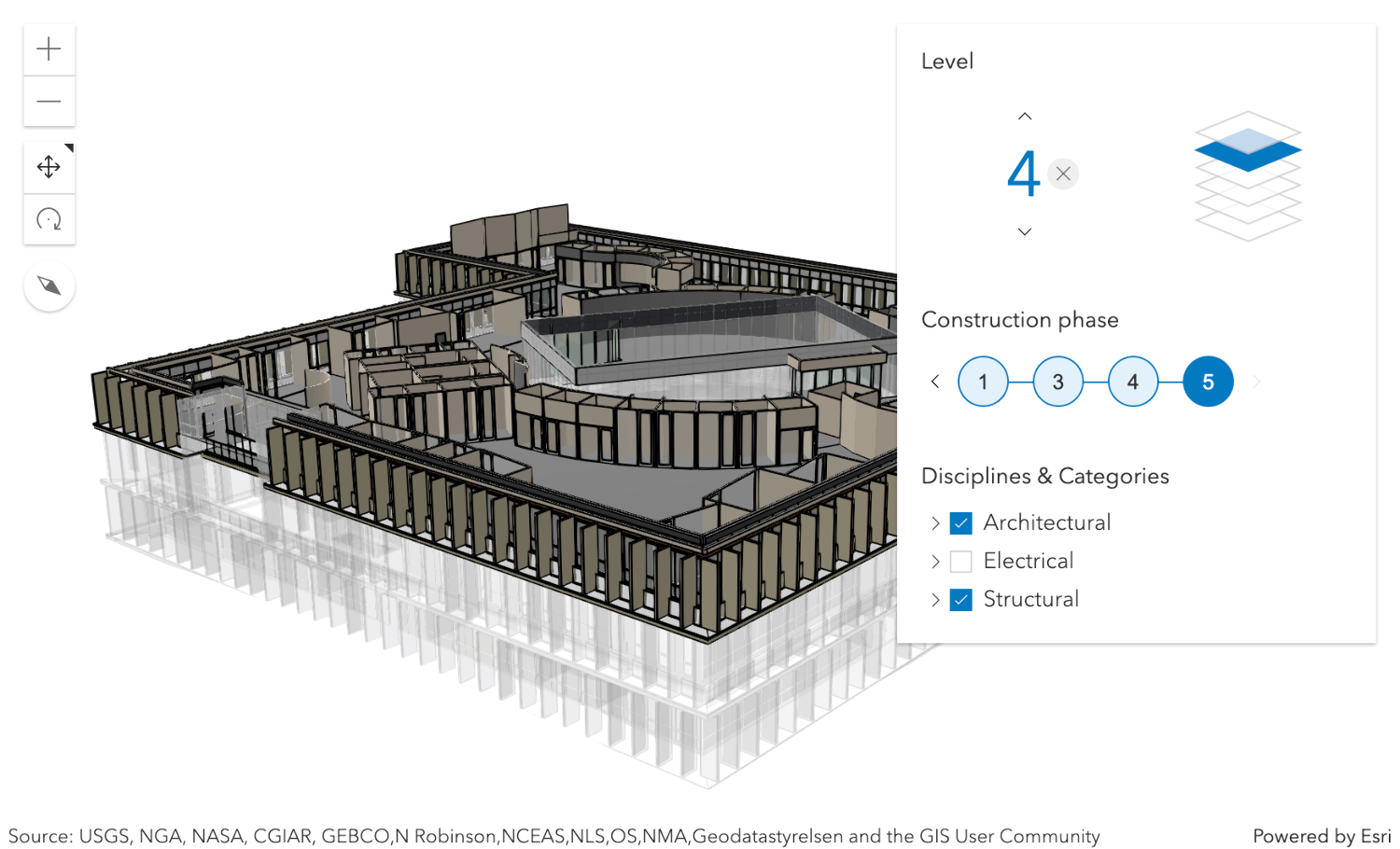](https://developers.arcgis.com/javascript/latest/sample-code/building-scene-layer-filter/)
*
* The [BuildingSceneLayers](https://developers.arcgis.com/javascript/latest/references/core/layers/BuildingSceneLayer/) to be explored
* have to be set on the [layers](https://developers.arcgis.com/javascript/latest/references/core/widgets/BuildingExplorer/#layers) property of the widget. When setting multiple layers, the filters set
* by the widget will be applied on all layers. The widget doesn't allow the user to select between multiple
* [BuildingSceneLayers](https://developers.arcgis.com/javascript/latest/references/core/layers/BuildingSceneLayer/) in a
* [SceneView](https://developers.arcgis.com/javascript/latest/references/core/views/SceneView/).
*
* Often, [BuildingSceneLayers](https://developers.arcgis.com/javascript/latest/references/core/layers/BuildingSceneLayer/)
* contain an overview [BuildingComponentSublayer](https://developers.arcgis.com/javascript/latest/references/core/layers/buildingSublayers/BuildingComponentSublayer/) that serves as an exterior shell
* and views the building model as a single feature. When a layer is added to the BuildingExplorer widget, the visibility of the overview
* layer is turned off, so that the user can interact with the individual features in the full model
* [BuildingGroupSublayer](https://developers.arcgis.com/javascript/latest/references/core/layers/buildingSublayers/BuildingGroupSublayer/).
*
* The Level element of the BuildingExplorer widget allows to select a single level in one or several buildings.
* When selecting a level, the levels above it are hidden and the levels below it become semi-transparent for added visual context.
*
* Some [BuildingSceneLayers](https://developers.arcgis.com/javascript/latest/references/core/layers/BuildingSceneLayer/) include information indicating the phase when the components
* were created, and optionally, when they were demolished. If a layer has multiple construction phases, these will be displayed in
* the Construction phases element. When selecting a construction phase, all the components created
* during or before the phase are selected. Demolished components aren't displayed.
*
* Discipline layers are [group layers](https://developers.arcgis.com/javascript/latest/references/core/layers/buildingSublayers/BuildingGroupSublayer/) that organize the
* [BuildingSceneLayer](https://developers.arcgis.com/javascript/latest/references/core/layers/BuildingSceneLayer/) content into architectural,
* structural, mechanical, or electrical groups. These layers contain a number of Category
* layers such as walls, windows, furniture, and lighting fixtures. These layers can be turned on and off in the
* Disciplines and Categories list.
*
* The widget can only display filters set by the widget itself. Filters set by other applications will be ignored.
*
* @deprecated since version 5.0. Use the [Building Explorer component](https://developers.arcgis.com/javascript/latest/references/map-components/components/arcgis-building-explorer/) instead. For information on widget deprecation, read about [Esri's move to web components](https://developers.arcgis.com/javascript/latest/components-transition-plan/).
* @since 4.16
* @see [Sample - Filter BuildingSceneLayer with BuildingExplorer](https://developers.arcgis.com/javascript/latest/sample-code/building-scene-layer-filter/)
* @see [BuildingExplorerViewModel](https://developers.arcgis.com/javascript/latest/references/core/widgets/BuildingExplorer/BuildingExplorerViewModel/) - Deprecated since 5.0. Use the [Building Explorer component](https://developers.arcgis.com/javascript/latest/references/map-components/components/arcgis-building-explorer/) instead.
* @example
* const buildingExplorer = new BuildingExplorer({
* view: view,
* layers: [buildingSceneLayer]
* });
* // adds the BuildingExplorer to the top right corner of the SceneView
* view.ui.add(buildingExplorer, "top-right");
*/
export default class BuildingExplorer extends Widget {
constructor(properties?: BuildingExplorerProperties);
/**
* Indicates the heading level to use for the headings in the widget. By default, they are rendered
* as level 3 headings (e.g. `<h3>Disciplines & categories</h3>`). Depending on the widget's placement
* in your app, you may need to adjust this heading for proper semantics. This is
* important for meeting accessibility standards.
*
* @default 3
* @since 4.20
* @see [Heading Elements](https://developer.mozilla.org/en-US/docs/Web/HTML/Element/Heading_Elements)
* @example buildingExplorer.headingLevel = 4;
*/
accessor headingLevel: HeadingLevel;
/**
* Icon which represents the widget. It is typically used when the widget is controlled by another
* one (e.g. in the Expand widget).
*
* @default "organization"
* @since 4.27
* @see [Calcite Icon Search](https://developers.arcgis.com/calcite-design-system/icons/)
* @see [Calcite Icon Search](https://developers.arcgis.com/calcite-design-system/icons/)
*/
get icon(): Icon["icon"];
set icon(value: Icon["icon"] | null | undefined);
/**
* The widget's default label.
*
* @since 4.11
*/
get label(): string;
set label(value: string | null | undefined);
/**
* A [Collection](https://developers.arcgis.com/javascript/latest/references/core/core/Collection/) of layers of type [BuildingSceneLayer](https://developers.arcgis.com/javascript/latest/references/core/layers/BuildingSceneLayer/)
* that are added to the widget for exploration. The widget is only displayed when this property is set.
* In case of multiple layers, the widget will display and apply the filters on all layers.
*/
get layers(): Collection<BuildingSceneLayer>;
set layers(value: ReadonlyArrayOrCollection<BuildingSceneLayerProperties>);
/** A reference to the [SceneView](https://developers.arcgis.com/javascript/latest/references/core/views/SceneView/). */
accessor view: SceneView | null | undefined;
/**
* The view model for this widget. This is a class that contains all the logic (properties and methods)
* that controls this widget's behavior. See the [BuildingExplorerViewModel](https://developers.arcgis.com/javascript/latest/references/core/widgets/BuildingExplorer/BuildingExplorerViewModel/)
* class to access all properties and methods on the widget.
*/
get viewModel(): BuildingExplorerViewModel;
set viewModel(value: BuildingExplorerViewModelProperties);
/**
* This property provides the ability to display or hide the individual elements of the widget.
* BuildingExplorer has three elements: buildings levels filter, construction phases filter and the sublayers list.
* By default they are all displayed. In case the [BuildingSceneLayer](https://developers.arcgis.com/javascript/latest/references/core/layers/BuildingSceneLayer/) doesn't provide
* [field statistics](https://developers.arcgis.com/javascript/latest/references/core/layers/support/BuildingSummaryStatistics/)
* information, then the filters for building levels and construction phases will not be displayed.
*
* @example
* // only display the building levels filter
* buildingExplorer.visibleElements = {
* phases: false,
* disciplines: false
* };
*/
accessor visibleElements: VisibleElements;
}