@arcgis/core
Version:
ArcGIS Maps SDK for JavaScript: A complete 2D and 3D mapping and data visualization API
432 lines (429 loc) • 23.6 kB
TypeScript
import type Collection from "../core/Collection.js";
import type CatalogLayerList from "./CatalogLayerList.js";
import type Widget from "./Widget.js";
import type BasemapLayerListViewModel from "./BasemapLayerList/BasemapLayerListViewModel.js";
import type BasemapLayerListVisibleElements from "./BasemapLayerList/BasemapLayerListVisibleElements.js";
import type ListItem from "./LayerList/ListItem.js";
import type { Icon } from "@esri/calcite-components/components/calcite-icon";
import type { IdentifiableMixin, IdentifiableMixinProperties } from "../core/Identifiable.js";
import type { MapViewOrSceneView } from "../views/MapViewOrSceneView.js";
import type { CatalogLayerListProperties } from "./CatalogLayerList.js";
import type { WidgetProperties } from "./Widget.js";
import type { BasemapLayerListViewModelEvents, BasemapLayerListViewModelProperties } from "./BasemapLayerList/BasemapLayerListViewModel.js";
import type { Action, FilterPredicate, ListItemModifier, VisibilityAppearance } from "./LayerList/types.js";
import type { HeadingLevel } from "./support/types.js";
import type { ListItemProperties } from "./LayerList/ListItem.js";
import type { ReadonlyArrayOrCollection } from "../core/Collection.js";
import type { BasemapLayerListVisibleElementsProperties } from "./BasemapLayerList/BasemapLayerListVisibleElements.js";
export interface BasemapLayerListProperties extends WidgetProperties, IdentifiableMixinProperties, Partial<Pick<BasemapLayerList, "baseFilterPredicate" | "baseFilterText" | "baseListItemCreatedFunction" | "basemapTitle" | "catalogOptions" | "collapsed" | "dragEnabled" | "editingTitle" | "filterPlaceholder" | "headingLevel" | "minFilterItems" | "referenceFilterPredicate" | "referenceFilterText" | "referenceListItemCreatedFunction" | "selectionMode" | "view" | "visibilityAppearance">> {
/**
* Icon which represents the widget. It is typically used when the widget is controlled by another
* one (e.g. in the Expand widget).
*
* @default "layers"
* @since 4.27
* @see [Calcite Icon Search](https://developers.arcgis.com/calcite-design-system/icons/)
* @see [Calcite Icon Search](https://developers.arcgis.com/calcite-design-system/icons/)
*/
icon?: Icon["icon"] | null;
/**
* The widget's default label.
*
* @since 4.11
*/
label?: string | null;
/**
* A collection of selected [ListItem](https://developers.arcgis.com/javascript/latest/references/core/widgets/LayerList/ListItem/)s representing basemap layers
* selected by the user.
*
* @see [selectionMode](https://developers.arcgis.com/javascript/latest/references/core/widgets/BasemapLayerList/#selectionMode)
*/
selectedItems?: ReadonlyArrayOrCollection<ListItemProperties>;
/**
* The view model for this widget. This is a class that contains all the logic
* (properties and methods) that controls this widget's behavior. See the
* [BasemapLayerListViewModel](https://developers.arcgis.com/javascript/latest/references/core/widgets/BasemapLayerList/BasemapLayerListViewModel/) class to access
* all properties and methods on the widget.
*/
viewModel?: BasemapLayerListViewModelProperties;
/**
* The visible elements that are displayed within the widget.
* This property provides the ability to turn individual elements of the widget's display on/off.
*
* @since 4.15
* @example
* basemapLayerList.visibleElements = {
* baseLayers: false,
* closeButton: false,
* collapseButton: true,
* editTitleButton: true,
* errors: true,
* filter: true,
* heading: true,
* referenceLayers: false,
* statusIndicators: true
* };
*/
visibleElements?: BasemapLayerListVisibleElementsProperties;
}
export interface BasemapLayerListEvents extends BasemapLayerListViewModelEvents {}
/**
* The BasemapLayerList widget provides a way to display a list of [Basemap](https://developers.arcgis.com/javascript/latest/references/core/Basemap/) layers and switch on/off their visibility.
* [Base layers](https://developers.arcgis.com/javascript/latest/references/core/Basemap/#baseLayers) and [reference layers](https://developers.arcgis.com/javascript/latest/references/core/Basemap/#referenceLayers)
* are divided into separate sections. When editing is enabled,
* layers can be reordered by dragging and dropping between the lists and the title can be edited.
*
* BasemapLayerList is very similar to our LayerList widget. See below samples for code inspiration:\
* [Sample - LayerList widget](https://developers.arcgis.com/javascript/latest/sample-code/widgets-layerlist/)\
* [Sample - LayerList widget with actions](https://developers.arcgis.com/javascript/latest/sample-code/widgets-layerlist-actions/)
*
* @deprecated since version 5.0. Use the [Basemap Layer List](https://developers.arcgis.com/javascript/latest/references/map-components/components/arcgis-basemap-layer-list/) component instead. For information on widget deprecation, read about [Esri's move to web components](https://developers.arcgis.com/javascript/latest/components-transition-plan/).
* @since 4.13
* @see [BasemapLayerListViewModel](https://developers.arcgis.com/javascript/latest/references/core/widgets/BasemapLayerList/BasemapLayerListViewModel/)
* @example
* let basemapLayerList = new BasemapLayerList({
* view: view
* });
* // Adds the widget below other elements in the top left corner of the view
* view.ui.add(basemapLayerList, {
* position: "top-left"
* });
*/
export default class BasemapLayerList extends BasemapLayerListSuperclass {
/**
* @deprecated
* Do not directly reference this property.
* Use EventNames and EventTypes helpers from \@arcgis/core/Evented
*/
"@eventTypes": BasemapLayerListEvents;
/**
* @example
* // typical usage
* let BasemapLayerList = new BasemapLayerList({
* view: view
* });
*/
constructor(properties?: BasemapLayerListProperties);
/**
* Specifies a function to handle filtering base layer [list items](https://developers.arcgis.com/javascript/latest/references/core/widgets/LayerList/ListItem/).
*
* @since 4.32
* @example layerList.baseFilterPredicate = (item) => item.title.toLowerCase().includes("streets");
*/
accessor baseFilterPredicate: FilterPredicate | null | undefined;
/**
* The value of the filter input text string if [visibleElements.filter](https://developers.arcgis.com/javascript/latest/references/core/widgets/BasemapLayerList/#visibleElements) is true.
*
* @default ""
* @since 4.29
* @see [visibleElements.filter](https://developers.arcgis.com/javascript/latest/references/core/widgets/BasemapLayerList/#visibleElements)
* @example
* reactiveUtils.watch(
* () => basemapLayerList.baseFilterText,
* (baseFilterText) => console.log(baseFilterText)
* );
*/
accessor baseFilterText: string;
/** A collection of [ListItem](https://developers.arcgis.com/javascript/latest/references/core/widgets/LayerList/ListItem/)s representing the [Basemap.baseLayers](https://developers.arcgis.com/javascript/latest/references/core/Basemap/#baseLayers). */
get baseItems(): Collection<ListItem>;
/**
* Specifies a function that accesses each [ListItem](https://developers.arcgis.com/javascript/latest/references/core/widgets/LayerList/ListItem/) representing a base layer.
* Each list item's modifiable properties can be updated within. Actions can be added to list items
* using the [ListItem.actionsSections](https://developers.arcgis.com/javascript/latest/references/core/widgets/LayerList/ListItem/#actionsSections)
* property of the ListItem.
*
* @example
* const bmLayerList = new BasemapLayerList({
* view: view,
* baseListItemCreatedFunction: (event) => {
* const baseListItem = event.item;
* if(baseListItem.title === "World Imagery_01"){
* // clean up title
* baseListItem.title = "World Imagery";
* // open the baseList item
* baseListItem.open = true;
* }
* }
* })
*/
accessor baseListItemCreatedFunction: ListItemModifier | null | undefined;
/** The current basemap's title. */
accessor basemapTitle: string | null | undefined;
/**
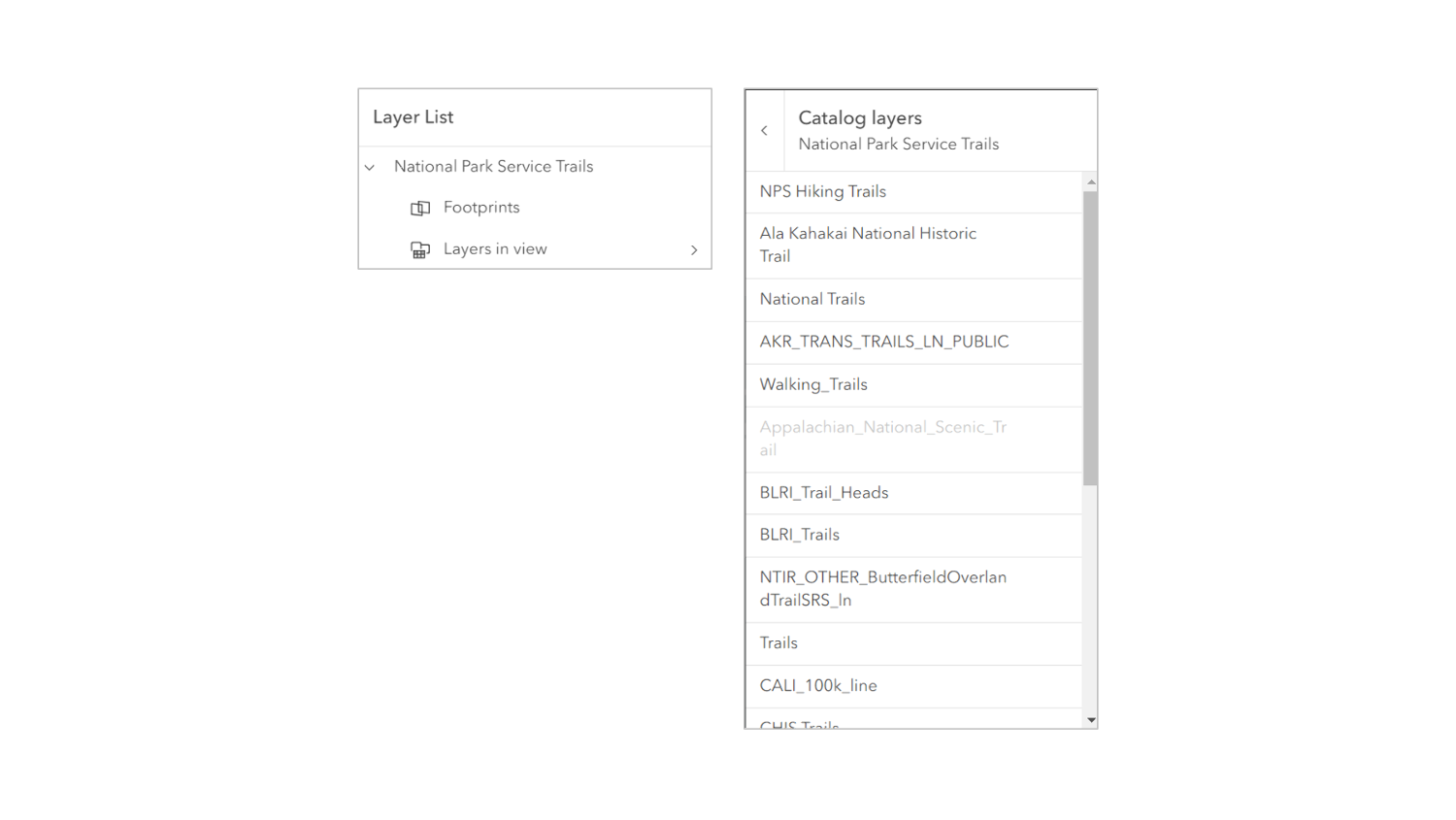
* The [CatalogLayerList](https://developers.arcgis.com/javascript/latest/references/core/widgets/CatalogLayerList/) widget instance that displays a catalog layer's [dynamic group layer](https://developers.arcgis.com/javascript/latest/references/core/layers/CatalogLayer/#dynamicGroupLayer).
* The catalog layer list will be displayed as an expandable [ListItem](https://developers.arcgis.com/javascript/latest/references/core/widgets/LayerList/ListItem/) in the BasemapLayerList widget.
* This property is set when a catalog layer's dynamic group layer is expanded in the BasemapLayerList.
* Otherwise, it is `null`.
* This list item will only be displayed when catalog layers are loaded in the map and will be displayed as a child of the catalog layer.
* This property is useful for listening to the [CatalogLayerList.@trigger-action](https://developers.arcgis.com/javascript/latest/references/core/widgets/CatalogLayerList/#event-trigger-action) event and managing selections in catalog layers.
*
* 
*
* @since 4.30
* @see [catalogOptions](https://developers.arcgis.com/javascript/latest/references/core/widgets/BasemapLayerList/#catalogOptions)
* @example
* // Use reactiveUtils to respond to the basemapLayerList.catalogLayerList "trigger-action" event
* reactiveUtils.on(
* () => basemapLayerList.catalogLayerList,
* "trigger-action",
* async (event) => {
* if (event.action.id === "add-layer") {
* // Get the parent catalog layer
* const parentCatalogLayer = catalogUtils.getCatalogLayerForLayer(event.item.layer);
* // Get the footprint from the parent catalog layer
* const footprint = parentCatalogLayer.createFootprintFromLayer(event.item.layer);
* // Get the layer from the footprint
* const layerFromFootprint = await parentCatalogLayer.createLayerFromFootprint(footprint);
* // Add the layer to the map
* map.add(layerFromFootprint);
* }
* }
* );
*
* // Use reactiveUtils to watch for a selected item in the basemapLayerList.catalogLayerList
* reactiveUtils.watch(
* () => basemapLayerList.catalogLayerList?.selectedItems.at(0)?.layer,
* (layer) => {
* // When a layer is selected log out its title
* if (layer) {
* console.log(layer.title);
* }
* }
* );
*/
get catalogLayerList(): CatalogLayerList | null | undefined;
/**
* [CatalogLayer](https://developers.arcgis.com/javascript/latest/references/core/layers/CatalogLayer/) specific properties.
* Catalog layers will display their [dynamicGroupLayer](https://developers.arcgis.com/javascript/latest/references/core/layers/CatalogLayer/#dynamicGroupLayer) as an expandable [catalogLayerList](https://developers.arcgis.com/javascript/latest/references/core/widgets/BasemapLayerList/#catalogLayerList) in the BasemapLayerList widget.
* This list item will only be displayed when catalog layers with dynamic group layers are loaded in the map.
* These are the properties that are used to configure the [catalogLayerList](https://developers.arcgis.com/javascript/latest/references/core/widgets/BasemapLayerList/#catalogLayerList).
*
* @since 4.30
* @see [catalogLayerList](https://developers.arcgis.com/javascript/latest/references/core/widgets/BasemapLayerList/#catalogLayerList)
* @example
* const basemapLayerList = new BasemapLayerList({
* catalogOptions: {
* listItemCreatedFunction: (event) => {
* const { item } = event;
* item.actionsSections = [
* [
* {
* title: "Add layer to map",
* icon: "add-layer",
* id: "add-layer"
* }
* ]
* ];
* },
* selectionMode: "single",
* visibleElements: {
* filter: true
* temporaryLayerIndicators: true
* }
* },
* view,
* });
*/
accessor catalogOptions: CatalogLayerListProperties | null | undefined;
/**
* Indicates whether the widget is collapsed.
* When collapsed, only the collapse button and heading are displayed.
*
* @default false
* @since 4.29
* @see [visibleElements.collapseButton](https://developers.arcgis.com/javascript/latest/references/core/widgets/BasemapLayerList/#visibleElements)
* @example basemapLayerList.collapsed = true;
*/
accessor collapsed: boolean;
/**
* Indicates whether [list items](https://developers.arcgis.com/javascript/latest/references/core/widgets/LayerList/ListItem/) may be reordered within the list by dragging and dropping.
* MapImageLayer [sublayers](https://developers.arcgis.com/javascript/latest/references/core/layers/MapImageLayer/#sublayers) can be reordered only within their parent MapImageLayer and can not be dragged out as a separate layer.
*
* @default false
* @since 4.29
* @example basemapLayerList.dragEnabled = true;
*/
accessor dragEnabled: boolean;
/**
* Indicates whether the form to edit the basemap's title is currently visible.
* Any edits made will only be shown locally and will not be saved.
*
* @default false
* @since 4.29
* @see [visibleElements.editTitleButton](https://developers.arcgis.com/javascript/latest/references/core/widgets/BasemapLayerList/#visibleElements)
* @example basemapLayerList.editingTitle = true;
*/
accessor editingTitle: boolean;
/**
* Placeholder text used in the filter input if [visibleElements.filter](https://developers.arcgis.com/javascript/latest/references/core/widgets/BasemapLayerList/#visibleElements) is true.
*
* @default ""
* @since 4.29
* @see [visibleElements.filter](https://developers.arcgis.com/javascript/latest/references/core/widgets/BasemapLayerList/#visibleElements)
* @example basemapLayerList.filterPlaceholder = "Filter layers";
*/
accessor filterPlaceholder: string;
/**
* Indicates the heading level to use for the widget title (i.e. "Navigation").
* By default, the basemap's title is rendered
* as a level 2 heading (e.g. `<h2>Navigation</h2>`). Depending on the widget's placement
* in your app, you may need to adjust this heading for proper semantics. This is
* important for meeting accessibility standards.
*
* @default 2
* @since 4.20
* @see [Heading Elements](https://developer.mozilla.org/en-US/docs/Web/HTML/Element/Heading_Elements)
* @example
* // the widget title will render as an <h3>
* basemapLayerList.headingLevel = 3;
*/
accessor headingLevel: HeadingLevel;
/**
* Icon which represents the widget. It is typically used when the widget is controlled by another
* one (e.g. in the Expand widget).
*
* @default "layers"
* @since 4.27
* @see [Calcite Icon Search](https://developers.arcgis.com/calcite-design-system/icons/)
* @see [Calcite Icon Search](https://developers.arcgis.com/calcite-design-system/icons/)
*/
get icon(): Icon["icon"];
set icon(value: Icon["icon"] | null | undefined);
/**
* The widget's default label.
*
* @since 4.11
*/
get label(): string;
set label(value: string | null | undefined);
/**
* The minimum number of list items required to display the [visibleElements.filter](https://developers.arcgis.com/javascript/latest/references/core/widgets/BasemapLayerList/BasemapLayerListVisibleElements/) input box.
*
* @default 10
* @since 4.29
* @see [visibleElements.filter](https://developers.arcgis.com/javascript/latest/references/core/widgets/BasemapLayerList/BasemapLayerListVisibleElements/)
* @example
* basemapLayerList.visibleElements.filter = true;
* basemapLayerList.minFilterItems = 5;
*/
accessor minFilterItems: number;
/**
* Specifies a function to handle filtering reference layer [list items](https://developers.arcgis.com/javascript/latest/references/core/widgets/LayerList/ListItem/).
*
* @since 4.32
* @example layerList.referenceFilterPredicate = (item) => item.title.toLowerCase().includes("streets");
*/
accessor referenceFilterPredicate: FilterPredicate | null | undefined;
/**
* The value of the filter input text string if [visibleElements.filter](https://developers.arcgis.com/javascript/latest/references/core/widgets/BasemapLayerList/#visibleElements) is true.
*
* @default ""
* @since 4.29
* @see [visibleElements.filter](https://developers.arcgis.com/javascript/latest/references/core/widgets/BasemapLayerList/#visibleElements)
* @example
* reactiveUtils.watch(
* () => basemapLayerList.referenceFilterText,
* (referenceFilterText) => console.log(referenceFilterText)
* );
*/
accessor referenceFilterText: string;
/** A collection of [ListItem](https://developers.arcgis.com/javascript/latest/references/core/widgets/LayerList/ListItem/)s representing the [Basemap.referenceLayers](https://developers.arcgis.com/javascript/latest/references/core/Basemap/#referenceLayers). */
get referenceItems(): Collection<ListItem>;
/**
* Specifies a function that accesses each [ListItem](https://developers.arcgis.com/javascript/latest/references/core/widgets/LayerList/ListItem/) representing a reference layer.
* Each list item's modifiable properties can be updated within. Actions can be added to list items
* using the [ListItem.actionsSections](https://developers.arcgis.com/javascript/latest/references/core/widgets/LayerList/ListItem/#actionsSections).
*
* @example
* let bmLayerList = new BasemapLayerList({
* view: view,
* referenceListItemCreatedFunction: (event) => {
* referenceListItem = event.item;
* if(referenceListItem.title === "World Imagery_01_reference_layer"){
* // clean up title
* referenceListItem.title = "Reference layer";
* // open the baseList item
* referenceListItem.open = true;
* }
* }
* })
*/
accessor referenceListItemCreatedFunction: ListItemModifier | null | undefined;
/**
* A collection of selected [ListItem](https://developers.arcgis.com/javascript/latest/references/core/widgets/LayerList/ListItem/)s representing basemap layers
* selected by the user.
*
* @see [selectionMode](https://developers.arcgis.com/javascript/latest/references/core/widgets/BasemapLayerList/#selectionMode)
*/
get selectedItems(): Collection<ListItem>;
set selectedItems(value: ReadonlyArrayOrCollection<ListItemProperties>);
/**
* Specifies the selection mode.
* Selected items are available in the [selectedItems](https://developers.arcgis.com/javascript/latest/references/core/widgets/BasemapLayerList/#selectedItems) property.
*
* | Value | Description |
* | ----- | ----------- |
* | multiple | Allows any number of items to be selected at once. This is useful when you want to apply an operation to multiple items at the same time. |
* | none | Disables selection. Use this when you want to prevent selecting items. |
* | single | Allows only one item to be selected at a time. If another item is selected, the previous selection is cleared. This is useful when you want to ensure that a maximum of one item is selected at a time. |
* | single-persist | Allows only one item to be selected at a time and prevents de-selection. Once an item is selected, it remains selected until another item is selected. This is useful when you want to ensure that there is always exactly one selected item. |
*
* @default "none"
* @since 4.29
* @see [selectedItems](https://developers.arcgis.com/javascript/latest/references/core/widgets/BasemapLayerList/#selectedItems)
* @example basemapLayerList.selectionMode = "multiple";
*/
accessor selectionMode: "multiple" | "none" | "single" | "single-persist";
/** A reference to the [MapView](https://developers.arcgis.com/javascript/latest/references/core/views/MapView/) or [SceneView](https://developers.arcgis.com/javascript/latest/references/core/views/SceneView/). Set this to link the widget to a specific view. */
accessor view: MapViewOrSceneView | null | undefined;
/**
* The view model for this widget. This is a class that contains all the logic
* (properties and methods) that controls this widget's behavior. See the
* [BasemapLayerListViewModel](https://developers.arcgis.com/javascript/latest/references/core/widgets/BasemapLayerList/BasemapLayerListViewModel/) class to access
* all properties and methods on the widget.
*/
get viewModel(): BasemapLayerListViewModel;
set viewModel(value: BasemapLayerListViewModelProperties);
/**
* Determines the icons used to indicate visibility.
*
* | Value | Description | Example |
* | ----- | ----------- | ------- |
* | default | Displays view icons on the far side. Icons are hidden except on hover or if they have keyboard focus. See [view-visible](https://developers.arcgis.com/calcite-design-system/icons/?icon=view-visible&library=Calcite%20UI&query=view) and [view-hide](https://developers.arcgis.com/calcite-design-system/icons/?icon=view-hide&library=Calcite%20UI&query=view) calcite icons. | 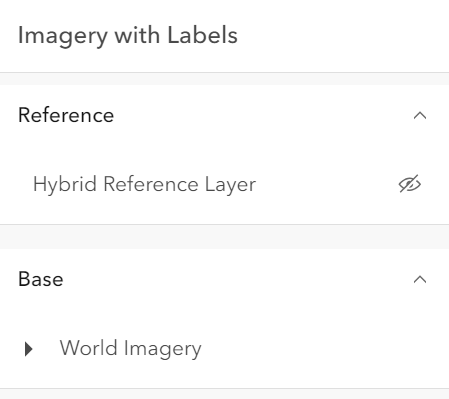 |
* | checkbox | Displays checkbox icons on the near side. See [check-square-f](https://developers.arcgis.com/calcite-design-system/icons/?icon=check-square-f&library=Calcite%20UI&query=check) and [square](https://developers.arcgis.com/calcite-design-system/icons/?icon=square&library=Calcite%20UI&query=square) calcite icons. | 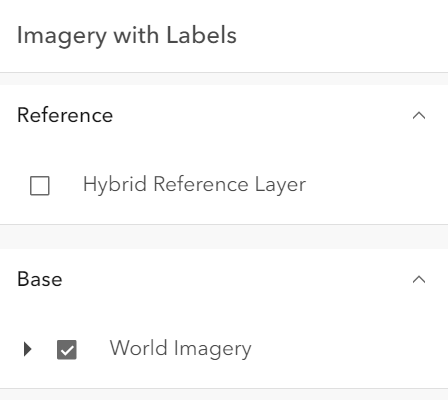 |
*
* @default "default"
* @since 4.29
* @example basemapLayerList.visibilityAppearance = "checkbox";
*/
accessor visibilityAppearance: VisibilityAppearance;
/**
* The visible elements that are displayed within the widget.
* This property provides the ability to turn individual elements of the widget's display on/off.
*
* @since 4.15
* @example
* basemapLayerList.visibleElements = {
* baseLayers: false,
* closeButton: false,
* collapseButton: true,
* editTitleButton: true,
* errors: true,
* filter: true,
* heading: true,
* referenceLayers: false,
* statusIndicators: true
* };
*/
get visibleElements(): BasemapLayerListVisibleElements;
set visibleElements(value: BasemapLayerListVisibleElementsProperties);
/**
* Triggers the [@trigger-action](https://developers.arcgis.com/javascript/latest/references/core/widgets/BasemapLayerList/#event-trigger-action) event and executes
* the given [action](https://developers.arcgis.com/javascript/latest/references/core/support/actions/ActionButton/) or [action toggle](https://developers.arcgis.com/javascript/latest/references/core/support/actions/ActionToggle/).
*
* @param action - The action to execute.
* @param item - An item associated with the action.
*/
triggerAction(action: Action, item: ListItem): void;
}
declare const BasemapLayerListSuperclass: typeof Widget & typeof IdentifiableMixin