@arcgis/core
Version:
ArcGIS Maps SDK for JavaScript: A complete 2D and 3D mapping and data visualization API
200 lines (198 loc) • 11.3 kB
TypeScript
import type Basemap from "../Basemap.js";
import type Portal from "../portal/Portal.js";
import type Widget from "./Widget.js";
import type BasemapGalleryViewModel from "./BasemapGallery/BasemapGalleryViewModel.js";
import type LocalBasemapsSource from "./BasemapGallery/support/LocalBasemapsSource.js";
import type PortalBasemapsSource from "./BasemapGallery/support/PortalBasemapsSource.js";
import type { Icon } from "@esri/calcite-components/components/calcite-icon";
import type { BasemapProperties } from "../Basemap.js";
import type { ReadonlyArrayOrCollection } from "../core/Collection.js";
import type { MapViewOrSceneView } from "../views/MapViewOrSceneView.js";
import type { LocalBasemapsSourceProperties } from "./BasemapGallery/support/LocalBasemapsSource.js";
import type { PortalBasemapsSourceProperties } from "./BasemapGallery/support/PortalBasemapsSource.js";
import type { HeadingLevel } from "./support/types.js";
import type { BasemapGalleryViewModelProperties } from "./BasemapGallery/BasemapGalleryViewModel.js";
import type { WidgetProperties } from "./Widget.js";
export interface BasemapGalleryProperties extends WidgetProperties, Partial<Pick<BasemapGallery, "disabled" | "headingLevel" | "view">> {
/** The map's [Map.basemap](https://developers.arcgis.com/javascript/latest/references/core/Map/#basemap). */
activeBasemap?: BasemapProperties | string | null;
/**
* Icon which represents the widget. It is typically used when the widget is controlled by another
* one (e.g. in the Expand widget).
*
* @default "basemap"
* @since 4.27
* @see [Calcite Icon Search](https://developers.arcgis.com/calcite-design-system/icons/)
* @see [Calcite Icon Search](https://developers.arcgis.com/calcite-design-system/icons/)
*/
icon?: Icon["icon"] | null;
/**
* The widget's default label.
*
* @since 4.7
*/
label?: string | null;
/**
* The source for basemaps that the widget will display.
* This property can be autocast with an array or [Collection](https://developers.arcgis.com/javascript/latest/references/core/core/Collection/) of [Basemap](https://developers.arcgis.com/javascript/latest/references/core/Basemap/)s, or
* a [Portal](https://developers.arcgis.com/javascript/latest/references/core/portal/Portal/) instance.
* The default source is a [PortalBasemapsSource](https://developers.arcgis.com/javascript/latest/references/core/widgets/BasemapGallery/support/PortalBasemapsSource/) that points to
* the default portal instance set in [esriConfig.portalUrl](https://developers.arcgis.com/javascript/latest/references/core/config/#Config-portalUrl).
*
* When a [global API key](https://developers.arcgis.com/javascript/latest/references/core/config/#Config-apiKey) is set, the default basemaps displayed in the BasemapGallery
* widget will default to the basemaps for use with API keys (as defined by the [Portal.devBasemapGalleryGroupQuery](https://developers.arcgis.com/javascript/latest/references/core/portal/Portal/#devBasemapGalleryGroupQuery) property).
*
* @example
* const basemapGallery = new BasemapGallery({
* view: view,
* source: [Basemap.fromId("topo-vector"), Basemap.fromId("hybrid")] // autocasts to LocalBasemapsSource
* });
* @example
* const basemapGallery = new BasemapGallery({
* view: view,
* source: { // autocasts to PortalBasemapsSource
* portal: "https://www.yourportal.arcgis.com"
* }
* });
* @example
* const basemapGallery = new BasemapGallery({
* view: view,
* source: new Portal({url: "https://www.yourportal.arcgis.com"}) // autocasts to PortalBasemapsSource
* });
*/
source?: Portal | LocalBasemapsSourceProperties | ReadonlyArrayOrCollection<Basemap> | PortalBasemapsSourceProperties;
/**
* The view model for this widget. This is a class that contains all the logic
* (properties and methods) that controls this widget's behavior. See the
* [BasemapGalleryViewModel](https://developers.arcgis.com/javascript/latest/references/core/widgets/BasemapGallery/BasemapGalleryViewModel/) class to access
* all properties and methods on the widget.
*/
viewModel?: BasemapGalleryViewModelProperties;
}
/**
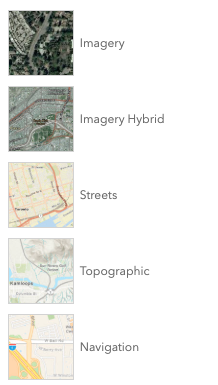
* The BasemapGallery widget displays a collection of images representing basemaps from ArcGIS.com or a user-defined set
* of map or image services. When a new basemap is selected from the BasemapGallery, the map's basemap
* layers are removed and replaced with the basemap layers of the associated basemap selected in the gallery. By default,
* the BasemapGallery widget looks like the following image.
*
* 
*
* When a [global API key](https://developers.arcgis.com/javascript/latest/references/core/config/#Config-apiKey) is set, the default basemaps displayed in the BasemapGallery
* widget will default to the basemaps defined by the [Portal.devBasemapGalleryGroupQuery](https://developers.arcgis.com/javascript/latest/references/core/portal/Portal/#devBasemapGalleryGroupQuery) property.
*
* Starting with version 4.23, basemaps added to the gallery can have different spatial references.
* Set the [MapView.spatialReferenceLocked](https://developers.arcgis.com/javascript/latest/references/core/views/MapView/#spatialReferenceLocked) property to `true`
* to disable basemaps in different spatial references and prevent users from changing the view's spatial reference at runtime.
*
* @deprecated since version 4.32. Use the [Basemap Gallery component](https://developers.arcgis.com/javascript/latest/references/map-components/components/arcgis-basemap-gallery/) instead. For information on widget deprecation, read about [Esri's move to web components](https://developers.arcgis.com/javascript/latest/components-transition-plan/).
* @since 4.3
* @see [Basemap Gallery component](https://developers.arcgis.com/javascript/latest/references/map-components/components/arcgis-basemap-gallery/)
* @see [Sample - Use Portal Basemaps](https://developers.arcgis.com/javascript/latest/sample-code/basemaps-portal/)
* @see [BasemapGalleryViewModel](https://developers.arcgis.com/javascript/latest/references/core/widgets/BasemapGallery/BasemapGalleryViewModel/)
* @example
* let basemapGallery = new BasemapGallery({
* view: view
* });
* // Add widget to the top right corner of the view
* view.ui.add(basemapGallery, {
* position: "top-right"
* });
*/
export default class BasemapGallery extends Widget {
/**
* @example
* // typical usage
* let basemapGallery = new BasemapGallery({
* view: view
* });
*/
constructor(properties?: BasemapGalleryProperties);
/** The map's [Map.basemap](https://developers.arcgis.com/javascript/latest/references/core/Map/#basemap). */
get activeBasemap(): Basemap | null;
set activeBasemap(value: BasemapProperties | string | null | undefined);
/**
* When `true`, sets the widget to a disabled state so the user cannot interact with it.
*
* @default false
* @since 4.15
*/
accessor disabled: boolean;
/**
* Indicates the heading level to use for the message "No basemaps available" when no basemaps
* are available in the BasemapGallery. By default, this message is rendered
* as level 2 headings (e.g. `<h2>No basemaps available</h2>`). Depending on the widget's placement
* in your app, you may need to adjust this heading for proper semantics. This is
* important for meeting accessibility standards.
*
* @default 2
* @since 4.20
* @see [Heading Elements](https://developer.mozilla.org/en-US/docs/Web/HTML/Element/Heading_Elements)
* @example
* // "No basemaps available" will render as an <h3>
* basemapGallery.headingLevel = 3;
*/
accessor headingLevel: HeadingLevel;
/**
* Icon which represents the widget. It is typically used when the widget is controlled by another
* one (e.g. in the Expand widget).
*
* @default "basemap"
* @since 4.27
* @see [Calcite Icon Search](https://developers.arcgis.com/calcite-design-system/icons/)
* @see [Calcite Icon Search](https://developers.arcgis.com/calcite-design-system/icons/)
*/
get icon(): Icon["icon"];
set icon(value: Icon["icon"] | null | undefined);
/**
* The widget's default label.
*
* @since 4.7
*/
get label(): string;
set label(value: string | null | undefined);
/**
* The source for basemaps that the widget will display.
* This property can be autocast with an array or [Collection](https://developers.arcgis.com/javascript/latest/references/core/core/Collection/) of [Basemap](https://developers.arcgis.com/javascript/latest/references/core/Basemap/)s, or
* a [Portal](https://developers.arcgis.com/javascript/latest/references/core/portal/Portal/) instance.
* The default source is a [PortalBasemapsSource](https://developers.arcgis.com/javascript/latest/references/core/widgets/BasemapGallery/support/PortalBasemapsSource/) that points to
* the default portal instance set in [esriConfig.portalUrl](https://developers.arcgis.com/javascript/latest/references/core/config/#Config-portalUrl).
*
* When a [global API key](https://developers.arcgis.com/javascript/latest/references/core/config/#Config-apiKey) is set, the default basemaps displayed in the BasemapGallery
* widget will default to the basemaps for use with API keys (as defined by the [Portal.devBasemapGalleryGroupQuery](https://developers.arcgis.com/javascript/latest/references/core/portal/Portal/#devBasemapGalleryGroupQuery) property).
*
* @example
* const basemapGallery = new BasemapGallery({
* view: view,
* source: [Basemap.fromId("topo-vector"), Basemap.fromId("hybrid")] // autocasts to LocalBasemapsSource
* });
* @example
* const basemapGallery = new BasemapGallery({
* view: view,
* source: { // autocasts to PortalBasemapsSource
* portal: "https://www.yourportal.arcgis.com"
* }
* });
* @example
* const basemapGallery = new BasemapGallery({
* view: view,
* source: new Portal({url: "https://www.yourportal.arcgis.com"}) // autocasts to PortalBasemapsSource
* });
*/
get source(): LocalBasemapsSource | PortalBasemapsSource;
set source(value: Portal | LocalBasemapsSourceProperties | ReadonlyArrayOrCollection<Basemap> | PortalBasemapsSourceProperties);
/**
* The view from which the widget will operate. This view
* provides access to the active
* [Map.basemap](https://developers.arcgis.com/javascript/latest/references/core/Map/#basemap)
* via the view's [View.map](https://developers.arcgis.com/javascript/latest/references/core/views/View/#map) property.
*/
accessor view: MapViewOrSceneView | null | undefined;
/**
* The view model for this widget. This is a class that contains all the logic
* (properties and methods) that controls this widget's behavior. See the
* [BasemapGalleryViewModel](https://developers.arcgis.com/javascript/latest/references/core/widgets/BasemapGallery/BasemapGalleryViewModel/) class to access
* all properties and methods on the widget.
*/
get viewModel(): BasemapGalleryViewModel;
set viewModel(value: BasemapGalleryViewModelProperties);
}