@arcgis/core
Version:
ArcGIS Maps SDK for JavaScript: A complete 2D and 3D mapping and data visualization API
162 lines (159 loc) • 9.78 kB
TypeScript
import type Graphic from "../Graphic.js";
import type EsriError from "../core/Error.js";
import type Widget from "./Widget.js";
import type AttachmentsViewModel from "./Attachments/AttachmentsViewModel.js";
import type { Icon } from "@esri/calcite-components/components/calcite-icon";
import type { WidgetProperties } from "./Widget.js";
import type { AttachmentsCapabilities, AttachmentsDisplay } from "./Attachments/types.js";
import type { GraphicProperties } from "../Graphic.js";
import type { AttachmentsViewModelProperties } from "./Attachments/AttachmentsViewModel.js";
export interface AttachmentsProperties extends WidgetProperties, Partial<Pick<Attachments, "attachmentKeywords" | "attachmentTypes" | "displayType" | "visibleElements">> {
/**
* The capabilities needed for the attachments widget.
*
* @since 4.27
*/
capabilities?: Partial<AttachmentsCapabilities>;
/** The graphic for the attachments. */
graphic?: GraphicProperties | null;
/**
* Icon which represents the widget. It is typically used when the widget is controlled by another
* one (e.g. in the Expand widget).
*
* @default "attachment"
* @since 4.27
* @see [Calcite Icon Search](https://developers.arcgis.com/calcite-design-system/icons/)
* @see [Calcite Icon Search](https://developers.arcgis.com/calcite-design-system/icons/)
*/
icon?: Icon["icon"] | null;
/**
* The view model for this widget. This is a class that contains all the logic
* (properties and methods) that controls this widget's behavior. See the
* [AttachmentsViewModel](https://developers.arcgis.com/javascript/latest/references/core/widgets/Attachments/AttachmentsViewModel/) class to access
* all properties and methods on the widget.
*/
viewModel?: AttachmentsViewModelProperties;
}
/**
* The visible elements that are displayed within the widget.
* This provides the ability to turn individual elements of the widget's display on/off.
*/
export interface VisibleElements {
/** Indicates whether to display the `Add` button which prompts the dialog to add a new attachment. Default is `true`. */
addButton?: boolean;
/** Indicates whether to display the `add` button after selecting the attachment to add. Default value is `true`. */
addSubmitButton?: boolean;
/** Indicates whether to display the `cancel` button after selecting the attachment to add. Default value is `true`. */
cancelAddButton?: boolean;
/** Indicates whether to display the `cancel` button after selecting an attachment to update an existing attachment. Default value is `true`. */
cancelUpdateButton?: boolean;
/** Indicates whether to display the `delete` button to delete an existing attachment. Default value is `true`. */
deleteButton?: boolean;
/** Indicates whether to display an error message if adding or updating an attachment results in errors. Default value is `true`. */
errorMessage?: boolean;
/** Indicates whether to display a progress bar when adding an attachment. Default value is `true`. */
progressBar?: boolean;
/** Indicates whether to display an `update` button to allow updating on existing attachments. Default value is `true`. */
updateButton?: boolean;
}
/**
* This widget allows users to view and edit attachments associated with a feature and is
* considered a standalone experience that can be utilized in widgets such [Popup](https://developers.arcgis.com/javascript/latest/references/core/widgets/Popup/) and [Editor](https://developers.arcgis.com/javascript/latest/references/core/widgets/Editor/).
* When viewing attachments, the attachment's thumbnail, file format, and size are
* displayed. The [Popup](https://developers.arcgis.com/javascript/latest/references/core/widgets/Popup/) widget uses this widget's
* functionality to display attachments. Whereas the [Editor](https://developers.arcgis.com/javascript/latest/references/core/widgets/Editor/)
* widget has the functionality to edit attachments automatically configured within it.
*
* If the associated feature layer(s) contains an `attachment` [capability](https://developers.arcgis.com/javascript/latest/references/core/layers/FeatureLayer/#capabilities),
* the widget will recognize it as such. And based on the functionality needed, will display the attachment for viewing
* or editing.
*
* If needing to edit attachments, the feature layer must first be enabled for editing. The ability
* to create, update, and delete attachments will display based on the feature layer's editing permissions.
*
* > [!WARNING]
* >
* > **Known Limitations**
* >
* > Editing attachments is currently available using the [Editor](https://developers.arcgis.com/javascript/latest/references/core/widgets/Editor/) widget.
*
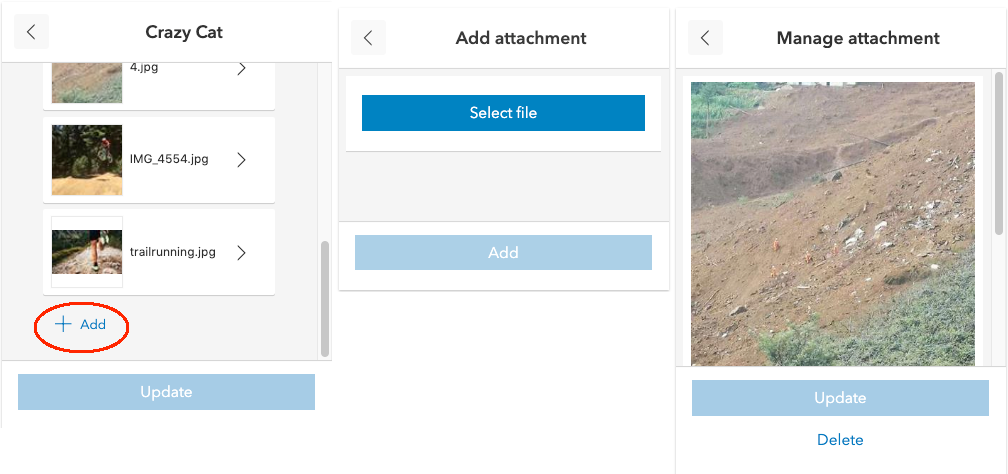
* The following image displays the various displays of the attachment widget.
* 
*
* @deprecated since version 5.0. Use the [Popup](https://developers.arcgis.com/javascript/latest/references/map-components/components/arcgis-popup/) and [Editor](https://developers.arcgis.com/javascript/latest/references/map-components/components/arcgis-editor/) components to view and edit attachments instead. For information on widget deprecation, read about [Esri's move to web components](https://developers.arcgis.com/javascript/latest/components-transition-plan/).
* @since 4.15
* @see [Sample - Popup with edit action](https://developers.arcgis.com/javascript/latest/sample-code/popup-editaction/)
* @see [AttachmentsViewModel](https://developers.arcgis.com/javascript/latest/references/core/widgets/Attachments/AttachmentsViewModel/)
* @see [Editor](https://developers.arcgis.com/javascript/latest/references/core/widgets/Editor/)
* @see [Popup](https://developers.arcgis.com/javascript/latest/references/core/widgets/Popup/)
* @see [PopupTemplate](https://developers.arcgis.com/javascript/latest/references/core/PopupTemplate/)
* @see [AttachmentsContent](https://developers.arcgis.com/javascript/latest/references/core/popup/content/AttachmentsContent/)
* @see [DefaultUI](https://developers.arcgis.com/javascript/latest/references/core/views/ui/DefaultUI/)
* @see [FeatureLayer](https://developers.arcgis.com/javascript/latest/references/core/layers/FeatureLayer/)
* @see [AttachmentInfo](https://developers.arcgis.com/javascript/latest/references/core/rest/query/support/AttachmentInfo/)
* @see [ArcGIS REST API - Attachment Infos (Feature Service)](https://developers.arcgis.com/rest/services-reference/attachment-infos-feature-service-.htm)
*/
export default class Attachments extends Widget {
constructor(properties?: AttachmentsProperties);
/** An array of strings used to identify attachment(s). When attachments are displayed, this property is used to query attachments using an exact match on the keywords provided. */
accessor attachmentKeywords: string[] | null | undefined;
/** An array of strings representing MIME types. When attachments are displayed, this property is used to query attachments based on MIME type. Valid values: application, audio, image, model, text, and video. */
accessor attachmentTypes: ("application" | "audio" | "image" | "model" | "text" | "video")[] | null | undefined;
/**
* The capabilities needed for the attachments widget.
*
* @since 4.27
*/
get capabilities(): AttachmentsCapabilities;
set capabilities(value: Partial<AttachmentsCapabilities>);
/**
* String indicating how to [display](https://developers.arcgis.com/javascript/latest/references/core/widgets/Attachments/#displayType) the attachments.
*
* | Value | Description |
* | ------ | ----------- |
* | auto | Default value. If a feature layer's capabilities supports [resizing attachments](https://developers.arcgis.com/javascript/latest/references/core/layers/FeatureLayer/#capabilities), the popup will display attachments in `preview` mode.|
* | preview | Shows a thumbnail image of the attachment.|
* | list | Shows a list of attachment links. |
*
* @default "auto"
*/
accessor displayType: AttachmentsDisplay;
/** Error defined when adding, updating or deleting an attachment fails. */
get error(): EsriError | null | undefined;
/** The graphic for the attachments. */
get graphic(): Graphic | null | undefined;
set graphic(value: GraphicProperties | null | undefined);
/**
* Icon which represents the widget. It is typically used when the widget is controlled by another
* one (e.g. in the Expand widget).
*
* @default "attachment"
* @since 4.27
* @see [Calcite Icon Search](https://developers.arcgis.com/calcite-design-system/icons/)
* @see [Calcite Icon Search](https://developers.arcgis.com/calcite-design-system/icons/)
*/
get icon(): Icon["icon"];
set icon(value: Icon["icon"] | null | undefined);
/**
* Indicates whether there is currently an attachment being added, updated or deleted.
*
* @default false
* @since 4.27
*/
get submitting(): boolean;
/**
* The view model for this widget. This is a class that contains all the logic
* (properties and methods) that controls this widget's behavior. See the
* [AttachmentsViewModel](https://developers.arcgis.com/javascript/latest/references/core/widgets/Attachments/AttachmentsViewModel/) class to access
* all properties and methods on the widget.
*/
get viewModel(): AttachmentsViewModel;
set viewModel(value: AttachmentsViewModelProperties);
/**
* The visible elements that are displayed within the widget.
* This property provides the ability to turn individual elements of the widget's display on/off.
*
* @since 4.27
*/
accessor visibleElements: VisibleElements;
}