@arcgis/core
Version:
ArcGIS Maps SDK for JavaScript: A complete 2D and 3D mapping and data visualization API
217 lines (215 loc) • 12.5 kB
TypeScript
import type AreaMeasurementAnalysis from "../analysis/AreaMeasurementAnalysis.js";
import type SceneView from "../views/SceneView.js";
import type Widget from "./Widget.js";
import type AreaMeasurement3DViewModel from "./AreaMeasurement3D/AreaMeasurement3DViewModel.js";
import type { Icon } from "@esri/calcite-components/components/calcite-icon";
import type { SystemOrAreaUnit } from "../core/units.js";
import type { WidgetProperties } from "./Widget.js";
import type { AreaMeasurementAnalysisProperties } from "../analysis/AreaMeasurementAnalysis.js";
import type { AreaMeasurement3DViewModelProperties } from "./AreaMeasurement3D/AreaMeasurement3DViewModel.js";
/** @deprecated since version 4.33. Use the [Area Measurement 3D component](https://developers.arcgis.com/javascript/latest/references/map-components/components/arcgis-area-measurement-3d/) instead. For information on widget deprecation, read about [Esri's move to web components](https://developers.arcgis.com/javascript/latest/components-transition-plan/). */
export interface AreaMeasurement3DProperties extends WidgetProperties, Partial<Pick<AreaMeasurement3D, "unit" | "unitOptions" | "view">> {
/**
* The area measurement analysis object being created or modified by the widget. This property is an
* alias for [AreaMeasurement3DViewModel.analysis](https://developers.arcgis.com/javascript/latest/references/core/widgets/AreaMeasurement3D/AreaMeasurement3DViewModel/#analysis).
*
* If no analysis is provided, the widget automatically creates its own analysis and adds it to the view. In this
* case, the analysis will also be automatically removed from the view when the widget is destroyed.
*
* @since 4.23
* @see [AreaMeasurement3DViewModel.analysis](https://developers.arcgis.com/javascript/latest/references/core/widgets/AreaMeasurement3D/AreaMeasurement3DViewModel/#analysis)
* @example
* // Construct an area measurement analysis object outside of the widget
* const analysis = new AreaMeasurementAnalysis({
* geometry: {
* type: "polygon", // autocasts as new Polygon()
* rings: [
* [-73.9817, 40.7681],
* [-73.9582, 40.8005],
* [-73.9495, 40.7968],
* [-73.9730, 40.7644],
* [-73.9817, 40.7681]
* ]
* }
* });
*
* // Ensure that the analysis is added to the view
* view.analyses.add(analysis);
*
* // Frame the analysis in the view
* view.goTo(analysis.extent);
*
* // Pass the analysis object as a constructor parameter to modify it using the widget
* const viewModel = new AreaMeasurement3D({
* analysis: analysis,
* view: view
* });
*/
analysis?: AreaMeasurementAnalysisProperties;
/**
* Icon which represents the widget. It is typically used when the widget is controlled by another
* one (e.g. in the Expand widget).
*
* @default "measure-area"
* @since 4.27
* @see [Calcite Icon Search](https://developers.arcgis.com/calcite-design-system/icons/)
* @see [Calcite Icon Search](https://developers.arcgis.com/calcite-design-system/icons/)
*/
icon?: Icon["icon"] | null;
/**
* The widget's default label.
*
* @since 4.11
*/
label?: string | null;
/**
* The view model for this widget. This is a class that contains all the logic
* (properties and methods) that controls this widget's behavior. See the
* [AreaMeasurement3DViewModel](https://developers.arcgis.com/javascript/latest/references/core/widgets/AreaMeasurement3D/AreaMeasurement3DViewModel/) class to access
* all properties and methods on the widget.
*/
viewModel?: AreaMeasurement3DViewModelProperties;
}
/**
* The AreaMeasurement3D widget calculates and displays the area and perimeter of a polygon.
* This widget can be used in a [SceneView](https://developers.arcgis.com/javascript/latest/references/core/views/SceneView/) to measure the area and perimeter of a polygon.
*
* [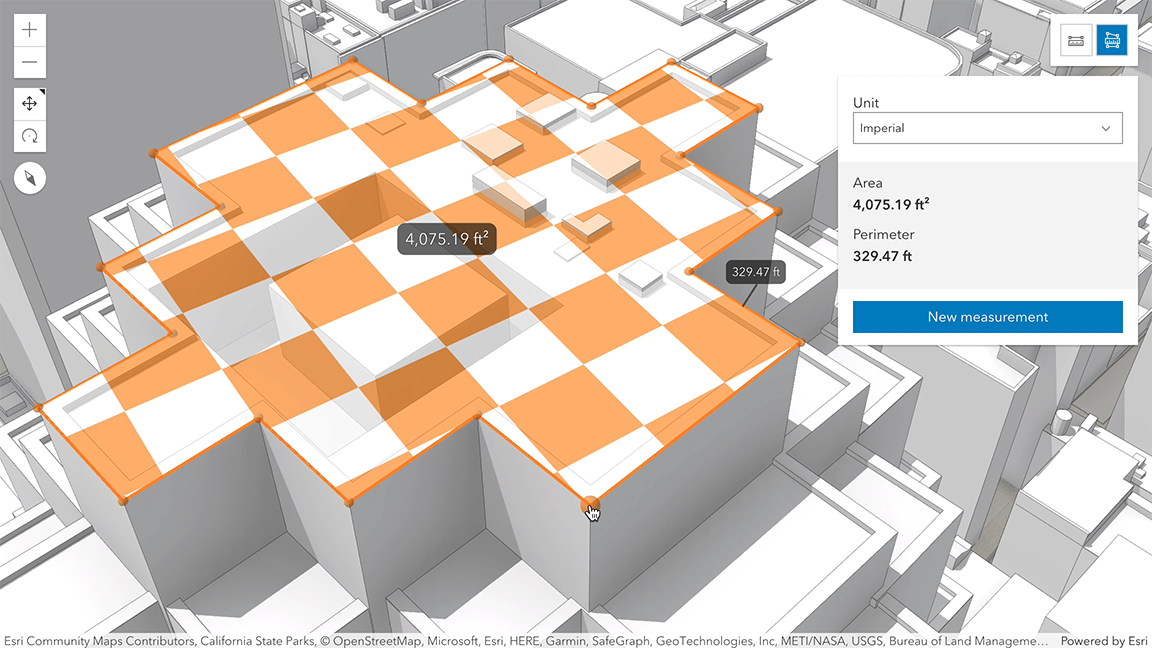](https://developers.arcgis.com/javascript/latest/sample-code/widgets-measurement-3d/)
*
* How the area and perimeter are computed depends on the scene's spatial reference and the length of the measured perimeter.
*
* In **geographic coordinate systems** (GCS) and in **Web Mercator**:
* - If the measurement's perimeter is below 100 km, they are computed in a Euclidean manner,
* in an [ECEF](https://en.wikipedia.org/wiki/ECEF) coordinate system (or equivalent on other planets).
* - If the perimeter is above 100 km, they are computed geodetically, and the visualization takes
* the curvature of the planet into consideration.
*
* In **projected coordinate systems** (PCS), apart from Web Mercator, the area and perimeter
* are always calculated in a Euclidean manner (in their respective PCS).
*
* The area may be visualized and calculated in two ways:
* 1. If all the vertices are more or less **coplanar** (aligning onto a horizontal or a sloped plane),
* the area and perimeter are projected to that plane. Also, the measurements are computed on that plane.
* 2. If the vertices have varying z-values and they create a **non-planar** surface, the visualization and the
* measurements show the area and perimeter that are projected to a horizontal plane.
*
* 
*
* When the widget is active, a horizontal "laser" line is drawn which indicates the height at the current mouse position.
* This line can help in analyzing the heights of objects relative to each other and the terrain.
*
* This widget is designed to work with 3D SceneViews. For measurements with 2D MapViews, use
* [AreaMeasurement2D](https://developers.arcgis.com/javascript/latest/references/core/widgets/AreaMeasurement2D/).
*
* > [!WARNING]
* >
* > **Things to consider:**
* > Snapping is enabled by default. This can be temporarily disabled by holding the `CTRL` key.
* > Layer types currently supported for snapping are: [FeatureLayer](https://developers.arcgis.com/javascript/latest/references/core/layers/FeatureLayer/), [GraphicsLayer](https://developers.arcgis.com/javascript/latest/references/core/layers/GraphicsLayer/) (except Mesh geometries),
* > [GeoJSONLayer](https://developers.arcgis.com/javascript/latest/references/core/layers/GeoJSONLayer/), [WFSLayer](https://developers.arcgis.com/javascript/latest/references/core/layers/WFSLayer/), [CSVLayer](https://developers.arcgis.com/javascript/latest/references/core/layers/CSVLayer/),
* > [3D Object SceneLayer](https://developers.arcgis.com/javascript/latest/references/core/layers/SceneLayer/), and [BuildingSceneLayer](https://developers.arcgis.com/javascript/latest/references/core/layers/BuildingSceneLayer/).
*
* @deprecated since version 4.33. Use the [Area Measurement 3D component](https://developers.arcgis.com/javascript/latest/references/map-components/components/arcgis-area-measurement-3d/) instead. For information on widget deprecation, read about [Esri's move to web components](https://developers.arcgis.com/javascript/latest/components-transition-plan/).
* @since 4.7
* @see [Sample - Measurement in 3D](https://developers.arcgis.com/javascript/latest/sample-code/widgets-measurement-3d/)
* @see [Sample - Analysis objects](https://developers.arcgis.com/javascript/latest/sample-code/analysis-objects/)
* @see [Sample - Color theming for interactive tools](https://developers.arcgis.com/javascript/latest/sample-code/view-theme/)
* @see [AreaMeasurement3DViewModel](https://developers.arcgis.com/javascript/latest/references/core/widgets/AreaMeasurement3D/AreaMeasurement3DViewModel/) - _Deprecated since 4.33. Use the [AreaMeasurementAnalysis](https://developers.arcgis.com/javascript/latest/references/core/analysis/AreaMeasurementAnalysis/) or [Area Measurement 3D component](https://developers.arcgis.com/javascript/latest/references/map-components/components/arcgis-area-measurement-3d/) instead._
* @see [DefaultUI](https://developers.arcgis.com/javascript/latest/references/core/views/ui/DefaultUI/)
* @see [SceneView.theme](https://developers.arcgis.com/javascript/latest/references/core/views/SceneView/#theme)
* @example
* let measurementWidget = new AreaMeasurement3D({
* view: view
* });
*
* view.ui.add(measurementWidget, "top-right");
*/
export default class AreaMeasurement3D extends Widget<AreaMeasurement3DProperties> {
/**
* @example
* // typical usage
* let measurementWidget = new AreaMeasurement3D({
* view: view
* });
*/
constructor(properties?: AreaMeasurement3DProperties);
/**
* The area measurement analysis object being created or modified by the widget. This property is an
* alias for [AreaMeasurement3DViewModel.analysis](https://developers.arcgis.com/javascript/latest/references/core/widgets/AreaMeasurement3D/AreaMeasurement3DViewModel/#analysis).
*
* If no analysis is provided, the widget automatically creates its own analysis and adds it to the view. In this
* case, the analysis will also be automatically removed from the view when the widget is destroyed.
*
* @since 4.23
* @see [AreaMeasurement3DViewModel.analysis](https://developers.arcgis.com/javascript/latest/references/core/widgets/AreaMeasurement3D/AreaMeasurement3DViewModel/#analysis)
* @example
* // Construct an area measurement analysis object outside of the widget
* const analysis = new AreaMeasurementAnalysis({
* geometry: {
* type: "polygon", // autocasts as new Polygon()
* rings: [
* [-73.9817, 40.7681],
* [-73.9582, 40.8005],
* [-73.9495, 40.7968],
* [-73.9730, 40.7644],
* [-73.9817, 40.7681]
* ]
* }
* });
*
* // Ensure that the analysis is added to the view
* view.analyses.add(analysis);
*
* // Frame the analysis in the view
* view.goTo(analysis.extent);
*
* // Pass the analysis object as a constructor parameter to modify it using the widget
* const viewModel = new AreaMeasurement3D({
* analysis: analysis,
* view: view
* });
*/
get analysis(): AreaMeasurementAnalysis;
set analysis(value: AreaMeasurementAnalysisProperties);
/**
* Icon which represents the widget. It is typically used when the widget is controlled by another
* one (e.g. in the Expand widget).
*
* @default "measure-area"
* @since 4.27
* @see [Calcite Icon Search](https://developers.arcgis.com/calcite-design-system/icons/)
* @see [Calcite Icon Search](https://developers.arcgis.com/calcite-design-system/icons/)
*/
get icon(): Icon["icon"];
set icon(value: Icon["icon"] | null | undefined);
/**
* The widget's default label.
*
* @since 4.11
*/
get label(): string;
set label(value: string | null | undefined);
/**
* Unit system (imperial, metric) or specific unit used for displaying the area values.
* Possible values are listed in [unitOptions](https://developers.arcgis.com/javascript/latest/references/core/widgets/AreaMeasurement3D/#unitOptions).
*
* @since 4.8
*/
accessor unit: SystemOrAreaUnit;
/**
* List of available units and unit systems (imperial, metric) for displaying the area values.
* By default, the following units are included: `metric`, `imperial`, `square-inches`, `square-feet`, `square-us-feet`, `square-yards`, `square-miles`, `square-meters`, `square-kilometers`, `acres`, `ares`, `hectares`.
* Possible [unit](https://developers.arcgis.com/javascript/latest/references/core/widgets/AreaMeasurement3D/#unit) values can only be a subset of this list.
*/
accessor unitOptions: SystemOrAreaUnit[];
/** A reference to the [SceneView](https://developers.arcgis.com/javascript/latest/references/core/views/SceneView/). Set this to link the widget to a specific view. */
accessor view: SceneView | null | undefined;
/**
* The view model for this widget. This is a class that contains all the logic
* (properties and methods) that controls this widget's behavior. See the
* [AreaMeasurement3DViewModel](https://developers.arcgis.com/javascript/latest/references/core/widgets/AreaMeasurement3D/AreaMeasurement3DViewModel/) class to access
* all properties and methods on the widget.
*/
get viewModel(): AreaMeasurement3DViewModel;
set viewModel(value: AreaMeasurement3DViewModelProperties);
}