@arcgis/core
Version:
ArcGIS Maps SDK for JavaScript: A complete 2D and 3D mapping and data visualization API
102 lines (100 loc) • 7.66 kB
TypeScript
import type SunLighting from "./SunLighting.js";
import type VirtualLighting from "./VirtualLighting.js";
import type Background from "./background/Background.js";
import type { JSONSupport } from "../core/JSONSupport.js";
import type { WeatherUnion } from "../views/3d/environment/types.js";
import type { VirtualLightingProperties } from "./VirtualLighting.js";
import type { SunLightingProperties } from "./SunLighting.js";
import type { BackgroundProperties } from "./background/Background.js";
import type { FoggyWeatherProperties } from "../views/3d/environment/FoggyWeather.js";
import type { SnowyWeatherProperties } from "../views/3d/environment/SnowyWeather.js";
import type { RainyWeatherProperties } from "../views/3d/environment/RainyWeather.js";
import type { CloudyWeatherProperties } from "../views/3d/environment/CloudyWeather.js";
import type { SunnyWeatherProperties } from "../views/3d/environment/SunnyWeather.js";
export interface EnvironmentProperties extends Partial<Pick<Environment, "atmosphereEnabled" | "starsEnabled">> {
/**
* Specifies how the background of the scene (which lies behind sky, stars and atmosphere) should be displayed. By
* default this is simply a single, fully opaque, black color. Currently [ColorBackground](https://developers.arcgis.com/javascript/latest/references/core/webscene/background/ColorBackground/)
* is the only type of background supported.
*/
background?: BackgroundProperties | null;
/** Settings for defining the lighting of the scene. The lighting can be either "sun" or "virtual". */
lighting?: (SunLightingProperties & { type?: "sun" }) | (VirtualLightingProperties & { type: "virtual" });
/**
* Indicates the type of weather visualization in the scene.
* This setting does not have any effect in [local scenes](https://developers.arcgis.com/javascript/latest/references/core/views/SceneView/#viewingMode).
*
* Known Value | Example
* ------------|---------
* [SunnyWeather](https://developers.arcgis.com/javascript/latest/references/core/views/3d/environment/SunnyWeather/) | 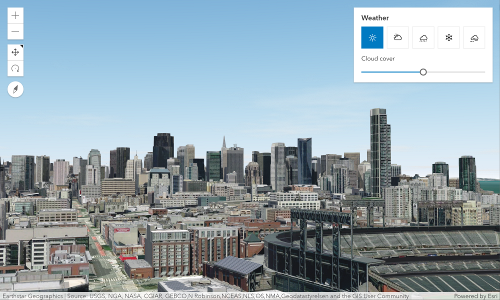
* [CloudyWeather](https://developers.arcgis.com/javascript/latest/references/core/views/3d/environment/CloudyWeather/) | 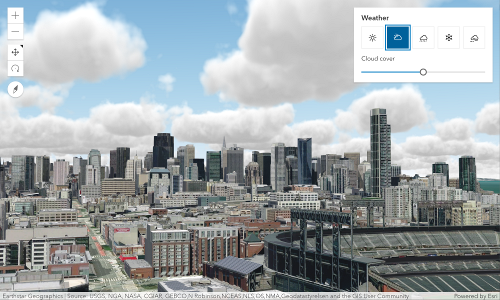
* [RainyWeather](https://developers.arcgis.com/javascript/latest/references/core/views/3d/environment/RainyWeather/) | 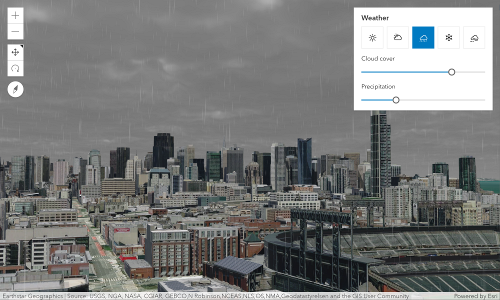
* [SnowyWeather](https://developers.arcgis.com/javascript/latest/references/core/views/3d/environment/SnowyWeather/) | 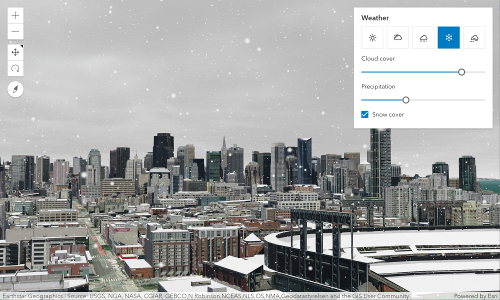
* [FoggyWeather](https://developers.arcgis.com/javascript/latest/references/core/views/3d/environment/FoggyWeather/) | 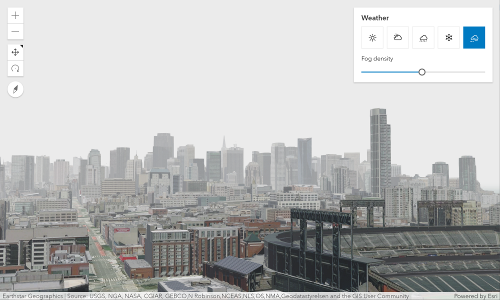
*
* @default SunnyWeather
*/
weather?: ((SunnyWeatherProperties & { type: "sunny" }) | (CloudyWeatherProperties & { type: "cloudy" }) | (RainyWeatherProperties & { type: "rainy" }) | (SnowyWeatherProperties & { type: "snowy" }) | (FoggyWeatherProperties & { type: "foggy" }));
}
/**
* Represents settings that affect the environment in
* which the [WebScene](https://developers.arcgis.com/javascript/latest/references/core/WebScene/) is displayed (such as lighting). It is part of the
* [initial state](https://developers.arcgis.com/javascript/latest/references/core/WebScene/#initialViewProperties) of the WebScene
* as well as [Presentation.slides](https://developers.arcgis.com/javascript/latest/references/core/webscene/Presentation/#slides) in the presentation.
*
* @since 4.0
* @see [InitialViewProperties](https://developers.arcgis.com/javascript/latest/references/core/webscene/InitialViewProperties/)
* @see [Slide](https://developers.arcgis.com/javascript/latest/references/core/webscene/Slide/)
*/
export default class Environment extends JSONSupport {
constructor(properties?: EnvironmentProperties);
/**
* Indicates whether atmosphere visualization is enabled.
*
* Disabling the atmosphere will disable the following features:
* - Sky and haze
* - Any [weather](https://developers.arcgis.com/javascript/latest/references/core/webscene/Environment/#weather) visualization
* - Natural light scattering in fog and haze around light emitters.
*
* @default true
*/
accessor atmosphereEnabled: boolean;
/**
* Specifies how the background of the scene (which lies behind sky, stars and atmosphere) should be displayed. By
* default this is simply a single, fully opaque, black color. Currently [ColorBackground](https://developers.arcgis.com/javascript/latest/references/core/webscene/background/ColorBackground/)
* is the only type of background supported.
*/
get background(): Background | null | undefined;
set background(value: BackgroundProperties | null | undefined);
/** Settings for defining the lighting of the scene. The lighting can be either "sun" or "virtual". */
get lighting(): SunLighting | VirtualLighting;
set lighting(value: (SunLightingProperties & { type?: "sun" }) | (VirtualLightingProperties & { type: "virtual" }));
/**
* Indicates whether stars visualization is enabled.
*
* @default true
*/
accessor starsEnabled: boolean;
/**
* Indicates the type of weather visualization in the scene.
* This setting does not have any effect in [local scenes](https://developers.arcgis.com/javascript/latest/references/core/views/SceneView/#viewingMode).
*
* Known Value | Example
* ------------|---------
* [SunnyWeather](https://developers.arcgis.com/javascript/latest/references/core/views/3d/environment/SunnyWeather/) | 
* [CloudyWeather](https://developers.arcgis.com/javascript/latest/references/core/views/3d/environment/CloudyWeather/) | 
* [RainyWeather](https://developers.arcgis.com/javascript/latest/references/core/views/3d/environment/RainyWeather/) | 
* [SnowyWeather](https://developers.arcgis.com/javascript/latest/references/core/views/3d/environment/SnowyWeather/) | 
* [FoggyWeather](https://developers.arcgis.com/javascript/latest/references/core/views/3d/environment/FoggyWeather/) | 
*
* @default SunnyWeather
*/
get weather(): WeatherUnion;
set weather(value: ((SunnyWeatherProperties & { type: "sunny" }) | (CloudyWeatherProperties & { type: "cloudy" }) | (RainyWeatherProperties & { type: "rainy" }) | (SnowyWeatherProperties & { type: "snowy" }) | (FoggyWeatherProperties & { type: "foggy" })));
/**
* Creates a deep clone of this object.
*
* @returns Creates a deep clone of the instance calling this method.
*/
clone(): Environment;
}