@arcgis/core
Version:
ArcGIS Maps SDK for JavaScript: A complete 2D and 3D mapping and data visualization API
77 lines (75 loc) • 4.91 kB
TypeScript
import type UI from "./UI.js";
import type { ComponentName } from "./types.js";
import type { UIProperties } from "./UI.js";
export interface DefaultUIProperties extends UIProperties, Partial<Pick<DefaultUI, "components">> {}
/**
* The DefaultUI class exposes the default
* [widgets](https://developers.arcgis.com/javascript/latest/references/core/widgets/Widget/) and [components](https://developers.arcgis.com/javascript/latest/references/core/views/ui/DefaultUI/#components) available in either a
* [MapView](https://developers.arcgis.com/javascript/latest/references/core/views/MapView/) or a [SceneView](https://developers.arcgis.com/javascript/latest/references/core/views/SceneView/). This class
* also provides a simple API for [adding](https://developers.arcgis.com/javascript/latest/references/core/views/ui/DefaultUI/#add), [moving](https://developers.arcgis.com/javascript/latest/references/core/views/ui/DefaultUI/#move) and [removing](https://developers.arcgis.com/javascript/latest/references/core/views/ui/DefaultUI/#remove)
* [widgets](https://developers.arcgis.com/javascript/latest/references/core/widgets/Widget/) and other HTML components from the view's UI.
*
* You typically don't have to create a new instance of this class since a default instance is
* available in the `ui` property of the
* [SceneView](https://developers.arcgis.com/javascript/latest/references/core/views/SceneView/) and [MapView](https://developers.arcgis.com/javascript/latest/references/core/views/MapView/).
*
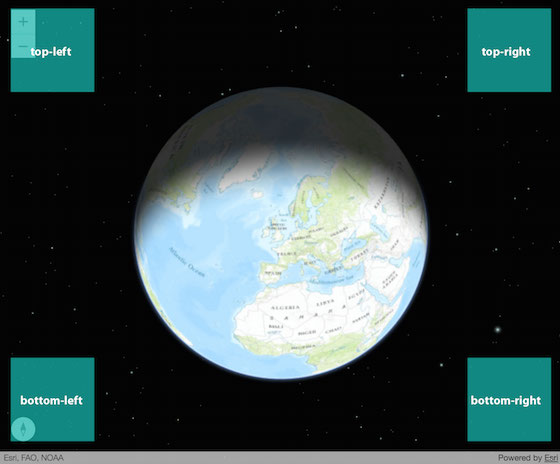
* When adding or moving components in the view's UI, you can specify a position. Widgets in
* the upper region are stacked vertically, while widgets in the lower region are stacked horizontally.
* The available positions are indicated in the image below.
*
* 
*
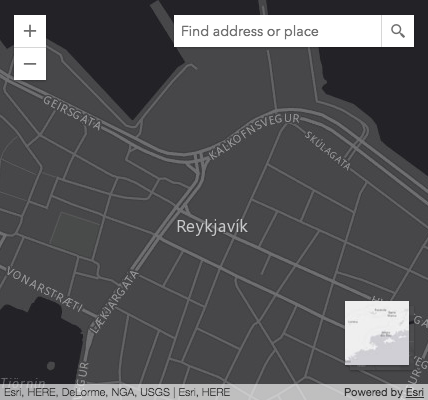
* Methods, such as [add()](https://developers.arcgis.com/javascript/latest/references/core/views/ui/DefaultUI/#add) and [move()](https://developers.arcgis.com/javascript/latest/references/core/views/ui/DefaultUI/#move) can be used to place widgets in specific
* positions of the UI. In the image below, the [Search](https://developers.arcgis.com/javascript/latest/references/core/widgets/Search/) and
* [BasemapToggle](https://developers.arcgis.com/javascript/latest/references/core/widgets/BasemapToggle/) widgets are placed in the view with the [add()](https://developers.arcgis.com/javascript/latest/references/core/views/ui/DefaultUI/#add)
* method.
*
* ```js
* let searchWidget = new Search({ view: view });
* let bmToggleWidget = new BasemapToggle({
* view: view,
* nextBasemap: "hybrid"
* });
*
* view.ui.add(searchWidget, "top-right");
* view.ui.add(bmToggleWidget, "bottom-right");
* ```
*
* 
*
* If you dive into the doc of the methods [add()](https://developers.arcgis.com/javascript/latest/references/core/views/ui/DefaultUI/#add), [empty()](https://developers.arcgis.com/javascript/latest/references/core/views/ui/DefaultUI/#empty) and [move()](https://developers.arcgis.com/javascript/latest/references/core/views/ui/DefaultUI/#move), you'll notice some of the
* possible values include "leading" and "trailing". That's because the ArcGIS Maps SDK for JavaScript provides
* bidirectional support.
*
* For left-to-right (LTR), "leading" is left and "trailing" is right. For right-to-left (RTL), "leading" is right and "trailing" is left.
*
* To enable right-to-left(RTL), set the `dir` attribute in the `<html>` or `<body>` tag to `rtl`.
*
* ```js
* <html dir="rtl">
* ```
*
* @since 4.0
* @see [SceneView.ui](https://developers.arcgis.com/javascript/latest/references/core/views/SceneView/#ui)
* @see [MapView.ui](https://developers.arcgis.com/javascript/latest/references/core/views/MapView/#ui)
*/
export default class DefaultUI extends UI {
constructor(properties?: DefaultUIProperties);
/**
* An array of strings representing the default
* widgets visible when a [MapView](https://developers.arcgis.com/javascript/latest/references/core/views/MapView/) or
* [SceneView](https://developers.arcgis.com/javascript/latest/references/core/views/SceneView/) is created. The default widgets differ between MapView
* and SceneView.
*
* The following are the default widgets in each view:
*
* **MapView:** `["zoom"]`
*
* **SceneView:** `["navigation-toggle", "compass", "zoom"]`
*
* > [!WARNING]
* >
* > As of version 5.0, attribution is a part of the view itself. To control the visibility of the attribution, use the [View.attributionVisible](https://developers.arcgis.com/javascript/latest/references/core/views/View/#attributionVisible) property.
*/
accessor components: ComponentName[];
}