@arcgis/core
Version:
ArcGIS Maps SDK for JavaScript: A complete 2D and 3D mapping and data visualization API
240 lines (238 loc) • 11.9 kB
TypeScript
import type Color from "../../Color.js";
import type Accessor from "../../core/Accessor.js";
import type { ColorLike } from "../../Color.js";
export interface HighlightOptionsProperties extends Partial<Pick<HighlightOptions, "fillOpacity" | "haloOpacity" | "shadowDifference" | "shadowOpacity">> {
/** The color of the highlight fill. */
color?: ColorLike;
/** The color of the halo surrounding the highlight. */
haloColor?: ColorLike | null;
/**
* A name used to uniquely identify the highlight options within the view's
* [View.highlights](https://developers.arcgis.com/javascript/latest/references/core/views/View/#highlights) collection. To apply a specific set of highlight options,
* include this name in the second parameter of a LayerView's `highlight()` method. If no name is specified, it will
* default to `default`.
*
* @see [FeatureLayerView.highlight()](https://developers.arcgis.com/javascript/latest/references/core/views/layers/FeatureLayerView/#highlight)
* @example
* // Use the default highlights collection to apply a highlight to features when you hover over them
*
* // A handler can be used to remove any previous highlight when applying a new one
* let hoverHighlight;
*
* view.on("pointer-move", (event) => {
* // Search for features in the featureLayer at the hovered location
* view.hitTest(event, { include: featureLayer }).then((response) => {
* if (response.results.length) {
* const features = response.results.map(result => result.graphic);
* // Remove any previous highlight, if it exists
* hoverHighlight?.remove();
* // Highlight the hit features with the temporary highlight options, which are pre-configured for this use case
* hoverHighlight = layerView.highlight(features, {name: "temporary"});
* }
* }).catch((error) => {
* console.error("Error during hitTest:", error);
* });
*/
name?: string;
/**
* The color of the highlighted feature's shadow in a [3D SceneView](https://developers.arcgis.com/javascript/latest/references/core/views/SceneView/).
*
* > [!WARNING]
* >
* > **Known Limitation**
* >
* > Shadow options are only supported on the `default` highlight options. Setting them on other highlights has no
* > effect.
*
* @default #000000
*/
shadowColor?: ColorLike;
}
/**
* HighlightOptions are used to customize the appearance of highlights applied to features. You can configure various
* options (such as color or opacity) to define how a feature will be visually emphasized when highlighted using those
* options.
*
* To be used in an application, highlight options first need to be added to the View's
* [View.highlights](https://developers.arcgis.com/javascript/latest/references/core/views/View/#highlights) collection. You can then use the `highlight()` method on the
* appropriate [LayerView](https://developers.arcgis.com/javascript/latest/references/core/views/layers/LayerView/) to apply the options to one or more features. If the
* `highlight()` method is called without passing specific options, the `default` options will be used. These are the
* options which have the [name](https://developers.arcgis.com/javascript/latest/references/core/views/support/HighlightOptions/#name) property set to "default". A
* pre-configured set of `default` options is provided for ease of use, but you can also define your own.
*
* The table below shows the pre-configured highlight options in the View's
* [View.highlights](https://developers.arcgis.com/javascript/latest/references/core/views/View/#highlights) collection if the collection has not been modified.
*
* | Highlight options name | Description | Default settings |
* | ---------------------- | ----------- | ---------------- |
* | default | The default highlight options. Used when `layerView.highlight()` is called without specifying any particular highlight options. | ` { name: "default", color: "cyan", haloOpacity: 1, fillOpacity: 0.25, shadowColor: "black", shadowOpacity: 0.4, shadowDifference: 0.2}` |
* | temporary | The temporary highlight options, pre-configured for common use cases such as hovering over a feature in the view. | `{ name: "temporary", color: "yellow", haloOpacity: 1, fillOpacity: 0.25}` |
*
* In a [3D SceneView](https://developers.arcgis.com/javascript/latest/references/core/views/SceneView/), highlighting a feature with the `default` options also
* influences the feature's shadow. You can customize the shadow options or use the pre-configured ones, which will
* display the shadow in a darker shade. Shadow options are only supported on the `default` highlight options; setting
* them on other highlights has no effect.
*
* @since 4.32
* @see [View.highlights](https://developers.arcgis.com/javascript/latest/references/core/views/View/#highlights)
* @see [FeatureLayerView.highlight()](https://developers.arcgis.com/javascript/latest/references/core/views/layers/FeatureLayerView/#highlight)
* @see [SceneLayerView.highlight()](https://developers.arcgis.com/javascript/latest/references/core/views/layers/SceneLayerView/#highlight)
* @see [Sample: Highlight features by geometry](https://developers.arcgis.com/javascript/latest/sample-code/highlight-features-by-geometry/)
* @see [Sample: Highlight SceneLayer](https://developers.arcgis.com/javascript/latest/sample-code/highlight-scenelayer/)
* @example
* // Override the default highlights collection
* const view = new MapView({
* map: map,
* // Set the highlight options to be used in the view
* highlights: [
* { name: "default", color: "orange" },
* { name: "temporary", color: "magenta" },
* { name: "oaks", color: "forestgreen", haloOpacity: 0.8, fillOpacity: 0.3 }
* ]
* });
* @example
* // Highlight features based on a query result
*
* // A handler can be used to remove any previous highlight when applying a new one
* let highlight;
*
* // Query for particualar features in a layer and then highlight them with the specified options
* view.whenLayerView(treesLayer).then((layerView) => {
* let query = treesLayer.createQuery();
* query.where = "type = 'Quercus'";
*
* treesLayer.queryFeatures(query).then((result) => {
* // Remove any previous highlight, if it exists
* highlight?.remove();
* // Apply the user-defined "oaks" highlight options to the corresponding tree features
* highlight = layerView.highlight(result.features, {name: "oaks"});
* });
* });
*/
export default class HighlightOptions extends Accessor {
constructor(properties?: HighlightOptionsProperties);
/** The color of the highlight fill. */
get color(): Color;
set color(value: ColorLike);
/**
* The opacity of the fill (area within the halo). This will be multiplied with the opacity specified in `color`.
*
* @default 0.25
*/
accessor fillOpacity: number;
/** The color of the halo surrounding the highlight. */
get haloColor(): Color | null | undefined;
set haloColor(value: ColorLike | null | undefined);
/**
* The opacity of the highlight halo. This will be multiplied with any opacity specified in `color`.
*
* @default 1
*/
accessor haloOpacity: number;
/**
* A name used to uniquely identify the highlight options within the view's
* [View.highlights](https://developers.arcgis.com/javascript/latest/references/core/views/View/#highlights) collection. To apply a specific set of highlight options,
* include this name in the second parameter of a LayerView's `highlight()` method. If no name is specified, it will
* default to `default`.
*
* @see [FeatureLayerView.highlight()](https://developers.arcgis.com/javascript/latest/references/core/views/layers/FeatureLayerView/#highlight)
* @example
* // Use the default highlights collection to apply a highlight to features when you hover over them
*
* // A handler can be used to remove any previous highlight when applying a new one
* let hoverHighlight;
*
* view.on("pointer-move", (event) => {
* // Search for features in the featureLayer at the hovered location
* view.hitTest(event, { include: featureLayer }).then((response) => {
* if (response.results.length) {
* const features = response.results.map(result => result.graphic);
* // Remove any previous highlight, if it exists
* hoverHighlight?.remove();
* // Highlight the hit features with the temporary highlight options, which are pre-configured for this use case
* hoverHighlight = layerView.highlight(features, {name: "temporary"});
* }
* }).catch((error) => {
* console.error("Error during hitTest:", error);
* });
*/
get name(): string;
/**
* The color of the highlighted feature's shadow in a [3D SceneView](https://developers.arcgis.com/javascript/latest/references/core/views/SceneView/).
*
* > [!WARNING]
* >
* > **Known Limitation**
* >
* > Shadow options are only supported on the `default` highlight options. Setting them on other highlights has no
* > effect.
*
* @default #000000
*/
get shadowColor(): Color;
set shadowColor(value: ColorLike);
/**
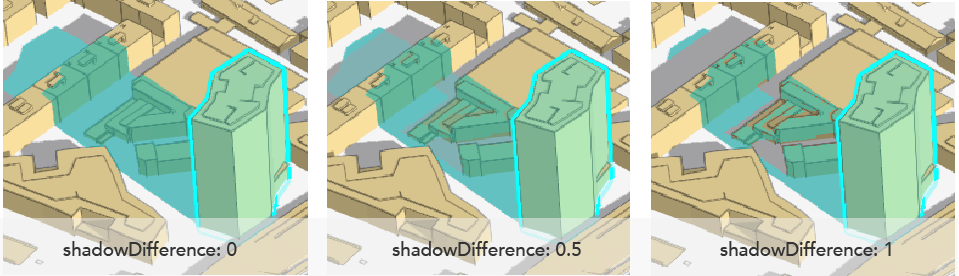
* Defines the intensity of the shadow area obtained by overlapping the shadow of the highlighted feature and the
* shadow of other objects in a [3D SceneView](https://developers.arcgis.com/javascript/latest/references/core/views/SceneView/). The value ranges from `0` to `1`.
* A value of `0` highlights the overlapping shadow areas in the same way (no difference). Setting it to `1`
* highlights only the difference between the shadow areas, so the overlapping shadow areas aren't highlighted at
* all. Here is an example of what the shadow highlight looks like with different values:
*
* 
*
* > [!WARNING]
* >
* > **Known Limitation**
* >
* > Shadow options are only supported on the `default` highlight options. Setting them on other highlights has no
* > effect.
*
* @default 0.2
* @example
* // SceneView highlights with shadow settings configured
* const view = new SceneView({
* map: map,
* highlights: [
* {
* name: "oaks"
* color: "forestgreen",
* haloColor: "green",
* haloOpacity: 0.9,
* fillOpacity: 0.2,
* shadowColor: "goldenrod",
* shadowOpacity: 0.5
* }
* ]
* });
* @example
* // A handler can be used to remove any previous highlight when applying a new one
* let highlight;
*
* // Query for particualar features in a layer and then highlight them with the specified options
* view.whenLayerView(treesLayer).then((layerView) => {
* let query = treesLayer.createQuery();
* query.where = "type = 'Quercus'";
* treesLayer.queryFeatures(query).then((result) => {
* // Remove any previous highlight, if it exists
* highlight?.remove();
* // Apply the user-defined "oaks" highlight options to the corresponding tree features
* highlight = layerView.highlight(result.features, {name: "oaks"});
* });
* });
*/
accessor shadowDifference: number;
/**
* The opacity of the highlighted feature's shadow in a [3D SceneView](https://developers.arcgis.com/javascript/latest/references/core/views/SceneView/). This will
* be multiplied with the opacity specified in `shadowColor`.
*
* > [!WARNING]
* >
* > **Known Limitation**
* >
* > Shadow options are only supported on the `default` highlight options. Setting them on other highlights has no
* > effect.
*
* @default 0.4
*/
accessor shadowOpacity: number;
}