@arcgis/core
Version:
ArcGIS Maps SDK for JavaScript: A complete 2D and 3D mapping and data visualization API
77 lines (75 loc) • 4.42 kB
TypeScript
import type Accessor from "../../../core/Accessor.js";
export interface SketchLabelOptionsProperties extends Partial<Pick<SketchLabelOptions, "enabled">> {}
/**
* The `SketchLabelOptions` allows users to configure the labels which are shown next to each
* segment of a graphic while sketching and editing. The labels display each segment's
* horizontal length and are not shown for non-planar polygons and polylines.
*
* [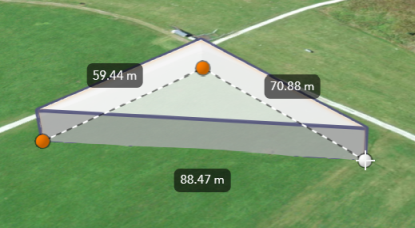](https://developers.arcgis.com/javascript/latest/sample-code/sketch-3d/)
*
* How the segment lengths are computed depends on the view's spatial reference. In geographic coordinate systems (GCS)
* and in Web Mercator, the lengths are computed geodetically. In projected coordinate systems (PCS),
* apart from Web Mercator, the lengths are computed in a Euclidean manner (in the respective PCS).
*
* > [!WARNING]
* >
* > **Known Limitation**
* >
* > Sketch labels are currently only supported when working with a [SceneView](https://developers.arcgis.com/javascript/latest/references/core/views/SceneView/).
*
* <span id="set"></span>
* ## Set the unit system for labels
*
* Utilize either a [Portal](https://developers.arcgis.com/javascript/latest/references/core/portal/Portal/) or a [PortalItem](https://developers.arcgis.com/javascript/latest/references/core/portal/Portal/) to establish the unit system for labels while using the [Sketch](https://developers.arcgis.com/javascript/latest/references/core/widgets/Sketch/) widget.
*
* <details>
* <summary>Read More</summary>
*
* The unit of measurement used in the Sketch labels can be programmatically set
* through the [PortalItem](https://developers.arcgis.com/javascript/latest/references/core/portal/Portal/) of a [Map](https://developers.arcgis.com/javascript/latest/references/core/Map/) by defining the [Portal.units](https://developers.arcgis.com/javascript/latest/references/core/portal/Portal/#units) property.
*
* ```js
* // Create a PortalItem instance for the map used in the 3D view
* view.map.portalItem = new PortalItem({
* portal: {
* units: "english" //or "metric"
* },
* });
* ```
*
* Or, if a [PortalItem](https://developers.arcgis.com/javascript/latest/references/core/portal/PortalItem/) already exists, the [Portal.units](https://developers.arcgis.com/javascript/latest/references/core/portal/Portal/#units) property can be directly set or changed.
*
* ```js
* // Set the units directly on an existing PortalItem of the 3D view
* view.map.portalItem.portal.units = "english" //or "metric"
* ```
*
* In alternative, if there is no an existing [Portal](https://developers.arcgis.com/javascript/latest/references/core/portal/Portal/), it is possible to set the [Portal.units](https://developers.arcgis.com/javascript/latest/references/core/portal/Portal/#units) property
* from a new default `Portal` created using the [Portal.getDefault()](https://developers.arcgis.com/javascript/latest/references/core/portal/Portal/#getDefault) method.
*
* ```js
* // Create an instance of a new Portal and set the unit
* const portal = Portal.getDefault();
* portal.units = "english" //or "metric"
* ```
*
* </details>
*
* @since 4.24
* @see [Sketch](https://developers.arcgis.com/javascript/latest/references/core/widgets/Sketch/)
* @see [SketchViewModel](https://developers.arcgis.com/javascript/latest/references/core/widgets/Sketch/SketchViewModel/)
* @see [SketchTooltipOptions](https://developers.arcgis.com/javascript/latest/references/core/views/interactive/sketch/SketchTooltipOptions/)
* @see [SketchValueOptions](https://developers.arcgis.com/javascript/latest/references/core/views/interactive/sketch/SketchValueOptions/)
* @see [Editor](https://developers.arcgis.com/javascript/latest/references/core/widgets/Editor/)
* @see [Sample - Sketch in 3D](https://developers.arcgis.com/javascript/latest/sample-code/sketch-3d/)
* @see [Sample - Edit features in 3D with the Editor widget](https://developers.arcgis.com/javascript/latest/sample-code/editor-3d/)
*/
export default class SketchLabelOptions extends Accessor {
constructor(properties?: SketchLabelOptionsProperties);
/**
* Whether labels are shown next to each segment of the graphic being sketched.
*
* @default false
*/
accessor enabled: boolean;
}