@arcgis/core
Version:
ArcGIS Maps SDK for JavaScript: A complete 2D and 3D mapping and data visualization API
96 lines (94 loc) • 4.82 kB
TypeScript
import type Accessor from "../core/Accessor.js";
import type { ScreenPoint } from "../core/types.js";
export interface MagnifierProperties extends Partial<Pick<Magnifier, "factor" | "maskEnabled" | "maskUrl" | "offset" | "overlayEnabled" | "overlayUrl" | "position" | "size" | "visible">> {}
/**
* The Magnifier allows end users to show a portion of the view
* as a magnified image. An instance of this class can be accessed through
* either [MapView.magnifier](https://developers.arcgis.com/javascript/latest/references/core/views/MapView/#magnifier) or [SceneView.magnifier](https://developers.arcgis.com/javascript/latest/references/core/views/SceneView/#magnifier).
*
* 
*
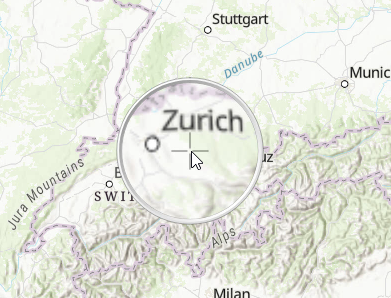
* As you can see in the screenshot above, the Magnifier utilizes a default overlay image of a magnifier
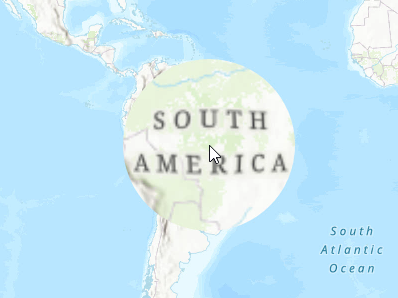
* glass. The overlay image is set using the [overlayUrl](https://developers.arcgis.com/javascript/latest/references/core/views/Magnifier/#overlayUrl) property. You can disable the overlay image by setting the [overlayEnabled](https://developers.arcgis.com/javascript/latest/references/core/views/Magnifier/#overlayEnabled) to `false`. The following
* demonstrates using a Magnifier without an overlay image.
*
* 
*
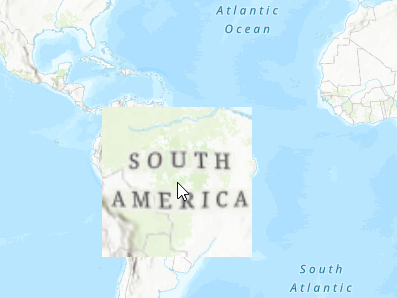
* The Magnifier contains a default mask image, which is set using the [maskUrl](https://developers.arcgis.com/javascript/latest/references/core/views/Magnifier/#maskUrl), and determines the visible area of the magnified image. Be default, the magnified area
* is in the shape of a circle. The following demonstrates an example of a mask image set in the shape of a square. Note that the `overlayEnabled` was set
* to `false` in this example as well to hide the overlay image, and only display the magnified area.
*
* 
*
* @since 4.19
* @see [MapView.magnifier](https://developers.arcgis.com/javascript/latest/references/core/views/MapView/#magnifier)
* @see [SceneView.magnifier](https://developers.arcgis.com/javascript/latest/references/core/views/SceneView/#magnifier)
* @example
* view.when(() => {
* view.magnifier.visible = true;
*
* const offset = view.magnifier.size / 2;
* view.magnifier.offset = { x: offset, y: offset };
*
* //The magnifier will be displayed whenever the cursor hovers over the map.
* view.on("pointer-move", function (event) {
* view.magnifier.position = { x: event.x, y: event.y };
* });
* });
*/
export default class Magnifier extends Accessor {
constructor(properties?: MagnifierProperties);
/**
* Controls the amount of magnification to display. The larger the value, the more augmented the magnified image appears.
*
* @default 1.5
*/
accessor factor: number;
/**
* Indicates whether the mask image is enabled.
*
* @default true
*/
accessor maskEnabled: boolean;
/**
* The mask url points to an image that determines the visible area of the magnified image [(alpha channel)](https://developer.mozilla.org/en-US/docs/Glossary/Alpha).
* A default built-in circle mask with a diameter equal to the size of the magnifier is used when the
* maskUrl is null.
*/
accessor maskUrl: string | null | undefined;
/**
* The offset of the magnifier in pixels. The offset allows to adjust where the magnifier is
* drawn relative to its [position](https://developers.arcgis.com/javascript/latest/references/core/views/Magnifier/#position).
*
* @example
* const offset = view.magnifier.size / 2;
* view.magnifier.offset = { x: offset, y: offset };
*/
accessor offset: ScreenPoint;
/**
* Indicates whether the overlay image is enabled.
*
* @default true
*/
accessor overlayEnabled: boolean;
/**
* The overlay url points to an image that is displayed on top of the magnified image. Note
* that the overlay image is not affected by the [maskUrl](https://developers.arcgis.com/javascript/latest/references/core/views/Magnifier/#maskUrl). A default
* built-in image of a magnifier glass is used when the overlayUrl is null.
*/
accessor overlayUrl: string | null | undefined;
/** The position of the magnifier in pixels. The magnifier will not be displayed if the position is null. */
accessor position: ScreenPoint | null | undefined;
/**
* The size of the magnifier in pixels.
*
* @default 120
*/
accessor size: number;
/**
* Indicates whether the magnifier is visible.
*
* @default true
*/
accessor visible: boolean;
}