@arcgis/core
Version:
ArcGIS Maps SDK for JavaScript: A complete 2D and 3D mapping and data visualization API
308 lines (306 loc) • 21.3 kB
TypeScript
import type Accessor from "../../../core/Accessor.js";
import type SceneView from "../../SceneView.js";
import type ManagedFBO from "./ManagedFBO.js";
import type RenderCamera from "./RenderCamera.js";
import type { RenderNodeOutput, ConsumedNodes } from "../webgl.js";
import type { SunLight } from "./types.js";
export interface RenderNodeProperties extends Partial<Pick<RenderNode, "produces">> {
/**
* Declare which inputs are needed from the engine for rendering.
*
* For example, to request composite-color and normals, the function `consumes()` is specified as follows:
* ```
* consumes: { required: ["composite-color" , "normals"], optional: ["highlights"] }
* ```
*/
consumes?: ConsumedNodes;
/** The SceneView linked to this render node. */
view?: SceneView;
}
/**
* The RenderNode provides low level access to the render pipeline of the [SceneView](https://developers.arcgis.com/javascript/latest/references/core/views/SceneView/)
* to create custom visualizations and effects. Render nodes inject custom WebGL code in different stages
* of the render pipeline to alter their outputs.
*
* > [!WARNING]
* >
* > ### Important guidelines
* >
* > **This interface is experimental**. Please read the following information carefully before using it in a product:
* > It is not possible to shield users of this interface from SceneView internal implementation details. Therefore,
* > this interface should be considered **not stable and subject to changes in upcoming minor releases** of the ArcGIS
* > Maps SDK for JavaScript.
* > Because of the complex nature of WebGL and hardware-accelerated 3D rendering, this interface is targeting
* > expert developers that are experienced with WebGL or OpenGL.
* > * Improper use of WebGL might not only break the custom rendering, but also the rendering of
* > [SceneView](https://developers.arcgis.com/javascript/latest/references/core/views/SceneView/) itself.
* > * Esri does not provide any support for issues related to WebGL rendering in custom rendering code, or for issues
* > that arise in [SceneView](https://developers.arcgis.com/javascript/latest/references/core/views/SceneView/) rendering while using custom rendering code.
* > Integration with third-party libraries is only possible under certain conditions. Specifically, the third-party
* > library has to be capable of working on the same WebGL context as [SceneView](https://developers.arcgis.com/javascript/latest/references/core/views/SceneView/), and able to
* > set the relevant parts of the WebGL state in every frame.
*
* <span id="usage"></span>
* ### Usage
* A RenderNode subclass is linked to a specific [SceneView](https://developers.arcgis.com/javascript/latest/references/core/views/SceneView/) during construction:
* ```js
* new LuminanceRenderNode({ view });
* ```
* A RenderNode subclass is created using [Accessor.createSubclass()](https://developers.arcgis.com/javascript/latest/references/core/core/Accessor/#createSubclass). This example node modifies the "composite-color"
* output of the render pipeline:
* ```js
* const LuminanceRenderNode = RenderNode.createSubclass({
* consumes: { required: ["composite-color"] }
* produces: ["composite-color"]
* render(inputs) {
* // custom render code
* }
* });
* ```
*
* <span id="outputs-and-inputs"></span>
*
* #### Modifying render graph outputs
* Rendering a single frame in SceneView traverses the individual nodes of the internal render graph of the
* [SceneView](https://developers.arcgis.com/javascript/latest/references/core/views/SceneView/). Every time a node is traversed, the render engine will modify or create
* framebuffers.
* For example, the render graph in the images shown
* [below](https://developers.arcgis.com/javascript/latest/references/core/views/3d/webgl/RenderNode/#render-node-input-images)
* contains nodes which render buildings, one transparent cube, the terrain with textures, atmosphere effects, and post
* processing effects such as antialiasing.
*
* Depending on the [SceneView](https://developers.arcgis.com/javascript/latest/references/core/views/SceneView/) properties and layer configuration, the rendering engine
* modifies the render graph to traverse the nodes which are required to produce the configured rendering. The
* chronological render order of the render graph is given by the input-output dependencies between the nodes in the
* graph. For example, transparent geometry is rendered after all opaque geometry.
*
* The [RenderNode](https://developers.arcgis.com/javascript/latest/references/core/views/3d/webgl/RenderNode/) class offers a way to inject custom render code to this render
* pipeline. Currently the following outputs can be modified by custom render nodes:
*
* | [RenderNodeOutput](https://developers.arcgis.com/javascript/latest/references/core/views/3d/webgl/#RenderNodeOutput) | Description |
* |---------- | ----------- |
* | opaque-color | Contains the rendered image after all opaque geometries have been drawn. |
* | transparent-color | Contains the rendered image after all opaque and transparent geometries have been drawn |
* | composite-color | Contains the rendered image without any post processes applied. |
* | final-color | Contains the rendered image including post processes. |
*
* Important to note is that the chronological order for traversing the render graph does not correspond to the
* object location in the frame. For example, all opaque objects are rendered first even if they are behind transparent
* objects. [Depth testing](https://developer.mozilla.org/en-US/docs/Web/API/WebGLRenderingContext/depthFunc) and
* [alpha blending](https://developer.mozilla.org/en-US/docs/Web/API/WebGLRenderingContext/blendFunc) will
* create the correct visibility.
*
* Once the injection point is declared with [produces](https://developers.arcgis.com/javascript/latest/references/core/views/3d/webgl/RenderNode/#produces), the [render()](https://developers.arcgis.com/javascript/latest/references/core/views/3d/webgl/RenderNode/#render)
* function needs to return this output in a [ManagedFBO](https://developers.arcgis.com/javascript/latest/references/core/views/3d/webgl/ManagedFBO/) for the RenderNode to be correctly
* traversed. The output is also provided as an input, and typically this input is read as a texture or bound as the
* framebuffer to create the output.
*
* See [produces](https://developers.arcgis.com/javascript/latest/references/core/views/3d/webgl/RenderNode/#produces) and [RenderNodeOutput](https://developers.arcgis.com/javascript/latest/references/core/views/3d/webgl/#RenderNodeOutput) for details.
*
* #### RenderNode inputs
*
* Every [RenderNode](https://developers.arcgis.com/javascript/latest/references/core/views/3d/webgl/RenderNode/) requires some input [framebuffer objects](https://developer.mozilla.org/en-US/docs/Web/API/WebGLRenderingContext/createFramebuffer).
* Typically a node will modify the state of a framebuffer, using its output also as a required input. The
* [RenderNode](https://developers.arcgis.com/javascript/latest/references/core/views/3d/webgl/RenderNode/) offers additional input targets to be used as inputs for a rendering code. These are
* used for advanced graphics effects. The following additional inputs are available:
*
* <span id="render-node-input-images"></span>
* | <img src="https://developers.arcgis.com/javascript/latest/assets/references/core/views/3d/rendernodeCompositeColor.png" style="width:200px;"/> | <img src="https://developers.arcgis.com/javascript/latest/assets/references/core/views/3d/rendernodeCompositeColorDepth.png" style="width:200px;"/> | <img src="https://developers.arcgis.com/javascript/latest/assets/references/core/views/3d/rendernodeCompositeEmissive.png" style="width:200px;"/> | <img src="https://developers.arcgis.com/javascript/latest/assets/references/core/views/3d/rendernodeHighlight.png" style="width:200px;"/> | <img src="https://developers.arcgis.com/javascript/latest/assets/references/core/views/3d/rendernodeNormals.png" style="width:200px;"/> |
* | ---------- | ---------- | ---------- | ---------- | ---------- |
* | composite-color | composite-color depth attachment | composite-color emissive attachment | highlights | normals |
*
* If one of the required inputs is not available then this [RenderNode](https://developers.arcgis.com/javascript/latest/references/core/views/3d/webgl/RenderNode/) will be skipped during the
* frame. For example, a custom [RenderNode](https://developers.arcgis.com/javascript/latest/references/core/views/3d/webgl/RenderNode/) using highlights as required input will only render if
* highlights are present in the scene. Optional inputs do not cause the render node to be skipped while rendering. If
* optional inputs are not available they will not be present in the input parameter of the render function.
*
* Note that there are restrictions in availability due to the implicit ordering of the render graph as well. For example,
* opaque-color cannot require composite-color. See details in [RenderNodeInput](https://developers.arcgis.com/javascript/latest/references/core/views/3d/webgl/#RenderNodeInput).
*
* #### Managed framebuffer objects and attachments
*
* All render nodes have in common that they alter the state of a [framebuffer object](https://developer.mozilla.org/en-US/docs/Web/API/WebGLRenderingContext/createFramebuffer).
* This happens either by simply drawing additional geometry "on top" of the input framebuffer, or by using the input as
* a Texture, e.g. to apply a post processing effect. See WebGL tutorials or the WebGL documentation to get familiar with
* the concept of [framebuffer objects](https://developer.mozilla.org/en-US/docs/Web/API/WebGLRenderingContext/createFramebuffer).
*
* The [ManagedFBO](https://developers.arcgis.com/javascript/latest/references/core/views/3d/webgl/ManagedFBO/) is a wrapper interface to request and provide framebuffer content to the render
* engine of the [SceneView](https://developers.arcgis.com/javascript/latest/references/core/views/SceneView/).The ManagedFBO exposes the necessary interface to reference count these
* framebuffer and attached textures to render nodes. See [ManagedFBO](https://developers.arcgis.com/javascript/latest/references/core/views/3d/webgl/ManagedFBO/) for details.
*
* <span id="coordinate-systems"></span>
* #### Coordinate systems
*
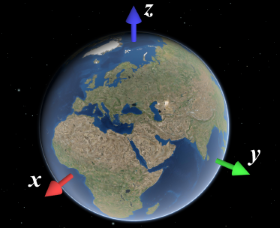
* When working with custom render nodes, coordinates have to be specified in the internal rendering coordinate system
* of SceneView. This coordinate system depends on the [SceneView.viewingMode](https://developers.arcgis.com/javascript/latest/references/core/views/SceneView/#viewingMode) of the view:
*
* * In `local` viewing mode, it is equal to the coordinate system defined by the spatial reference of the view.
* * In `global` viewing mode, it is an [ECEF](https://en.wikipedia.org/wiki/ECEF) coordinate system where the X-axis
* points to 0°N 0°E, the Y-axis points to 0°N 90°E, and the Z-axis points to the North Pole. The virtual globe is
* drawn as a perfect sphere with a radius of 6378137, so the unit of the coordinate system should be considered
* meters.
*
* 
*
* You can use [toRenderCoordinates()](https://developers.arcgis.com/javascript/latest/references/core/views/3d/webgl/#toRenderCoordinates) and [fromRenderCoordinates()](https://developers.arcgis.com/javascript/latest/references/core/views/3d/webgl/#fromRenderCoordinates) to transform to
* and from the rendering coordinate system without having to worry about viewingMode and the exact coordinate system
* definition.
*
* #### Precision and local origins
*
* In global scenes, the precision of 32-bit floating point arithmetic is not sufficient for visualizations that go
* beyond global scale (i.e. country scale to city scale). When zooming the view beyond a certain scale, geometries
* will appear to wobble or jitter, and generally appear displaced. The same applies to local scenes where
* geometries are far away from the origin of the coordinate system.
*
* In general, you should ensure that all arithmetic done in JavaScript is done in double precision. This is the case
* for normal JavaScript arithmetic, but you should specifically avoid using
* [Float32Array](https://developer.mozilla.org/en-US/docs/Web/JavaScript/Reference/Global_Objects/Float32Array)
* unless you can rule out precision issues.
*
* However, WebGL does not support 64 bit floating point arithmetic. A simple way to work around this limitation
* is to render scenes with a local origin:
*
* * Pick a local origin position, approximately at the center of your data.
* * Subtract the local origin position from all positional data (vertex data, uniforms, etc.) before passing it into
* WebGL.
* * Translate the view transformation matrix by the origin (pre-multiply the view transformation matrix by
* the origin translation matrix)
*
* This technique will cause the data to be rendered in a local coordinate frame, and thus avoid the large numbers
* which would otherwise be needed to place the data at the right location. Multiple local origins are needed if the
* data covers large extents with high detail. Note that the local origin has to be representable *exactly* in 32 bit
* floating point, which is best achieved by storing the local origin itself as a [Float32Array](https://developer.mozilla.org/en-US/docs/Web/JavaScript/Reference/Global_Objects/Float32Array).
*
* @since 4.29
* @see [Sample - Custom Render Node - Color modification](https://developers.arcgis.com/javascript/latest/sample-code/custom-render-node-color/)
* @see [Sample - Custom Render Node - Depth of field](https://developers.arcgis.com/javascript/latest/sample-code/custom-render-node-dof/)
* @see [Sample - Custom Render Node - Crossfade slide transition](https://developers.arcgis.com/javascript/latest/sample-code/custom-render-node-xfade/)
* @see [Sample - Custom Render Node - Windmills](https://developers.arcgis.com/javascript/latest/sample-code/custom-render-node-windmills/)
*/
export default abstract class RenderNode extends Accessor {
constructor(properties?: RenderNodeProperties);
/** Get the render representation of the current camera of a view. */
get camera(): RenderCamera;
/**
* Declare which inputs are needed from the engine for rendering.
*
* For example, to request composite-color and normals, the function `consumes()` is specified as follows:
* ```
* consumes: { required: ["composite-color" , "normals"], optional: ["highlights"] }
* ```
*/
get consumes(): ConsumedNodes;
/**
* Returns the current WebGL2RenderingContext instance. A context is available within the
* [render()](https://developers.arcgis.com/javascript/latest/references/core/views/3d/webgl/RenderNode/#render) once the view is ready.
*/
get gl(): WebGL2RenderingContext;
/**
* Define the output produced by the render function.
*
* The output is always given as one of the inputs to the render function. A post-processing render function
* would for example declare to produce the composite-color output:
* ```
* produces: "composite-color"
* ```
*/
accessor produces: RenderNodeOutput;
/** The lighting used by [SceneView](https://developers.arcgis.com/javascript/latest/references/core/views/SceneView/) to render the current frame. */
get sunLight(): SunLight;
/** The SceneView linked to this render node. */
get view(): SceneView;
/**
* Acquire and bind a managed framebuffer object to be written to and returned by the render function.
*
* A custom RenderNode can render in two ways:
* * First, bind an input framebuffer and render into this framebuffer
* * Second, acquire a new output framebuffer to render into and bind inputs framebuffers as textures.
*
* This function is a convenience function for acquiring a framebuffer to be returned by the render function. The
* framebuffer will have the same resolution as the input framebuffer. This function will automatically bind and
* initialize the acquired framebuffer.
*
* The returned FBO has only a color0 attachment. The render function is however expected to return a ManagedFBO
* with the same attachments as the input framebuffer. Any additionally needed attachments can be allocated using
* [ManagedFBO.acquireDepth()](https://developers.arcgis.com/javascript/latest/references/core/views/3d/webgl/ManagedFBO/#acquireDepth) and [ManagedFBO.acquireColor()](https://developers.arcgis.com/javascript/latest/references/core/views/3d/webgl/ManagedFBO/#acquireColor), or reused from
* an input framebuffer using [ManagedFBO.attachDepth()](https://developers.arcgis.com/javascript/latest/references/core/views/3d/webgl/ManagedFBO/#attachDepth) and [ManagedFBO.attachColor()](https://developers.arcgis.com/javascript/latest/references/core/views/3d/webgl/ManagedFBO/#attachColor).
*
* @returns The requested framebuffer object.
* @example
* // A grayscale RenderNode producing "composite-color" rendering into a color output
* // framebuffer, and then reuses the unmodified input depth texture:
* render(inputs) {
* const input = inputs.find(({ name }) => name === "composite-color")!;
* const output = this.acquireOutputFramebuffer();
*
* gl.activeTexture(gl.TEXTURE0);
* gl.bindTexture(gl.TEXTURE_2D, input.getTexture().glName);
* gl.uniform1i(this.textureUniformLocation, 0);
*
* // ...render grayscale using input texture
*
* output.attachDepth(input.getAttachment(gl.DEPTH_STENCIL_ATTACHMENT));
* return output;
* }
*/
acquireOutputFramebuffer(): ManagedFBO;
/**
* Bind the color and depth buffers to render into and return the ManagedFBO.
*
* The 'produces' output framebuffer is always provided as an input to the render function. Depending on the
* implementation, a custom render node implementation will read this input buffer to produce a new output, or bind
* it as the active framebuffer to update it. This function will create this framebuffer binding for the second
* use case.
*
* @returns The bound managed framebuffer object.
*/
bindRenderTarget(): ManagedFBO;
/**
* The render function is called whenever a frame is rendered.
*
* It has to return a framebuffer with the same attachments as the input "produces" framebuffer. A render node producing
* "composite-color" is expected to produce a "composite-color" framebuffer with one color and depth attachment. If the
* "composite-color" framebuffer contains an additional color attachment, e.g. for emissive rendering, the render node
* is expected to return a framebuffer with two attachments and a depth attachment.
*
* Typically the render function either uses bindRenderTarget() to render into this framebuffer, or
* acquireOutputFramebuffer() to get a new output framebuffer.
*
* The returned framebuffer will be released once by the render engine once it is no longer needed. If the same
* framebuffer is returned over multiple frames it needs to be retained once per frame.
*
* @param inputs - An array of currently provided fbos.
* @returns The framebuffer containing the modified input.
*/
protected render(inputs: ManagedFBO[]): ManagedFBO | null | undefined;
/**
* Request the SceneView to be redrawn.
*
* SceneView only renders a frame when there have been changes to the view, for example when the camera has moved or
* new data is available for display. Frames are always redrawn from the ground up, which means that external
* renderers will get called in each frame that is drawn.
*
* If a render node requires the view to be redrawn, for example because data has changed, it must call this
* function. This will trigger a single frame to be rendered. For continuous rendering, e.g. during animations,
* requestRender can be called in every frame from within `render`. It is important to note that calling
* requestRender() should be avoided if frame content stays the same for performance reasons.
*
* Render requests are throttled to allow continuous background animations, and they do not affect
* SceneView.updating.
*/
requestRender(): void;
/**
* Reset WebGL to a well-defined state.
*
* The ArcGIS Maps SDK for JavaScript offers no guarantee at the time of the call to `render`
* that all WebGL state variables are set to their respective defaults according to the
* [WebGL 2.0 specification](https://www.khronos.org/registry/webgl/specs/latest/2.0/). Calling this function will
* reset the state to these defaults.
*
* Because this function conservatively sets all WebGL state, it might incur a performance overhead. Therefore we
* suggest users instead keep track of the specific WebGL state that is modified, and reset that part of the state
* manually before returning from 'render'.
*/
resetWebGLState(): void;
}