@arcgis/core
Version:
ArcGIS Maps SDK for JavaScript: A complete 2D and 3D mapping and data visualization API
225 lines (217 loc) • 13 kB
TypeScript
/**
* This module contains convenience functions and typings to work with [RenderNode](https://developers.arcgis.com/javascript/latest/references/core/views/3d/webgl/RenderNode/).
*
* @since 4.29
* @see [RenderNode](https://developers.arcgis.com/javascript/latest/references/core/views/3d/webgl/RenderNode/)
*/
import type Camera from "../../Camera.js";
import type SpatialReference from "../../geometry/SpatialReference.js";
import type SceneView from "../SceneView.js";
import type RenderCamera from "./webgl/RenderCamera.js";
/**
* Describes a specific RenderNodeOutput.
*
* RenderNodeOutput | Description | Available RenderNodeInput FBOs | FBO attachments
* ---------------- | ----------- | ------------------------------ | --------------- |
* opaque-color | Contains the rendered image after all opaque geometries have been drawn. | opaque-color, normals | color0, depth, color1(emissive)
* transparent-color| Contains the rendered image after all opaque and transparent geometries have been drawn. | transparent-color, normals | color0, depth, color1(emissive)
* composite-color | Contains the rendered image without any post processes applied. | composite-color, normals, highlights (if scene has highlights) | color0, depth, color1(emissive)
* final-color | Contains the rendered image including post processes. | final-color, normals, highlights (if scene has highlights) | color0, depth, color1(emissive)
*
* Emissive attachments are only available when at least one object with [Symbol3DEmissive](https://developers.arcgis.com/javascript/latest/references/core/symbols/support/Symbol3DEmissive/) is
* added to the [SceneView](https://developers.arcgis.com/javascript/latest/references/core/views/SceneView/).
*
* @since 5.0
*/
export type RenderNodeOutput = "opaque-color" | "transparent-color" | "composite-color" | "final-color";
/**
* Describes a specific RenderNodeInput.
*
* RenderNodeInput | Description | FBO attachments |
* --------------- | ----------- | --------------- |
* normals | Contains the normals in camera space for the front-most visible content in the SceneView per pixel stored in RGB. | color0
* highlights | Contains the currently selected highlights in the SceneView. Only available when the scene has highlights. | color0
*
* Furthermore all [RenderNodeOutput](https://developers.arcgis.com/javascript/latest/references/core/views/3d/webgl/#RenderNodeOutput) framebuffers may also be used as an input.
*
* ### Normals encoding
*
* The normals color0 attachment is an rgba texture, where the rgb components encode the normal. To get the
* normal in camera space, the following glsl code can be used:
* ```glsl
* vec3 normal = 2.0 * texture(normalsTexture, uv).xyz - vec3(1.0);
* ```
*
* Using the normals for a custom [RenderNode](https://developers.arcgis.com/javascript/latest/references/core/views/3d/webgl/RenderNode/) can have measurable performance impact in some settings due to
* the additional render tasks necessary to provide the normal information.
*
* ### Highlight encoding
*
* The highlights color0 attachment uses only the red channel to encode a bit field as follows:
* * Fragments with bit 0 of the red channel set are highlighted
* * Fragments with bit 1 of the red channel set are highlighted but hidden behind other (not highlighted) geometry
*
* The other bits and channels should not be set. Fragments always contain the front-most highlight only.
*
* Usage example:
* ```glsl
* uint bits = uint(texelFetch(highlightTexture, uv, 0).r * 255.0);
* bool isHighlit = (bits & 1u) == 1u;
* bool isOccluded = (bits & 3u) == 3u;
* ```
*
* @since 5.0
*/
export type RenderNodeInput = RenderNodeOutput | "normals" | "highlights";
/**
* Describes the input framebuffer objects of a custom RenderNode.
*
* @since 5.0
*/
export interface ConsumedNodes {
/**
* One or more required inputs. If a required input is not available, the render function will not be called.
*
* @since 5.0
*/
required: RenderNodeInput[];
/**
* One or more optional inputs. You can use an optional input if you want the render function to be called even if this input is not available.
*
* @since 5.0
*/
optional?: RenderNodeInput[];
}
/**
* Transforms positions from the given spatial reference to the internal rendering coordinate system. The allowable
* input spatial reference is limited and depends on the [SceneView.viewingMode](https://developers.arcgis.com/javascript/latest/references/core/views/SceneView/#viewingMode):
* * In `global` mode, it can either be Web Mercator or WGS84.
* * In `local` mode, it has to match [view.spatialReference](https://developers.arcgis.com/javascript/latest/references/core/views/SceneView/#spatialReference);
* the call to this function simply copies the coordinates from `srcCoordinates` to `destCoordinates`.
*
* If these conditions are not met, nothing is written to `destCoordinates` and the function returns `null`.
*
* @param view - The view in which the coordinates will be used.
* @param srcCoordinates - A linear array of one or more vectors which are interpreted as XYZ
* coordinates. For example, two position vectors would be represented as `[x1, y1, z1, x2, y2, z2]`. This must
* contain at least `srcStart + 3 * count` elements.
* @param srcStart - An index in `srcCoordinates` from which the coordinates start to be read.
* @param srcSpatialReference - The spatial reference of the input coordinates. When
* `null`, `view.spatialReference` is used instead.
* @param destCoordinates - A reference to an array where the results will be written.
* @param destStart - An index in `destCoordinates` to which the coordinates will start to be written.
* @param count - The number of vertices to be transformed.
* @returns Returns a reference to `destCoordinates` if the operation succeeds, otherwise
* returns `null`.
* @example
* // A linear list of coordinate triples
* let geographicCoordinates = [
* // lon lat elevation
* -117.19, 34.05, 414,
* 47.39, 8.51, 408];
*
* // Allocate storage for the result
* let renderCoordinates = new Array(6);
*
* webgl.toRenderCoordinates(view,
* geographicCoordinates, 0, SpatialReference.WGS84,
* renderCoordinates, 0,
* 2);
*/
export function toRenderCoordinates<T1 extends ArrayLike<number>, T2 extends ArrayLike<number>>(view: SceneView, srcCoordinates: T1, srcStart: number, srcSpatialReference: SpatialReference, destCoordinates: T2, destStart: number, count: number): T2 | null | undefined;
/**
* Transforms positions from the internal rendering coordinate system to the output spatial reference. The allowable
* output spatial reference is limited and depends on the [SceneView.viewingMode](https://developers.arcgis.com/javascript/latest/references/core/views/SceneView/#viewingMode):
* * In `global` mode, it can either be Web Mercator or WGS84.
* * In `local` mode, it has to match [view.spatialReference](https://developers.arcgis.com/javascript/latest/references/core/views/SceneView/#spatialReference), and
* the call to this function simply copies the coordinates from `srcCoordinates` to `destCoordinates`.
*
* If these conditions are not met, nothing is written to `destCoordinates` and the function returns `null`.
*
* @param view - The view related to the input coordinates.
* @param srcCoordinates - A linear array of one or more vectors that are interpreted as XYZ
* coordinates. For example, two position vectors would be represented as `[x1, y1, z1, x2, y2, z2]`. This must
* contain at least `srcStart + 3 * count` elements.
* @param srcStart - An index in `srcCoordinates` from which the coordinates will start being read.
* @param destCoordinates - A reference to an array in which the results will be written.
* @param destStart - An index in `destCoordinates` in which the coordinates will start to be written.
* @param destSpatialReference - The spatial reference of the output coordinates.
* When `null`, `view.spatialReference` is used instead.
* @param count - The number of vertices to be transformed.
* @returns Returns a reference to `destCoordinates` if the operation succeeded, otherwise
* returns `null`.
* @example
* let cameraPositionGeographic = new Array(3);
* webgl.fromRenderCoordinates(view,
* context.camera.eye, 0,
* cameraPositionGeographic, 0, SpatialReference.WGS84,
* 1);
*/
export function fromRenderCoordinates<T1 extends ArrayLike<number>, T2 extends ArrayLike<number>>(view: SceneView, srcCoordinates: T1, srcStart: number, destCoordinates: T2, destStart: number, destSpatialReference: SpatialReference, count: number): T2 | null | undefined;
/**
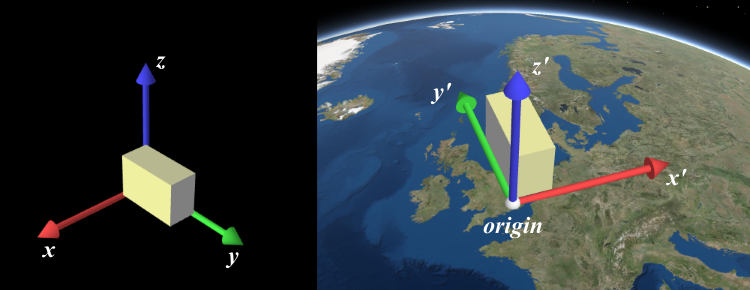
* Computes a 4x4 affine transformation matrix that constitutes a linear coordinate transformation from a local
* Cartesian coordinate system to the virtual world coordinate system. For example, this matrix can be used to transform
* the vertices of a 3D model to the rendering coordinate system.
*
* The local Cartesian system is defined by its origin and the following axis definition:
* * X: Easting
* * Y: Northing
* * Z: Elevation
*
* 
*
* When [view.viewingMode](https://developers.arcgis.com/javascript/latest/references/core/views/SceneView/#viewingMode) is `global`, a linear
* transformation does not take the curvature of the globe or other non-linear projection aspects into account. Thus,
* the resulting coordinates will only appear correct within a small region around the origin of the local Cartesian
* system.
*
* The allowable spatial reference of `origin` depends on the
* [SceneView.viewingMode](https://developers.arcgis.com/javascript/latest/references/core/views/SceneView/#viewingMode):
* * In `global` mode, it can either be Web Mercator or WGS84.
* * In `local` mode, it has to match [view.spatialReference](https://developers.arcgis.com/javascript/latest/references/core/views/SceneView/#spatialReference).
*
* If these conditions are not met, nothing will be written to `dest` and the function will return `null`.
*
* @param view - The view for which the transformation will be used.
* @param origin - The global coordinates of the origin in the local Cartesian coordinate
* system.
* @param srcSpatialReference - The spatial reference of the origin
* coordinates. If undefined, `view.spatialReference` is used instead.
* @param dest - A reference to an array where the 16 matrix elements will be stored.
* The resulting matrix follows WebGL conventions where the translation components occupy the 13th, 14th and
* 15th elements. If undefined, a newly created matrix returned.
* @returns Returns a reference to `dest` if the operation succeeds, otherwise returns `null`.
* @example
* // places a tetrahedron in New York
* let verticesLocal = [[10, 10, 10], [10, −10, −10], [−10, 10, −10], [−10, −10, 10]],
* transformation = new Array(16),
* geographicCoordinates = [
* // lon lat elevation
* -74, 40.71, 10]
*
* webgl.renderCoordinateTransformAt(view, geographicCoordinates, SpatialReference.WGS84, transformation);
*
* let verticesGlobal = verticesLocal.map(function(vertexLocal) {
* // transform the coordinates with the computed transformation (using the syntax of glMatrix, see http://glmatrix.net)
* return vec3.transformMat4(new Array(3), vertexLocal, transformation);
* });
*/
export function renderCoordinateTransformAt<T extends number[] | Float32Array | Float64Array>(view: SceneView, origin: number[] | Float32Array | Float64Array, srcSpatialReference?: SpatialReference, dest?: T): T | null | undefined;
/**
* Takes a [RenderCamera](https://developers.arcgis.com/javascript/latest/references/core/views/3d/webgl/RenderCamera/) as input and projects it into a [Camera](https://developers.arcgis.com/javascript/latest/references/core/Camera/)
* using a given view.
*
* @param view - The view the output camera should be related to.
* @param camera - The input render camera.
* @returns The new camera using the spatial reference of the view.
*/
export function fromRenderCamera(view: SceneView, camera: RenderCamera): Camera;
/**
* Coverts a [Camera](https://developers.arcgis.com/javascript/latest/references/core/Camera/) into a new [RenderCamera](https://developers.arcgis.com/javascript/latest/references/core/views/3d/webgl/RenderCamera/) using
* a given view.
*
* @param view - The view the output camera should be related to.
* @param camera - The input render camera.
* @returns The new camera using the spatial reference of the view.
*/
export function toRenderCamera(view: SceneView, camera: Camera | null | undefined): RenderCamera;