@arcgis/core
Version:
ArcGIS Maps SDK for JavaScript: A complete 2D and 3D mapping and data visualization API
151 lines (148 loc) • 9.38 kB
TypeScript
import type Portal from "../portal/Portal.js";
import type Symbol from "./Symbol.js";
import type { AbortOptions } from "../core/promiseUtils.js";
import type { SymbolProperties } from "./Symbol.js";
import type { Symbol2D3DUnion } from "./types.js";
import type { WebStyleAcceptedFormat } from "./support/types.js";
import type { PortalProperties } from "../portal/Portal.js";
export interface WebStyleSymbolProperties extends SymbolProperties, Partial<Pick<WebStyleSymbol, "name" | "styleName" | "styleUrl">> {
/**
* The portal that contains the web style this symbol refers to. Only required when [styleName](https://developers.arcgis.com/javascript/latest/references/core/symbols/WebStyleSymbol/#styleName) is set.
*
* Defaults to the value in [Config](https://developers.arcgis.com/javascript/latest/references/core/config/#Config-portalUrl)
* (e.g. https://www.arcgis.com).
*/
portal?: PortalProperties | null;
}
/**
* WebStyleSymbol is a class used to conveniently create vector 2D symbols and realistic and thematic
* 3D symbols. It is a wrapper for creating [CIMSymbol](https://developers.arcgis.com/javascript/latest/references/core/symbols/CIMSymbol/) and [PointSymbol3D](https://developers.arcgis.com/javascript/latest/references/core/symbols/PointSymbol3D/)
* objects that point to a web style resource available in the API.
*
* [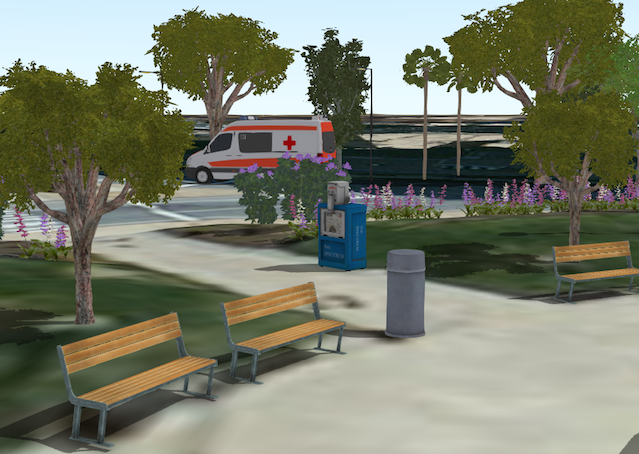](https://developers.arcgis.com/javascript/latest/sample-code/visualization-webstylesymbol/)
*
* Web styles are collections of symbols stored in an [ArcGIS Enterprise portal](https://enterprise.arcgis.com/en/portal/) or
* [ArcGIS Online](https://www.arcgis.com/home/) item. As of the current release, only
* [Esri Web Style Symbols (2D)](https://developers.arcgis.com/javascript/latest/esri-web-style-symbols-2d/) and
* [Esri Web Style Symbols (3D)](https://developers.arcgis.com/javascript/latest/esri-web-style-symbols-3d/) can be used in conjunction with this class.
* Note that the 2D web style symbols are only supported in 2D and 3D web style symbols are only supported in 3D with an
* exception of [`EsriIconsStyle`](https://developers.arcgis.com/javascript/latest/esri-web-style-symbols-3d/#icons) which can be used in both 2D and 3D.
*
* A WebStyleSymbol does not contain any symbology definition itself; it only contains a
* reference to a web style
* symbol. For visualization purposes, it is internally replaced with the [CIMSymbol](https://developers.arcgis.com/javascript/latest/references/core/symbols/CIMSymbol/) or the
* [PointSymbol3D](https://developers.arcgis.com/javascript/latest/references/core/symbols/PointSymbol3D/) instance it refers to. You can use
* [fetchSymbol()](https://developers.arcgis.com/javascript/latest/references/core/symbols/WebStyleSymbol/#fetchSymbol) to retrieve the actual symbol object from the web style to alter
* its color or size.
*
* A web style can be referenced either directly with a URL ([styleUrl](https://developers.arcgis.com/javascript/latest/references/core/symbols/WebStyleSymbol/#styleUrl)) or
* registered style's unique name ([styleName](https://developers.arcgis.com/javascript/latest/references/core/symbols/WebStyleSymbol/#styleName)).
*
* > [!WARNING]
* >
* > **Known Limitation**
* >
* > - Currently, [fetchSymbol()](https://developers.arcgis.com/javascript/latest/references/core/symbols/WebStyleSymbol/#fetchSymbol) method will only work for 3d web style symbols
*
* @since 4.1
* @see [Guide - Visualizing points with 3D symbols](https://developers.arcgis.com/javascript/latest/visualizing-points-3d/)
* @see [Guide - WebStyleSymbol reference list](https://developers.arcgis.com/javascript/latest/esri-web-style-symbols-3d/)
* @see [Symbol Builder](https://developers.arcgis.com/javascript/latest/symbol-builder/)
* @see [Sample - WebStyleSymbols(2D)](https://developers.arcgis.com/javascript/latest/sample-code/webstylesymbol-2d/)
* @see [Sample - Visualize features with realistic WebStyleSymbols](https://developers.arcgis.com/javascript/latest/sample-code/visualization-webstylesymbol/)
* @see [Sample - Visualize features with realistic 3D symbols](https://developers.arcgis.com/javascript/latest/sample-code/visualization-trees-realistic/)
* @see [CIMSymbol](https://developers.arcgis.com/javascript/latest/references/core/symbols/CIMSymbol/)
* @see [PointSymbol3D](https://developers.arcgis.com/javascript/latest/references/core/symbols/PointSymbol3D/)
* @see [ObjectSymbol3DLayer](https://developers.arcgis.com/javascript/latest/references/core/symbols/ObjectSymbol3DLayer/)
* @see [IconSymbol3DLayer](https://developers.arcgis.com/javascript/latest/references/core/symbols/IconSymbol3DLayer/)
* @see [Renderer](https://developers.arcgis.com/javascript/latest/references/core/renderers/Renderer/)
* @example
* // Referencing a web style via styleName
* let symbol = {
* type: "web-style", // autocasts as new WebStyleSymbol()
* styleName: "EsriThematicShapesStyle",
* name: "Standing Diamond"
* };
* @example
* // Referencing a web style via styleUrl
* let symbol = {
* type: "web-style", // autocasts as new WebStyleSymbol()
* styleUrl: "http://www.arcgis.com/sharing/rest/content/items/bf27400d167d4c2e8e12c8a46f87afe4/data",
* name: "Centered Sphere"
* };
*/
export default class WebStyleSymbol extends Symbol {
constructor(properties?: WebStyleSymbolProperties);
/**
* The name of the symbol within the web style. Each symbol in a web style is identified
* by a unique name. Only [Esri Web Style Symbols (2D)](https://developers.arcgis.com/javascript/latest/esri-web-style-symbols-2d/) and
* [Esri Web Style Symbols (3D)](https://developers.arcgis.com/javascript/latest/esri-web-style-symbols-3d/) can be referenced here.
*
* @see [Guide - WebStyleSymbol reference list](https://developers.arcgis.com/javascript/latest/esri-web-style-symbols-3d/)
*/
accessor name: string | null | undefined;
/**
* The portal that contains the web style this symbol refers to. Only required when [styleName](https://developers.arcgis.com/javascript/latest/references/core/symbols/WebStyleSymbol/#styleName) is set.
*
* Defaults to the value in [Config](https://developers.arcgis.com/javascript/latest/references/core/config/#Config-portalUrl)
* (e.g. https://www.arcgis.com).
*/
get portal(): Portal | null | undefined;
set portal(value: PortalProperties | null | undefined);
/**
* A registered web style name. Only
* [Esri Web Style Symbols (2D)](https://developers.arcgis.com/javascript/latest/esri-web-style-symbols-2d/) and
* [Esri Web Style Symbols (3D)](https://developers.arcgis.com/javascript/latest/esri-web-style-symbols-3d/) can be referenced here.
* Note that the 2D web style symbols are only supported in 2D and 3D web style symbols are only supported in 3D with an
* exception of [`EsriIconsStyle`](https://developers.arcgis.com/javascript/latest/esri-web-style-symbols-3d/#icons) which can be used in both 2D and 3D.
*
* Requires [portal](https://developers.arcgis.com/javascript/latest/references/core/symbols/WebStyleSymbol/#portal) property to be set.
* Can not be used in conjunction with [styleUrl](https://developers.arcgis.com/javascript/latest/references/core/symbols/WebStyleSymbol/#styleUrl).
*
* See class description for example.
*
* @see [Guide - WebStyleSymbol reference list](https://developers.arcgis.com/javascript/latest/esri-web-style-symbols-3d/)
*/
accessor styleName: string | null | undefined;
/**
* URL that points to the web style definition. Cannot be used in conjunction with [styleName](https://developers.arcgis.com/javascript/latest/references/core/symbols/WebStyleSymbol/#styleName) and
* [portal](https://developers.arcgis.com/javascript/latest/references/core/symbols/WebStyleSymbol/#portal).
*
* See class description for example.
*/
accessor styleUrl: string | null | undefined;
/** The symbol type. */
get type(): "web-style";
/**
* Creates a deep clone of the symbol.
*
* @returns A deep clone of the object that
* invoked this method.
* @example
* // Creates a deep clone of the graphic's symbol
* let symLyr = graphic.symbol.clone();
*/
clone(): WebStyleSymbol;
/**
* Resolves and returns the symbol instance the WebStyleSymbol refers to.
*
* @param options - An object with the following properties.
* @returns When resolved, returns a symbol instance.
* @see [Guide - Visualizing points with 3D symbols](https://developers.arcgis.com/javascript/latest/visualizing-points-3d/)
* @example
* // Given a SimpleRenderer with a WebStyleSymbol, replaces the symbol with its non-referencing version by fetching it
* renderer.symbol.fetchSymbol().then(function(actualSymbol) {
* renderer.symbol = actualSymbol;
* });
*/
fetchSymbol(options?: WebStyleSymbolFetchSymbolOptions | null | undefined): Promise<Symbol2D3DUnion>;
}
export interface WebStyleSymbolFetchSymbolOptions extends AbortOptions {
/**
* A list of accepted formats. The symbol
* will resolve to the first accepted format in the list.
*
* @default ["web", "cim"]
*/
acceptedFormats?: WebStyleAcceptedFormat[];
}