@arcgis/core
Version:
ArcGIS Maps SDK for JavaScript: A complete 2D and 3D mapping and data visualization API
554 lines (552 loc) • 22.1 kB
TypeScript
import type Color from "../Color.js";
import type Font from "./Font.js";
import type Symbol from "./Symbol.js";
import type { TextVerticalAlignment, TextHorizontalAlignment } from "./types.js";
import type { ColorLike } from "../Color.js";
import type { FontProperties } from "./Font.js";
import type { SymbolProperties } from "./Symbol.js";
export interface TextSymbolProperties extends SymbolProperties, Partial<Pick<TextSymbol, "angle" | "borderLineSize" | "horizontalAlignment" | "kerning" | "lineHeight" | "rotated" | "text" | "verticalAlignment">> {
/**
* The background color of the label's bounding box.
*
* > [!WARNING]
* >
* > **Known Limitations**
* >
* > This property is currently not supported when labelling a
* > [FeatureLayer](https://developers.arcgis.com/javascript/latest/references/core/layers/FeatureLayer/) polyline with
* > a "curved" [LabelClass.labelPosition](https://developers.arcgis.com/javascript/latest/references/core/layers/support/LabelClass/#labelPosition).
*
* @see [Sample: MapImageLayer - label sublayer features](https://developers.arcgis.com/javascript/latest/sample-code/layers-mapimagelayer-dynamic-labels/)
*/
backgroundColor?: ColorLike | null;
/**
* The border color of the label's bounding box.
*
* > [!WARNING]
* >
* > **Known Limitations**
* >
* > This property is currently not supported when labelling a
* > [FeatureLayer](https://developers.arcgis.com/javascript/latest/references/core/layers/FeatureLayer/) polyline with
* > a "curved" [LabelClass.labelPosition](https://developers.arcgis.com/javascript/latest/references/core/layers/support/LabelClass/#labelPosition).
*
* @see [Sample: MapImageLayer - label sublayer features](https://developers.arcgis.com/javascript/latest/sample-code/layers-mapimagelayer-dynamic-labels/)
*/
borderLineColor?: ColorLike | null;
/**
* The [Font](https://developers.arcgis.com/javascript/latest/references/core/symbols/Font/) used to style the text.
* This property allows the developer to set the font's family, decoration, size, style, and weight properties.
*
* See the [Labeling guide page](https://developers.arcgis.com/javascript/latest/labeling/) for more information and known limitations.
*
* > [!WARNING]
* >
* > **Known Limitations**
* >
* > The available [Font.family](https://developers.arcgis.com/javascript/latest/references/core/symbols/Font/#family) property values depend on whether you are
* > working with a 2D [MapView](https://developers.arcgis.com/javascript/latest/references/core/views/MapView/) or a 3D [SceneView](https://developers.arcgis.com/javascript/latest/references/core/views/SceneView/).
*
* @see [Labeling Guide](https://developers.arcgis.com/javascript/latest/labeling/)
* @example
* let textSymbol = {
* type: "text", // autocasts as new TextSymbol()
* text: "Science of Where",
* font: { // autocasts as new Font()
* family: "Merriweather",
* size: 12,
* style: "italic",
* weight: "bold"
* }
* };
*/
font?: FontProperties;
/**
* The color of the text symbol's halo. To include a halo in the TextSymbol, you
* must also set the size of the halo in [haloSize](https://developers.arcgis.com/javascript/latest/references/core/symbols/TextSymbol/#haloSize).
*
* > [!WARNING]
* >
* > **Known Limitations**
* >
* > Sub-pixel halo (i.e. fractional size such as 1.25px) renders inconsistently in various browsers.
*
* @example
* // CSS color string
* symbol.haloColor = "dodgerblue";
* @example
* // HEX string
* symbol.haloColor = "#33cc33";
* @example
* // array of RGBA values
* symbol.haloColor = [51, 204, 51, 0.3];
* @example
* // object with rgba properties
* symbol.haloColor = {
* r: 51,
* g: 51,
* b: 204,
* a: 0.7
* };
*/
haloColor?: ColorLike | null;
/**
* The size in points of the text symbol's halo. This value may be autocast with a string
* expressing size in points or pixels (e.g. `12px`). To include a halo in the TextSymbol, you
* must also set the color of the halo in [haloColor](https://developers.arcgis.com/javascript/latest/references/core/symbols/TextSymbol/#haloColor).
*
* > [!WARNING]
* >
* > **Known Limitations**
* >
* > Sub-pixel halo (i.e. fractional size such as 1.25px) renders inconsistently in various browsers.
* > Halo size should not be 1/4 larger than the [text size](https://developers.arcgis.com/javascript/latest/references/core/symbols/Font/#size).
* > For example, if your text size is 12, the halo size should not be larger than 3.
*
* @example
* // haloSize in points
* symbol.haloSize = 1;
* @example
* // haloSize in pixels
* symbol.haloSize = "2px";
* @example
* // haloSize in points
* symbol.haloSize = "1pt";
*/
haloSize?: number | string | null;
/**
* The maximum length in points for each line of text. This value may be autocast with a string
* expressing size in points or pixels (e.g. `72px`).
*
* The default value is 192 points. The range of possible values is: 32px - 512px.
*
* If text extends farther than the `lineWidth` value, then the line will break at the whitespace
* before the text that extends past the limit if possible, and a new line will be created.
*
* > [!WARNING]
* >
* > **Known Limitations**
* >
* > This property is currently not supported in 3D [SceneViews](https://developers.arcgis.com/javascript/latest/references/core/views/SceneView/).
* > The default value is subject to change in future releases.
*
* @default 192
* @since 4.15
* @example
* const textSymbol = {
* type: "text", // autocasts as new TextSymbol()
* color: "blue",
* haloColor: "white",
* haloSize: 1,
* lineWidth: 200
* };
*/
lineWidth?: number | string;
/**
* The offset on the x-axis in points. This value may be autocast with a string
* expressing size in points or pixels (e.g. `12px`).
*
* > [!WARNING]
* >
* > **Known Limitations**
* >
* > This property is currently not supported in 3D [SceneViews](https://developers.arcgis.com/javascript/latest/references/core/views/SceneView/).
*
* @default 0
* @example
* // xoffset in points
* symbol.xoffset = 3;
* @example
* // xoffset in pixels
* symbol.xoffset = "6px";
* @example
* // xoffset in points
* symbol.xoffset = "3pt";
*/
xoffset?: number | string;
/**
* The offset on the y-axis in points. This value may be autocast with a string
* expressing size in points or pixels (e.g. `12px`).
*
* > [!WARNING]
* >
* > **Known Limitations**
* >
* > This property is currently not supported in 3D [SceneViews](https://developers.arcgis.com/javascript/latest/references/core/views/SceneView/).
*
* @default 0
* @example
* // yoffset in points
* symbol.yoffset = 3;
* @example
* // yoffset in pixels
* symbol.yoffset = "6px";
* @example
* // yoffset in points
* symbol.yoffset = "3pt";
*/
yoffset?: number | string;
}
/**
* Text symbols are used to define the graphic for displaying labels on
* a [FeatureLayer](https://developers.arcgis.com/javascript/latest/references/core/layers/FeatureLayer/), [CSVLayer](https://developers.arcgis.com/javascript/latest/references/core/layers/CSVLayer/), [Sublayer](https://developers.arcgis.com/javascript/latest/references/core/layers/support/Sublayer/),
* and [StreamLayer](https://developers.arcgis.com/javascript/latest/references/core/layers/StreamLayer/) in a 2D [MapView](https://developers.arcgis.com/javascript/latest/references/core/views/MapView/).
* Text symbols can also be used to define the symbol property of [Graphic](https://developers.arcgis.com/javascript/latest/references/core/Graphic/) if the geometry type is
* [Point](https://developers.arcgis.com/javascript/latest/references/core/geometry/Point/) or [Multipoint](https://developers.arcgis.com/javascript/latest/references/core/geometry/Multipoint/).
* With this class, you may alter the [color](https://developers.arcgis.com/javascript/latest/references/core/symbols/TextSymbol/#color), [font](https://developers.arcgis.com/javascript/latest/references/core/symbols/TextSymbol/#font), [halo](https://developers.arcgis.com/javascript/latest/references/core/symbols/TextSymbol/#haloSize),
* and other properties of the label graphic.
*
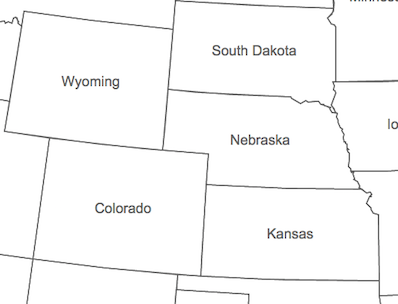
* TextSymbol may be used to label [Point](https://developers.arcgis.com/javascript/latest/references/core/geometry/Point/),
* [Polyline](https://developers.arcgis.com/javascript/latest/references/core/geometry/Polyline/), or [Polygon](https://developers.arcgis.com/javascript/latest/references/core/geometry/Polygon/)
* features. The image below depicts a polygon [FeatureLayer](https://developers.arcgis.com/javascript/latest/references/core/layers/FeatureLayer/) that
* uses a TextSymbol to label its features.
*
* 
*
* @since 4.0
* @see [Symbol Builder](https://developers.arcgis.com/javascript/latest/symbol-builder/)
* @see [Sample: Add labels to a FeatureLayer](https://developers.arcgis.com/javascript/latest/sample-code/labels-basic/)
* @see [Sample: Using Esri Icon Fonts with map graphics](https://developers.arcgis.com/javascript/latest/sample-code/styling-icon-fonts/)
* @see [TextSymbol3DLayer](https://developers.arcgis.com/javascript/latest/references/core/symbols/TextSymbol3DLayer/)
* @see [Labeling Guide](https://developers.arcgis.com/javascript/latest/labeling/)
* @example
* let textSymbol = {
* type: "text", // autocasts as new TextSymbol()
* color: "white",
* haloColor: "black",
* haloSize: "1px",
* text: "You are here",
* xoffset: 3,
* yoffset: 3,
* font: { // autocasts as new Font()
* size: 12,
* family: "Josefin Slab",
* weight: "bold"
* }
* };
*/
export default class TextSymbol extends Symbol {
constructor(properties?: TextSymbolProperties);
/**
* The angle of the text. `0` is horizontal and the angle moves clockwise.
*
* > [!WARNING]
* >
* > **Known Limitations**
* >
* > This property is currently not supported in 3D [SceneViews](https://developers.arcgis.com/javascript/latest/references/core/views/SceneView/).
*
* @default 0
* @example
* const textSymbol = {
* type: "text", // autocasts as new TextSymbol()
* angle: 90,
* color: "green",
* font: {
* // autocast as new Font()
* family: "Just Another Hand",
* size: 12
* },
* haloColor: "black",
* haloSize: 1,
* horizontalAlignment: "right",
* verticalAlignment: "bottom"
* };
*/
accessor angle: number;
/**
* The background color of the label's bounding box.
*
* > [!WARNING]
* >
* > **Known Limitations**
* >
* > This property is currently not supported when labelling a
* > [FeatureLayer](https://developers.arcgis.com/javascript/latest/references/core/layers/FeatureLayer/) polyline with
* > a "curved" [LabelClass.labelPosition](https://developers.arcgis.com/javascript/latest/references/core/layers/support/LabelClass/#labelPosition).
*
* @see [Sample: MapImageLayer - label sublayer features](https://developers.arcgis.com/javascript/latest/sample-code/layers-mapimagelayer-dynamic-labels/)
*/
get backgroundColor(): Color | null | undefined;
set backgroundColor(value: ColorLike | null | undefined);
/**
* The border color of the label's bounding box.
*
* > [!WARNING]
* >
* > **Known Limitations**
* >
* > This property is currently not supported when labelling a
* > [FeatureLayer](https://developers.arcgis.com/javascript/latest/references/core/layers/FeatureLayer/) polyline with
* > a "curved" [LabelClass.labelPosition](https://developers.arcgis.com/javascript/latest/references/core/layers/support/LabelClass/#labelPosition).
*
* @see [Sample: MapImageLayer - label sublayer features](https://developers.arcgis.com/javascript/latest/sample-code/layers-mapimagelayer-dynamic-labels/)
*/
get borderLineColor(): Color | null | undefined;
set borderLineColor(value: ColorLike | null | undefined);
/**
* The border size or width of the label's bounding box.
*
* > [!WARNING]
* >
* > **Known Limitations**
* >
* > This property is currently not supported when labelling a
* > [FeatureLayer](https://developers.arcgis.com/javascript/latest/references/core/layers/FeatureLayer/) polyline with
* > a "curved" [LabelClass.labelPosition](https://developers.arcgis.com/javascript/latest/references/core/layers/support/LabelClass/#labelPosition).
*
* @see [Sample: MapImageLayer - label sublayer features](https://developers.arcgis.com/javascript/latest/sample-code/layers-mapimagelayer-dynamic-labels/)
*/
accessor borderLineSize: number | null | undefined;
/**
* The [Font](https://developers.arcgis.com/javascript/latest/references/core/symbols/Font/) used to style the text.
* This property allows the developer to set the font's family, decoration, size, style, and weight properties.
*
* See the [Labeling guide page](https://developers.arcgis.com/javascript/latest/labeling/) for more information and known limitations.
*
* > [!WARNING]
* >
* > **Known Limitations**
* >
* > The available [Font.family](https://developers.arcgis.com/javascript/latest/references/core/symbols/Font/#family) property values depend on whether you are
* > working with a 2D [MapView](https://developers.arcgis.com/javascript/latest/references/core/views/MapView/) or a 3D [SceneView](https://developers.arcgis.com/javascript/latest/references/core/views/SceneView/).
*
* @see [Labeling Guide](https://developers.arcgis.com/javascript/latest/labeling/)
* @example
* let textSymbol = {
* type: "text", // autocasts as new TextSymbol()
* text: "Science of Where",
* font: { // autocasts as new Font()
* family: "Merriweather",
* size: 12,
* style: "italic",
* weight: "bold"
* }
* };
*/
get font(): Font;
set font(value: FontProperties);
/**
* The color of the text symbol's halo. To include a halo in the TextSymbol, you
* must also set the size of the halo in [haloSize](https://developers.arcgis.com/javascript/latest/references/core/symbols/TextSymbol/#haloSize).
*
* > [!WARNING]
* >
* > **Known Limitations**
* >
* > Sub-pixel halo (i.e. fractional size such as 1.25px) renders inconsistently in various browsers.
*
* @example
* // CSS color string
* symbol.haloColor = "dodgerblue";
* @example
* // HEX string
* symbol.haloColor = "#33cc33";
* @example
* // array of RGBA values
* symbol.haloColor = [51, 204, 51, 0.3];
* @example
* // object with rgba properties
* symbol.haloColor = {
* r: 51,
* g: 51,
* b: 204,
* a: 0.7
* };
*/
get haloColor(): Color | null | undefined;
set haloColor(value: ColorLike | null | undefined);
/**
* The size in points of the text symbol's halo. This value may be autocast with a string
* expressing size in points or pixels (e.g. `12px`). To include a halo in the TextSymbol, you
* must also set the color of the halo in [haloColor](https://developers.arcgis.com/javascript/latest/references/core/symbols/TextSymbol/#haloColor).
*
* > [!WARNING]
* >
* > **Known Limitations**
* >
* > Sub-pixel halo (i.e. fractional size such as 1.25px) renders inconsistently in various browsers.
* > Halo size should not be 1/4 larger than the [text size](https://developers.arcgis.com/javascript/latest/references/core/symbols/Font/#size).
* > For example, if your text size is 12, the halo size should not be larger than 3.
*
* @example
* // haloSize in points
* symbol.haloSize = 1;
* @example
* // haloSize in pixels
* symbol.haloSize = "2px";
* @example
* // haloSize in points
* symbol.haloSize = "1pt";
*/
get haloSize(): number | null | undefined;
set haloSize(value: number | string | null | undefined);
/**
* Adjusts the horizontal alignment of the text in multi-lines.
*
* > [!WARNING]
* >
* > **Known Limitations**
* >
* > This property only applies when TextSymbol is not used for labeling purposes. The `horizontalAlignment` for labels
* > is inferred from the [LabelClass.labelPlacement](https://developers.arcgis.com/javascript/latest/references/core/layers/support/LabelClass/#labelPlacement) value.
*
* @default "center"
*/
accessor horizontalAlignment: TextHorizontalAlignment;
/**
* Determines whether to adjust the spacing between characters in the text string.
*
* @default true
*/
accessor kerning: boolean;
/**
* The height of the space between each line of text. Only applies to multiline text.
*
* This property can be considered as a multiplier of the default value of 1.0
* (e.g. a value of 2.0 will be two times the height of the default height).
* The range of possible values is: 0.1 - 4.0.
* If a value of 0 is specified, the default value of 1.0 will be used.
*
* @default 1.0
* @since 4.15
* @example
* const textSymbol = {
* type: "text", // autocasts as new TextSymbol()
* color: "blue",
* haloColor: "white",
* haloSize: 1,
* lineHeight: 1.5
* };
*/
accessor lineHeight: number;
/**
* The maximum length in points for each line of text. This value may be autocast with a string
* expressing size in points or pixels (e.g. `72px`).
*
* The default value is 192 points. The range of possible values is: 32px - 512px.
*
* If text extends farther than the `lineWidth` value, then the line will break at the whitespace
* before the text that extends past the limit if possible, and a new line will be created.
*
* > [!WARNING]
* >
* > **Known Limitations**
* >
* > This property is currently not supported in 3D [SceneViews](https://developers.arcgis.com/javascript/latest/references/core/views/SceneView/).
* > The default value is subject to change in future releases.
*
* @default 192
* @since 4.15
* @example
* const textSymbol = {
* type: "text", // autocasts as new TextSymbol()
* color: "blue",
* haloColor: "white",
* haloSize: 1,
* lineWidth: 200
* };
*/
get lineWidth(): number;
set lineWidth(value: number | string);
/**
* Determines whether every character in the text string is rotated.
*
* > [!WARNING]
* >
* > **Known Limitations**
* >
* > This property is currently not supported in 3D [SceneViews](https://developers.arcgis.com/javascript/latest/references/core/views/SceneView/).
*
* @default false
*/
accessor rotated: boolean;
/**
* The text string to display in the view. Long text strings will be split into multiple lines.
* The length of the line is controlled by the [lineWidth](https://developers.arcgis.com/javascript/latest/references/core/symbols/TextSymbol/#lineWidth) property.
* To manually create a new line, use the `\n` escape character.
*
* > [!WARNING]
* >
* > **Known Limitations**
* >
* > This property only applies when TextSymbol is used to define the symbol property of a [Graphic](https://developers.arcgis.com/javascript/latest/references/core/Graphic/), and not for labeling purposes.
*
* @default ""
* @see [lineWidth](https://developers.arcgis.com/javascript/latest/references/core/symbols/TextSymbol/#lineWidth)
* @example symbol.text = "You are here";
* @example symbol.text = "Wish you were \n here";
*/
accessor text: string;
/** The symbol type. */
get type(): "text";
/**
* Adjusts the vertical alignment of the text.
*
* > [!WARNING]
* >
* > **Known Limitations**
* >
* > This property only applies when TextSymbol is not used for labeling purposes. The `verticalAlignment` for labels
* > is inferred from the [LabelClass.labelPlacement](https://developers.arcgis.com/javascript/latest/references/core/layers/support/LabelClass/#labelPlacement) value.
*
* @default "baseline"
*/
accessor verticalAlignment: TextVerticalAlignment;
/**
* The offset on the x-axis in points. This value may be autocast with a string
* expressing size in points or pixels (e.g. `12px`).
*
* > [!WARNING]
* >
* > **Known Limitations**
* >
* > This property is currently not supported in 3D [SceneViews](https://developers.arcgis.com/javascript/latest/references/core/views/SceneView/).
*
* @default 0
* @example
* // xoffset in points
* symbol.xoffset = 3;
* @example
* // xoffset in pixels
* symbol.xoffset = "6px";
* @example
* // xoffset in points
* symbol.xoffset = "3pt";
*/
get xoffset(): number;
set xoffset(value: number | string);
/**
* The offset on the y-axis in points. This value may be autocast with a string
* expressing size in points or pixels (e.g. `12px`).
*
* > [!WARNING]
* >
* > **Known Limitations**
* >
* > This property is currently not supported in 3D [SceneViews](https://developers.arcgis.com/javascript/latest/references/core/views/SceneView/).
*
* @default 0
* @example
* // yoffset in points
* symbol.yoffset = 3;
* @example
* // yoffset in pixels
* symbol.yoffset = "6px";
* @example
* // yoffset in points
* symbol.yoffset = "3pt";
*/
get yoffset(): number;
set yoffset(value: number | string);
/**
* Creates a deep clone of the symbol.
*
* @returns A deep clone of the object that
* invoked this method.
* @example
* // Creates a deep clone of the graphic's symbol
* let symLyr = graphic.symbol.clone();
*/
clone(): TextSymbol;
}