@arcgis/core
Version:
ArcGIS Maps SDK for JavaScript: A complete 2D and 3D mapping and data visualization API
260 lines (258 loc) • 11.4 kB
TypeScript
import type Color from "../Color.js";
import type MarkerSymbol from "./MarkerSymbol.js";
import type SimpleLineSymbol from "./SimpleLineSymbol.js";
import type { ColorLike } from "../Color.js";
import type { SimpleLineSymbolProperties } from "./SimpleLineSymbol.js";
import type { MarkerSymbolProperties } from "./MarkerSymbol.js";
export interface SimpleMarkerSymbolProperties extends MarkerSymbolProperties, Partial<Pick<SimpleMarkerSymbol, "path" | "style">> {
/**
* The color of the symbol.
* This can be autocast with an array of rgb(a) values, named string, hex string or an hsl(a) string,
* an object with `r`, `g`, `b`, and `a` properties, or a [Color](https://developers.arcgis.com/javascript/latest/references/core/Color/) object.
*
* > [!WARNING]
* >
* > The `color` property does not apply to marker symbols defined with the `cross` or `x`
* > [style](https://developers.arcgis.com/javascript/latest/references/core/symbols/SimpleMarkerSymbol/#style). Since these styles are wholly comprised of outlines, you must
* > modify the [outline.color](https://developers.arcgis.com/javascript/latest/references/core/symbols/SimpleMarkerSymbol/#outline) property to set the color of symbols with those styles.
*
* @default [255, 255, 255, 0.25] - white, semitransparent
* @example
* // CSS color string
* symbol.color = "dodgerblue";
* @example
* // HEX string
* symbol.color = "#33cc33";
* @example
* // array of RGBA values
* symbol.color = [51, 204, 51, 0.3];
* @example
* // object with rgba properties
* symbol.color = {
* r: 51,
* g: 51,
* b: 204,
* a: 0.7
* };
* @example
* // CSS color string
* symbol.color = "dodgerblue";
* @example
* // HEX string
* symbol.color = "#33cc33";
* @example
* // array of RGBA values
* symbol.color = [51, 204, 51, 0.3];
* @example
* // object with rgba properties
* symbol.color = {
* r: 51,
* g: 51,
* b: 204,
* a: 0.7
* };
*/
color?: ColorLike;
/**
* The outline of the marker symbol. The `color` property of this object
* directly modifies the overall color of marker symbols defined with the `cross` or `x`
* [style](https://developers.arcgis.com/javascript/latest/references/core/symbols/SimpleMarkerSymbol/#style).
*
* > [!WARNING]
* >
* > **Known Limitations**
* >
* > [SimpleLineSymbol `style](https://developers.arcgis.com/javascript/latest/references/core/symbols/SimpleLineSymbol/) property is not honored in a simple marker symbol's `outline` in a 3D [SceneView](https://developers.arcgis.com/javascript/latest/references/core/views/SceneView/).
* > Support for outline `style` was added in a 2D [MapView](https://developers.arcgis.com/javascript/latest/references/core/views/MapView/) at version 4.28.
*
* @example
* let sym = {
* type: "simple-marker", // autocasts as new SimpleMarkerSymbol()
* color: "red",
* outline: { // autocasts as new SimpleLineSymbol()
* color: [ 128, 128, 128, 0.5 ],
* width: "0.5px"
* }
* };
*/
outline?: (SimpleLineSymbolProperties & { type?: "simple-line" });
/**
* The size of the marker in points. This value may be autocast with a string
* expressing size in points or pixels (e.g. `12px`).
*
* @default 12
* @example
* // size in points
* symbol.size = 14;
* @example
* // size in pixels
* symbol.size = "20px";
* @example
* // size in points
* symbol.size = "14pt";
*/
size?: number | string;
}
/**
* SimpleMarkerSymbol is used for rendering 2D [Point](https://developers.arcgis.com/javascript/latest/references/core/geometry/Point/) geometries
* with a simple shape and [color](https://developers.arcgis.com/javascript/latest/references/core/symbols/SimpleMarkerSymbol/#color) in either a [MapView](https://developers.arcgis.com/javascript/latest/references/core/views/MapView/)
* or a [SceneView](https://developers.arcgis.com/javascript/latest/references/core/views/SceneView/). It may be filled with a solid [color](https://developers.arcgis.com/javascript/latest/references/core/symbols/SimpleMarkerSymbol/#color) and
* have an optional [outline](https://developers.arcgis.com/javascript/latest/references/core/symbols/SimpleMarkerSymbol/#outline), which is defined with a [SimpleLineSymbol](https://developers.arcgis.com/javascript/latest/references/core/symbols/SimpleLineSymbol/).
*
* SimpleMarkerSymbols may be applied to point or polygon features in a
* [FeatureLayer](https://developers.arcgis.com/javascript/latest/references/core/layers/FeatureLayer/) or individual [graphics](https://developers.arcgis.com/javascript/latest/references/core/Graphic/).
* Marker symbols can be used in a 3D [SceneView](https://developers.arcgis.com/javascript/latest/references/core/views/SceneView/). However, it is
* recommended you use [PointSymbol3D](https://developers.arcgis.com/javascript/latest/references/core/symbols/PointSymbol3D/) instead. The image below depicts a [FeatureLayer](https://developers.arcgis.com/javascript/latest/references/core/layers/FeatureLayer/) whose point features
* are styled with [SimpleMarkerSymbols](https://developers.arcgis.com/javascript/latest/references/core/symbols/SimpleMarkerSymbol/).
*
* [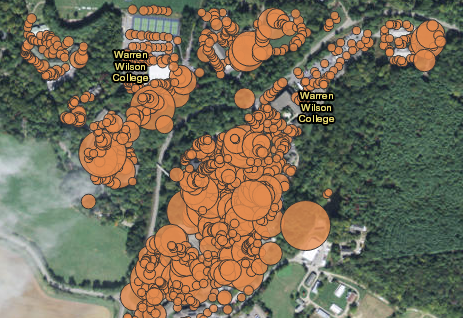](https://developers.arcgis.com/javascript/latest/sample-code/visualization-vv-size/)
*
* @since 4.0
* @see [Symbol Builder](https://developers.arcgis.com/javascript/latest/symbol-builder/)
* @see [Sample - Visualize features with simple symbols](https://developers.arcgis.com/javascript/latest/sample-code/visualization-location-simple/)
* @see [Sample - Continuous size](https://developers.arcgis.com/javascript/latest/sample-code/visualization-vv-size/)
* @see [Sample - Add graphics (MapView)](https://developers.arcgis.com/javascript/latest/sample-code/intro-graphics/)
* @see [Renderer](https://developers.arcgis.com/javascript/latest/references/core/renderers/Renderer/)
* @see [Graphic](https://developers.arcgis.com/javascript/latest/references/core/Graphic/)
* @example
* let symbol = {
* type: "simple-marker", // autocasts as new SimpleMarkerSymbol()
* style: "square",
* color: "blue",
* size: "8px", // pixels
* outline: { // autocasts as new SimpleLineSymbol()
* color: [ 255, 255, 0 ],
* width: 3 // points
* }
* };
*/
export default class SimpleMarkerSymbol extends MarkerSymbol {
constructor(properties?: SimpleMarkerSymbolProperties);
/**
* The color of the symbol.
* This can be autocast with an array of rgb(a) values, named string, hex string or an hsl(a) string,
* an object with `r`, `g`, `b`, and `a` properties, or a [Color](https://developers.arcgis.com/javascript/latest/references/core/Color/) object.
*
* > [!WARNING]
* >
* > The `color` property does not apply to marker symbols defined with the `cross` or `x`
* > [style](https://developers.arcgis.com/javascript/latest/references/core/symbols/SimpleMarkerSymbol/#style). Since these styles are wholly comprised of outlines, you must
* > modify the [outline.color](https://developers.arcgis.com/javascript/latest/references/core/symbols/SimpleMarkerSymbol/#outline) property to set the color of symbols with those styles.
*
* @default [255, 255, 255, 0.25] - white, semitransparent
* @example
* // CSS color string
* symbol.color = "dodgerblue";
* @example
* // HEX string
* symbol.color = "#33cc33";
* @example
* // array of RGBA values
* symbol.color = [51, 204, 51, 0.3];
* @example
* // object with rgba properties
* symbol.color = {
* r: 51,
* g: 51,
* b: 204,
* a: 0.7
* };
* @example
* // CSS color string
* symbol.color = "dodgerblue";
* @example
* // HEX string
* symbol.color = "#33cc33";
* @example
* // array of RGBA values
* symbol.color = [51, 204, 51, 0.3];
* @example
* // object with rgba properties
* symbol.color = {
* r: 51,
* g: 51,
* b: 204,
* a: 0.7
* };
*/
get color(): Color;
set color(value: ColorLike);
/**
* The outline of the marker symbol. The `color` property of this object
* directly modifies the overall color of marker symbols defined with the `cross` or `x`
* [style](https://developers.arcgis.com/javascript/latest/references/core/symbols/SimpleMarkerSymbol/#style).
*
* > [!WARNING]
* >
* > **Known Limitations**
* >
* > [SimpleLineSymbol `style](https://developers.arcgis.com/javascript/latest/references/core/symbols/SimpleLineSymbol/) property is not honored in a simple marker symbol's `outline` in a 3D [SceneView](https://developers.arcgis.com/javascript/latest/references/core/views/SceneView/).
* > Support for outline `style` was added in a 2D [MapView](https://developers.arcgis.com/javascript/latest/references/core/views/MapView/) at version 4.28.
*
* @example
* let sym = {
* type: "simple-marker", // autocasts as new SimpleMarkerSymbol()
* color: "red",
* outline: { // autocasts as new SimpleLineSymbol()
* color: [ 128, 128, 128, 0.5 ],
* width: "0.5px"
* }
* };
*/
get outline(): SimpleLineSymbol;
set outline(value: (SimpleLineSymbolProperties & { type?: "simple-line" }));
/**
* The SVG path of the icon.
*
* > [!WARNING]
* >
* > **Known Limitations**
* >
* > This property works only in 2D.
*/
accessor path: string;
/**
* The size of the marker in points. This value may be autocast with a string
* expressing size in points or pixels (e.g. `12px`).
*
* @default 12
* @example
* // size in points
* symbol.size = 14;
* @example
* // size in pixels
* symbol.size = "20px";
* @example
* // size in points
* symbol.size = "14pt";
*/
get size(): number;
set size(value: number | string);
/**
* The marker style. Possible values are in the table below.
*
* Value | Description
* ------|------------
* circle | 
* cross | 
* diamond | 
* square | 
* triangle | 
* x | 
*
* @default "circle"
*/
accessor style: "circle" | "square" | "cross" | "x" | "diamond" | "triangle" | "path";
/** The symbol type. */
get type(): "simple-marker";
/**
* Creates a deep clone of the symbol.
*
* @returns A deep clone of the object that
* invoked this method.
* @example
* // Creates a deep clone of the graphic's symbol
* let symLyr = graphic.symbol.clone();
*/
clone(): SimpleMarkerSymbol;
}