@arcgis/core
Version:
ArcGIS Maps SDK for JavaScript: A complete 2D and 3D mapping and data visualization API
185 lines (183 loc) • 9.74 kB
TypeScript
import type LineSymbol from "./LineSymbol.js";
import type LineSymbolMarker from "./LineSymbolMarker.js";
import type { LineStyle, LineCap, LineJoin } from "./types.js";
import type { LineSymbolMarkerProperties } from "./LineSymbolMarker.js";
import type { LineSymbolProperties } from "./LineSymbol.js";
export interface SimpleLineSymbolProperties extends LineSymbolProperties, Partial<Pick<SimpleLineSymbol, "cap" | "join" | "miterLimit" | "style">> {
/**
* Specifies the color, style, and placement of a symbol marker on the line.
*
* > [!WARNING]
* >
* > **Known Limitations**
* >
* > - This is not currently supported within a 3D [SceneView](https://developers.arcgis.com/javascript/latest/references/core/views/SceneView/).
*
* @since 4.16
* @example
* // Places a blue diamond marker at the beginning of the line symbol
* simpleLineSymbol.marker = {
* color: "blue",
* placement: "begin",
* style: "diamond"
* }
*/
marker?: (LineSymbolMarkerProperties & { type?: "line-marker" }) | null;
}
/**
* SimpleLineSymbol is used for rendering 2D [polyline geometries](https://developers.arcgis.com/javascript/latest/references/core/geometry/Polyline/)
* in a 2D [MapView](https://developers.arcgis.com/javascript/latest/references/core/views/MapView/).
* SimpleLineSymbol is also used for rendering outlines for
* [marker symbols](https://developers.arcgis.com/javascript/latest/references/core/symbols/MarkerSymbol/) and
* [fill symbols](https://developers.arcgis.com/javascript/latest/references/core/symbols/FillSymbol/).
*
* [SimpleLineSymbol](https://developers.arcgis.com/javascript/latest/references/core/symbols/SimpleLineSymbol/) may also be used to symbolize 2D polyline features
* in a [SceneView](https://developers.arcgis.com/javascript/latest/references/core/views/SceneView/). However, it is
* recommended you use [LineSymbol3D](https://developers.arcgis.com/javascript/latest/references/core/symbols/LineSymbol3D/) instead.
*
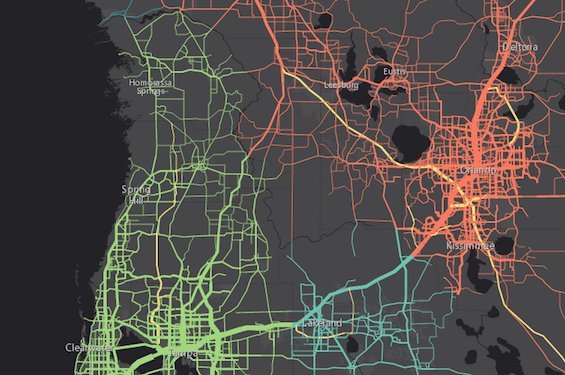
* The image below depicts a [FeatureLayer](https://developers.arcgis.com/javascript/latest/references/core/layers/FeatureLayer/) whose graphics
* are styled with SimpleLineSymbols.
*
* [](https://developers.arcgis.com/javascript/latest/sample-code/visualization-location-types/)
*
* @since 4.0
* @see [Symbol Builder](https://developers.arcgis.com/javascript/latest/symbol-builder/)
* @see [Sample - Visualize features by type](https://developers.arcgis.com/javascript/latest/sample-code/visualization-location-types/)
* @see [Sample - Add graphics (MapView)](https://developers.arcgis.com/javascript/latest/sample-code/intro-graphics/)
* @see [Sample - Add graphics (SceneView)](https://developers.arcgis.com/javascript/latest/sample-code/graphics-basic-3d/)
* @see [Renderer](https://developers.arcgis.com/javascript/latest/references/core/renderers/Renderer/)
* @see [Graphic](https://developers.arcgis.com/javascript/latest/references/core/Graphic/)
* @example
* // this symbol can be used to visualize polyline
* // features or the outline of a fill symbol
* let symbol = {
* type: "simple-line", // autocasts as new SimpleLineSymbol()
* color: "lightblue",
* width: "2px",
* style: "short-dot"
* };
*/
export default class SimpleLineSymbol extends LineSymbol {
constructor(properties?: SimpleLineSymbolProperties);
/**
* Specifies the cap style. The cap is the end node of a polyline, or the end of a line segment that does not connect with another segment of the same polyline.
*
* See the table below for possible values.
*
* Possible Value | Example
* ---------------|---------
* butt | 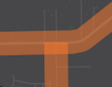
* round | 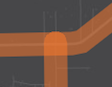
* square | 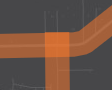
*
* > [!WARNING]
* >
* > **Known Limitations**
* >
* > This property does not persist when applied to a symbol used in a layer saved
* > to a web map or portal item. See the [web map specification](https://developers.arcgis.com/web-map-specification/objects/esriSLS_symbol/)
* > for more details about properties that persist when a SimpleLineSymbol is saved
* > to an ArcGIS Online or Portal item.
*
* @default "round"
* @example symbol.cap = "square";
*/
accessor cap: LineCap;
/**
* Specifies the join style. A `join` refers to the joint of a polyline, or the end of a line segment that connects to another segment of the same polyline.
* See the table below for possible values.
*
* Possible Value | Example
* ---------------|---------
* bevel | 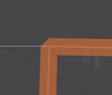
* miter | 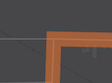
* round | 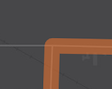
*
* @default "round"
* @example symbol.join = "bevel";
*/
accessor join: LineJoin;
/**
* Specifies the color, style, and placement of a symbol marker on the line.
*
* > [!WARNING]
* >
* > **Known Limitations**
* >
* > - This is not currently supported within a 3D [SceneView](https://developers.arcgis.com/javascript/latest/references/core/views/SceneView/).
*
* @since 4.16
* @example
* // Places a blue diamond marker at the beginning of the line symbol
* simpleLineSymbol.marker = {
* color: "blue",
* placement: "begin",
* style: "diamond"
* }
*/
get marker(): LineSymbolMarker | null | undefined;
set marker(value: (LineSymbolMarkerProperties & { type?: "line-marker" }) | null | undefined);
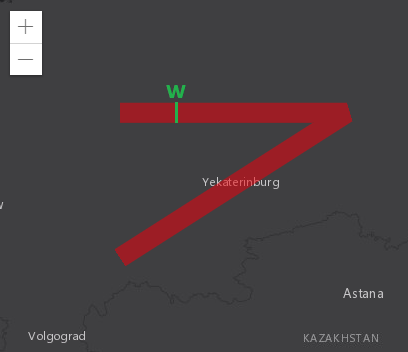
/**
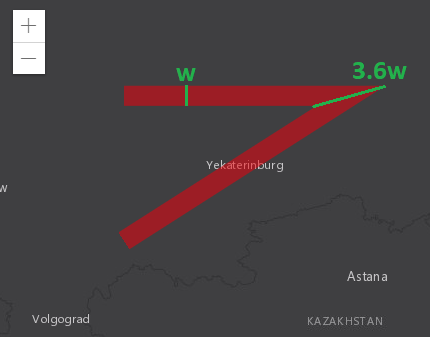
* Maximum allowed ratio of the width of a miter join to the line width.
* Miter joins can get very wide at sharp line angles; this can be visually
* unpleasant or interfere with cartography. In the example below, the
* width of the miter join is about 3.6 times the width of the line.
*
* 
*
* A miter limit of `X` means that a miter join can be at most `X` times
* as wide as the line itself. Beyond that threshold, it is replaced with
* a bevel join. Referring to the previous example, setting the miter limit
* to 3.6 or greater has no effect on the generated visuals; setting the miter
* limit to 3.5 or smaller causes the replacement with a bevel join.
*
* 
*
* > [!WARNING]
* >
* > **Known Limitations**
* >
* > This property is currently not supported in 3D [SceneViews](https://developers.arcgis.com/javascript/latest/references/core/views/SceneView/).
*
* @default 2
* @example
* // Miter joins that would be twice as wide as the line itself are
* // replaced by bevel joins.
* symbol.miterLimit = 2;
*/
accessor miterLimit: number;
/**
* Specifies the line style. Possible values are listed in the table below:
*
* Value | Description
* ------|-------------
* dash | 
* dash-dot | 
* dot | 
* long-dash | 
* long-dash-dot | 
* long-dash-dot-dot | 
* none | The line has no symbol.
* short-dash | 
* short-dash-dot | 
* short-dash-dot-dot | 
* short-dot | 
* solid | 
*
* @default "solid"
* @example symbol.style = "short-dash-dot";
*/
accessor style: LineStyle;
/** The symbol type. */
get type(): "simple-line";
/**
* Creates a deep clone of the symbol.
*
* @returns A deep clone of the object that
* invoked this method.
* @example
* // Creates a deep clone of the graphic's symbol
* let symLyr = graphic.symbol.clone();
*/
clone(): SimpleLineSymbol;
}