@arcgis/core
Version:
ArcGIS Maps SDK for JavaScript: A complete 2D and 3D mapping and data visualization API
161 lines (159 loc) • 6.91 kB
TypeScript
import type Color from "../Color.js";
import type FillSymbol from "./FillSymbol.js";
import type { FillStyle } from "./types.js";
import type { ColorLike } from "../Color.js";
import type { FillSymbolProperties } from "./FillSymbol.js";
export interface SimpleFillSymbolProperties extends FillSymbolProperties, Partial<Pick<SimpleFillSymbol, "style">> {
/**
* The color of the symbol.
* This can be autocast with an array of rgb(a) values, named string, hex string or an hsl(a) string,
* an object with `r`, `g`, `b`, and `a` properties, or a [Color](https://developers.arcgis.com/javascript/latest/references/core/Color/) object.
*
* @default [0, 0, 0, 0.25] - black, semitransparent
* @example
* // CSS color string
* symbol.color = "dodgerblue";
* @example
* // HEX string
* symbol.color = "#33cc33";
* @example
* // array of RGBA values
* symbol.color = [51, 204, 51, 0.3];
* @example
* // object with rgba properties
* symbol.color = {
* r: 51,
* g: 51,
* b: 204,
* a: 0.7
* };
* @example
* // CSS color string
* symbol.color = "dodgerblue";
* @example
* // HEX string
* symbol.color = "#33cc33";
* @example
* // array of RGBA values
* symbol.color = [51, 204, 51, 0.3];
* @example
* // object with rgba properties
* symbol.color = {
* r: 51,
* g: 51,
* b: 204,
* a: 0.7
* };
*/
color?: ColorLike;
}
/**
* SimpleFillSymbol is used for rendering 2D polygons in either a [MapView](https://developers.arcgis.com/javascript/latest/references/core/views/MapView/)
* or a [SceneView](https://developers.arcgis.com/javascript/latest/references/core/views/SceneView/). It can be filled with a solid [color](https://developers.arcgis.com/javascript/latest/references/core/symbols/SimpleFillSymbol/#color),
* or a [pattern](https://developers.arcgis.com/javascript/latest/references/core/symbols/SimpleFillSymbol/#style). In addition, the symbol can have an optional [outline](https://developers.arcgis.com/javascript/latest/references/core/symbols/SimpleFillSymbol/#outline),
* which is defined by a [SimpleLineSymbol](https://developers.arcgis.com/javascript/latest/references/core/symbols/SimpleLineSymbol/).
*
* SimpleFillSymbols may be applied to polygon features in a [FeatureLayer](https://developers.arcgis.com/javascript/latest/references/core/layers/FeatureLayer/)
* or an individual [Graphic](https://developers.arcgis.com/javascript/latest/references/core/Graphic/).
*
* Fill symbols may also be used to symbolize 2D polygon features
* in a 3D [SceneView](https://developers.arcgis.com/javascript/latest/references/core/views/SceneView/). However, it is
* recommended you use [PolygonSymbol3D](https://developers.arcgis.com/javascript/latest/references/core/symbols/PolygonSymbol3D/) instead. The image below
* depicts a [FeatureLayer](https://developers.arcgis.com/javascript/latest/references/core/layers/FeatureLayer/) whose graphics
* are styled with a SimpleFillSymbol.
*
* [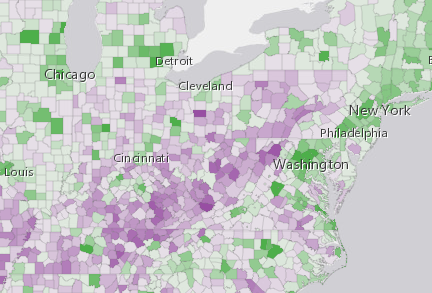](https://developers.arcgis.com/javascript/latest/sample-code/visualization-vv-color/)
*
* @since 4.0
* @see [Symbol Builder](https://developers.arcgis.com/javascript/latest/symbol-builder/)
* @see [Sample - Continuous color](https://developers.arcgis.com/javascript/latest/sample-code/visualization-vv-color/)
* @see [Sample - Add graphics (MapView)](https://developers.arcgis.com/javascript/latest/sample-code/intro-graphics/)
* @see [Graphic](https://developers.arcgis.com/javascript/latest/references/core/Graphic/)
* @see [Renderer](https://developers.arcgis.com/javascript/latest/references/core/renderers/Renderer/)
* @example
* let symbol = {
* type: "simple-fill", // autocasts as new SimpleFillSymbol()
* color: [ 51,51, 204, 0.9 ],
* style: "solid",
* outline: { // autocasts as new SimpleLineSymbol()
* color: "white",
* width: 1
* }
* };
*/
export default class SimpleFillSymbol extends FillSymbol {
constructor(properties?: SimpleFillSymbolProperties);
/**
* The color of the symbol.
* This can be autocast with an array of rgb(a) values, named string, hex string or an hsl(a) string,
* an object with `r`, `g`, `b`, and `a` properties, or a [Color](https://developers.arcgis.com/javascript/latest/references/core/Color/) object.
*
* @default [0, 0, 0, 0.25] - black, semitransparent
* @example
* // CSS color string
* symbol.color = "dodgerblue";
* @example
* // HEX string
* symbol.color = "#33cc33";
* @example
* // array of RGBA values
* symbol.color = [51, 204, 51, 0.3];
* @example
* // object with rgba properties
* symbol.color = {
* r: 51,
* g: 51,
* b: 204,
* a: 0.7
* };
* @example
* // CSS color string
* symbol.color = "dodgerblue";
* @example
* // HEX string
* symbol.color = "#33cc33";
* @example
* // array of RGBA values
* symbol.color = [51, 204, 51, 0.3];
* @example
* // object with rgba properties
* symbol.color = {
* r: 51,
* g: 51,
* b: 204,
* a: 0.7
* };
*/
get color(): Color;
set color(value: ColorLike);
/**
* The fill style.
* Possible values are listed in the table below:
*
* Value | Description
* ------|-------------
* backward-diagonal | 
* cross | 
* diagonal-cross | 
* forward-diagonal | 
* horizontal | 
* none | The polygon has no fill.
* solid | 
* vertical | 
*
* @default "solid"
*/
accessor style: FillStyle;
/** The symbol type. */
get type(): "simple-fill";
/**
* Creates a deep clone of the symbol.
*
* @returns A deep clone of the object that
* invoked this method.
* @example
* // Creates a deep clone of the graphic's symbol
* let symLyr = graphic.symbol.clone();
*/
clone(): SimpleFillSymbol;
}