@arcgis/core
Version:
ArcGIS Maps SDK for JavaScript: A complete 2D and 3D mapping and data visualization API
222 lines (220 loc) • 9.01 kB
TypeScript
import type Color from "../Color.js";
import type MarkerSymbol from "./MarkerSymbol.js";
import type { MarkerSymbolProperties } from "./MarkerSymbol.js";
export interface PictureMarkerSymbolProperties extends MarkerSymbolProperties, Partial<Pick<PictureMarkerSymbol, "url">> {
/**
* > [!WARNING]
* >
* > PictureMarkerSymbols do not utilize color
* > information; this property is ignored if set.
* > The color property is present for consistency with other
* > symbol types.
*
* @example
* // CSS color string
* symbol.color = "dodgerblue";
* @example
* // HEX string
* symbol.color = "#33cc33";
* @example
* // array of RGBA values
* symbol.color = [51, 204, 51, 0.3];
* @example
* // object with rgba properties
* symbol.color = {
* r: 51,
* g: 51,
* b: 204,
* a: 0.7
* };
*/
color?: Color | null;
/**
* The height of the image in points. This value may be autocast with a string
* expressing size in points or pixels (e.g. `12px`).
*
* The maximum allowed height of a picture marker symbol is 200px. If you
* set any value higher than 200px, then the image will be scaled down to
* a height of 200px while preserving the aspect ratio of the image.
*
* @default 12
* @example
* // height in points
* symbol.height = 14;
* @example
* // height in pixels
* symbol.height = "20px";
* @example
* // height in points
* symbol.height = "14pt";
*/
height?: number | string;
/**
* The width of the image in points. This value may be autocast with a string
* expressing size in points or pixels (e.g. `12px`).
*
* The maximum allowed width of a picture marker symbol is 200px. If you
* set any value higher than 200px, then the image will be scaled down to
* a width of 200px while preserving the aspect ratio of the image.
*
* @default 12
* @example
* // height in points
* symbol.height = 14;
* @example
* // height in pixels
* symbol.height = "20px";
* @example
* // height in points
* symbol.height = "14pt";
*/
width?: number | string;
}
/**
* PictureMarkerSymbol renders [Point](https://developers.arcgis.com/javascript/latest/references/core/geometry/Point/) graphics in either a
* 2D [MapView](https://developers.arcgis.com/javascript/latest/references/core/views/MapView/) or 3D [SceneView](https://developers.arcgis.com/javascript/latest/references/core/views/SceneView/) using an image.
* A [url](https://developers.arcgis.com/javascript/latest/references/core/symbols/PictureMarkerSymbol/#url) must point to a valid image. PictureMarkerSymbols may be applied to point
* features in a [FeatureLayer](https://developers.arcgis.com/javascript/latest/references/core/layers/FeatureLayer/)
* or individual [graphics](https://developers.arcgis.com/javascript/latest/references/core/Graphic/). The image below depicts a
* [FeatureLayer](https://developers.arcgis.com/javascript/latest/references/core/layers/FeatureLayer/) whose point features
* are styled with a [PictureMarkerSymbol](https://developers.arcgis.com/javascript/latest/references/core/symbols/PictureMarkerSymbol/).
*
* [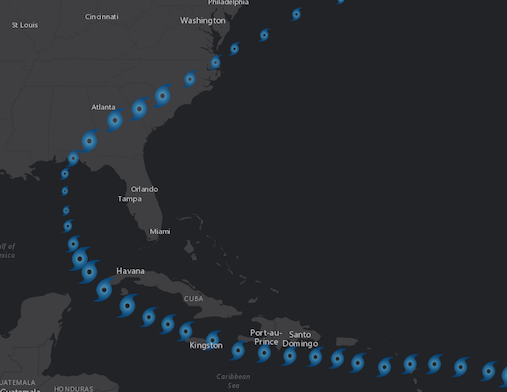](https://developers.arcgis.com/javascript/latest/sample-code/visualization-vv-rotation/)
*
* > [!WARNING]
* >
* > **Known Limitations:**
* >
* > - SVG documents must include a definition for width and height to load properly in Firefox.
* > - Animated GIF and PNG images are not supported in [3D SceneView](https://developers.arcgis.com/javascript/latest/references/core/views/SceneView/).
* > - The [height](https://developers.arcgis.com/javascript/latest/references/core/symbols/PictureMarkerSymbol/#height) and [width](https://developers.arcgis.com/javascript/latest/references/core/symbols/PictureMarkerSymbol/#width) of the symbol is restricted to no more than 200px.
* > - Animated SVG images are currently not supported.
*
* > [!WARNING]
* >
* > To avoid CORS issues with this symbol, do one of the following:
* >
* > Make certain that the [image](https://developers.arcgis.com/javascript/latest/references/core/symbols/PictureMarkerSymbol/#url) is hosted on a [CORS enabled server](https://developers.arcgis.com/javascript/latest/cors/).
* > Use an [image](https://developers.arcgis.com/javascript/latest/references/core/symbols/PictureMarkerSymbol/#url) hosted on the same domain as the application.
* > Install a [proxy](https://developers.arcgis.com/javascript/latest/proxies/).
*
* @since 4.0
* @see [Symbol Builder](https://developers.arcgis.com/javascript/latest/symbol-builder/)
* @see [Sample - Visualize data with rotation](https://developers.arcgis.com/javascript/latest/sample-code/visualization-vv-rotation/)
* @see [SimpleMarkerSymbol](https://developers.arcgis.com/javascript/latest/references/core/symbols/SimpleMarkerSymbol/)
* @example
* let symbol = {
* type: "picture-marker", // autocasts as new PictureMarkerSymbol()
* url: "https://static.arcgis.com/images/Symbols/Shapes/BlackStarLargeB.png",
* width: "64px",
* height: "64px"
* };
*/
export default class PictureMarkerSymbol extends MarkerSymbol {
constructor(properties?: PictureMarkerSymbolProperties);
/**
* > [!WARNING]
* >
* > PictureMarkerSymbols do not utilize color
* > information; this property is ignored if set.
* > The color property is present for consistency with other
* > symbol types.
*
* @example
* // CSS color string
* symbol.color = "dodgerblue";
* @example
* // HEX string
* symbol.color = "#33cc33";
* @example
* // array of RGBA values
* symbol.color = [51, 204, 51, 0.3];
* @example
* // object with rgba properties
* symbol.color = {
* r: 51,
* g: 51,
* b: 204,
* a: 0.7
* };
*/
accessor color: Color | null;
/**
* The height of the image in points. This value may be autocast with a string
* expressing size in points or pixels (e.g. `12px`).
*
* The maximum allowed height of a picture marker symbol is 200px. If you
* set any value higher than 200px, then the image will be scaled down to
* a height of 200px while preserving the aspect ratio of the image.
*
* @default 12
* @example
* // height in points
* symbol.height = 14;
* @example
* // height in pixels
* symbol.height = "20px";
* @example
* // height in points
* symbol.height = "14pt";
*/
get height(): number;
set height(value: number | string);
/** The symbol type. */
get type(): "picture-marker";
/**
* The URL to an image or SVG document. To avoid CORS issues with this symbol,
* do one of the following:
*
* * Make certain that the [image](https://developers.arcgis.com/javascript/latest/references/core/symbols/PictureMarkerSymbol/#url) is hosted on a [CORS enabled server](https://developers.arcgis.com/javascript/latest/cors/).
* * Use an [image](https://developers.arcgis.com/javascript/latest/references/core/symbols/PictureMarkerSymbol/#url) hosted on the same domain as the application.
* * Install a [proxy](https://developers.arcgis.com/javascript/latest/proxies/).
*
* > [!WARNING]
* >
* > **Known Limitations**
* >
* > - SVG documents must include a definition for width and height to load properly in Firefox.
* > - Animated GIF and PNG images are not supported in [SceneView](https://developers.arcgis.com/javascript/latest/references/core/views/SceneView/). See the
* > [Custom WebGL layer view](https://developers.arcgis.com/javascript/latest/sample-code/custom-gl-visuals/) sample to learn how to accomplish this
* > using WebGL.
* > - Animated SVG images are currently not supported.
*
* @example symbol.url = "cat-1-hurricane.png";
* @example
* // render SVG document as a PictureMarkerSymbol
* symbol.url = "logo.svg";
*/
accessor url: string | null | undefined;
/**
* The width of the image in points. This value may be autocast with a string
* expressing size in points or pixels (e.g. `12px`).
*
* The maximum allowed width of a picture marker symbol is 200px. If you
* set any value higher than 200px, then the image will be scaled down to
* a width of 200px while preserving the aspect ratio of the image.
*
* @default 12
* @example
* // height in points
* symbol.height = 14;
* @example
* // height in pixels
* symbol.height = "20px";
* @example
* // height in points
* symbol.height = "14pt";
*/
get width(): number;
set width(value: number | string);
/**
* Creates a deep clone of the symbol.
*
* @returns A deep clone of the object that
* invoked this method.
* @example
* // Creates a deep clone of the graphic's symbol
* let symLyr = graphic.symbol.clone();
*/
clone(): PictureMarkerSymbol;
}