@arcgis/core
Version:
ArcGIS Maps SDK for JavaScript: A complete 2D and 3D mapping and data visualization API
249 lines (247 loc) • 7.65 kB
TypeScript
import type Color from "../Color.js";
import type FillSymbol from "./FillSymbol.js";
import type { FillSymbolProperties } from "./FillSymbol.js";
export interface PictureFillSymbolProperties extends FillSymbolProperties, Partial<Pick<PictureFillSymbol, "url" | "xscale" | "yscale">> {
/**
* > [!WARNING]
* >
* > PictureFillSymbols do not utilize color information; this property is ignored if set.
* > The color property is present for consistency with other
* > symbol types.
*
* @example
* // CSS color string
* symbol.color = "dodgerblue";
* @example
* // HEX string
* symbol.color = "#33cc33";
* @example
* // array of RGBA values
* symbol.color = [51, 204, 51, 0.3];
* @example
* // object with rgba properties
* symbol.color = {
* r: 51,
* g: 51,
* b: 204,
* a: 0.7
* };
*/
color?: Color | null;
/**
* The height of the image in points. This value may be autocast with a string
* expressing size in points or pixels (e.g. `12px`).
*
* @default 12
* @example
* // height in points
* symbol.height = 16;
* @example
* // height in pixels
* symbol.height = "12px";
* @example
* // height in points
* symbol.height = "16pt";
*/
height?: number | string;
/**
* The width of the image in points. This value may be autocast with a string
* expressing size in points or pixels (e.g. `12px`).
*
* @default 12
* @example
* // width in points
* symbol.width = 16;
* @example
* // width in pixels
* symbol.width = "12px";
* @example
* // width in points
* symbol.width = "16pt";
*/
width?: number | string;
/**
* The offset on the x-axis in points. This value may be autocast with a string
* expressing size in points or pixels (e.g. `12px`).
*
* @default 0
* @example
* // xoffset in points
* symbol.xoffset = 6;
* @example
* // xoffset in pixels
* symbol.xoffset = "8px";
* @example
* // xoffset in points
* symbol.xoffset = "6pt";
*/
xoffset?: number | string;
/**
* The offset on the y-axis in pixels or points. This value may be autocast with a string
* expressing size in points or pixels (e.g. `12px`).
*
* @default 0
* @example
* // yoffset in points
* symbol.yoffset = 6;
* @example
* // yoffset in pixels
* symbol.yoffset = "8px";
* @example
* // yoffset in points
* symbol.yoffset = "6pt";
*/
yoffset?: number | string;
}
/**
* PictureFillSymbol uses an image in a repeating pattern to symbolize polygon features in a
* 2D [MapView](https://developers.arcgis.com/javascript/latest/references/core/views/MapView/). A [url](https://developers.arcgis.com/javascript/latest/references/core/symbols/PictureFillSymbol/#url) must point to a valid image.
* In addition, the symbol can have an optional [outline](https://developers.arcgis.com/javascript/latest/references/core/symbols/PictureFillSymbol/#outline), which is defined by a
* [SimpleLineSymbol](https://developers.arcgis.com/javascript/latest/references/core/symbols/SimpleLineSymbol/). PictureFillSymbols may be applied to polygon
* features in a [FeatureLayer](https://developers.arcgis.com/javascript/latest/references/core/layers/FeatureLayer/) or an individual [Graphic](https://developers.arcgis.com/javascript/latest/references/core/Graphic/).
*
* PictureFillSymbol is not supported in 3D [SceneView](https://developers.arcgis.com/javascript/latest/references/core/views/SceneView/). Only use it when
* working in a [MapView](https://developers.arcgis.com/javascript/latest/references/core/views/MapView/).
*
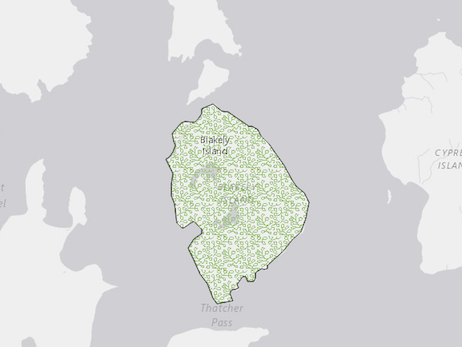
* The image below depicts a [Graphic](https://developers.arcgis.com/javascript/latest/references/core/Graphic/) that is styled with a PictureFillSymbol.
*
* 
*
* @since 4.0
* @see [Symbol Builder](https://developers.arcgis.com/javascript/latest/symbol-builder/)
* @see [Graphic](https://developers.arcgis.com/javascript/latest/references/core/Graphic/)
* @see [Renderer](https://developers.arcgis.com/javascript/latest/references/core/renderers/Renderer/)
* @example
* let symbol = {
* type: "picture-fill", // autocasts as new PictureFillSymbol()
* url: "https://static.arcgis.com/images/Symbols/Shapes/BlackStarLargeB.png",
* width: "24px",
* height: "24px",
* outline: {
* style: "solid"
* },
* };
*/
export default class PictureFillSymbol extends FillSymbol {
constructor(properties?: PictureFillSymbolProperties);
/**
* > [!WARNING]
* >
* > PictureFillSymbols do not utilize color information; this property is ignored if set.
* > The color property is present for consistency with other
* > symbol types.
*
* @example
* // CSS color string
* symbol.color = "dodgerblue";
* @example
* // HEX string
* symbol.color = "#33cc33";
* @example
* // array of RGBA values
* symbol.color = [51, 204, 51, 0.3];
* @example
* // object with rgba properties
* symbol.color = {
* r: 51,
* g: 51,
* b: 204,
* a: 0.7
* };
*/
accessor color: Color | null;
/**
* The height of the image in points. This value may be autocast with a string
* expressing size in points or pixels (e.g. `12px`).
*
* @default 12
* @example
* // height in points
* symbol.height = 16;
* @example
* // height in pixels
* symbol.height = "12px";
* @example
* // height in points
* symbol.height = "16pt";
*/
get height(): number;
set height(value: number | string);
/** The symbol type. */
get type(): "picture-fill";
/** The URL to the image. */
accessor url: string | null | undefined;
/**
* The width of the image in points. This value may be autocast with a string
* expressing size in points or pixels (e.g. `12px`).
*
* @default 12
* @example
* // width in points
* symbol.width = 16;
* @example
* // width in pixels
* symbol.width = "12px";
* @example
* // width in points
* symbol.width = "16pt";
*/
get width(): number;
set width(value: number | string);
/**
* The offset on the x-axis in points. This value may be autocast with a string
* expressing size in points or pixels (e.g. `12px`).
*
* @default 0
* @example
* // xoffset in points
* symbol.xoffset = 6;
* @example
* // xoffset in pixels
* symbol.xoffset = "8px";
* @example
* // xoffset in points
* symbol.xoffset = "6pt";
*/
get xoffset(): number;
set xoffset(value: number | string);
/**
* The scale factor on the x axis of the symbol.
*
* @default 1
*/
accessor xscale: number;
/**
* The offset on the y-axis in pixels or points. This value may be autocast with a string
* expressing size in points or pixels (e.g. `12px`).
*
* @default 0
* @example
* // yoffset in points
* symbol.yoffset = 6;
* @example
* // yoffset in pixels
* symbol.yoffset = "8px";
* @example
* // yoffset in points
* symbol.yoffset = "6pt";
*/
get yoffset(): number;
set yoffset(value: number | string);
/**
* The scale factor on the y axis of the symbol.
*
* @default 1
*/
accessor yscale: number;
/**
* Creates a deep clone of the symbol.
*
* @returns A deep clone of the object that
* invoked this method.
* @example
* // Creates a deep clone of the graphic's symbol
* let sym = graphic.symbol.clone();
*/
clone(): PictureFillSymbol;
}