@arcgis/core
Version:
ArcGIS Maps SDK for JavaScript: A complete 2D and 3D mapping and data visualization API
315 lines (313 loc) • 15 kB
TypeScript
import type Symbol3DLayer from "./Symbol3DLayer.js";
import type Symbol3DMaterial from "./support/Symbol3DMaterial.js";
import type { PathSymbol3DLayerAnchor, PathSymbol3DLayerCap, PathSymbol3DLayerJoin, PathSymbol3DLayerProfile, PathSymbol3DLayerProfileRotation } from "./types.js";
import type { Symbol3DMaterialProperties } from "./support/Symbol3DMaterial.js";
import type { Symbol3DLayerProperties } from "./Symbol3DLayer.js";
export interface PathSymbol3DLayerProperties extends Symbol3DLayerProperties, Partial<Pick<PathSymbol3DLayer, "anchor" | "cap" | "castShadows" | "height" | "join" | "profile" | "profileRotation" | "width">> {
/**
* The material used to shade the path. This property defines the paths's color and emissive properties.
*
* @example
* // CSS color string
* symbolLayer.material = {
* color: "dodgerblue"
* };
* @example
* // HEX string
* symbolLayer.material = {
* color: "#33cc33";
* };
* @example
* // array of RGBA values
* symbolLayer.material = {
* color: [51, 204, 51, 0.3];
* };
* @example
* // object with rgba properties
* symbolLayer.material = {
* color: {
* r: 51,
* g: 51,
* b: 204,
* a: 0.7
* }
* };
* @example
* // object with emissive properties and color
* symbolLayer.material: {
* color: "#00E9FF",
* emissive: { strength: 1, source: "color" },
* };
*/
material?: Symbol3DMaterialProperties | null;
}
/**
* PathSymbol3DLayer renders [Polyline](https://developers.arcgis.com/javascript/latest/references/core/geometry/Polyline/) geometries
* by extruding a 2D profile along the line. A PathSymbol3DLayer must be added to the `symbolLayers` property of
* a [LineSymbol3D](https://developers.arcgis.com/javascript/latest/references/core/symbols/LineSymbol3D/). This is a 3D symbol, therefore it is only supported in a
* [SceneView](https://developers.arcgis.com/javascript/latest/references/core/views/SceneView/).
*
* Different styles can be created by combining the [profile](https://developers.arcgis.com/javascript/latest/references/core/symbols/PathSymbol3DLayer/#profile), [width](https://developers.arcgis.com/javascript/latest/references/core/symbols/PathSymbol3DLayer/#width)
* and [height](https://developers.arcgis.com/javascript/latest/references/core/symbols/PathSymbol3DLayer/#height) properties.
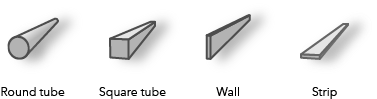
* A path can have a `circle` profile that displays the path as a tube and can be used for visualizations of
* pipelines or any other tube-like features.
* Setting the profile to `quad` displays the path with a rectangular shape. By varying height and width different
* styles can be created like a wall or a strip.
* Below are some of the path visualizations that could be created by combining these properties:
*
* 
*
* The color of the path is set in the [material](https://developers.arcgis.com/javascript/latest/references/core/symbols/PathSymbol3DLayer/#material) property. The color can be data-driven by
* adding [color visual variables](https://developers.arcgis.com/javascript/latest/references/core/renderers/SimpleRenderer/#visualVariables)
* to any [Renderer](https://developers.arcgis.com/javascript/latest/references/core/renderers/Renderer/) that uses this symbol layer. The width and the height
* can also be driven with [size visual variable](https://developers.arcgis.com/javascript/latest/references/core/renderers/SimpleRenderer/#visualVariables).
*
* More properties like [cap](https://developers.arcgis.com/javascript/latest/references/core/symbols/PathSymbol3DLayer/#cap), [join](https://developers.arcgis.com/javascript/latest/references/core/symbols/PathSymbol3DLayer/#join) and [profileRotation](https://developers.arcgis.com/javascript/latest/references/core/symbols/PathSymbol3DLayer/#profileRotation) can be set to
* enhance the PathSymbol3DLayer visualization.
*
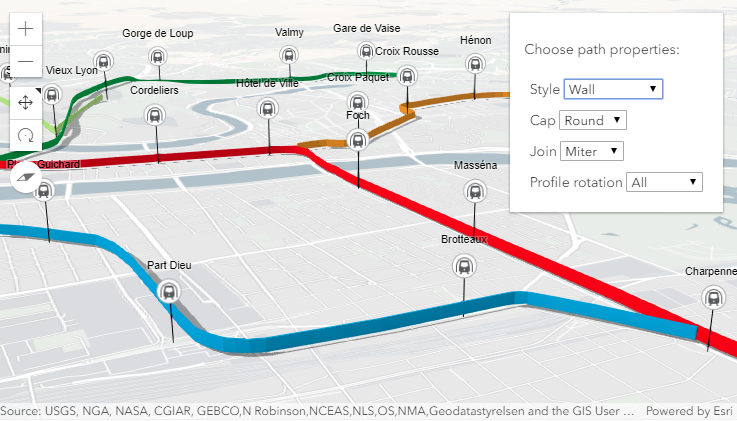
* In the image below the [FeatureLayer](https://developers.arcgis.com/javascript/latest/references/core/layers/FeatureLayer/) depicts transit lines in a city.
* The polyline features are visualized with [PathSymbol3DLayer](https://developers.arcgis.com/javascript/latest/references/core/symbols/PathSymbol3DLayer/) set on a [LineSymbol3D](https://developers.arcgis.com/javascript/latest/references/core/symbols/LineSymbol3D/).
*
* 
*
* [Path visualization in 3D sample](https://developers.arcgis.com/javascript/latest/sample-code/visualization-path-3d/) shows how the different
* properties change the style of the PathSymbol3DLayer.
*
* @since 4.0
* @see [Path visualization in 3D](https://developers.arcgis.com/javascript/latest/sample-code/visualization-path-3d/)
* @see [Symbol Builder](https://developers.arcgis.com/javascript/latest/symbol-builder/)
* @see [Symbol3DLayer](https://developers.arcgis.com/javascript/latest/references/core/symbols/Symbol3DLayer/)
* @see [Symbol3D](https://developers.arcgis.com/javascript/latest/references/core/symbols/Symbol3D/)
* @see [Renderer](https://developers.arcgis.com/javascript/latest/references/core/renderers/Renderer/)
* @see [ArcGIS blog - Using attributes to represent real-world sizes of features](https://blogs.esri.com/esri/arcgis/2016/02/01/3d-visualization-using-attributes-to-represent-real-world-sizes-of-features/)
* @example
* // create a PathSymbol3DLayer with a strip style
* let stripPath = {
* type: "line-3d", // autocasts as new LineSymbol3D()
* symbolLayers: [{
* type: "path", // autocasts as new PathSymbol3DLayer()
* profile: "quad", // creates a rectangular shape
* width: 20, // path width in meters
* height: 5, // path height in meters
* material: { color: "#ff7380" },
* cap: "square",
* profileRotation: "heading"
* }]
* };
*
* // create a PathSymbol3DLayer with a pipe style
* let pipePath = {
* type: "line-3d", // autocasts as new LineSymbol3D()
* symbolLayers: [{
* type: "path", // autocasts as new PathSymbol3DLayer()
* profile: "circle", // creates a rectangular shape
* width: 20, // path width will also set the height to the same value
* material: { color: "#ff7380" },
* cap: "round"
* }]
* };
*/
export default class PathSymbol3DLayer extends Symbol3DLayer {
constructor(properties?: PathSymbol3DLayerProperties);
/**
* Defines offset of the path cross section relative to the
* [Polyline](https://developers.arcgis.com/javascript/latest/references/core/geometry/Polyline/) geometry.
*
* Possible Value | Example
* ---------------|---------
* center | 
* bottom | 
* top | 
*
* @default "center"
* @since 4.12
*/
accessor anchor: PathSymbol3DLayerAnchor;
/**
* Controls the shape at the start and end point of the path. `none` will not render
* the faces that close the path.
* See the table below for possible values.
*
* Possible Value | Example
* ---------------|---------
* butt | 
* round | 
* square | 
* none | 
*
* @default "butt"
* @since 4.12
*/
accessor cap: PathSymbol3DLayerCap;
/**
* Indicates whether the symbol layer geometry casts shadows in the scene.
* Setting this property to `false` will disable shadows for the symbol layer
* even if direct shadows are enabled in
* [SceneView.environment](https://developers.arcgis.com/javascript/latest/references/core/views/SceneView/#environment).
*
* @default true
* @since 4.11
* @example
* // disables shadow casting
* symbolLayer.castShadows = false;
*/
accessor castShadows: boolean;
/**
* The vertical dimension of the cross-section of the path in meters.
* If only the [width](https://developers.arcgis.com/javascript/latest/references/core/symbols/PathSymbol3DLayer/#width) is set, then the height is set to the
* same value as the width.
* If neither width nor height are set, then the path is not displayed.
*
* @since 4.12
* @example
* // create a path with a wall style
* let wallPath = {
* type: "line-3d", // autocasts as new LineSymbol3D()
* symbolLayers: [{
* type: "path", // autocasts as new PathSymbol3DLayer()
* profile: "quad", // creates a rectangular shape
* width: 1, // path width in meters
* height: 20, // path height in meters
* material: { color: "#a382cc" }
* }]
* };
* @example
* // create a path with a pipe style
* let wallPath = {
* type: "line-3d", // autocasts as new LineSymbol3D()
* symbolLayers: [{
* type: "path", // autocasts as new PathSymbol3DLayer()
* profile: "circle",
* height: 20, // path width in meters this also sets the width to 20 meters
* material: { color: "##a382cc" }
* }]
* };
*/
accessor height: number | null | undefined;
/**
* Controls the shape of the connection between two segments of the path.
* See the table below for possible values.
*
* Possible Value | Example
* ---------------|---------
* bevel | 
* miter | 
* round | 
*
* @default "miter"
* @since 4.12
*/
accessor join: PathSymbol3DLayerJoin;
/**
* The material used to shade the path. This property defines the paths's color and emissive properties.
*
* @example
* // CSS color string
* symbolLayer.material = {
* color: "dodgerblue"
* };
* @example
* // HEX string
* symbolLayer.material = {
* color: "#33cc33";
* };
* @example
* // array of RGBA values
* symbolLayer.material = {
* color: [51, 204, 51, 0.3];
* };
* @example
* // object with rgba properties
* symbolLayer.material = {
* color: {
* r: 51,
* g: 51,
* b: 204,
* a: 0.7
* }
* };
* @example
* // object with emissive properties and color
* symbolLayer.material: {
* color: "#00E9FF",
* emissive: { strength: 1, source: "color" },
* };
*/
get material(): Symbol3DMaterial | null | undefined;
set material(value: Symbol3DMaterialProperties | null | undefined);
/**
* Cross-section profile of the path geometry. Setting it to `circle` creates a
* path with a pipe shape and setting it to `quad` gives the path a rectangular shape.
*
* @default "circle"
* @since 4.12
*/
accessor profile: PathSymbol3DLayerProfile;
/**
* Defines how the [profile](https://developers.arcgis.com/javascript/latest/references/core/symbols/PathSymbol3DLayer/#profile) is rotated as it is extruded along the [Polyline](https://developers.arcgis.com/javascript/latest/references/core/geometry/Polyline/)
* geometry.
*
* The rotation axes (heading, tilt, roll) can be limited to constrain the orientation of the profile in the scene.
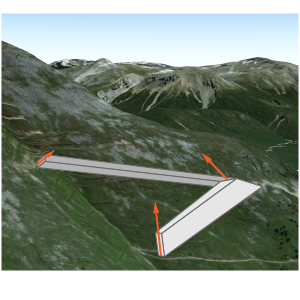
* Setting `profileRotation` to `all` minimizes the twist along the line and ensures that the diameter of the
* resulting visualization corresponds to [width](https://developers.arcgis.com/javascript/latest/references/core/symbols/PathSymbol3DLayer/#width) and [height](https://developers.arcgis.com/javascript/latest/references/core/symbols/PathSymbol3DLayer/#height). Setting `profileRotation` to
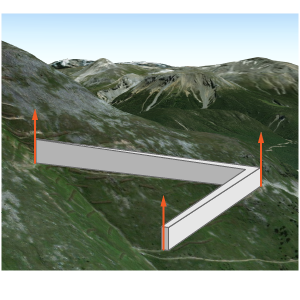
* `"heading"` ensures that the profile stays upright (no tilt or twist).
*
* Typically, `all` is used for `circle` profiles and `heading` is used for `quad` profiles.
*
* As an example, when setting `heading` on a path with a `quad` profile the path is oriented upright:
*
* 
*
* The same path with `profileRotation` set to `all` will rotate in all three degrees of freedom:
*
* 
*
* @default "all"
* @since 4.12
*/
accessor profileRotation: PathSymbol3DLayerProfileRotation;
/** The symbol type. */
get type(): "path";
/**
* The horizontal dimension of the cross-section of the path in meters.
* If only the [height](https://developers.arcgis.com/javascript/latest/references/core/symbols/PathSymbol3DLayer/#height) is set, then the width is set to
* the same value as the height.
* If neither width nor height are set, then the path is not displayed.
*
* @since 4.12
* @example
* // create a path with a strip style
* let wallPath = {
* type: "line-3d", // autocasts as new LineSymbol3D()
* symbolLayers: [{
* type: "path", // autocasts as new PathSymbol3DLayer()
* profile: "quad", // creates a rectangular shape
* width: 20, // path width in meters
* height: 1, // path height in meters
* material: { color: "#a382cc" }
* }]
* };
* @example
* // create a path with a square style
* let wallPath = {
* type: "line-3d", // autocasts as new LineSymbol3D()
* symbolLayers: [{
* type: "path", // autocasts as new PathSymbol3DLayer()
* profile: "quad", // creates a rectangular shape
* width: 20, // this property also sets the height to 20 meters
* material: { color: "#a382cc" }
* }]
* };
*/
accessor width: number | null | undefined;
/**
* Creates a deep clone of the symbol layer.
*
* @returns A deep clone of the object that
* invoked this method.
* @example
* // Creates a deep clone of the graphic's first symbol layer
* let symLyr = graphic.symbol.symbolLayers.at(0).clone();
*/
clone(): PathSymbol3DLayer;
}