@arcgis/core
Version:
ArcGIS Maps SDK for JavaScript: A complete 2D and 3D mapping and data visualization API
102 lines (100 loc) • 4.04 kB
TypeScript
import type Symbol from "./Symbol.js";
import type { SymbolProperties } from "./Symbol.js";
export interface MarkerSymbolProperties extends SymbolProperties, Partial<Pick<MarkerSymbol, "angle">> {
/**
* The offset on the x-axis in points. This value may be autocast with a string
* expressing size in points or pixels (e.g. `12px`).
*
* @default 0
* @example
* // xoffset in points
* symbol.xoffset = 4;
* @example
* // xoffset in pixels
* symbol.xoffset = "2px";
* @example
* // xoffset in points
* symbol.xoffset = "4pt";
*/
xoffset?: number | string;
/**
* The offset on the y-axis in points. This value may be autocast with a string
* expressing size in points or pixels (e.g. `12px`).
*
* @default 0
* @example
* // yoffset in points
* symbol.yoffset = 4;
* @example
* // yoffset in pixels
* symbol.yoffset = "2px";
* @example
* // yoffset in points
* symbol.yoffset = "4pt";
*/
yoffset?: number | string;
}
/**
* Marker symbols are used to draw [Point](https://developers.arcgis.com/javascript/latest/references/core/geometry/Point/) graphics in
* a [FeatureLayer](https://developers.arcgis.com/javascript/latest/references/core/layers/FeatureLayer/) or individual [graphics](https://developers.arcgis.com/javascript/latest/references/core/Graphic/)
* in a 2D [MapView](https://developers.arcgis.com/javascript/latest/references/core/views/MapView/). To create new marker symbols, use either
* [SimpleMarkerSymbol](https://developers.arcgis.com/javascript/latest/references/core/symbols/SimpleMarkerSymbol/) or [PictureMarkerSymbol](https://developers.arcgis.com/javascript/latest/references/core/symbols/PictureMarkerSymbol/).
*
* Marker symbols may also be used to symbolize 2D polygon features. The image below
* depicts a [FeatureLayer](https://developers.arcgis.com/javascript/latest/references/core/layers/FeatureLayer/) whose polygon features
* are styled with [SimpleMarkerSymbols](https://developers.arcgis.com/javascript/latest/references/core/symbols/SimpleMarkerSymbol/).
*
* [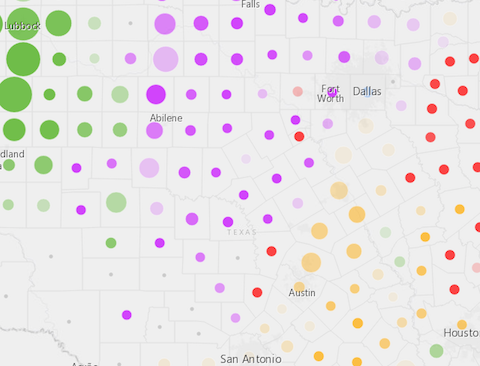](https://developers.arcgis.com/javascript/latest/sample-code/visualization-multivariate-2d/)
*
* Marker symbols can be used in a 3D [SceneView](https://developers.arcgis.com/javascript/latest/references/core/views/SceneView/). However, it is
* recommended you use [PointSymbol3D](https://developers.arcgis.com/javascript/latest/references/core/symbols/PointSymbol3D/) instead.
*
* @since 4.0
* @see [Symbol Builder](https://developers.arcgis.com/javascript/latest/symbol-builder/)
* @see [Renderer](https://developers.arcgis.com/javascript/latest/references/core/renderers/Renderer/)
* @see [Graphic](https://developers.arcgis.com/javascript/latest/references/core/Graphic/)
*/
export default abstract class MarkerSymbol extends Symbol {
/**
* The angle of the marker relative to the screen in degrees.
*
* @default 0
*/
accessor angle: number;
/** The symbol type. */
get type(): "simple-marker" | "picture-marker";
/**
* The offset on the x-axis in points. This value may be autocast with a string
* expressing size in points or pixels (e.g. `12px`).
*
* @default 0
* @example
* // xoffset in points
* symbol.xoffset = 4;
* @example
* // xoffset in pixels
* symbol.xoffset = "2px";
* @example
* // xoffset in points
* symbol.xoffset = "4pt";
*/
get xoffset(): number;
set xoffset(value: number | string);
/**
* The offset on the y-axis in points. This value may be autocast with a string
* expressing size in points or pixels (e.g. `12px`).
*
* @default 0
* @example
* // yoffset in points
* symbol.yoffset = 4;
* @example
* // yoffset in pixels
* symbol.yoffset = "2px";
* @example
* // yoffset in points
* symbol.yoffset = "4pt";
*/
get yoffset(): number;
set yoffset(value: number | string);
}