@arcgis/core
Version:
ArcGIS Maps SDK for JavaScript: A complete 2D and 3D mapping and data visualization API
290 lines (288 loc) • 11.7 kB
TypeScript
import type LineStyleMarker3D from "./LineStyleMarker3D.js";
import type Symbol3DLayer from "./Symbol3DLayer.js";
import type LineStylePattern3D from "./patterns/LineStylePattern3D.js";
import type Symbol3DMaterial from "./support/Symbol3DMaterial.js";
import type { LineStyleMarker3DProperties } from "./LineStyleMarker3D.js";
import type { LineCap, LineJoin } from "./types.js";
import type { LineStylePattern3DProperties } from "./patterns/LineStylePattern3D.js";
import type { Symbol3DMaterialProperties } from "./support/Symbol3DMaterial.js";
import type { Symbol3DLayerProperties } from "./Symbol3DLayer.js";
export interface LineSymbol3DLayerProperties extends Symbol3DLayerProperties, Partial<Pick<LineSymbol3DLayer, "cap" | "join">> {
/**
* Optional markers to be placed at the start and/or end of each line geometry.
*
* By default, no markers are placed. If markers are added, marker size is proportional
* to the width of the line. While markers inherit the line's color by default, you can
* use the color attribute to set a different one.
*
* @since 4.23
* @example
* const symbol = {
* type: "line-3d", // autocasts as new LineSymbol3D()
* symbolLayers: [{
* type: "line", // autocasts as new LineSymbol3DLayer()
* material: { color: "black" },
* marker: { // autocasts as new LineStyleMarker3D()
* type: "style",
* style: "arrow",
* placement: "end",
* color: "red" // black line with red arrows
* }
* }]
* };
*/
marker?: (LineStyleMarker3DProperties & { type: "style" }) | null;
/**
* The material used to shade the line. This property defines the line's color.
*
* @example
* // CSS color string
* symbolLayer.material = {
* color: "dodgerblue"
* };
* @example
* // HEX string
* symbolLayer.material = {
* color: "#33cc33";
* }
* @example
* // array of RGBA values
* symbolLayer.material = {
* color: [51, 204, 51, 0.3];
* }
* @example
* // object with rgba properties
* symbolLayer.material = {
* color: {
* r: 51,
* g: 51,
* b: 204,
* a: 0.7
* }
* };
*/
material?: Symbol3DMaterialProperties | null;
/**
* The pattern used to render the line stroke. By default, the lines are shown as solid.
*
* @since 4.22
* @example
* const symbol = {
* type: "line-3d", // autocasts as new LineSymbol3D()
* symbolLayers: [{
* type: "line", // autocasts as new LineSymbol3DLayer()
* size: 2, // points
* material: { color: "black" },
* pattern: { // autocasts as new LineStylePattern3D()
* type: "style",
* style: "dash"
* }
* }]
* };
*/
pattern?: (LineStylePattern3DProperties & { type: "style" }) | null;
/**
* The width of the line in points. This value may be autocast with a string
* expressing size in points or pixels (e.g. `12px`).
*
* @default "1px"
* @example
* // width in points
* symbolLayer.size = 4;
* @example
* // width in pixels
* symbolLayer.size = "2px";
* @example
* // width in points
* symbolLayer.size = "4pt";
*/
size?: number | string;
}
/**
* LineSymbol3DLayer renders [Polyline](https://developers.arcgis.com/javascript/latest/references/core/geometry/Polyline/) geometries
* using a flat 2D line with a [LineSymbol3D](https://developers.arcgis.com/javascript/latest/references/core/symbols/LineSymbol3D/)
* in a 3D [SceneView](https://developers.arcgis.com/javascript/latest/references/core/views/SceneView/). [MapView](https://developers.arcgis.com/javascript/latest/references/core/views/MapView/) does not support
* 3D symbols.
*
* The color of the line is set in the [material](https://developers.arcgis.com/javascript/latest/references/core/symbols/LineSymbol3DLayer/#material) property. The width of the line may be
* defined in either points or pixels with the [size](https://developers.arcgis.com/javascript/latest/references/core/symbols/LineSymbol3DLayer/#size) property. Line width and color
* can also be data-driven by
* adding [size](https://developers.arcgis.com/javascript/latest/references/core/renderers/SimpleRenderer/#visualVariables) and/or
* [color visual variables](https://developers.arcgis.com/javascript/latest/references/core/renderers/SimpleRenderer/#visualVariables)
* to any [Renderer](https://developers.arcgis.com/javascript/latest/references/core/renderers/Renderer/) that uses this symbol layer.
*
* A LineSymbol3DLayer must be added to the `symbolLayers` property of
* a [LineSymbol3D](https://developers.arcgis.com/javascript/latest/references/core/symbols/LineSymbol3D/). Multiple symbol layers may be used in a single
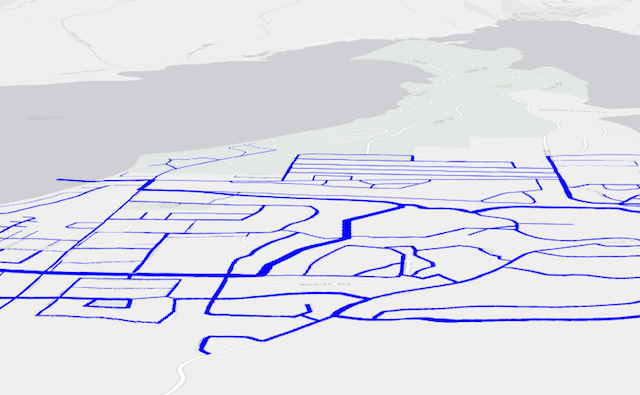
* symbol. The image below depicts a line [FeatureLayer](https://developers.arcgis.com/javascript/latest/references/core/layers/FeatureLayer/) whose features
* are symbolized with a [LineSymbol3D](https://developers.arcgis.com/javascript/latest/references/core/symbols/LineSymbol3D/) containing a LineSymbol3DLayer.
*
* 
*
* See [Symbol3DLayer](https://developers.arcgis.com/javascript/latest/references/core/symbols/Symbol3DLayer/) and [Symbol3D](https://developers.arcgis.com/javascript/latest/references/core/symbols/Symbol3D/) to read
* more general information about 3D symbols, symbol layers and how they relate to one another.
*
* @since 4.0
* @see [Symbol Builder](https://developers.arcgis.com/javascript/latest/symbol-builder/)
* @see [Sample - 3D hiking map with line patterns](https://developers.arcgis.com/javascript/latest/sample-code/visualization-line-patterns/)
* @see [Sample - Line markers and label placement](https://developers.arcgis.com/javascript/latest/sample-code/visualization-line-markers/)
* @see [Symbol3DLayer](https://developers.arcgis.com/javascript/latest/references/core/symbols/Symbol3DLayer/)
* @see [Symbol3D](https://developers.arcgis.com/javascript/latest/references/core/symbols/Symbol3D/)
* @see [Renderer](https://developers.arcgis.com/javascript/latest/references/core/renderers/Renderer/)
* @see [ArcGIS blog - Working with icons, lines, and fill symbols](https://blogs.esri.com/esri/arcgis/2016/01/19/3d-visualization-working-with-icons-lines-and-fill-symbols/)
* @example
* const symbol = {
* type: "line-3d", // autocasts as new LineSymbol3D()
* symbolLayers: [{
* type: "line", // autocasts as new LineSymbol3DLayer()
* size: 2, // points
* material: { color: "black" },
* cap: "round",
* join: "round",
* pattern: { // autocasts as new LineStylePattern3D()
* type: "style",
* style: "dash"
* },
* marker: { // autocasts as new LineStyleMarker3D()
* type: "style",
* style: "arrow",
* placement: "end",
* color: "red" // black line with red arrows
* }
* }]
* };
*/
export default class LineSymbol3DLayer extends Symbol3DLayer {
constructor(properties?: LineSymbol3DLayerProperties);
/**
* The style used to draw the endpoint of a line. This also applies to the tips of each pattern segment along the line. See the table below for possible values.
*
* Possible Value | Example
* ---------------|---------
* butt | 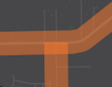
* round | 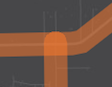
* square | 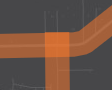
*
* @default "butt"
* @since 4.12
*/
accessor cap: LineCap;
/**
* The style used to draw the intersection of two line segments within a line geometry.
* See the table below for possible values.
*
* Possible Value | Example
* ---------------|---------
* bevel | 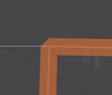
* miter | 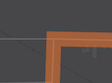
* round | 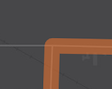
*
* @default "miter"
* @since 4.12
*/
accessor join: LineJoin;
/**
* Optional markers to be placed at the start and/or end of each line geometry.
*
* By default, no markers are placed. If markers are added, marker size is proportional
* to the width of the line. While markers inherit the line's color by default, you can
* use the color attribute to set a different one.
*
* @since 4.23
* @example
* const symbol = {
* type: "line-3d", // autocasts as new LineSymbol3D()
* symbolLayers: [{
* type: "line", // autocasts as new LineSymbol3DLayer()
* material: { color: "black" },
* marker: { // autocasts as new LineStyleMarker3D()
* type: "style",
* style: "arrow",
* placement: "end",
* color: "red" // black line with red arrows
* }
* }]
* };
*/
get marker(): LineStyleMarker3D | null | undefined;
set marker(value: (LineStyleMarker3DProperties & { type: "style" }) | null | undefined);
/**
* The material used to shade the line. This property defines the line's color.
*
* @example
* // CSS color string
* symbolLayer.material = {
* color: "dodgerblue"
* };
* @example
* // HEX string
* symbolLayer.material = {
* color: "#33cc33";
* }
* @example
* // array of RGBA values
* symbolLayer.material = {
* color: [51, 204, 51, 0.3];
* }
* @example
* // object with rgba properties
* symbolLayer.material = {
* color: {
* r: 51,
* g: 51,
* b: 204,
* a: 0.7
* }
* };
*/
get material(): Symbol3DMaterial | null | undefined;
set material(value: Symbol3DMaterialProperties | null | undefined);
/**
* The pattern used to render the line stroke. By default, the lines are shown as solid.
*
* @since 4.22
* @example
* const symbol = {
* type: "line-3d", // autocasts as new LineSymbol3D()
* symbolLayers: [{
* type: "line", // autocasts as new LineSymbol3DLayer()
* size: 2, // points
* material: { color: "black" },
* pattern: { // autocasts as new LineStylePattern3D()
* type: "style",
* style: "dash"
* }
* }]
* };
*/
get pattern(): LineStylePattern3D | null | undefined;
set pattern(value: (LineStylePattern3DProperties & { type: "style" }) | null | undefined);
/**
* The width of the line in points. This value may be autocast with a string
* expressing size in points or pixels (e.g. `12px`).
*
* @default "1px"
* @example
* // width in points
* symbolLayer.size = 4;
* @example
* // width in pixels
* symbolLayer.size = "2px";
* @example
* // width in points
* symbolLayer.size = "4pt";
*/
get size(): number;
set size(value: number | string);
/** The symbol type. */
get type(): "line";
/**
* Creates a deep clone of the symbol layer.
*
* @returns A deep clone of the object that
* invoked this method.
* @example
* // Creates a deep clone of the graphic's first symbol layer
* let symLyr = graphic.symbol.symbolLayers.at(0).clone();
*/
clone(): LineSymbol3DLayer;
}