@arcgis/core
Version:
ArcGIS Maps SDK for JavaScript: A complete 2D and 3D mapping and data visualization API
170 lines (168 loc) • 8.73 kB
TypeScript
import type Collection from "../core/Collection.js";
import type Symbol3D from "./Symbol3D.js";
import type TextSymbol3DLayer from "./TextSymbol3DLayer.js";
import type Callout3D from "./callouts/Callout3D.js";
import type Symbol3DVerticalOffset from "./support/Symbol3DVerticalOffset.js";
import type { ReadonlyArrayOrCollection } from "../core/Collection.js";
import type { Symbol3DProperties } from "./Symbol3D.js";
import type { TextSymbol3DLayerProperties } from "./TextSymbol3DLayer.js";
import type { Symbol3DVerticalOffsetProperties } from "./support/Symbol3DVerticalOffset.js";
import type { Callout3DProperties } from "./callouts/Callout3D.js";
export interface LabelSymbol3DProperties extends Symbol3DProperties {
/**
* Settings for adding a callout visualization to the symbol. Callouts are drawn from the point feature location that is being symbolized,
* to the vertical offset of the symbol. This property has no effect if [verticalOffset](https://developers.arcgis.com/javascript/latest/references/core/symbols/LabelSymbol3D/#verticalOffset) is not set. At the moment only callouts of type `line` are
* supported. See [LineCallout3D](https://developers.arcgis.com/javascript/latest/references/core/symbols/callouts/LineCallout3D/).
*
* @since 4.4
* @see [Sample: Using callout lines with labels](https://developers.arcgis.com/javascript/latest/sample-code/visualization-label-callout/)
* @example
* let symbol = {
* type: "label-3d", // autocasts as new LabelSymbol3D()
* symbolLayers: [...],
* verticalOffset: ...,
* callout: {
* type: "line", // autocasts as new LineCallout3D()
* size: 1.5,
* color: [150, 150, 150],
* border: {
* color: [50, 50, 50]
* }
* }
* };
*/
callout?: Callout3DProperties | null;
/**
* A Collection of [Symbol3DLayer](https://developers.arcgis.com/javascript/latest/references/core/symbols/Symbol3DLayer/) objects
* used to visualize the graphic or feature. Individual symbol layers
* may be autocast as objects and specified using the `type` property.
*/
symbolLayers?: ReadonlyArrayOrCollection<TextSymbol3DLayerProperties & { type: "text"; }>;
/**
* Shifts the symbol along the vertical world axis by a given height. The height is set in screen space units like points or pixels.
* For points displayed with a [callout](https://developers.arcgis.com/javascript/latest/references/core/symbols/LabelSymbol3D/#callout) `verticalOffset` should be set.
*
* @since 4.4
* @see [Sample: Using callout lines with labels](https://developers.arcgis.com/javascript/latest/sample-code/visualization-label-callout/)
* @example
* let symbol = {
* type: "label-3d", // autocasts as new LabelSymbol3D()
* symbolLayers: [...],
* verticalOffset: {
* screenLength: 40,
* maxWorldLength: 100,
* minWorldLength: 20
* },
* callout: ...
* };
*/
verticalOffset?: Symbol3DVerticalOffsetProperties | null;
}
/**
* LabelSymbol3D is used to render labels for features from a [FeatureLayer](https://developers.arcgis.com/javascript/latest/references/core/layers/FeatureLayer/)
* in a 3D [SceneView](https://developers.arcgis.com/javascript/latest/references/core/views/SceneView/). This symbol type is not supported in 2D
* [MapViews](https://developers.arcgis.com/javascript/latest/references/core/views/MapView/).
*
* A LabelSymbol3D must include at least one [symbol layer](https://developers.arcgis.com/javascript/latest/references/core/symbols/LabelSymbol3D/#symbolLayers) for it to
* render in the view. One or more of the following
* [symbol layer](https://developers.arcgis.com/javascript/latest/references/core/symbols/Symbol3DLayer/) types my be used to define a 3D label symbol:
*
* [Symbol3DLayer](https://developers.arcgis.com/javascript/latest/references/core/symbols/Symbol3DLayer/) Type | Flat/Volumetric | Size Units | Example
* ------------|-----------|------------|-----------
* [TextSymbol3DLayer](https://developers.arcgis.com/javascript/latest/references/core/symbols/TextSymbol3DLayer/)| flat | points | 
*
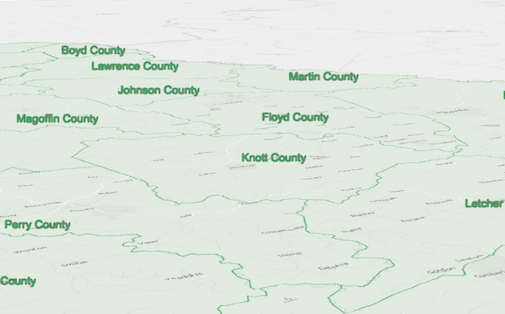
* The image below depicts a [FeatureLayer](https://developers.arcgis.com/javascript/latest/references/core/layers/FeatureLayer/) with labels defined
* by LabelSymbol3D.
*
* 
*
* @since 4.0
* @see [Symbol Builder](https://developers.arcgis.com/javascript/latest/symbol-builder/)
* @see [FeatureLayer](https://developers.arcgis.com/javascript/latest/references/core/layers/FeatureLayer/)
* @see [LabelClass](https://developers.arcgis.com/javascript/latest/references/core/layers/support/LabelClass/)
* @see [Sample - Flat vs. volumetric 3D symbol layers](https://developers.arcgis.com/javascript/latest/sample-code/symbols-points-3d/)
* @see [Sample - Line markers and label placement](https://developers.arcgis.com/javascript/latest/sample-code/visualization-line-markers/)
* @example
* let labelClass = new LabelClass({
* labelExpressionInfo: {
* expression: "$feature.COUNTY" // Text for labels comes from COUNTY field
* },
* symbol: {
* type: "label-3d", // autocasts as new LabelSymbol3D()
* symbolLayers: [{
* type: "text", // autocasts as new TextSymbol3DLayer()
* material: { color: [ 49,163,84 ] },
* size: 12 // Defined in points
* }]
* }
* });
* // Add labels to the feature layer
* featureLayer.labelsVisible = true;
* featureLayer.labelingInfo = [ labelClass ];
*/
export default class LabelSymbol3D extends Symbol3D {
constructor(properties?: LabelSymbol3DProperties);
/**
* Settings for adding a callout visualization to the symbol. Callouts are drawn from the point feature location that is being symbolized,
* to the vertical offset of the symbol. This property has no effect if [verticalOffset](https://developers.arcgis.com/javascript/latest/references/core/symbols/LabelSymbol3D/#verticalOffset) is not set. At the moment only callouts of type `line` are
* supported. See [LineCallout3D](https://developers.arcgis.com/javascript/latest/references/core/symbols/callouts/LineCallout3D/).
*
* @since 4.4
* @see [Sample: Using callout lines with labels](https://developers.arcgis.com/javascript/latest/sample-code/visualization-label-callout/)
* @example
* let symbol = {
* type: "label-3d", // autocasts as new LabelSymbol3D()
* symbolLayers: [...],
* verticalOffset: ...,
* callout: {
* type: "line", // autocasts as new LineCallout3D()
* size: 1.5,
* color: [150, 150, 150],
* border: {
* color: [50, 50, 50]
* }
* }
* };
*/
get callout(): Callout3D | null | undefined;
set callout(value: Callout3DProperties | null | undefined);
/**
* A Collection of [Symbol3DLayer](https://developers.arcgis.com/javascript/latest/references/core/symbols/Symbol3DLayer/) objects
* used to visualize the graphic or feature. Individual symbol layers
* may be autocast as objects and specified using the `type` property.
*/
get symbolLayers(): Collection<TextSymbol3DLayer>;
set symbolLayers(value: ReadonlyArrayOrCollection<TextSymbol3DLayerProperties & { type: "text"; }>);
/** The symbol type. */
get type(): "label-3d";
/**
* Shifts the symbol along the vertical world axis by a given height. The height is set in screen space units like points or pixels.
* For points displayed with a [callout](https://developers.arcgis.com/javascript/latest/references/core/symbols/LabelSymbol3D/#callout) `verticalOffset` should be set.
*
* @since 4.4
* @see [Sample: Using callout lines with labels](https://developers.arcgis.com/javascript/latest/sample-code/visualization-label-callout/)
* @example
* let symbol = {
* type: "label-3d", // autocasts as new LabelSymbol3D()
* symbolLayers: [...],
* verticalOffset: {
* screenLength: 40,
* maxWorldLength: 100,
* minWorldLength: 20
* },
* callout: ...
* };
*/
get verticalOffset(): Symbol3DVerticalOffset | null | undefined;
set verticalOffset(value: Symbol3DVerticalOffsetProperties | null | undefined);
/**
* Creates a deep clone of the symbol.
*
* @returns A deep clone of the object that
* invoked this method.
* @example
* // Creates a deep clone of the graphic's symbol
* let symLyr = graphic.symbol.clone();
*/
clone(): LabelSymbol3D;
}