@arcgis/core
Version:
ArcGIS Maps SDK for JavaScript: A complete 2D and 3D mapping and data visualization API
310 lines (308 loc) • 15.2 kB
TypeScript
import type Symbol3DLayer from "./Symbol3DLayer.js";
import type IconSymbol3DLayerResource from "./support/IconSymbol3DLayerResource.js";
import type OccludedVisibility from "./support/OccludedVisibility.js";
import type Symbol3DAnchorPosition2D from "./support/Symbol3DAnchorPosition2D.js";
import type Symbol3DIconOutline from "./support/Symbol3DIconOutline.js";
import type Symbol3DMaterial from "./support/Symbol3DMaterial.js";
import type { IconSymbol3DLayerAnchor } from "./types.js";
import type { IconSymbol3DLayerResourceProperties } from "./support/IconSymbol3DLayerResource.js";
import type { OccludedVisibilityProperties } from "./support/OccludedVisibility.js";
import type { Symbol3DAnchorPosition2DProperties } from "./support/Symbol3DAnchorPosition2D.js";
import type { Symbol3DIconOutlineProperties } from "./support/Symbol3DIconOutline.js";
import type { Symbol3DMaterialProperties } from "./support/Symbol3DMaterial.js";
import type { Symbol3DLayerProperties } from "./Symbol3DLayer.js";
export interface IconSymbol3DLayerProperties extends Symbol3DLayerProperties, Partial<Pick<IconSymbol3DLayer, "anchor" | "angle">> {
/**
* Defines the [anchor](https://developers.arcgis.com/javascript/latest/references/core/symbols/IconSymbol3DLayer/#anchor) relative to the center of the icon. It is specified as a ratio of the icon's dimensions.
* For example, a value of `{ x: 0, y: 0 }` designates the center of the icon, while a value of `{ x: -0.5, y: -0.5 }`
* causes the top-left corner of the icon to coincide with the feature geometry.
*
* This property only applies when [anchor](https://developers.arcgis.com/javascript/latest/references/core/symbols/IconSymbol3DLayer/#anchor) is set to `relative`.
*
* @since 4.11
* @example
* symbolLayer.anchor = "relative";
* symbolLayer.anchorPosition = { x: 0, y: 0.5 }; // equivalent to `anchor: "bottom"`
* @example
* symbolLayer.anchor = "relative";
* symbolLayer.anchorPosition = { x: 1.5, y: 1 }; // the anchor can be placed outside of the icon
*/
anchorPosition?: Symbol3DAnchorPosition2DProperties;
/**
* The material used to shade the icon. This property defines the icon's color.
*
* @example
* // CSS color string
* symbolLayer.material = {
* color: "dodgerblue"
* };
* @example
* // HEX string
* symbolLayer.material = {
* color: "#33cc33";
* }
* @example
* // array of RGBA values
* symbolLayer.material = {
* color: [51, 204, 51, 0.3];
* }
* @example
* // object with rgba properties
* symbolLayer.material = {
* color: {
* r: 51,
* g: 51,
* b: 204,
* a: 0.7
* }
* };
*/
material?: Symbol3DMaterialProperties | null;
/**
* Defines the occluded visibility mode of the icon.
*
* @since 5.0
*/
occludedVisibility?: OccludedVisibilityProperties | null;
/**
* The outline of the icon. The color property of this object directly modifies the overall
* color of IconSymbol3DLayer defined with the `cross` or `x` primitive.
*
* @example
* symbolLayer.outline = {
* color: "blue",
* size: "0.5px"
* };
*/
outline?: Symbol3DIconOutlineProperties | null;
/**
* The shape (`primitive`) or image URL (`href`) used to visualize the features. If both
* properties are present, `href` takes precedence and `primitive` is ignored.
*
* @default { primitive: "circle" }
* @example
* symbolLayer.resource = {
* primitive: "triangle"
* };
*/
resource?: IconSymbol3DLayerResourceProperties | null;
/**
* The size of the icon in points. This value may be autocast with a string
* expressing size in points or pixels (e.g. `12px`).
*
* @default 12
* @example
* // size in points
* symbolLayer.size = 14;
* @example
* // size in pixels
* symbolLayer.size = "20px"; // autocasts to number
* @example
* // size in points
* symbolLayer.size = "14pt"; // autocasts to number
*/
size?: number | string;
}
/**
* IconSymbol3DLayer is used to render [Point](https://developers.arcgis.com/javascript/latest/references/core/geometry/Point/) geometries
* using a flat 2D icon (e.g. a circle) with a [PointSymbol3D](https://developers.arcgis.com/javascript/latest/references/core/symbols/PointSymbol3D/)
* in a [SceneView](https://developers.arcgis.com/javascript/latest/references/core/views/SceneView/). [MapView](https://developers.arcgis.com/javascript/latest/references/core/views/MapView/) does not support
* 3D symbols. [Polygon](https://developers.arcgis.com/javascript/latest/references/core/geometry/Polygon/) features may also be rendered with
* IconSymbol3DLayers, but the icon symbol layer must be contained within a
* [PolygonSymbol3D](https://developers.arcgis.com/javascript/latest/references/core/symbols/PolygonSymbol3D/), not a [PointSymbol3D](https://developers.arcgis.com/javascript/latest/references/core/symbols/PointSymbol3D/)
* in that scenario.
*
* The shape of the icon is set in the [resource](https://developers.arcgis.com/javascript/latest/references/core/symbols/IconSymbol3DLayer/#resource) property and the color
* is set in the [material](https://developers.arcgis.com/javascript/latest/references/core/symbols/IconSymbol3DLayer/#material) property. Size may be
* defined in points or pixels with the [size](https://developers.arcgis.com/javascript/latest/references/core/symbols/IconSymbol3DLayer/#size) property. The [angle](https://developers.arcgis.com/javascript/latest/references/core/symbols/IconSymbol3DLayer/#angle) property allows to rotate the icons clockwise by specifying a number in degree.
*
* Icon `color`, `angle` and `size` can also be
* data-driven by adding [color visual variables](https://developers.arcgis.com/javascript/latest/references/core/renderers/visualVariables/ColorVariable/), [rotation visual variables](https://developers.arcgis.com/javascript/latest/references/core/renderers/visualVariables/RotationVariable/)
* and/or [size visual variables](https://developers.arcgis.com/javascript/latest/references/core/renderers/visualVariables/SizeVariable/)
* to any [Renderer](https://developers.arcgis.com/javascript/latest/references/core/renderers/Renderer/) that uses this symbol layer.
*
* IconSymbol3DLayers must be added to the `symbolLayers` property of
* either the [PointSymbol3D.symbolLayers](https://developers.arcgis.com/javascript/latest/references/core/symbols/PointSymbol3D/#symbolLayers) or
* [PolygonSymbol3D.symbolLayers](https://developers.arcgis.com/javascript/latest/references/core/symbols/PolygonSymbol3D/#symbolLayers) symbols.
* Multiple symbol layers may be used in a single symbol.
*
* Because icon symbol layers are defined in screen space (pixels/points), they can either be
* draped on the terrain, or billboarded in the view. **Billboarded** icons allow the
* symbol to face the user at all times as long as it is visible in to the
* [SceneView.camera](https://developers.arcgis.com/javascript/latest/references/core/views/SceneView/#camera). This is particularly apparent with tilted views.
* **Draped** icons drape the symbols on the surface of the terrain.
*
* Draped icons | Billboarded icons
* -------------|------------------
* [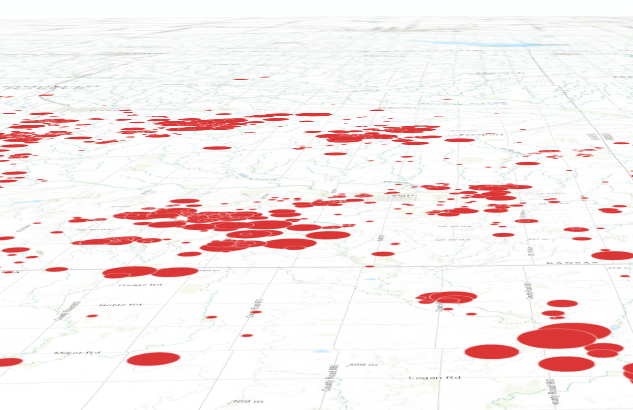](https://developers.arcgis.com/javascript/latest/sample-code/visualization-multivariate-2d/) | [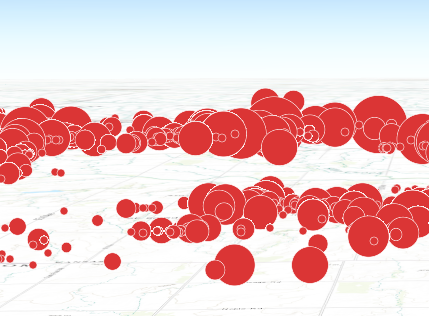](https://developers.arcgis.com/javascript/latest/sample-code/symbols-points-3d/)
*
* The ability to drape and billboard icons is controlled in the
* [FeatureLayer.elevationInfo](https://developers.arcgis.com/javascript/latest/references/core/layers/FeatureLayer/#elevationInfo) property of the
* [FeatureLayer](https://developers.arcgis.com/javascript/latest/references/core/layers/FeatureLayer/).
* Setting the `mode` to `on-the-ground` drapes the icons, whereas setting it
* to `relative-to-ground` billboards them.
*
* See [Symbol3DLayer](https://developers.arcgis.com/javascript/latest/references/core/symbols/Symbol3DLayer/) and [Symbol3D](https://developers.arcgis.com/javascript/latest/references/core/symbols/Symbol3D/) to read
* more general information about 3D symbols, symbol layers and how they relate to one another.
*
* @since 4.0
* @see [Symbol Builder](https://developers.arcgis.com/javascript/latest/symbol-builder/)
* @see [Sample - 3D icon rotation](https://developers.arcgis.com/javascript/latest/sample-code/visualization-icon-rotation-3d/)
* @see [Sample - Visualize features thematically with multiple variables (2D)](https://developers.arcgis.com/javascript/latest/sample-code/visualization-multivariate-2d/)
* @see [Sample - Flat vs. volumetric 3D symbol layers](https://developers.arcgis.com/javascript/latest/sample-code/symbols-points-3d/)
* @see [Symbol3DLayer](https://developers.arcgis.com/javascript/latest/references/core/symbols/Symbol3DLayer/)
* @see [Symbol3D](https://developers.arcgis.com/javascript/latest/references/core/symbols/Symbol3D/)
* @see [Renderer](https://developers.arcgis.com/javascript/latest/references/core/renderers/Renderer/)
* @see [ArcGIS blog - Working with icons, lines, and fill symbols](https://blogs.esri.com/esri/arcgis/2016/01/19/3d-visualization-working-with-icons-lines-and-fill-symbols/)
* @example
* let symbol = {
* type: "point-3d", // autocasts as new PointSymbol3D()
* symbolLayers: [{
* type: "icon", // autocasts as new IconSymbol3DLayer()
* angle: 90, // degree
* size: 8, // points
* resource: { primitive: "circle" },
* material: { color: "red" }
* }]
* };
*/
export default class IconSymbol3DLayer extends Symbol3DLayer {
constructor(properties?: IconSymbol3DLayerProperties);
/**
* The positioning of the icon relative to the geometry.
*
* The [anchor](https://developers.arcgis.com/javascript/latest/references/core/symbols/IconSymbol3DLayer/#anchor) is also the centre of rotation when using [angle](https://developers.arcgis.com/javascript/latest/references/core/symbols/IconSymbol3DLayer/#angle) to rotate the icon.
*
* @default "center"
*/
anchor: IconSymbol3DLayerAnchor;
/**
* Defines the [anchor](https://developers.arcgis.com/javascript/latest/references/core/symbols/IconSymbol3DLayer/#anchor) relative to the center of the icon. It is specified as a ratio of the icon's dimensions.
* For example, a value of `{ x: 0, y: 0 }` designates the center of the icon, while a value of `{ x: -0.5, y: -0.5 }`
* causes the top-left corner of the icon to coincide with the feature geometry.
*
* This property only applies when [anchor](https://developers.arcgis.com/javascript/latest/references/core/symbols/IconSymbol3DLayer/#anchor) is set to `relative`.
*
* @since 4.11
* @example
* symbolLayer.anchor = "relative";
* symbolLayer.anchorPosition = { x: 0, y: 0.5 }; // equivalent to `anchor: "bottom"`
* @example
* symbolLayer.anchor = "relative";
* symbolLayer.anchorPosition = { x: 1.5, y: 1 }; // the anchor can be placed outside of the icon
*/
get anchorPosition(): Symbol3DAnchorPosition2D;
set anchorPosition(value: Symbol3DAnchorPosition2DProperties);
/**
* The clockwise rotation angle of the icon in degrees.
*
* In a [SceneView](https://developers.arcgis.com/javascript/latest/references/core/views/SceneView/), icon rotation can be either screen-aligned
* (icons maintain a constant orientation relative to the screen, regardless of map movements)
* or map-aligned (icons rotate in conjunction with the map). For example, a map-aligned
* arrow icon placed on a road will consistently point along the road's direction,
* even as the map is rotated or tilted.
*
* This behavior depends on the `mode` property within the
* [FeatureLayer.elevationInfo](https://developers.arcgis.com/javascript/latest/references/core/layers/FeatureLayer/#elevationInfo).
* When set to `on-the-ground`, icons are draped onto the terrain, resulting in map-aligned rotation.
* Otherwise, icons are billboarded, maintaining a screen-aligned rotation.
*
* @default 0
* @since 4.31
* @example
* // rotation angle in degree
* symbolLayer.angle = 45;
*/
accessor angle: number;
/**
* The material used to shade the icon. This property defines the icon's color.
*
* @example
* // CSS color string
* symbolLayer.material = {
* color: "dodgerblue"
* };
* @example
* // HEX string
* symbolLayer.material = {
* color: "#33cc33";
* }
* @example
* // array of RGBA values
* symbolLayer.material = {
* color: [51, 204, 51, 0.3];
* }
* @example
* // object with rgba properties
* symbolLayer.material = {
* color: {
* r: 51,
* g: 51,
* b: 204,
* a: 0.7
* }
* };
*/
get material(): Symbol3DMaterial | null | undefined;
set material(value: Symbol3DMaterialProperties | null | undefined);
/**
* Defines the occluded visibility mode of the icon.
*
* @since 5.0
*/
get occludedVisibility(): OccludedVisibility | null | undefined;
set occludedVisibility(value: OccludedVisibilityProperties | null | undefined);
/**
* The outline of the icon. The color property of this object directly modifies the overall
* color of IconSymbol3DLayer defined with the `cross` or `x` primitive.
*
* @example
* symbolLayer.outline = {
* color: "blue",
* size: "0.5px"
* };
*/
get outline(): Symbol3DIconOutline | null | undefined;
set outline(value: Symbol3DIconOutlineProperties | null | undefined);
/**
* The shape (`primitive`) or image URL (`href`) used to visualize the features. If both
* properties are present, `href` takes precedence and `primitive` is ignored.
*
* @default { primitive: "circle" }
* @example
* symbolLayer.resource = {
* primitive: "triangle"
* };
*/
get resource(): IconSymbol3DLayerResource | null | undefined;
set resource(value: IconSymbol3DLayerResourceProperties | null | undefined);
/**
* The size of the icon in points. This value may be autocast with a string
* expressing size in points or pixels (e.g. `12px`).
*
* @default 12
* @example
* // size in points
* symbolLayer.size = 14;
* @example
* // size in pixels
* symbolLayer.size = "20px"; // autocasts to number
* @example
* // size in points
* symbolLayer.size = "14pt"; // autocasts to number
*/
get size(): number;
set size(value: number | string);
/** The symbol type. */
get type(): "icon";
/**
* Creates a deep clone of the symbol layer.
*
* @returns A deep clone of the object that
* invoked this method.
* @example
* // Creates a deep clone of the graphic's first symbol layer
* let symLyr = graphic.symbol.symbolLayers.at(0).clone();
*/
clone(): IconSymbol3DLayer;
}