@arcgis/core
Version:
ArcGIS Maps SDK for JavaScript: A complete 2D and 3D mapping and data visualization API
137 lines (129 loc) • 6.19 kB
TypeScript
/**
* Object containing helper methods for generating optimal settings for
* [FlowRenderer](https://developers.arcgis.com/javascript/latest/references/core/renderers/FlowRenderer/). The [getSchemes()](https://developers.arcgis.com/javascript/latest/references/core/smartMapping/symbology/flow/#getSchemes) method is used to
* generate renderer properties best suited to the basemap and theme.
*
* @since 4.23
* @see [flowRendererCreator](https://developers.arcgis.com/javascript/latest/references/core/smartMapping/raster/renderers/flow/)
*/
import type Basemap from "../../Basemap.js";
import type { FlowScheme, FlowSchemes, BasemapTheme, Theme } from "./types.js";
/**
* Returns metadata for the available themes. If a basemap is provided, returns themes that work best
* with the given basemap.
*
* @param basemap - The [Esri basemap string](https://developers.arcgis.com/javascript/latest/references/core/Map/#basemap)
* or basemap object that will be used with the returned theme(s).
* @returns Returns an object containing information about the available themes for the given basemap.
*/
export function getThemes(basemap?: Basemap | string): Theme[];
/**
* Returns a primary scheme and secondary schemes defining properties for
* flow visualizations in
* a [ImageryLayer](https://developers.arcgis.com/javascript/latest/references/core/layers/ImageryLayer/) and [ImageryTileLayer](https://developers.arcgis.com/javascript/latest/references/core/layers/ImageryTileLayer/).
* The `basemap` parameter determines the appropriate color schemes used to visualize flow lines.
*
* @param params - The function parameters.
* @returns Returns an object containing the
* primary flow scheme to use for the given basemap. Secondary schemes are also provided.
* @example
* // gets the primary scheme for the features of the given geometry type and basemap
* const schemes = flowSchemes.getSchemes({
* basemapTheme: "dark",
* theme: "wave-front"
* });
*
* // the suggested default scheme for the layer, basemap, and theme
* let primaryScheme = schemes.primaryScheme;
*/
export function getSchemes(params: GetSchemesParameters): FlowSchemes | null | undefined;
/**
* Returns the flow scheme with the given name.
*
* @param params - The function parameters.
* @returns Returns the scheme matching the given name.
* @example
* // Constructs the scheme using the Perfect Pigtails color ramp.
* const schemes = flowSchemes.getSchemeByName({
* name: "Perfect Pigtails",
* basemapTheme: "dark",
* theme: "wave-front"
* });
*/
export function getSchemeByName(params: GetSchemesByNameParameters): FlowScheme | null | undefined;
/**
* Returns the flow schemes filtered by tags included and excluded from the paramters.
*
* @param params - The function parameters.
* @returns Returns an array of flow schemes
* with the given tags included in the search and excluding the given tags excluded from the search.
* @example
* // returns colorblind friendly red color schemes
* const schemes = flowSchemes.getSchemesByTag({
* basemapTheme: "dark",
* theme: "wave-front",
* includedTags: [ "reds", "colorblind-friendly" ]
* });
*/
export function getSchemesByTag(params: GetSchemesByTagParameters): FlowScheme[];
/**
* Clones a flow scheme object.
*
* @param scheme - The flow scheme object to clone.
* @returns Returns
* a clone of the given color scheme object.
* @example
* // clones the primary scheme returned from the getSchemes() method
* let flowScheme = primaryScheme.clone();
*/
export function cloneScheme(scheme: FlowScheme | null | undefined): FlowScheme | null | undefined;
export interface GetSchemesParameters {
/**
* The Esri basemap to pair with the visualization. This
* value indicates the best colors for visualizing flow lines against the given basemap. If you have a
* non-Esri basemap (e.g. a VectorTileLayer basemap with a custom style) or no basemap at all, then use the `basemapTheme` parameter
* instead of this parameter.
*/
basemap?: Basemap | string | null;
/**
* Determines how flow lines will render.
* Possible values are listed below.
* | Value | Description | Example |
* | ----- | ----------- | ------- |
* | flow-line | Renders the uv and magnitude data as animated flow lines. This is ideal for representing wind and other atmospheric data. | 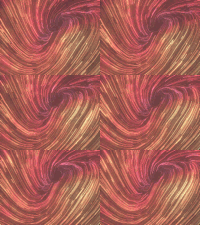 |
* | wave-front | Renders UV and magnitude data in a wave-like animation. This theme works well for ocean data. | 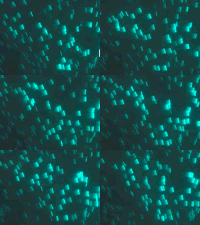 |
*
* > [!WARNING]
* >
* > **Known Limitations**
* >
* > The `wave-front` flow theme is not supported in 3D [SceneView](https://developers.arcgis.com/javascript/latest/references/core/views/SceneView/).
*
* @default "flow-line"
*/
theme?: "flow-line" | "wave-front" | null;
/**
* If you have a
* non-Esri basemap (e.g. a VectorTileLayer basemap with a custom style) or no basemap at all, use this parameter to indicate
* whether the background of the visualization is `light` or `dark`.
*/
basemapTheme?: BasemapTheme | null;
}
export interface GetSchemesByNameParameters extends GetSchemesParameters {
/** The name of the desired scheme. */
name: string;
}
export interface GetSchemesByTagParameters extends GetSchemesParameters {
/**
* When provided, only schemes containing all the matching tags will be returned.
*
* **Known Tags:** light | dark | reds | yellows | oranges | greens | blues | purples | pinks | browns | grays | bright | subdued | colorblind-friendly | diverging | sequential | 3d
*/
includedTags?: string[] | null;
/**
* When provided, only schemes excluding all the provided tags will be returned.
*
* **Known Tags:** light | dark | reds | yellows | oranges | greens | blues | purples | pinks | browns | grays | bright | subdued | colorblind-friendly | diverging | sequential | 3d
*/
excludedTags?: string[] | null;
}