@arcgis/core
Version:
ArcGIS Maps SDK for JavaScript: A complete 2D and 3D mapping and data visualization API
165 lines (162 loc) • 7.29 kB
TypeScript
/**
* This object contains helper methods for generating a [FlowRenderer](https://developers.arcgis.com/javascript/latest/references/core/renderers/FlowRenderer/) for a
* `Vector-UV` or `Vector-MagDir` [ImageryLayer](https://developers.arcgis.com/javascript/latest/references/core/layers/ImageryLayer/) or
* [ImageryTileLayer](https://developers.arcgis.com/javascript/latest/references/core/layers/ImageryTileLayer/).
*
* The [createRenderer()](https://developers.arcgis.com/javascript/latest/references/core/smartMapping/raster/renderers/flow/#createRenderer) method in this module generates a renderer that may be
* applied directly to the input layer.
*
* > [!WARNING]
* >
* > **Known Limitations**
* >
* > FlowRenderer is only supported with [ImageryTileLayer](https://developers.arcgis.com/javascript/latest/references/core/layers/ImageryTileLayer/) and
* > [ImageryLayer](https://developers.arcgis.com/javascript/latest/references/core/layers/ImageryLayer/) where the
* > [source type](https://pro.arcgis.com/en/pro-app/latest/help/data/imagery/raster-dataset-properties.htm)
* > is `Vector-UV` or `Vector-MagDir`.
*
* @since 4.23
*/
import type FlowRenderer from "../../../renderers/FlowRenderer.js";
import type RotationVariable from "../../../renderers/visualVariables/RotationVariable.js";
import type { VisualVariable } from "../../../renderers/types.js";
import type { RendererLegendOptionsProperties } from "../../../renderers/support/RendererLegendOptions.js";
import type { RasterRendererParameters } from "./types.js";
import type { SummaryStatisticsResult } from "../../statistics/types.js";
import type { FlowScheme } from "../../symbology/types.js";
import type { MapViewOrSceneView } from "../../../views/MapViewOrSceneView.js";
/**
* Generates a [FlowRenderer](https://developers.arcgis.com/javascript/latest/references/core/renderers/FlowRenderer/) to display raster data with streamlines.
* This renderer is often used for visualizing flow direction and magnitude information in meteorology
* and oceanography raster data.
*
* @param parameters - Input parameters for generating a flow visualization.
* @returns Resolves
* to an object containing a FlowRenderer that can be set on the input layer.
* @example
* const { renderer } = await flowRendererCreator.createRenderer({
* layer,
* view,
* theme: "wave-front",
* flowRepresentation: "flow-to"
* });
*
* // renders animated wave-like lines on the raster
* layer.renderer = renderer;
*/
export function createRenderer(parameters: FlowRendererParameters): Promise<FlowRendererResult>;
export interface FlowRendererParameters extends RasterRendererParameters {
/**
* Defines the flow direction of the
* data. This can be modified to display meteorological (the direction it is flowing from) or
* oceanographic data (the direction it is flowing to). See
* [FlowRenderer.flowRepresentation](https://developers.arcgis.com/javascript/latest/references/core/renderers/FlowRenderer/#flowRepresentation)
* for more information.
*/
flowRepresentation?: FlowRenderer["flowRepresentation"] | null;
/**
* Determines how flow lines will render.
* Possible values are listed below.
* | Value | Description | Example |
* | ----- | ----------- | ------- |
* | flow-line | Renders the uv and magnitude data as animated flow lines. This is ideal for representing wind and other atmospheric data. | 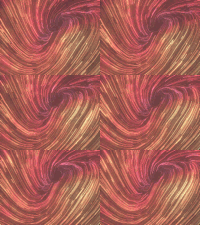 |
* | wave-front | Renders UV and magnitude data in a wave-like animation. This theme works well for ocean data. | 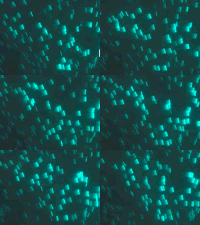 |
*
* > [!WARNING]
* >
* > **Known Limitations**
* >
* > The `wave-front` flow theme is not supported in 3D [SceneView](https://developers.arcgis.com/javascript/latest/references/core/views/SceneView/).
*
* @default "flow-line"
*/
theme?: "flow-line" | "wave-front" | null;
/**
* When `true`, the color of streamlines will vary
* depending on the magnitude of the data. Flow lines with stronger
* magnitude values will have bright colors on dark backgrounds and dark colors on light backgrounds, giving
* them more prominence.
*
* @default false
*/
includeColorVariable?: boolean | null;
/**
* When `true`, the width of streamlines will vary
* depending on the magnitude of the data. Flow lines with stronger
* magnitude values will be wider than lines with weaker magnitude values, giving
* them more prominence.
*
* @default false
*/
includeSizeVariable?: boolean | null;
/**
* When `true`, the opacity of streamlines will vary
* depending on the magnitude of the data. Flow lines with stronger
* magnitude values will be more opaque than lines with weaker magnitude values, giving
* them more prominence.
*
* @default false
*/
includeOpacityVariable?: boolean | null;
/**
* Provides options for setting a title to the renderer in the
* [Legend](https://developers.arcgis.com/javascript/latest/references/map-components/components/arcgis-legend/).
*/
legendOptions?: RendererLegendOptionsProperties | null;
/**
* The flow scheme
* used to set colors and sizes to the flow lines.
*/
flowScheme?: FlowScheme | null;
/**
* The view where the input layer is rendered. This method
* inspects the view's background (i.e. basemap, web map background, or view container) to determine optimal
* colors for the output renderer. This parameter should always be set in practice, but if not provided
* this method will assume the generated renderer will display on a light background.
*/
view?: MapViewOrSceneView | null;
}
/**
* The result object of the [createRenderer()](https://developers.arcgis.com/javascript/latest/references/core/smartMapping/raster/renderers/flow/#createRenderer) method. See the table
* below for details of each property.
*/
export interface FlowRendererResult {
/**
* The FlowRenderer renderer to apply
* to the input layer.
*/
renderer: FlowRenderer;
/**
* The flow scheme
* used to set colors and sizes to the flow lines.
*/
flowScheme: FlowScheme;
/**
* Visual variables
* included in the output renderer.
*/
visualVariables: Exclude<VisualVariable, RotationVariable>[];
/**
* A suggested layer effect to apply to the input layer. When the
* `basemapTheme` is dark, a bloom is suggested to add to the layer.
*
* > [!WARNING]
* >
* > **Known Limitations**
* >
* > The layer effects are not supported in 3D [SceneView](https://developers.arcgis.com/javascript/latest/references/core/views/SceneView/).
*/
layerEffect: string;
/** Summary statistics of the raster layer. */
statistics: SummaryStatisticsResult;
/**
* The ID of the basemap used to determine the optimal
* color of the flow lines.
*/
basemapId?: string | null;
/**
* Indicates whether the average color of the input view's
* basemap is `light` or `dark`.
*/
basemapTheme?: string | null;
}