@arcgis/core
Version:
ArcGIS Maps SDK for JavaScript: A complete 2D and 3D mapping and data visualization API
84 lines (82 loc) • 5.06 kB
TypeScript
import type VisualVariable from "./VisualVariable.js";
import type { VisualVariableProperties } from "./VisualVariable.js";
export interface RotationVariableProperties extends VisualVariableProperties, Partial<Pick<RotationVariable, "axis" | "rotationType">> {}
/**
* The rotation visual variable, determined by mapping the values to data in a field or
* by other arithmetic means with an Arcade expression, controls how features rendered with
* [marker symbols](https://developers.arcgis.com/javascript/latest/references/core/symbols/MarkerSymbol/) or [text symbols](https://developers.arcgis.com/javascript/latest/references/core/symbols/TextSymbol/) in a [MapView](https://developers.arcgis.com/javascript/latest/references/core/views/MapView/) ,
* as well as with [marker symbols](https://developers.arcgis.com/javascript/latest/references/core/symbols/MarkerSymbol/), [ObjectSymbol3DLayer](https://developers.arcgis.com/javascript/latest/references/core/symbols/ObjectSymbol3DLayer/) or [IconSymbol3DLayer](https://developers.arcgis.com/javascript/latest/references/core/symbols/IconSymbol3DLayer/) in a [SceneView](https://developers.arcgis.com/javascript/latest/references/core/views/SceneView/),
* are rotated. The final rotation is derived by adding the mapped or calculated rotation
* value to the symbol's initial `angle`.
*
* This object may be used to depict variables such as wind direction, vehicle heading, trend indicators, etc.
*
* [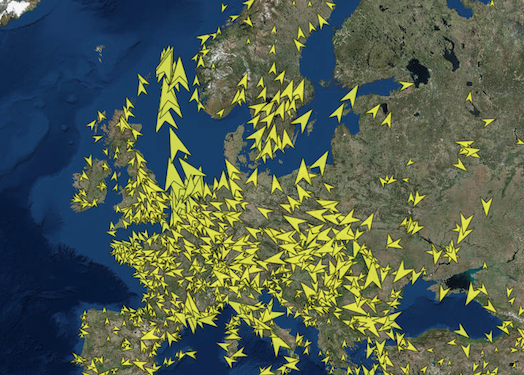](https://developers.arcgis.com/javascript/latest/sample-code/visualization-vv-rotation/)
*
* > [!WARNING]
* >
* > **Known Limitations**
* >
* > In a [SceneView](https://developers.arcgis.com/javascript/latest/references/core/views/SceneView/) rotation visual variables are not currently supported
* > with [text symbols](https://developers.arcgis.com/javascript/latest/references/core/symbols/TextSymbol/) and
* > [3D text symbol layers](https://developers.arcgis.com/javascript/latest/references/core/symbols/TextSymbol3DLayer/).
*
* @since 4.10
* @see [Sample - Visualize data with rotation](https://developers.arcgis.com/javascript/latest/sample-code/visualization-vv-rotation/)
* @see [Sample - 3D icon rotation](https://developers.arcgis.com/javascript/latest/sample-code/visualization-icon-rotation-3d/)
* @example
* const rotationVisualVariable = {
* type: "rotation",
* field: "heading",
* rotationType: "geographic"
* };
* renderer.visualVariables = [ rotationVisualVariable ];
*/
export default class RotationVariable extends VisualVariable {
constructor(properties?: RotationVariableProperties);
/**
* Only applicable when working in a [SceneView](https://developers.arcgis.com/javascript/latest/references/core/views/SceneView/) with an [ObjectSymbol3DLayer](https://developers.arcgis.com/javascript/latest/references/core/symbols/ObjectSymbol3DLayer/).
* Defines the axis the rotation visual variable should be applied to when rendering features with an
* [ObjectSymbol3DLayer](https://developers.arcgis.com/javascript/latest/references/core/symbols/ObjectSymbol3DLayer/).
*
* If the symbol resource is aligned such that its forward facing side points in the direction of the y-axis
* (the y-axis always points North in WGS84 or WebMercator coordinates), its upwards facing side is pointing
* in the direction of the z-axis, and its right-hand side points in the direction of the x-axis (the x-axis
* always points East in WGS84 or WebMercator coordinates), then the following rotation axis will rotate the
* symbol as indicated by their name.
*
* Possible Value | Description
* ----------------|-----------
* heading | The rotation of the symbol in the horizontal plane (i.e., around the z axis).
* tilt | The rotation of the symbol in the longitudinal vertical plane (i.e., around the x axis).
* roll | The rotation of the symbol in the lateral vertical plane (i.e., around the y axis).
*
* @default "heading"
*/
accessor axis: "heading" | "tilt" | "roll";
/**
* Defines the origin and direction of rotation depending
* on how the angle of rotation was measured. See the table below for a list of possible values.
* This property only applies to rotations around the `heading` axis.
*
* Value | Description
* ------|------------
* geographic | Rotates the symbol from the north in a clockwise direction.
* arithmetic | Rotates the symbol from the east in a counter-clockwise direction.
*
* @default "geographic"
*/
accessor rotationType: "geographic" | "arithmetic";
/** The visual variable type. */
get type(): "rotation";
/**
* Creates a deep clone of the RotationVariable.
*
* @returns A deep clone of the rotation
* visual variable that invoked this method.
* @example
* // Creates a deep clone of the visual variable
* let renderer = renderer.visualVariables[0].clone();
*/
clone(): RotationVariable;
}