@arcgis/core
Version:
ArcGIS Maps SDK for JavaScript: A complete 2D and 3D mapping and data visualization API
93 lines (91 loc) • 5.04 kB
TypeScript
import type VisualVariable from "./VisualVariable.js";
import type ColorStop from "./support/ColorStop.js";
import type { VisualVariableProperties } from "./VisualVariable.js";
import type { ColorStopProperties } from "./support/ColorStop.js";
export interface ColorVariableProperties extends VisualVariableProperties, Partial<Pick<ColorVariable, "normalizationField">> {
/**
* An array of sequential objects, or stops, that defines a continuous color ramp.
* You must specify 2 - 8 stops. In most cases, no more than five are needed. Features with values that fall
* between the given stops will be assigned colors
* linearly interpolated along the ramp in relation to the nearest stop values. The stops must be listed in ascending order
* based on the value of the `value` property in each stop.
*/
stops?: ColorStopProperties[];
}
/**
* The color visual variable is used to visualize features along a continuous color ramp based
* on the values of a numeric attribute [field](https://developers.arcgis.com/javascript/latest/references/core/renderers/visualVariables/ColorVariable/#field) or an [expression](https://developers.arcgis.com/javascript/latest/references/core/renderers/visualVariables/ColorVariable/#valueExpression).
* The color ramp is defined along a sequence of [stops](https://developers.arcgis.com/javascript/latest/references/core/renderers/visualVariables/ColorVariable/#stops), where color values are mapped to data values.
* Data values that fall between two stops are assigned a color that is linearly interpolated based on the
* value's position relative to the closest defined stops.
*
* For [CIMSymbol](https://developers.arcgis.com/javascript/latest/references/core/symbols/CIMSymbol/)s, the color value is applied only to symbol layers that aren't color locked.
*
* [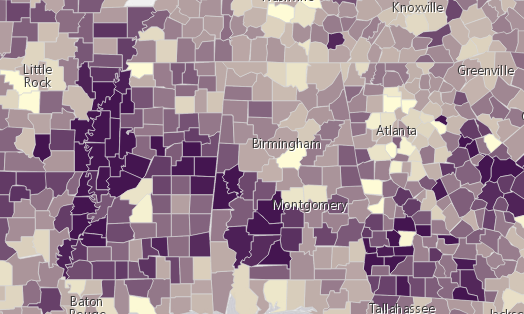](https://developers.arcgis.com/javascript/latest/sample-code/visualization-vv-color/)
*
* @since 4.10
* @see [Sample - Continuous color](https://developers.arcgis.com/javascript/latest/sample-code/visualization-vv-color/)
* @see [Guide - Esri color ramps](https://developers.arcgis.com/javascript/latest/esri-color-ramps/)
* @see [Guide - Visualization best practices](https://developers.arcgis.com/javascript/latest/visualization-best-practices/)
* @see [Sample - Visualize features thematically with extrusion](https://developers.arcgis.com/javascript/latest/sample-code/visualization-vv-extrusion/)
* @see [Sample - Visualize features thematically with multiple variables (3D)](https://developers.arcgis.com/javascript/latest/sample-code/visualization-multivariate-3d/)
* @see [Sample - Visualize features thematically with multiple variables (2D)](https://developers.arcgis.com/javascript/latest/sample-code/visualization-multivariate-2d/)
* @example
* // Population per square kilometer
* const colorVisVar = {
* type: "color",
* field: "POPULATION",
* normalizationField: "SQ_KM",
* stops: [
* { value: 30, color: "#fffcd4" },
* { value: 6000, color: "#0d2644" }
* ],
* legendOptions: {
* title: "Population per square kilometer"
* }
* };
* renderer.visualVariables = [ colorVisVar ];
* @example
* // color visual variable with arcade expression
* // voter turnout
* const colorVisVar = {
* type: "color",
* valueExpression: "( $feature.TOT_VOTES / $feature.REG_VOTERS ) * 100",
* valueExpressionTitle: "Voter Turnout",
* stops: [
* { value: 30, color: "#fffcd4" },
* { value: 70, color: "#0d2644" }
* ]
* };
* renderer.visualVariables = [ colorVisVar ];
*/
export default class ColorVariable extends VisualVariable {
constructor(properties?: ColorVariableProperties);
/**
* Name of the numeric attribute field by which to normalize
* the data. If this field is used, then the values in [stops](https://developers.arcgis.com/javascript/latest/references/core/renderers/visualVariables/ColorVariable/#stops) should be
* normalized as percentages or ratios.
*/
accessor normalizationField: string | null | undefined;
/**
* An array of sequential objects, or stops, that defines a continuous color ramp.
* You must specify 2 - 8 stops. In most cases, no more than five are needed. Features with values that fall
* between the given stops will be assigned colors
* linearly interpolated along the ramp in relation to the nearest stop values. The stops must be listed in ascending order
* based on the value of the `value` property in each stop.
*/
get stops(): ColorStop[];
set stops(value: ColorStopProperties[]);
/** The visual variable type. */
get type(): "color";
/**
* Creates a deep clone of the ColorVariable.
*
* @returns A deep clone of the color
* visual variable that invoked this method.
* @example
* // Creates a deep clone of the visual variable
* let renderer = renderer.visualVariables[0].clone();
*/
clone(): ColorVariable;
}