@arcgis/core
Version:
ArcGIS Maps SDK for JavaScript: A complete 2D and 3D mapping and data visualization API
111 lines (109 loc) • 7.75 kB
TypeScript
import type BaseContent from "./Content.js";
import type RelatedRecordsInfoFieldOrder from "../support/RelatedRecordsInfoFieldOrder.js";
import type { ClonableMixin } from "../../core/Clonable.js";
import type { RelatedRecordsInfoFieldOrderProperties } from "../support/RelatedRecordsInfoFieldOrder.js";
import type { ContentProperties as BaseContentProperties } from "./Content.js";
export interface RelationshipContentProperties extends BaseContentProperties, Partial<Pick<RelationshipContent, "description" | "displayCount" | "displayType" | "relationshipId" | "title">> {
/** An array of [RelatedRecordsInfoFieldOrder](https://developers.arcgis.com/javascript/latest/references/core/popup/support/RelatedRecordsInfoFieldOrder/) indicating the display order for the related records, and whether they should be sorted in ascending `asc` or descending `desc` order. */
orderByFields?: RelatedRecordsInfoFieldOrderProperties[] | null;
}
/**
* A `RelationshipContent` popup element represents a relationship element associated with a feature.
* This can only be configured if the related layer or table is added to the map.
*
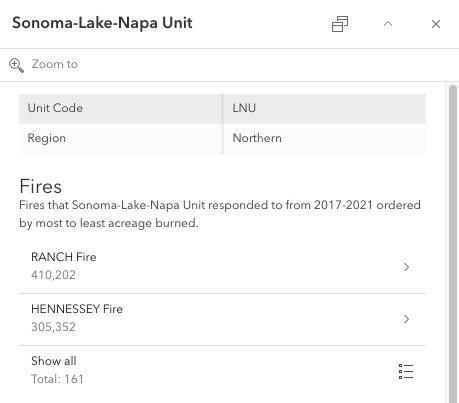
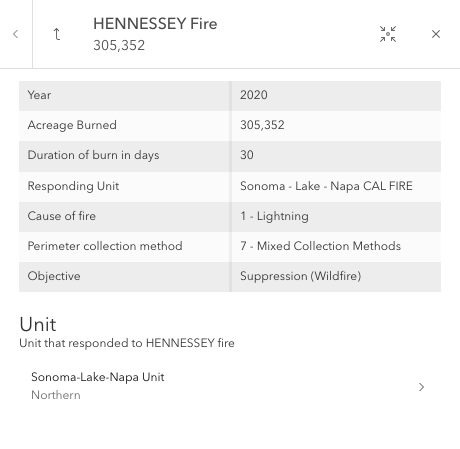
* `RelationshipContent` provides a way to browse related records of the current selected feature within its popup, as shown in the images below.
* The Origin Feature image shows a popup template configured with `RelationshipContent`.
* When selecting one of the related features in the list, the popup template for the chosen related destination feature displays.
* The Related Destination Feature image shows the destination popup template `content` with
* [FieldsContent](https://developers.arcgis.com/javascript/latest/references/core/popup/content/FieldsContent/) and `RelationshipContent` configured.
* When exploring a related feature's `RelationshipContent`, one could navigate into that feature's related records or
* exit the origin feature's related record exploration with the arrow button.
*
* | Origin Feature | Related Destination Feature |
* | -------------- | ------------- |
* |  |  |
*
* > [!WARNING]
* >
* > **Note**
* > The related layer or table must also be added to the map to be able to configure `RelationshipContent`.
* > For feature services, viewing related records is only supported for ArcGIS Online and ArcGIS Enterprise version 11.2 or higher.
* > For map services, viewing related records is only supported for ArcGIS Online and ArcGIS Enterprise version 11.3 or higher.
* > Starting at version 4.32, `RelationshipContent` can be configured on [SubtypeSublayer popup templates](https://developers.arcgis.com/javascript/latest/references/core/layers/support/SubtypeSublayer/#popupTemplate) when both the origin and destination features belong to a [SubtypeGroupLayer](https://developers.arcgis.com/javascript/latest/references/core/layers/SubtypeGroupLayer/).
*
* @since 4.25
* @see [PopupTemplate](https://developers.arcgis.com/javascript/latest/references/core/PopupTemplate/)
* @see [Content](https://developers.arcgis.com/javascript/latest/references/core/popup/content/Content/)
* @see [Sample - Browse related records in a popup](https://developers.arcgis.com/javascript/latest/sample-code/popuptemplate-browse-related-records/)
* @example
* // Create the RelationshipContent popup element
* const relationshipContent = new RelationshipContent({
* relationshipId: 3,
* title: "Cities in {COUNTY_NAME}",
* description: "All the cities that reside in {COUNTY_NAME}.",
* displayCount: 3,
* // Autocasts as new array of RelatedRecordsInfoFieldOrder objects
* orderByFields: [{
* field: "CITY",
* order: "asc"
* }]
* });
* @example
* // Create the RelationshipContent popup element
* // and add it to the popup template content for the layer.
* layer.popupTemplate.content = [{
* // Autocasts as new RelationshipContent object
* type: "relationship",
* relationshipId: 1,
* title: "Hydrant Maintenance Inspections",
* description: "Hydrant maintenance inspections for {expression/asset}",
* displayCount: 5,
* // Autocasts as new array of RelatedRecordsInfoFieldOrder objects
* orderByFields: [{
* field: "INSTALLDATE",
* order: "desc"
* }]
* }];
*/
export default class RelationshipContent extends RelationshipContentSuperclass {
constructor(properties?: RelationshipContentProperties);
/** Describes the relationship's content in detail. Starting at version 4.30, the `description` supports rendering HTML. */
accessor description: string | null | undefined;
/**
* A numeric value indicating the maximum number of related features to display in the list of related records.
* The maximum number of related records to display in the list of related records is 10.
* If no value is specified, the `Show all` button will be available to display all related records.
*/
accessor displayCount: number;
/**
* A string value indicating how to display related records within the relationship content.
*
* | Value | Description |
* | ------ | ----------- |
* | list | Shows a list of related records from the specified relationship. |
*
* @default "list"
*/
accessor displayType: "list";
/** An array of [RelatedRecordsInfoFieldOrder](https://developers.arcgis.com/javascript/latest/references/core/popup/support/RelatedRecordsInfoFieldOrder/) indicating the display order for the related records, and whether they should be sorted in ascending `asc` or descending `desc` order. */
get orderByFields(): RelatedRecordsInfoFieldOrder[] | null | undefined;
set orderByFields(value: RelatedRecordsInfoFieldOrderProperties[] | null | undefined);
/** The numeric id value for the defined relationship. This value can be found on the [service](https://developers.arcgis.com/rest/services-reference/enterprise/feature-service.htm) itself or on the service's [relationships resource](https://developers.arcgis.com/rest/services-reference/enterprise/relationships-feature-service-.htm) if `supportsRelationshipResource` is `true`. */
accessor relationshipId: number;
/** A heading indicating what the relationship's content represents. Starting at version 4.30, the `title` supports rendering HTML. */
accessor title: string | null | undefined;
/**
* The type of popup element displayed.
*
* @see [TextContent](https://developers.arcgis.com/javascript/latest/references/core/popup/content/TextContent/)
* @see [FieldsContent](https://developers.arcgis.com/javascript/latest/references/core/popup/content/FieldsContent/)
* @see [MediaContent](https://developers.arcgis.com/javascript/latest/references/core/popup/content/MediaContent/)
* @see [AttachmentsContent](https://developers.arcgis.com/javascript/latest/references/core/popup/content/AttachmentsContent/)
* @see [CustomContent](https://developers.arcgis.com/javascript/latest/references/core/popup/content/CustomContent/)
* @see [ExpressionContent](https://developers.arcgis.com/javascript/latest/references/core/popup/content/ExpressionContent/)
* @see [RelationshipContent](https://developers.arcgis.com/javascript/latest/references/core/popup/content/RelationshipContent/)
* @see [UtilityNetworkAssociationsContent](https://developers.arcgis.com/javascript/latest/references/core/popup/content/UtilityNetworkAssociationsContent/)
*/
get type(): "relationship";
}
declare const RelationshipContentSuperclass: typeof BaseContent & typeof ClonableMixin