@arcgis/core
Version:
ArcGIS Maps SDK for JavaScript: A complete 2D and 3D mapping and data visualization API
130 lines (128 loc) • 8.22 kB
TypeScript
import type BaseContent from "./Content.js";
import type AttachmentsOrderByInfo from "../support/AttachmentsOrderByInfo.js";
import type { ClonableMixin } from "../../core/Clonable.js";
import type { AttachmentsOrderByInfoProperties } from "../support/AttachmentsOrderByInfo.js";
import type { ContentProperties as BaseContentProperties } from "./Content.js";
export interface AttachmentsContentProperties extends BaseContentProperties, Partial<Pick<AttachmentsContent, "attachmentKeywords" | "attachmentTypes" | "description" | "displayType" | "title">> {
/**
* An array of [AttachmentsOrderByInfo](https://developers.arcgis.com/javascript/latest/references/core/popup/support/AttachmentsOrderByInfo/) indicating the display order for the attachments, and whether they should be sorted in ascending or descending order.
* This only applies if the feature layer capabilities supports [attachment.supportsOrderByFields](https://developers.arcgis.com/javascript/latest/references/core/layers/FeatureLayer/#capabilities).
*
* @since 4.32
* @example
* // Sort the attachments by their `ATT_NAME` attribute in descending order
* const attachmentsElement = new AttachmentsContent({
* orderByFields: [
* { field: "ATT_NAME", order: "descending" }
* ]
* });
*/
orderByFields?: AttachmentsOrderByInfoProperties[] | null;
}
/**
* An `AttachmentsContent` popup element represents an attachment element associated with a
* feature. This resource is available only if the [FeatureLayer.capabilities.data.supportsAttachment](https://developers.arcgis.com/javascript/latest/references/core/layers/FeatureLayer/#capabilities)
* or the [Sublayer.capabilities.data.supportsAttachment](https://developers.arcgis.com/javascript/latest/references/core/layers/support/Sublayer/#capabilities) is `true`.
*
* | Preview view | List view |
* | ---- | ---- |
* | 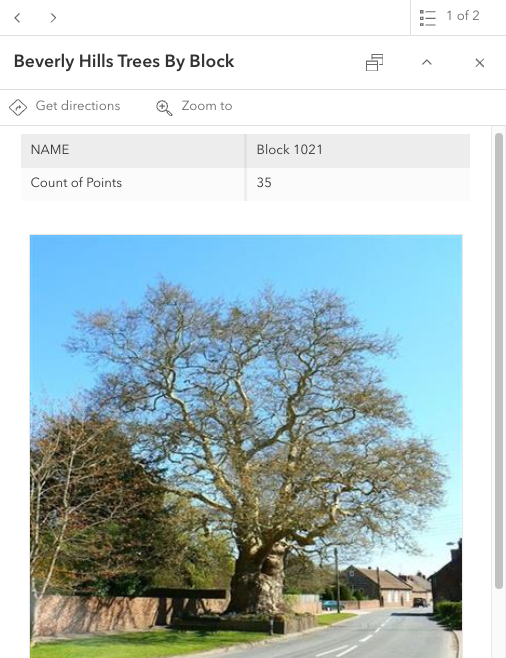| 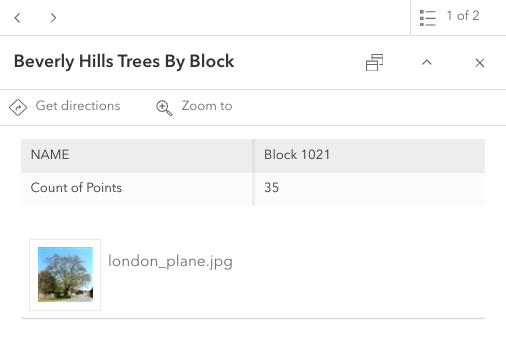 |
*
* @since 4.11
* @see [PopupTemplate](https://developers.arcgis.com/javascript/latest/references/core/PopupTemplate/)
* @see [AttachmentInfo](https://developers.arcgis.com/javascript/latest/references/core/rest/query/support/AttachmentInfo/)
* @see [Sample - Intro to PopupTemplate](https://developers.arcgis.com/javascript/latest/sample-code/intro-popuptemplate/)
* @example
* // Create the AttachmentsContent popup element
* // If the selected feature has attributes associated with it, they will display within the popup
* let attachmentsElement = new AttachmentsContent({
* // Shows all attachments as a list of linked files
* displayType: "list",
* // Sorts the attachments by their `ATT_NAME` attachmentInfo field in descending order
* orderByFields: [{ field: "ATT_NAME", order: "descending" }]
* });
*
* // Create the PopupTemplate
* let template = new PopupTemplate({
* title: "Beverly Hills trees by block",
* outFields: ["*"],
* content: [attachmentsElement]
* });
*/
export default class AttachmentsContent extends AttachmentsContentSuperclass {
constructor(properties?: AttachmentsContentProperties);
/**
* An array of strings used to identify attachment(s). When keywords are specified, attachments will be filtered using this array of keywords.
* Matching is case-sensitive and requires exact keyword matches; partial matches are not supported.
*
* @since 4.34
* @see [AttachmentInfo.keywords](https://developers.arcgis.com/javascript/latest/references/core/rest/query/support/AttachmentInfo/#keywords)
* @see [AttachmentQuery.keywords](https://developers.arcgis.com/javascript/latest/references/core/rest/support/AttachmentQuery/#keywords)
* @see [Query Attachments REST API operation](https://developers.arcgis.com/rest/services-reference/enterprise/query-attachments-feature-service-layer/)
*/
accessor attachmentKeywords: string[] | null | undefined;
/**
* An array of strings representing MIME types. Attachments will be filtered based on the specified array of MIME types.
*
* @since 4.34
* @see [AttachmentInfo.contentType](https://developers.arcgis.com/javascript/latest/references/core/rest/query/support/AttachmentInfo/#contentType)
* @see [AttachmentQuery.attachmentTypes](https://developers.arcgis.com/javascript/latest/references/core/rest/support/AttachmentQuery/#attachmentTypes)
* @see [Query Attachments REST API operation](https://developers.arcgis.com/rest/services-reference/enterprise/query-attachments-feature-service-layer/)
*/
accessor attachmentTypes: ("application" | "audio" | "image" | "model" | "text" | "video")[] | null | undefined;
/**
* Describes the attachment's content in detail. Starting at version 4.30, the `description` supports rendering HTML.
*
* @since 4.19
*/
accessor description: string | null | undefined;
/**
* A string value indicating how to display an attachment.
*
* | Value | Description |
* | ------ | ----------- |
* | auto | The attachments will display in `preview` mode if the [feature layer capabilities](https://developers.arcgis.com/javascript/latest/references/core/layers/FeatureLayer/#capabilities) or [sublayer capabilites](https://developers.arcgis.com/javascript/latest/references/core/layers/support/Sublayer/#capabilities) support resized attachments. Otherwise, the attachments are displayed in `list` mode. |
* | preview | Shows a thumbnail image of the attachment.|
* | list | Shows a list of attachment links. |
*
* @default "auto"
* @since 4.22
*/
accessor displayType: "auto" | "preview" | "list";
/**
* An array of [AttachmentsOrderByInfo](https://developers.arcgis.com/javascript/latest/references/core/popup/support/AttachmentsOrderByInfo/) indicating the display order for the attachments, and whether they should be sorted in ascending or descending order.
* This only applies if the feature layer capabilities supports [attachment.supportsOrderByFields](https://developers.arcgis.com/javascript/latest/references/core/layers/FeatureLayer/#capabilities).
*
* @since 4.32
* @example
* // Sort the attachments by their `ATT_NAME` attribute in descending order
* const attachmentsElement = new AttachmentsContent({
* orderByFields: [
* { field: "ATT_NAME", order: "descending" }
* ]
* });
*/
get orderByFields(): AttachmentsOrderByInfo[] | null | undefined;
set orderByFields(value: AttachmentsOrderByInfoProperties[] | null | undefined);
/**
* A heading indicating what the attachment's content represents. Starting at version 4.30, the `title` supports rendering HTML.
*
* @since 4.19
*/
accessor title: string | null | undefined;
/**
* The type of popup element displayed.
*
* @default "attachments"
* @see [TextContent](https://developers.arcgis.com/javascript/latest/references/core/popup/content/TextContent/)
* @see [FieldsContent](https://developers.arcgis.com/javascript/latest/references/core/popup/content/FieldsContent/)
* @see [MediaContent](https://developers.arcgis.com/javascript/latest/references/core/popup/content/MediaContent/)
* @see [AttachmentsContent](https://developers.arcgis.com/javascript/latest/references/core/popup/content/AttachmentsContent/)
* @see [CustomContent](https://developers.arcgis.com/javascript/latest/references/core/popup/content/CustomContent/)
* @see [ExpressionContent](https://developers.arcgis.com/javascript/latest/references/core/popup/content/ExpressionContent/)
* @see [RelationshipContent](https://developers.arcgis.com/javascript/latest/references/core/popup/content/RelationshipContent/)
* @see [UtilityNetworkAssociationsContent](https://developers.arcgis.com/javascript/latest/references/core/popup/content/UtilityNetworkAssociationsContent/)
*/
get type(): "attachments";
}
declare const AttachmentsContentSuperclass: typeof BaseContent & typeof ClonableMixin