@arcgis/core
Version:
ArcGIS Maps SDK for JavaScript: A complete 2D and 3D mapping and data visualization API
403 lines (401 loc) • 21.5 kB
TypeScript
import type LabelExpressionInfo from "./LabelExpressionInfo.js";
import type LabelSymbol3D from "../../symbols/LabelSymbol3D.js";
import type TextSymbol from "../../symbols/TextSymbol.js";
import type { JSONSupport } from "../../core/JSONSupport.js";
import type { PlacementType3D, PointPlacement, PolylinePlacement, PolygonPlacement } from "./types.js";
import type { LabelPosition } from "../../portal/jsonTypes.js";
import type { LabelExpressionInfoProperties } from "./LabelExpressionInfo.js";
import type { LabelSymbol3DProperties } from "../../symbols/LabelSymbol3D.js";
import type { TextSymbolProperties } from "../../symbols/TextSymbol.js";
export interface LabelClassProperties extends Partial<Pick<LabelClass, "allowOverrun" | "deconflictionStrategy" | "labelExpression" | "labelPlacement" | "labelPosition" | "maxScale" | "minScale" | "name" | "repeatLabel" | "useCodedValues" | "where">> {
/**
* Defines the labels for a [FeatureLayer](https://developers.arcgis.com/javascript/latest/references/core/layers/FeatureLayer/).
*
* If working with a MapImageLayer that supports Arcade, you can also use
* labelExpressionInfo. To determine this, check the
* [supportsArcadeExpressionForLabeling](https://developers.arcgis.com/javascript/latest/references/core/layers/MapImageLayer/#capabilities)
* property. If `true`, then [labelExpression](https://developers.arcgis.com/javascript/latest/references/core/layers/support/LabelClass/#labelExpression) or labelExpressionInfo can be used.
* If `false`, then only labelExpression can be used.
*
* @see [Arcade Labeling Profile](https://developers.arcgis.com/javascript/latest/arcade/#labeling)
* @example
* // For Spokane County, WA, label will display: "Spokane County, Washington"
* labelClass.labelExpressionInfo = {
* expression: "$feature.COUNTY_NAME + ' County, ' + $feature.STATE_NAME"
* };
*/
labelExpressionInfo?: LabelExpressionInfoProperties | null;
/**
* The size in points of the distance between labels on a polyline. This value may be autocast
* with a string expressing size in points or pixels (e.g. `100`, or `"64pt"`, or `"128px"`).
* The [repeatLabel](https://developers.arcgis.com/javascript/latest/references/core/layers/support/LabelClass/#repeatLabel) property must be `true` for this property to
* be honored.
*
* > [!WARNING]
* >
* > **Known Limitations**
* >
* > Currently, this property only applies to [Polyline](https://developers.arcgis.com/javascript/latest/references/core/geometry/Polyline/)
* > FeatureLayer, CSVLayer, and StreamLayer in 2D MapViews.
*
* @since 4.22
* @example
* const labelClass = { // autocasts as new LabelClass()
* symbol: {
* type: "text", // autocasts as new TextSymbol()
* color: "white",
* font: { // autocast as new Font()
* family: "Orbitron",
* size: 12,
* weight: "bold"
* }
* },
* labelExpressionInfo: {
* expression: "$feature.rte_num1"
* },
* labelPlacement: "center-along",
* repeatLabel: true,
* repeatDistanceLabel: 100
* };
*/
repeatLabelDistance?: number | string | null;
/**
* Defines the symbol used for rendering the label. If not set, the default symbol will be used. See the example
* below.
*
* @example
* // If not set, this default symbol will be used
* labelClass.symbol = {
* type: "text",
* color: [255, 255, 255, 255], // white
* font: { family: "Arial Unicode MS", size: 10, weight: "bold" },
* haloColor: [0, 0, 0, 255], // black
* haloSize: 1
* };
*/
symbol?: (TextSymbolProperties & { type: "text" }) | (LabelSymbol3DProperties & { type: "label-3d" });
}
/**
* Defines label expressions, symbols, scale ranges, label priorities, and label placement options for labels on a layer.
* See the [Labeling guide](https://developers.arcgis.com/javascript/latest/labeling/) for more information about labeling.
*
* > [!WARNING]
* >
* > **Known Limitations**
* >
* > [Polygon](https://developers.arcgis.com/javascript/latest/references/core/geometry/Polygon/) geometries only support `always-horizontal` [labelPlacement](https://developers.arcgis.com/javascript/latest/references/core/layers/support/LabelClass/#labelPlacement).
* > The available [Font](https://developers.arcgis.com/javascript/latest/references/core/symbols/Font/) properties used in the [symbol](https://developers.arcgis.com/javascript/latest/references/core/layers/support/LabelClass/#symbol) depends on the layer type,
* > geometry type, and if you are working in 2D or 3D.
* > Currently, features cannot be properly labeled when a [TimeExtent](https://developers.arcgis.com/javascript/latest/references/core/time/TimeExtent/) is applied to the `layer` or `view`.
* > Currently, when a [FeatureEffect](https://developers.arcgis.com/javascript/latest/references/core/layers/support/FeatureEffect/) and/or a
* > [FeatureFilter](https://developers.arcgis.com/javascript/latest/references/core/layers/support/FeatureFilter/) is applied to the [LayerView](https://developers.arcgis.com/javascript/latest/references/core/views/layers/LayerView/),
* > labels may not display properly.
* > 3D [SceneViews](https://developers.arcgis.com/javascript/latest/references/core/views/SceneView/) only support one label per feature. If a feature satisfies the [where](https://developers.arcgis.com/javascript/latest/references/core/layers/support/LabelClass/#where)
* > condition of multiple [LabelClasses](https://developers.arcgis.com/javascript/latest/references/core/layers/support/LabelClass/), then only the label corresponding
* > to the first matching [LabelClass](https://developers.arcgis.com/javascript/latest/references/core/layers/support/LabelClass/) is displayed.
*
* @since 4.0
* @see [FeatureLayer.labelingInfo](https://developers.arcgis.com/javascript/latest/references/core/layers/FeatureLayer/#labelingInfo)
* @see [TextSymbol](https://developers.arcgis.com/javascript/latest/references/core/symbols/TextSymbol/)
* @see [Labeling guide](https://developers.arcgis.com/javascript/latest/labeling/)
* @see [Sample: Flat vs. volumetric 3D symbol layers](https://developers.arcgis.com/javascript/latest/sample-code/symbols-points-3d/)
* @see [Sample: MapImageLayer - label sublayer features](https://developers.arcgis.com/javascript/latest/sample-code/layers-mapimagelayer-dynamic-labels/)
* @see [Sample: Add labels to a FeatureLayer](https://developers.arcgis.com/javascript/latest/sample-code/labels-basic/)
* @see [Sample: Add multiple label classes to a layer](https://developers.arcgis.com/javascript/latest/sample-code/labels-multiple-classes/)
* @see [Sample: Multi-line labels](https://developers.arcgis.com/javascript/latest/sample-code/labels-multiline/)
* @see [Sample: Line markers and label placement](https://developers.arcgis.com/javascript/latest/sample-code/visualization-line-markers/)
* @example
* const labelClass = { // autocasts as new LabelClass()
* symbol: {
* type: "text", // autocasts as new TextSymbol()
* color: "white",
* haloColor: "blue",
* haloSize: 1,
* font: { // autocast as new Font()
* family: "Ubuntu Mono",
* size: 14,
* weight: "bold"
* }
* },
* labelPlacement: "above-right",
* labelExpressionInfo: {
* expression: "$feature.Team + TextFormatting.NewLine + $feature.Division"
* },
* maxScale: 0,
* minScale: 25000000,
* where: "Conference = 'AFC'"
* };
*
* const labelLayer = new FeatureLayer({
* portalItem: { // autocasts as new PortalItem()
* id: "7f0bfc7bf67a407d8efebf584f6d956d"
* },
* labelingInfo: [labelClass]
* });
*/
export default class LabelClass extends JSONSupport {
constructor(properties?: LabelClassProperties);
/**
* Specifies whether or not a polyline label can overrun the feature being labeled.
* For example, after the end of a polyline segment.
*
* > [!WARNING]
* >
* > **Known Limitations**
* >
* > Currently, this property only applies to [Polyline](https://developers.arcgis.com/javascript/latest/references/core/geometry/Polyline/)
* > FeatureLayer, CSVLayer, and StreamLayer in 2D MapViews.
*
* @default false
* @since 4.22
*/
accessor allowOverrun: boolean;
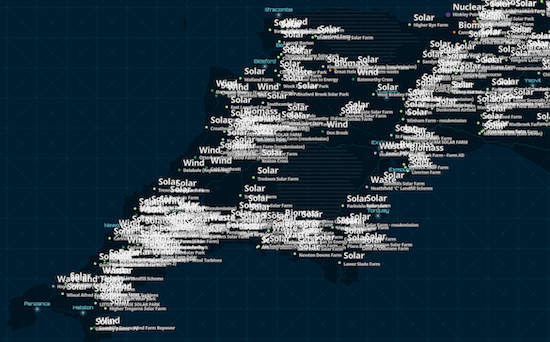
/**
* Defines how labels should be placed relative to one another. By default,
* labels have a `static` deconfliction strategy, meaning labels that overlap
* are dropped to make them easier to read.
*
* In some cases where few labels overlap, it may be preferable to
* turn off label deconfliction with the `none` option. It is also advisable to turn off deconfliction when
* [labeling clusters](https://developers.arcgis.com/javascript/latest/references/core/layers/support/FeatureReductionCluster/#labelingInfo) with a
* count of features in the center of the cluster.
*
* <details>
* <summary>Read More</summary>
*
* The following images illustrate when you may, or may not, want labels to deconflict.
*
* When labeling dense layers, the default deconfliction strategy (`static`) is preferable since
* labeling all features causes significant overlap, making the labels illegible. Keeping the
* default setting allows some labels to render. As the user zooms in, all labels will eventually come into view.
*
* static (default) | none
* -----------------|------
* 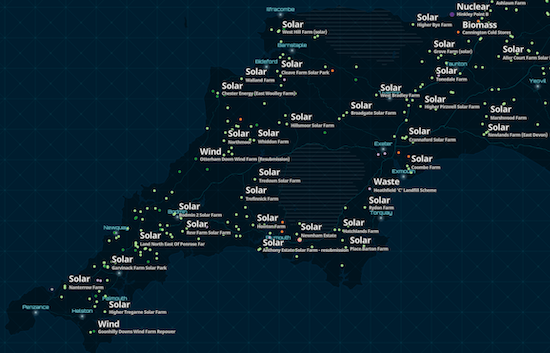 | 
*
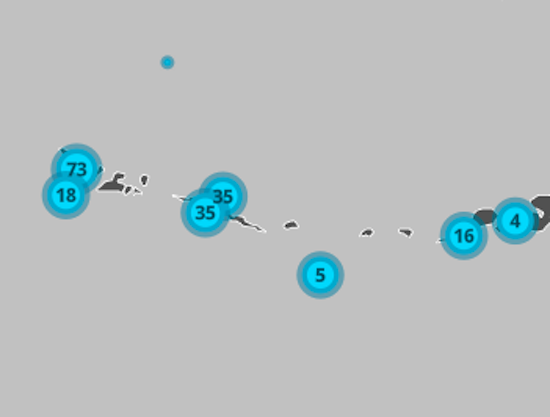
* When labeling clusters (or even sparsely distributed features) with small labels, it may be preferable to allow
* labels to slightly overlap since the information is still legible and doesn't significantly occlude the visualization.
* In the clustering scenario, a label deconfliction setting of `static` may actually cause more confusion, making some features not appear to be clusters.
*
* static (default) | none
* -----------------|------
* 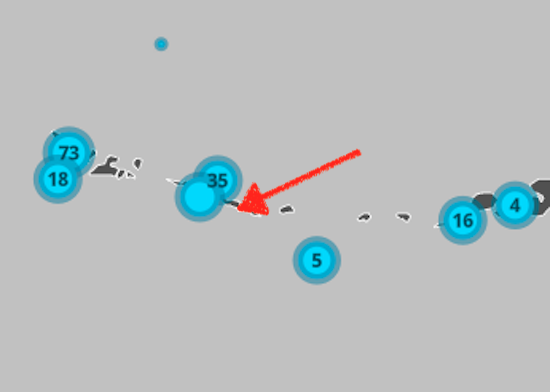 | 
*
* </details>
*
* > [!WARNING]
* >
* > **Known Limitations**
* >
* > Currently, this property only applies to FeatureLayer, CSVLayer, and StreamLayer in 2D MapViews.
*
* @default "static"
* @since 4.16
* @example
* // Ensures all labels are displayed regardless
* // of whether they overlap
* labelClass.deconflictionStrategy = "none";
*/
accessor deconflictionStrategy: "none" | "static";
/**
* Defines the labels for a [MapImageLayer](https://developers.arcgis.com/javascript/latest/references/core/layers/MapImageLayer/).
* If working with a MapImageLayer that supports Arcade, you can also use
* [labelExpressionInfo](https://developers.arcgis.com/javascript/latest/references/core/layers/support/LabelClass/#labelExpressionInfo) instead. To determine this,
* check the [supportsArcadeExpressionForLabeling](https://developers.arcgis.com/javascript/latest/references/core/layers/MapImageLayer/#capabilities)
* property. If `true`, then labelExpression or labelExpressionInfo can be used.
* If `false`, then only labelExpression can be used.
*
* If working with [FeatureLayer](https://developers.arcgis.com/javascript/latest/references/core/layers/FeatureLayer/), use
* [labelExpressionInfo](https://developers.arcgis.com/javascript/latest/references/core/layers/support/LabelClass/#labelExpressionInfo) instead.
*
* Attribute values may be included in labels using SQL syntax. To include an
* attribute value in a label, wrap the name of the field in square brackets `[]`.
* See the example snippet below.
*
* @example
* // For Spokane County, WA, label will display: "Spokane County, Washington"
* labelClass.labelExpression = '[COUNTY_NAME] CONCAT " County, " CONCAT [STATE_NAME]';
*/
accessor labelExpression: string | null | undefined;
/**
* Defines the labels for a [FeatureLayer](https://developers.arcgis.com/javascript/latest/references/core/layers/FeatureLayer/).
*
* If working with a MapImageLayer that supports Arcade, you can also use
* labelExpressionInfo. To determine this, check the
* [supportsArcadeExpressionForLabeling](https://developers.arcgis.com/javascript/latest/references/core/layers/MapImageLayer/#capabilities)
* property. If `true`, then [labelExpression](https://developers.arcgis.com/javascript/latest/references/core/layers/support/LabelClass/#labelExpression) or labelExpressionInfo can be used.
* If `false`, then only labelExpression can be used.
*
* @see [Arcade Labeling Profile](https://developers.arcgis.com/javascript/latest/arcade/#labeling)
* @example
* // For Spokane County, WA, label will display: "Spokane County, Washington"
* labelClass.labelExpressionInfo = {
* expression: "$feature.COUNTY_NAME + ' County, ' + $feature.STATE_NAME"
* };
*/
get labelExpressionInfo(): LabelExpressionInfo | null | undefined;
set labelExpressionInfo(value: LabelExpressionInfoProperties | null | undefined);
/**
* The position of the label. Possible values are based on the feature type. This property requires a value.
*
* | Feature Type | Possible Values |
* |--------------|-----------------|
* | Points | `above-center`, `above-left`, `above-right`, `below-center`, `below-left`, `below-right`, `center-center`, `center-left`, `center-right` |
* | Polylines | `above-after`, `above-along`, `above-before`, `above-start`, `above-end`, `below-after`, `below-along`, `below-before`, `below-start`, `below-end`, `center-after`, `center-along`, `center-before`, `center-start`, `center-end`|
* | Polygons | `always-horizontal`|
*
* > [!WARNING]
* >
* > **Known Limitations**
* >
* > Currently, if the label has a [line callout](https://developers.arcgis.com/javascript/latest/references/core/symbols/callouts/LineCallout3D/)
* > or [vertical offset](https://developers.arcgis.com/javascript/latest/references/core/symbols/LabelSymbol3D/#verticalOffset) in a 3D SceneView, then only `above-center` is supported.
* > Label placement only applies to [Point](https://developers.arcgis.com/javascript/latest/references/core/geometry/Point/) layers in 3D SceneViews.
* > FeatureLayer [Polylines](https://developers.arcgis.com/javascript/latest/references/core/geometry/Polyline/) only support `above-along`, `below-along`, and `center-along` label placement in 2D MapViews.
*
* @see [Point label placement properties](https://pro.arcgis.com/en/pro-app/latest/help/mapping/text/specify-a-point-label-position.htm)
* @see [Polyline label placement properties](https://pro.arcgis.com/en/pro-app/latest/help/mapping/text/set-line-label-placement-properties.htm)
* @see [Polygon label placement properties](https://pro.arcgis.com/en/pro-app/latest/help/mapping/text/set-polygon-label-placement-properties.htm)
* @example labelClass.labelPlacement = "above-right";
*/
accessor labelPlacement: PointPlacement | PolylinePlacement | PolygonPlacement | PlacementType3D;
/**
* Specifies the orientation of the label position of a single line polyline label.
* If `"curved"`, this means the characters follow the curve of the polyline,
* while `"parallel"` means the characters will always be straight, and the
* orientation will be based on the angle of the polyline's curve at the
* label's position.
*
* > [!WARNING]
* >
* > **Known Limitations**
* >
* > Currently, multiline polyline labels only support the `"parallel"` property value.
* > Currently, this property only applies to [Polyline](https://developers.arcgis.com/javascript/latest/references/core/geometry/Polyline/)
* > FeatureLayer, CSVLayer, and StreamLayer in 2D MapViews.
* > Currently, this property cannot be saved as part of a [WebMap](https://developers.arcgis.com/javascript/latest/references/core/WebMap/).
*
* @default "curved"
* @since 4.22
*/
accessor labelPosition: LabelPosition;
/**
* The maximum scale (most zoomed in) at which labels are visible in the view.
* A value of `0` means the label's visibility does not have a maximum scale.
* The maxScale value should always be smaller than the [minScale](https://developers.arcgis.com/javascript/latest/references/core/layers/support/LabelClass/#minScale) value,
* and greater than or equal to the service specification.
*
* @default 0
*/
accessor maxScale: number;
/**
* The minimum scale (most zoomed out) at which labels are visible in the view.
* A value of `0` means the label's visibility does not have a minimum scale.
* The minScale value should always be larger than the [maxScale](https://developers.arcgis.com/javascript/latest/references/core/layers/support/LabelClass/#maxScale) value,
* and lesser than or equal to the service specification.
*
* @default 0
*/
accessor minScale: number;
/**
* When set, specifies a custom title for the label class.
*
* @since 5.0
*/
accessor name: string | null | undefined;
/**
* Indicates whether or not to repeat the label along the polyline feature.
* If `true`, the label will be repeated according to the [repeatLabelDistance](https://developers.arcgis.com/javascript/latest/references/core/layers/support/LabelClass/#repeatLabelDistance).
* If `false`, the label will display once per polyline segment.
*
* > [!WARNING]
* >
* > **Known Limitations**
* >
* > Currently, this property only applies to [Polyline](https://developers.arcgis.com/javascript/latest/references/core/geometry/Polyline/)
* > FeatureLayer, CSVLayer, and StreamLayer in 2D MapViews.
*
* @default true
* @since 4.22
*/
accessor repeatLabel: boolean;
/**
* The size in points of the distance between labels on a polyline. This value may be autocast
* with a string expressing size in points or pixels (e.g. `100`, or `"64pt"`, or `"128px"`).
* The [repeatLabel](https://developers.arcgis.com/javascript/latest/references/core/layers/support/LabelClass/#repeatLabel) property must be `true` for this property to
* be honored.
*
* > [!WARNING]
* >
* > **Known Limitations**
* >
* > Currently, this property only applies to [Polyline](https://developers.arcgis.com/javascript/latest/references/core/geometry/Polyline/)
* > FeatureLayer, CSVLayer, and StreamLayer in 2D MapViews.
*
* @since 4.22
* @example
* const labelClass = { // autocasts as new LabelClass()
* symbol: {
* type: "text", // autocasts as new TextSymbol()
* color: "white",
* font: { // autocast as new Font()
* family: "Orbitron",
* size: 12,
* weight: "bold"
* }
* },
* labelExpressionInfo: {
* expression: "$feature.rte_num1"
* },
* labelPlacement: "center-along",
* repeatLabel: true,
* repeatDistanceLabel: 100
* };
*/
get repeatLabelDistance(): number | null | undefined;
set repeatLabelDistance(value: number | string | null | undefined);
/**
* Defines the symbol used for rendering the label. If not set, the default symbol will be used. See the example
* below.
*
* @example
* // If not set, this default symbol will be used
* labelClass.symbol = {
* type: "text",
* color: [255, 255, 255, 255], // white
* font: { family: "Arial Unicode MS", size: 10, weight: "bold" },
* haloColor: [0, 0, 0, 255], // black
* haloSize: 1
* };
*/
get symbol(): TextSymbol | LabelSymbol3D;
set symbol(value: (TextSymbolProperties & { type: "text" }) | (LabelSymbol3DProperties & { type: "label-3d" }));
/**
* Indicates whether to use domain names if the fields in the [labelExpression](https://developers.arcgis.com/javascript/latest/references/core/layers/support/LabelClass/#labelExpression)
* or [labelExpressionInfo](https://developers.arcgis.com/javascript/latest/references/core/layers/support/LabelClass/#labelExpressionInfo) have domains.
*
* > [!WARNING]
* >
* > **Known Limitations**
* >
* > This property only applies to 3D [SceneViews](https://developers.arcgis.com/javascript/latest/references/core/views/SceneView/).
*/
accessor useCodedValues: boolean;
/**
* A SQL where clause used to determine the features to which the label class should be applied.
* When specified, only features evaluating to `true` based on this expression will be labeled.
*
* @example labelClass.where = "CITYNAME = 'Redlands'";
* @example labelClass.where = "MARKER_ACTIVITY IN ('Picnicking', 'Group Camping')";
*/
accessor where: string | null | undefined;
/**
* Creates a deep clone of the LabelClass.
*
* @returns A deep clone of the object that invoked this method.
* @example
* // Creates a deep clone of the layer's first labelClass
* let label = layer.labelingInfo[0].clone();
*/
clone(): LabelClass;
}