@arcgis/core
Version:
ArcGIS Maps SDK for JavaScript: A complete 2D and 3D mapping and data visualization API
845 lines (843 loc) • 48.3 kB
TypeScript
import type PopupTemplate from "../PopupTemplate.js";
import type Extent from "../geometry/Extent.js";
import type SpatialReference from "../geometry/SpatialReference.js";
import type Layer from "./Layer.js";
import type Field from "./support/Field.js";
import type FieldsIndex from "./support/FieldsIndex.js";
import type LabelClass from "./support/LabelClass.js";
import type AttributeBinsFeatureSet from "../rest/support/AttributeBinsFeatureSet.js";
import type FeatureSet from "../rest/support/FeatureSet.js";
import type Query from "../rest/support/Query.js";
import type ElevationInfo from "../symbols/support/ElevationInfo.js";
import type { MultiOriginJSONSupportMixin } from "../core/MultiOriginJSONSupport.js";
import type { FeatureGeometryType } from "../geometry/types.js";
import type { FeatureLayerCapabilities, FieldDomainOptions } from "./types.js";
import type { BlendLayer, BlendLayerProperties } from "./mixins/BlendLayer.js";
import type { CustomParameters, CustomParametersMixin, CustomParametersMixinProperties } from "./mixins/CustomParametersMixin.js";
import type { DisplayFilteredLayer, DisplayFilteredLayerProperties } from "./mixins/DisplayFilteredLayer.js";
import type { FeatureEffectLayer, FeatureEffectLayerProperties } from "./mixins/FeatureEffectLayer.js";
import type { FeatureReductionLayer, FeatureReductionLayerProperties } from "./mixins/FeatureReductionLayer.js";
import type { OperationalLayer, OperationalLayerProperties } from "./mixins/OperationalLayer.js";
import type { OrderedLayer, OrderedLayerProperties } from "./mixins/OrderedLayer.js";
import type { PortalLayer, PortalLayerProperties } from "./mixins/PortalLayer.js";
import type { RefreshableLayer, RefreshableLayerProperties } from "./mixins/RefreshableLayer.js";
import type { ScaleRangeLayer, ScaleRangeLayerProperties } from "./mixins/ScaleRangeLayer.js";
import type { WFSCapabilities, WFSLayerInfo } from "./ogc/wfsUtils.js";
import type { DomainUnion } from "./support/types.js";
import type { RendererUnion } from "../renderers/types.js";
import type { RequestOptions } from "../request/types.js";
import type { AttributeBinsQueryProperties } from "../rest/support/AttributeBinsQuery.js";
import type { QueryProperties } from "../rest/support/Query.js";
import type { CreatePopupTemplateOptions } from "../support/popupUtils.js";
import type { TimeZone } from "../time/types.js";
import type { ElevationInfoProperties } from "../symbols/support/ElevationInfo.js";
import type { FieldProperties } from "./support/Field.js";
import type { ExtentProperties } from "../geometry/Extent.js";
import type { LabelClassProperties } from "./support/LabelClass.js";
import type { PopupTemplateProperties } from "../PopupTemplate.js";
import type { HeatmapRendererProperties } from "../renderers/HeatmapRenderer.js";
import type { PieChartRendererProperties } from "../renderers/PieChartRenderer.js";
import type { DictionaryRendererProperties } from "../renderers/DictionaryRenderer.js";
import type { DotDensityRendererProperties } from "../renderers/DotDensityRenderer.js";
import type { UniqueValueRendererProperties } from "../renderers/UniqueValueRenderer.js";
import type { ClassBreaksRendererProperties } from "../renderers/ClassBreaksRenderer.js";
import type { SimpleRendererProperties } from "../renderers/SimpleRenderer.js";
import type { SpatialReferenceProperties } from "../geometry/SpatialReference.js";
import type { LayerProperties } from "./Layer.js";
export interface WFSLayerProperties extends LayerProperties, PortalLayerProperties, OperationalLayerProperties, ScaleRangeLayerProperties, RefreshableLayerProperties, BlendLayerProperties, FeatureEffectLayerProperties, FeatureReductionLayerProperties, CustomParametersMixinProperties, DisplayFilteredLayerProperties, OrderedLayerProperties, Partial<Pick<WFSLayer, "copyright" | "definitionExpression" | "displayField" | "geometryType" | "labelsVisible" | "legendEnabled" | "maxPageCount" | "maxRecordCount" | "name" | "namespaceUri" | "objectIdField" | "outFields" | "popupEnabled" | "screenSizePerspectiveEnabled" | "url" | "wfsCapabilities">> {
/**
* A list of custom parameters appended to the URL of all resources fetched by the layer.
* It's an object with key-value pairs where value is a string.
* The layer's `refresh()` method needs to be called if the customParameters are updated at runtime.
*
* @example
* // apply a BBOX parameter to your WFSLayer
* const layer = new WFSLayer({
* url: "https://giswebservices.massgis.state.ma.us/geoserver/wfs",
* name: "GISDATA.CENSUS1990BLOCKGROUPS_POLY",
* customParameters: {
* BBOX: `-71.16686, 42.35918, -71.03708, 42.420035, EPSG:4326`
* }
* });
* @example
* // apply a CQL filter to the layer
* const layer = new WFSLayer({
* url: "https://geobretagne.fr/geoserver/ows",
* name: "ign:commune_metro",
* customParameters: {
* "cql_filter": "population > 10000"
* }
* });
* @since 4.18
* @example
* // send a custom parameter to your special service
* let layer = new MapImageLayer({
* url: serviceUrl,
* customParameters: {
* "key": "my-special-key"
* }
* });
*/
customParameters?: CustomParameters | null;
/**
* Specifies how features are placed on the vertical axis (z). This property may only be used
* in a [SceneView](https://developers.arcgis.com/javascript/latest/references/core/views/SceneView/). See the [ElevationInfo sample](https://developers.arcgis.com/javascript/latest/sample-code/scene-elevationinfo/)
* for an example of how this property may be used.
*
* > [!WARNING]
* >
* > If the elevation info is not specified, the effective elevation depends on the context and could vary per graphic.
*/
elevationInfo?: ElevationInfoProperties | null;
/**
* An array of fields in the layer.
*
* @example
* // define each field's schema
* let fields = [
* new Field({
* "name": "ObjectID",
* "alias": "ObjectID",
* "type": "oid"
* }), new Field({
* "name": "description",
* "alias": "Description",
* "type": "string"
* }), new Field ({
* "name": "title",
* "alias": "Title",
* "type": "string"
* })
* ];
*/
fields?: FieldProperties[];
/**
* The full extent of the layer.
*
* @example
* // Once the layer loads, set the view's extent to the layer's full extent
* layer.when(function(){
* view.extent = layer.fullExtent;
* });
*/
fullExtent?: ExtentProperties | null;
/**
* The label definition for this layer, specified as an array of
* [LabelClass](https://developers.arcgis.com/javascript/latest/references/core/layers/support/LabelClass/). Use this property to specify
* labeling properties for the layer such as label expression, placement, and size.
*
* Multiple Label classes with different `where` clauses can be used to define several
* labels with varying styles on the same feature. Likewise, multiple label classes
* may be used to label different types of features (for example blue labels
* for lakes and green labels for parks).
*
* > [!WARNING]
* >
* > **Known Limitations**
* >
* > 3D [SceneViews](https://developers.arcgis.com/javascript/latest/references/core/views/SceneView/) only support displaying one [LabelClass](https://developers.arcgis.com/javascript/latest/references/core/layers/support/LabelClass/) per feature.
*/
labelingInfo?: LabelClassProperties[] | null;
/**
* The popup template for the layer. When set on the layer, the `popupTemplate`
* allows users to access attributes and display their values in the
* view's Popup when a feature is selected
* using text and/or charts. See the [PopupTemplate sample](https://developers.arcgis.com/javascript/latest/sample-code/intro-popuptemplate/)
* for an example of how [PopupTemplate](https://developers.arcgis.com/javascript/latest/references/core/PopupTemplate/) interacts with a
* [FeatureLayer](https://developers.arcgis.com/javascript/latest/references/core/layers/FeatureLayer/).
*
* A default popup template is automatically used if no `popupTemplate` has been defined when
* [Popup.defaultPopupTemplateEnabled](https://developers.arcgis.com/javascript/latest/references/core/widgets/Popup/#defaultPopupTemplateEnabled)
* is set to `true`.
*
* @see [createPopupTemplate()](https://developers.arcgis.com/javascript/latest/references/core/layers/WFSLayer/#createPopupTemplate)
* @see [SceneView.popup](https://developers.arcgis.com/javascript/latest/references/core/views/SceneView/#popup)
* @see [View2D.popup](https://developers.arcgis.com/javascript/latest/references/core/views/View2D/#popup)
*/
popupTemplate?: PopupTemplateProperties | null;
/**
* The renderer assigned to the layer. The renderer defines how to
* visualize each feature in the layer. Depending on the renderer type,
* features may be visualized with the same symbol, or with varying symbols
* based on the values of provided attribute fields or functions. If not specified,
* a default renderer will be generated based on the geometry type.
*
* @see [Visualization guide pages](https://developers.arcgis.com/javascript/latest/visualization/)
* @see [Data driven styles](https://developers.arcgis.com/javascript/latest/visualization/data-driven-styles)
*/
renderer?: (((SimpleRendererProperties & { type: "simple" }) | (ClassBreaksRendererProperties & { type: "class-breaks" }) | (UniqueValueRendererProperties & { type: "unique-value" }) | (DotDensityRendererProperties & { type: "dot-density" }) | (DictionaryRendererProperties & { type: "dictionary" }) | (PieChartRendererProperties & { type: "pie-chart" })) | (HeatmapRendererProperties & { type: "heatmap" }));
/**
* The spatial reference of the layer. The default value is WGS84.
* This property can be set explicitly to project the longitude and latitude
* coordinates when the layer parses the features.
*
* @default SpatialReference.WGS84
* @see [SpatialReference.WGS84](https://developers.arcgis.com/javascript/latest/references/core/geometry/SpatialReference/#WGS84)
*/
spatialReference?: SpatialReferenceProperties;
/**
* The title of the layer used to identify it in places such as the [Legend](https://developers.arcgis.com/javascript/latest/references/map-components/components/arcgis-legend/)
* and [LayerList](https://developers.arcgis.com/javascript/latest/references/core/widgets/LayerList/).
*
* 
*
* @default "WFS"
*/
title?: string | null;
}
/**
* The WFSLayer is used to create a layer based on an [OGC Web Feature Service](https://www.ogc.org/standards/wfs) (WFS).
* Each layer available in the service is called a `FeatureType`. To target a specific layer in the service, use the [name](https://developers.arcgis.com/javascript/latest/references/core/layers/WFSLayer/#name)
* property to specify the name of the FeatureType you want. If no `name` is specified, the WFSLayer will default to the first layer available in the service.
* See the table below for more specific load behaviors:
*
* | Properties specified | Layer load behavior |
* |----------------------|---------------------|
* | none | First layer in the service |
* | [name](https://developers.arcgis.com/javascript/latest/references/core/layers/WFSLayer/#name) | First layer with the name |
* | [name](https://developers.arcgis.com/javascript/latest/references/core/layers/WFSLayer/#name) and [namespaceUri](https://developers.arcgis.com/javascript/latest/references/core/layers/WFSLayer/#namespaceUri) | Layer with the name in the namespace identified by the URI |
*
* To browse a WFS service and its layers, use the [wfsUtils](https://developers.arcgis.com/javascript/latest/references/core/layers/ogc/wfsUtils/) class.
*
* When using ArcGIS services, we recommend using the [FeatureLayer](https://developers.arcgis.com/javascript/latest/references/core/layers/FeatureLayer/) for better performance.
*
* > [!WARNING]
* >
* > **Minimum requirements**
* > To work with the `WFSLayer`, a WFS service must support WFS 2.0.0 and have GeoJSON output format enabled.
*
* @since 4.20
* @see [Sample - WFSLayer](https://developers.arcgis.com/javascript/latest/sample-code/layers-wfs)
* @see [wfsUtils](https://developers.arcgis.com/javascript/latest/references/core/layers/ogc/wfsUtils/)
* @see [WFSLayerView](https://developers.arcgis.com/javascript/latest/references/core/views/layers/WFSLayerView/)
* @see [OGCFeatureLayer](https://developers.arcgis.com/javascript/latest/references/core/layers/OGCFeatureLayer/)
* @example
* // Create a layer with features from Massachusetts 1990 census
* const censusData = new WFSLayer({
* url: "https://giswebservices.massgis.state.ma.us/geoserver/wfs",
* name: "GISDATA.CENSUS1990BLOCKGROUPS_POLY"
* })
* map.add(censusData)
*/
export default class WFSLayer extends WFSLayerSuperclass {
/**
* Creates a WFSLayer from an object created by [getWFSLayerInfo()](https://developers.arcgis.com/javascript/latest/references/core/layers/ogc/wfsUtils/#getWFSLayerInfo).
*
* @param layerInfo - The layer info object created from [getWFSLayerInfo()](https://developers.arcgis.com/javascript/latest/references/core/layers/ogc/wfsUtils/#getWFSLayerInfo)
* @returns Returns a WFSLayer instance based on the information provided in `layerInfo`.
* @example
* const capabilities = wfsUtils.getCapabilities(url);
* const layerInfo = wfsUtils.getWFSLayerInfo(capabilities);
* // create WFSLayer from the layer info
* const layer = WFSLayer.fromWFSLayerInfo(layerInfo);
* // add layer to the map
* map.add(layer);
*/
static fromWFSLayerInfo(layerInfo: WFSLayerInfo): WFSLayer;
/**
* @example
* const layer = new WFSLayer({
* url: "https://url_to_your_service"
* });
*/
constructor(properties?: WFSLayerProperties);
/**
* Describes the layer's supported capabilities.
*
* @example
* // Once the layer loads, check if the supportsStatistics operations is enabled on the layer
* await layer.load();
* if (layer.capabilities.query.supportsStatistics) {
* // query for the sum of the population in all features
* let sumPopulation = {
* onStatisticField: "POP_2015", // service field for 2015 population
* outStatisticFieldName: "Pop_2015_sum",
* statisticType: "sum"
* }
* let query = layer.createQuery();
* query.outStatistics = [ sumPopulation ];
* const result = await layer.queryFeatures(query);
* // process the stats query result
* }
*/
get capabilities(): FeatureLayerCapabilities;
/** Copyright information for the layer. This information will be shown in the [Attribution](https://developers.arcgis.com/javascript/latest/references/core/widgets/Attribution/) widget. */
accessor copyright: string | null | undefined;
/**
* A list of custom parameters appended to the URL of all resources fetched by the layer.
* It's an object with key-value pairs where value is a string.
* The layer's `refresh()` method needs to be called if the customParameters are updated at runtime.
*
* @example
* // apply a BBOX parameter to your WFSLayer
* const layer = new WFSLayer({
* url: "https://giswebservices.massgis.state.ma.us/geoserver/wfs",
* name: "GISDATA.CENSUS1990BLOCKGROUPS_POLY",
* customParameters: {
* BBOX: `-71.16686, 42.35918, -71.03708, 42.420035, EPSG:4326`
* }
* });
* @example
* // apply a CQL filter to the layer
* const layer = new WFSLayer({
* url: "https://geobretagne.fr/geoserver/ows",
* name: "ign:commune_metro",
* customParameters: {
* "cql_filter": "population > 10000"
* }
* });
* @since 4.18
* @example
* // send a custom parameter to your special service
* let layer = new MapImageLayer({
* url: serviceUrl,
* customParameters: {
* "key": "my-special-key"
* }
* });
*/
accessor customParameters: CustomParameters | null | undefined;
/**
* The time zone that dates are stored in. Time zone is always `UTC` for WFSLayer.
* This property may be useful when constructing date or time [where clauses](https://developers.arcgis.com/javascript/latest/references/core/rest/support/Query/#date-query).
*
* @since 4.28
*/
get dateFieldsTimeZone(): TimeZone | null | undefined;
/**
* The SQL where clause used to filter features on the client. Only the features that satisfy the definition
* expression are displayed in the [View](https://developers.arcgis.com/javascript/latest/references/core/views/View/).
* Definition expressions may be set when a layer is constructed prior to it loading in the view or
* after it has been added to the map. If the definition expression is set after the layer has been added to the map, the view will
* automatically refresh itself to display the features that satisfy the new definition expression.
*
* @example
* // for a layer showing the massachusetts block groups
* // only show features where the number of households is greater than 500
* const layer = new WFSLayer({
* url: "https://giswebservices.massgis.state.ma.us/geoserver/wfs",
* name: "GISDATA.CENSUS1990BLOCKGROUPS_POLY",
* definitionExpression: "households > 500"
* });
*/
accessor definitionExpression: string | null | undefined;
/** The name of the layer's primary display field. The value of this property matches the name of one of the fields of the layer. */
accessor displayField: string | null | undefined;
/**
* Specifies how features are placed on the vertical axis (z). This property may only be used
* in a [SceneView](https://developers.arcgis.com/javascript/latest/references/core/views/SceneView/). See the [ElevationInfo sample](https://developers.arcgis.com/javascript/latest/sample-code/scene-elevationinfo/)
* for an example of how this property may be used.
*
* > [!WARNING]
* >
* > If the elevation info is not specified, the effective elevation depends on the context and could vary per graphic.
*/
get elevationInfo(): ElevationInfo | null | undefined;
set elevationInfo(value: ElevationInfoProperties | null | undefined);
/**
* An array of fields in the layer.
*
* @example
* // define each field's schema
* let fields = [
* new Field({
* "name": "ObjectID",
* "alias": "ObjectID",
* "type": "oid"
* }), new Field({
* "name": "description",
* "alias": "Description",
* "type": "string"
* }), new Field ({
* "name": "title",
* "alias": "Title",
* "type": "string"
* })
* ];
*/
get fields(): Field[];
set fields(value: FieldProperties[]);
/**
* A convenient property that can be used to make case-insensitive lookups for a field by name.
* It can also provide a list of the [date fields](https://developers.arcgis.com/javascript/latest/references/core/layers/support/FieldsIndex/#dateFields) in a layer.
*
* @example
* // lookup a field by name. name is case-insensitive
* const field = layer.fieldsIndex.get("SoMeFiEld");
*
* if (field) {
* console.log(field.name); // SomeField
* }
*/
get fieldsIndex(): FieldsIndex<Field>;
/**
* The full extent of the layer.
*
* @example
* // Once the layer loads, set the view's extent to the layer's full extent
* layer.when(function(){
* view.extent = layer.fullExtent;
* });
*/
get fullExtent(): Extent | null | undefined;
set fullExtent(value: ExtentProperties | null | undefined);
/** The geometry type of features in the layer. All features are of the same type. */
accessor geometryType: FeatureGeometryType | null | undefined;
/**
* The label definition for this layer, specified as an array of
* [LabelClass](https://developers.arcgis.com/javascript/latest/references/core/layers/support/LabelClass/). Use this property to specify
* labeling properties for the layer such as label expression, placement, and size.
*
* Multiple Label classes with different `where` clauses can be used to define several
* labels with varying styles on the same feature. Likewise, multiple label classes
* may be used to label different types of features (for example blue labels
* for lakes and green labels for parks).
*
* > [!WARNING]
* >
* > **Known Limitations**
* >
* > 3D [SceneViews](https://developers.arcgis.com/javascript/latest/references/core/views/SceneView/) only support displaying one [LabelClass](https://developers.arcgis.com/javascript/latest/references/core/layers/support/LabelClass/) per feature.
*/
get labelingInfo(): LabelClass[] | null | undefined;
set labelingInfo(value: LabelClassProperties[] | null | undefined);
/**
* Indicates whether to display labels for this layer. If `true`, labels will
* appear as defined in the [labelingInfo](https://developers.arcgis.com/javascript/latest/references/core/layers/WFSLayer/#labelingInfo) property.
*
* > [!WARNING]
* >
* > **Known Limitations**
* >
* > 3D [SceneViews](https://developers.arcgis.com/javascript/latest/references/core/views/SceneView/) only support displaying one [LabelClass](https://developers.arcgis.com/javascript/latest/references/core/layers/support/LabelClass/) per feature.
*
* @default true
*/
accessor labelsVisible: boolean;
/**
* Indicates whether the layer will be included in the legend.
*
* @default true
*/
accessor legendEnabled: boolean;
/**
* The maximum number of queries allowed to fetch the whole dataset from the service.
* When multiplied by [maxRecordCount](https://developers.arcgis.com/javascript/latest/references/core/layers/WFSLayer/#maxRecordCount),
* this will determine the maximum number of features that can be returned from the service.
*
* When working with large WFS services, we recommend increasing the
* [maxRecordCount](https://developers.arcgis.com/javascript/latest/references/core/layers/WFSLayer/#maxRecordCount) instead of the `maxPageCount`,
* so you don't overwhelm the server with too many requests.
*
* @default 10
* @since 4.29
*/
accessor maxPageCount: number;
/**
* The maximum number of features that can be returned in a single request.
* When pagination is supported on the WFS service, each request will fetch this many
* features until all the features have been returned from the service or the
* [maxPageCount](https://developers.arcgis.com/javascript/latest/references/core/layers/WFSLayer/#maxPageCount) has been reached.
*
* @default 3000
* @since 4.29
*/
accessor maxRecordCount: number;
/**
* The name of the layer in the WFS service to display, excluding the namespace.
* If not specified, the first layer found in the GetCapabilities request will be used.
*
* 
*
* @see [namespaceUri](https://developers.arcgis.com/javascript/latest/references/core/layers/WFSLayer/#namespaceUri)
* @example
* const layer = new WFSLayer({
* url: "https://giswebservices.massgis.state.ma.us/geoserver/wfs",
* name: "GISDATA.CENSUS1990BLOCKGROUPS_POLY",
* });
*/
accessor name: string | null | undefined;
/**
* The namespace URI for the layer name.
* If not specified, the first namespace associated with the first layer found with `name` will be used.
*
* 
*
* @see [name](https://developers.arcgis.com/javascript/latest/references/core/layers/WFSLayer/#name)
* @example
* const layer = new WFSLayer({
* url: "https://giswebservices.massgis.state.ma.us/geoserver/wfs",
* name: "GISDATA.CENSUS1990BLOCKGROUPS_POLY",
* namespaceUri: "http://massgis.state.ma.us/featuretype"
* });
*/
accessor namespaceUri: string | null | undefined;
/**
* The name of an `oid` [field](https://developers.arcgis.com/javascript/latest/references/core/layers/WFSLayer/#fields) containing
* a unique value or identifier for each feature in the layer.
* `id` property of the feature object in the GeoJSON will be used as ObjectID.
* If `id` property is not present and `objectIDField` is not specified, `ObjectID` field will be generated for each feature.
*
* @see [fields](https://developers.arcgis.com/javascript/latest/references/core/layers/WFSLayer/#fields)
*/
accessor objectIdField: string;
/**
* An array of field names from the WFS layer to include with each feature.
* To fetch the values from all fields in the layer, use `["*"]`.
* The required fields used for layer [rendering](https://developers.arcgis.com/javascript/latest/references/core/layers/WFSLayer/#renderer), [labeling](https://developers.arcgis.com/javascript/latest/references/core/layers/WFSLayer/#labelingInfo), and
* setting the [elevation info](https://developers.arcgis.com/javascript/latest/references/core/layers/WFSLayer/#elevationInfo), along with the fields specified in `outFields` are used to populate
* [FeatureLikeLayerView.availableFields](https://developers.arcgis.com/javascript/latest/references/core/views/layers/FeatureLikeLayerView/#availableFields).
* Set this property to include the fields that will be used for client-side
* [queries](https://developers.arcgis.com/javascript/latest/references/core/views/layers/FeatureLikeLayerView/#queryFeatures)
* if the fields are not part of required fields.
*
* @see [FeatureLikeLayerView.availableFields](https://developers.arcgis.com/javascript/latest/references/core/views/layers/FeatureLikeLayerView/#availableFields)
* @see [fieldUtils](https://developers.arcgis.com/javascript/latest/references/core/layers/support/fieldUtils/)
* @example
* // Includes all fields from the service in the layer
* layer.outFields = ["*"];
* @example
* // Get the specified fields from the service in the layer
* // These fields will be added to WFSLayer.availableFields
* // along with rendering and labeling fields. Use these fields
* // for client-side filtering and querying.
* layer.outFields = ["NAME", "POP_2010", "FIPS", "AREA"];
*/
accessor outFields: string[] | null | undefined;
/**
* Indicates whether to display popups when features in the layer are clicked. The layer needs to have a [popupTemplate](https://developers.arcgis.com/javascript/latest/references/core/layers/WFSLayer/#popupTemplate) to define what
* information should be displayed in the popup. Alternatively, a default popup template may be automatically used if
* [Popup.defaultPopupTemplateEnabled](https://developers.arcgis.com/javascript/latest/references/core/widgets/Popup/#defaultPopupTemplateEnabled) is set to `true`.
*
* @default true
* @see [createPopupTemplate()](https://developers.arcgis.com/javascript/latest/references/core/layers/WFSLayer/#createPopupTemplate)
* @see [SceneView.popup](https://developers.arcgis.com/javascript/latest/references/core/views/SceneView/#popup)
* @see [View2D.popup](https://developers.arcgis.com/javascript/latest/references/core/views/View2D/#popup)
*/
accessor popupEnabled: boolean;
/**
* The popup template for the layer. When set on the layer, the `popupTemplate`
* allows users to access attributes and display their values in the
* view's Popup when a feature is selected
* using text and/or charts. See the [PopupTemplate sample](https://developers.arcgis.com/javascript/latest/sample-code/intro-popuptemplate/)
* for an example of how [PopupTemplate](https://developers.arcgis.com/javascript/latest/references/core/PopupTemplate/) interacts with a
* [FeatureLayer](https://developers.arcgis.com/javascript/latest/references/core/layers/FeatureLayer/).
*
* A default popup template is automatically used if no `popupTemplate` has been defined when
* [Popup.defaultPopupTemplateEnabled](https://developers.arcgis.com/javascript/latest/references/core/widgets/Popup/#defaultPopupTemplateEnabled)
* is set to `true`.
*
* @see [createPopupTemplate()](https://developers.arcgis.com/javascript/latest/references/core/layers/WFSLayer/#createPopupTemplate)
* @see [SceneView.popup](https://developers.arcgis.com/javascript/latest/references/core/views/SceneView/#popup)
* @see [View2D.popup](https://developers.arcgis.com/javascript/latest/references/core/views/View2D/#popup)
*/
get popupTemplate(): PopupTemplate | null | undefined;
set popupTemplate(value: PopupTemplateProperties | null | undefined);
/**
* The renderer assigned to the layer. The renderer defines how to
* visualize each feature in the layer. Depending on the renderer type,
* features may be visualized with the same symbol, or with varying symbols
* based on the values of provided attribute fields or functions. If not specified,
* a default renderer will be generated based on the geometry type.
*
* @see [Visualization guide pages](https://developers.arcgis.com/javascript/latest/visualization/)
* @see [Data driven styles](https://developers.arcgis.com/javascript/latest/visualization/data-driven-styles)
*/
get renderer(): RendererUnion;
set renderer(value: (((SimpleRendererProperties & { type: "simple" }) | (ClassBreaksRendererProperties & { type: "class-breaks" }) | (UniqueValueRendererProperties & { type: "unique-value" }) | (DotDensityRendererProperties & { type: "dot-density" }) | (DictionaryRendererProperties & { type: "dictionary" }) | (PieChartRendererProperties & { type: "pie-chart" })) | (HeatmapRendererProperties & { type: "heatmap" })));
/**
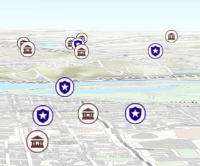
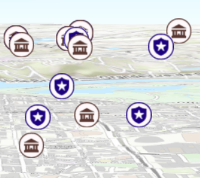
* Apply perspective scaling to screen-size symbols in a [SceneView](https://developers.arcgis.com/javascript/latest/references/core/views/SceneView/).
* When `true`, screen sized objects such as [icons](https://developers.arcgis.com/javascript/latest/references/core/symbols/IconSymbol3DLayer/),
* [labels](https://developers.arcgis.com/javascript/latest/references/core/symbols/LabelSymbol3D/) or [callouts](https://developers.arcgis.com/javascript/latest/references/core/symbols/callouts/Callout3D/) integrate
* better in the 3D scene by applying a certain perspective projection to the
* sizing of features. This only applies when using a [SceneView](https://developers.arcgis.com/javascript/latest/references/core/views/SceneView/).
*
* `layer.screenSizePerspectiveEnabled = true`
*
* 
*
* `layer.screenSizePerspectiveEnabled = false`
*
* 
*
* > [!WARNING]
* >
* > **Known Limitations**
* >
* > Screen size perspective is currently not optimized for situations where the camera is very near the ground, or for scenes
* > with visual elements located far from the ground surface. In these cases it may be better to turn off screen size perspective.
* > As screen size perspective changes the size based on distance to the camera, it should be set to false when using
* > [size visual variables](https://developers.arcgis.com/javascript/latest/references/core/renderers/visualVariables/SizeVariable/).
*
* @default true
*/
accessor screenSizePerspectiveEnabled: boolean;
/**
* The spatial reference of the layer. The default value is WGS84.
* This property can be set explicitly to project the longitude and latitude
* coordinates when the layer parses the features.
*
* @default SpatialReference.WGS84
* @see [SpatialReference.WGS84](https://developers.arcgis.com/javascript/latest/references/core/geometry/SpatialReference/#WGS84)
*/
get spatialReference(): SpatialReference;
set spatialReference(value: SpatialReferenceProperties);
/**
* The title of the layer used to identify it in places such as the [Legend](https://developers.arcgis.com/javascript/latest/references/map-components/components/arcgis-legend/)
* and [LayerList](https://developers.arcgis.com/javascript/latest/references/core/widgets/LayerList/).
*
* 
*
* @default "WFS"
*/
accessor title: string | null | undefined;
/** The layer type provides a convenient way to check the type of the layer without the need to import specific layer modules. */
get type(): "wfs";
/**
* The url to the WFS service. The service must be version 2.0.0, and must support GeoJSON data.
*
* @example
* // create a WFSLayer of snowfall indicators
* const wfsLayer = new WFSLayer({
* url: "https://gispub4.epa.gov/arcgis/services/OAR_OAP/Snowfall_Indicators/MapServer/WFSServer"
* });
* // add the layer to the map
* map.add(wfsLayer);
*/
accessor url: string | null | undefined;
/** WFS service information about the available layers and operations. */
accessor wfsCapabilities: WFSCapabilities;
/**
* Creates a popup template for the layer, populated with all the fields of the layer.
*
* @param options - Options for creating the popup template.
* @returns The popup template, or `null` if the layer does not
* have any fields.
* @example
* const template = wfsLayer.createPopupTemplate(); // create the popupTemplate
* wfsLayer.popupTemplate = template; // set the popupTemplate on the layer
*/
createPopupTemplate(options?: CreatePopupTemplateOptions): PopupTemplate | null | undefined;
/**
* Creates query parameter object that can be used to fetch features that satisfy the layer's configurations.
*
* @returns The query object representing the layer's definition
* expression and other configurations.
* @see [Sample - Query features from a FeatureLayer](https://developers.arcgis.com/javascript/latest/sample-code/featurelayer-query/)
* @example
* const query = wfsLayer.createQuery(); // create query from the layer
* wfsLayer.queryFeatures(query).then((results) => {
* // do something with the query results
* })
*/
createQuery(): Query;
/**
* Returns the [Field](https://developers.arcgis.com/javascript/latest/references/core/layers/support/Field/) instance for a field name (case-insensitive).
*
* @param fieldName - Name of the field.
* @returns the matching field or `undefined`
* @see [fields](https://developers.arcgis.com/javascript/latest/references/core/layers/WFSLayer/#fields)
*/
getField(fieldName: string): Field | null | undefined;
/**
* Returns the [Domain](https://developers.arcgis.com/javascript/latest/references/core/layers/support/Domain/) associated with the given field name. The domain can be either a
* [CodedValueDomain](https://developers.arcgis.com/javascript/latest/references/core/layers/support/CodedValueDomain/) or [RangeDomain](https://developers.arcgis.com/javascript/latest/references/core/layers/support/RangeDomain/).
*
* @param fieldName - Name of the field.
* @param options - An object specifying additional options. See the
* object specification table below for the required properties of this object.
* @returns The Domain object associated with the given field name for the given feature.
*/
getFieldDomain(fieldName: string, options?: FieldDomainOptions): DomainUnion | null | undefined;
/**
* Executes a [AttributeBinsQuery](https://developers.arcgis.com/javascript/latest/references/core/rest/support/AttributeBinsQuery/) against a WFSLayer, which groups features into bins based on ranges in numeric or date fields, and returns a
* [AttributeBinsFeatureSet](https://developers.arcgis.com/javascript/latest/references/core/rest/support/AttributeBinsFeatureSet/) containing the series of bins. Please refer to the [AttributeBinsQuery](https://developers.arcgis.com/javascript/latest/references/core/rest/support/AttributeBinsQuery/) document for more detailed information
* on how to configure the bin parameters.
*
* Binned data can condense complex information into meaningful insight. This query allows you to classify data into meaningful categories and summarize the data within each bin with summary statistics.
* Binned data can be effectively visualized in histograms (or bar charts), providing clearer insights into data distributions and trends.
* It can reveal underlying patterns that might be obscured in raw data. For example, bins can show concentrations of values in common ranges.
*
* > [!WARNING]
* >
* > **Notes**
* >
* > The `queryAttributeBins()` method is unrelated to querying bins in [FeatureReductionBinning](https://developers.arcgis.com/javascript/latest/references/core/layers/support/FeatureReductionBinning/).
*
* @param binsQuery - Specifies the parameters of the `queryAttributeBins()` operation. The [AttributeBinsQuery.binParameters](https://developers.arcgis.com/javascript/latest/references/core/rest/support/AttributeBinsQuery/#binParameters) property must be set.
* @param options - An object with the following properties.
* @returns When resolved, returns an [AttributeBinsFeatureSet](https://developers.arcgis.com/javascript/latest/references/core/rest/support/AttributeBinsFeatureSet/) containing
* a series of bins. Each feature in the AttributeBinsFeatureSet represents a bin. The attributes of each feature contains statistics summarizing the data in the bin, including count, average, standard deviation, etc.
* @since 4.33
* @see [AttributeBinsQuery](https://developers.arcgis.com/javascript/latest/references/core/rest/support/AttributeBinsQuery/)
* @see [Sample - Attribute Bins Query](https://developers.arcgis.com/javascript/latest/sample-code/query-attribute-bins/)
* @example
* // Query the temperature field in the feature layer and create a histogram
* // Analyze temperature data over a year, create 100 bins for different temperature ranges
* // to assess frequency and identify patterns.
* const binQuery = new AttributeBinsQuery({
* where: "UnitTop = 0",
* binParameters: new AutoIntervalBinParameters({
* bins: 100,
* field: "temp",
* start: 0, // lowest temp value to be included in the bin query
* end: 30 // highest temp value to be included
* })
* });
*
* layer.queryAttributeBins(query).then((results) => {
* const bins = results.features.map((bin) => {
* return {
* minValue: bin.attributes.lowerBoundary,
* maxValue: bin.attributes.upperBoundary,
* count: bin.attributes.temperature_count,
* };
* });
*
* // get the lower boundary of the first bin
* const min = results.features[0].attributes.lowerBoundary;
* // get the upper boundary of the last bin
* const max = results.features[results.features.length - 1].attributes.upperBoundary;
* // calculate the average for the bins
* const average = results.features[0].attributes.lowerBoundary + results.features[results.features.length - 1].attributes.upperBoundary) / 2;
*
* const histogram = new Histogram({
* container: "histogramDiv",
* bins: bins,
* min: min,
* max: max,
* average: average,
* barCreatedFunction:(index, element) => {
* element.setAttribute("fill", "#FFA500");
* element.setAttribute("opacity", 0.5);
* },
* labelFormatFunction: (value, type) => {
* return (Math.round(value)).toLocaleString();
* },
* dataLines: [{
* value: histogram.min,
* label: histogram.min.toLocaleString()
* }, {
* value: histogram.average,
* label: histogram.average.toLocaleString()
* }, {
* value: histogram.max,
* label: histogram.max.toLocaleString()
* }]
* });
* });
*/
queryAttributeBins(binsQuery: AttributeBinsQueryProperties, options?: RequestOptions): Promise<AttributeBinsFeatureSet>;
/**
* Executes a [Query](https://developers.arcgis.com/javascript/latest/references/core/rest/support/Query/) against the layer and
* returns the [Extent](https://developers.arcgis.com/javascript/latest/references/core/geometry/Extent/) of features that satisfy the query. If no
* parameters are specified, then the extent and count of all features
* satisfying the layer's configuration/filters are returned.
*
* > [!WARNING]
* >
* > **Known Limitations**
* >
* > Spatial queries have the same limitations as those listed in the [projectOperator](https://developers.arcgis.com/javascript/latest/references/core/geometry/operators/projectOperator/)
* > documentation.
* > Spatial queries are not currently supported if the layer view has any of the following [SpatialReferences](https://developers.arcgis.com/javascript/latest/references/core/geometry/SpatialReference/):
* > - GDM 2000 (4742) – Malaysia
* > - Gusterberg (Ferro) (8042) – Austria/Czech Republic
* > - ISN2016 (8086) - Iceland
* > - SVY21 (4757) - Singapore
*
* @param query - Specifies the attributes and spatial
* filter of the query. If no parameters are specified, then the extent and count of all features
* satisfying the layer's configuration/filters are returned.
* @param options - An object with the following properties.
* @returns When resolved, returns the extent and count of the features
* that satisfy the input query. See the object specification table below for details.
* Property | Type | Description
* ---------|------|-------------
* count | Number | The number of features that satisfy the input query.
* extent | [Extent](https://developers.arcgis.com/javascript/latest/references/core/geometry/Extent/) \| null | The extent of the features that satisfy the query.
*/
queryExtent(query?: QueryProperties | null | undefined, options?: RequestOptions): Promise<{
count: number;
extent: Extent | null;
}>;
/**
* Executes a [Query](https://developers.arcgis.com/javascript/latest/references/core/rest/support/Query/) against the layer and
* returns the number of features that satisfy the query. If no parameters are specified,
* the total number of features satisfying the layer's configuration/filters is returned.
*
* > [!WARNING]
* >
* > **Known Limitations**
* >
* > Spatial queries have the same limitations as those listed in the [projectOperator](https://developers.arcgis.com/javascript/latest/references/core/geometry/operators/projectOperator/)
* > documentation.
* > Spatial queries are not currently supported if the layer view has any of the following [SpatialReferences](https://developers.arcgis.com/javascript/latest/references/core/geometry/SpatialReference/):
* > - GDM 2000 (4742) – Malaysia
* > - Gusterberg (Ferro) (8042) – Austria/Czech Republic
* > - ISN2016 (8086) - Iceland
* > - SVY21 (4757) - Singapore
*
* @param query - Specifies the attributes and
* spatial filter of the query. If no parameters are specified, the total number of features
* satisfying the layer's configuration/filters is returned.
* @param options - An object with the following properties.
* @returns When resolved, returns the number of features that satisfy the query.
*/
queryFeatureCount(query?: QueryProperties | null | undefined, options?: RequestOptions): Promise<number>;
/**
* Executes a [Query](https://developers.arcgis.com/javascript/latest/references/core/rest/support/Query/) against the layer and returns a
* [FeatureSet](https://developers.arcgis.com/javascript/latest/references/core/rest/support/FeatureSet/) once the promise resolves.
* A [FeatureSet](https://developers.arcgis.com/javascript/latest/references/core/rest/support/FeatureSet/) contains an array of [Graphic](https://developers.arcgis.com/javascript/latest/references/core/Graphic/)
* features, which can be added to the [view's graphics](https://developers.arcgis.com/javascript/latest/references/core/views/View/#graphics).
* This array will not be populated if zero results are found.
*
* > [!WARNING]
* >
* > **Known Limitations**
* >
* > Attribute values used in attribute queries executed against WSFLayer are case sensitive.
* > Spatial queries have the same limitations as those listed in the [projectOperator](https://developers.arcgis.com/javascript/latest/references/core/geometry/operators/projectOperator/)
* > documentation.
* > Spatial queries are not currently supported if the layer view has any of the following [SpatialReferences](https://developers.arcgis.com/javascript/latest/references/core/geometry/SpatialReference/):
* > - GDM 2000 (4742) – Malaysia
* > - Gusterberg (Ferro) (8042) – Austria/Czech Republic
* > - ISN2016 (8086) - Iceland
* > - SVY21 (4757) - Singapore
*
* @param query - Specifies the attributes and spatial
* filter of the query. If no parameters are specified, then all features satisfying the layer's
* configuration/filters are returned.
* @param options - An object with the following properties.
* @returns When resolved, a [FeatureSet](https://developers.arcgis.com/javascript/latest/references/core/rest/support/FeatureSet/) containing
* an array of graphic features is returned.
* @see [Sample - Query features from a FeatureLayer](https://developers.arcgis.com/javascript/latest/sample-code/featurelayer-query/)
*/
queryFeatures(query?: QueryProperties | null | undefined, options?: RequestOptions): Promise<FeatureSet>;
/**
* Executes a [Query](https://developers.arcgis.com/javascript/latest/references/core/rest/support/Query/) against the layer and returns an
* array of Object IDs for features that satisfy the input query. If no parameters are specified,
* then the Object IDs of all features satisfying the layer's configuration/filters are returned.
*
* > [!WARNING]
* >
* > **Known Limitations**
* >
* > Spatial queries have the same limitations as those listed in the [projectOperator](https://developers.arcgis.com/javascript/latest/references/core/geometry/operators/projectOperator/)
* > documentation.
* > Spatial queries are not currently supported if the layer view has any of the following [SpatialReferences](https://developers.arcgis.com/javascript/latest/references/core/geometry/SpatialReference/):
* > - GDM 2000 (4742) – Malaysia
* > - Gusterberg (Ferro) (8042) – Austria/Czech Republic
* > - ISN2016 (8086) - Iceland
* > - SVY21 (4757) - Singapore
*
* @param query - Specifies the attributes and spatial
* filter of the query. If no parameters are specified, then the Object IDs of all features
* satisfying the layer's configuration/filters are returned.
* @param options - An object with the following properties.
* @returns When resolved, returns an array of numbers representing the object IDs of the features
* satisfying the query.
*/
queryObjectIds(query?: QueryProperties | null | undefined, options?: RequestOptions): Promise<number[]>;
}
declare const WFSLayerSuperclass: typeof Layer & typeof MultiOriginJSONSupportMixin & typeof PortalLayer & typeof OperationalLayer & typeof ScaleRangeLayer & typeof RefreshableLayer & typeof BlendLayer & typeof FeatureEffectLayer & typeof FeatureReductionLayer & typeof CustomParametersMixin & typeof DisplayFilteredLayer & typeof OrderedLayer