@arcgis/core
Version:
ArcGIS Maps SDK for JavaScript: A complete 2D and 3D mapping and data visualization API
658 lines (655 loc) • 42.6 kB
TypeScript
import type Color from "../Color.js";
import type PopupTemplate from "../PopupTemplate.js";
import type Collection from "../core/Collection.js";
import type Layer from "./Layer.js";
import type Field from "./support/Field.js";
import type TimeInfo from "./support/TimeInfo.js";
import type VoxelVariable from "./voxel/VoxelVariable.js";
import type VoxelVariableStyle from "./voxel/VoxelVariableStyle.js";
import type VoxelVolume from "./voxel/VoxelVolume.js";
import type VoxelVolumeStyle from "./voxel/VoxelVolumeStyle.js";
import type TimeExtent from "../time/TimeExtent.js";
import type TimeInterval from "../time/TimeInterval.js";
import type { MultiOriginJSONSupportMixin } from "../core/MultiOriginJSONSupport.js";
import type { APIKeyMixin, APIKeyMixinProperties } from "./mixins/APIKeyMixin.js";
import type { CustomParametersMixin, CustomParametersMixinProperties } from "./mixins/CustomParametersMixin.js";
import type { OperationalLayer, OperationalLayerProperties } from "./mixins/OperationalLayer.js";
import type { PortalLayer, PortalLayerProperties } from "./mixins/PortalLayer.js";
import type { ScaleRangeLayer, ScaleRangeLayerProperties } from "./mixins/ScaleRangeLayer.js";
import type { SceneService, SceneServiceProperties } from "./mixins/SceneService.js";
import type { CreatePopupTemplateOptions } from "../support/popupUtils.js";
import type { VoxelVolumeStyleProperties } from "./voxel/VoxelVolumeStyle.js";
import type { ReadonlyArrayOrCollection } from "../core/Collection.js";
import type { VoxelVariableStyleProperties } from "./voxel/VoxelVariableStyle.js";
import type { PopupTemplateProperties } from "../PopupTemplate.js";
import type { TimeExtentProperties } from "../time/TimeExtent.js";
import type { TimeIntervalProperties } from "../time/TimeInterval.js";
import type { LayerProperties } from "./Layer.js";
export interface VoxelLayerProperties extends LayerProperties, APIKeyMixinProperties, CustomParametersMixinProperties, ScaleRangeLayerProperties, PortalLayerProperties, OperationalLayerProperties, SceneServiceProperties, Partial<Pick<VoxelLayer, "currentVariableId" | "enableDynamicSections" | "enableIsosurfaces" | "enableSlices" | "legendEnabled" | "popupEnabled" | "renderMode" | "useViewTime">> {
/**
* The popup template for the layer. When set on the layer, the popupTemplate
* allows users to access attributes and display their values using text and/or charts
* in the view's popup when a voxel is clicked.
* See [this sample](https://developers.arcgis.com/javascript/latest/sample-code/layers-voxel-popup-config/)
* for an example of how [PopupTemplate](https://developers.arcgis.com/javascript/latest/references/core/PopupTemplate/) interacts with a
* [VoxelLayer](https://developers.arcgis.com/javascript/latest/references/core/layers/VoxelLayer/).
*
* A default popup template is automatically used if no `popupTemplate` has been defined when
* [defaultPopupTemplateEnabled](https://developers.arcgis.com/javascript/latest/references/core/widgets/Popup/#defaultPopupTemplateEnabled)
* is set to `true`.
*
* @since 4.31
* @see [createPopupTemplate()](https://developers.arcgis.com/javascript/latest/references/core/layers/VoxelLayer/#createPopupTemplate)
* @see [popup](https://developers.arcgis.com/javascript/latest/references/core/views/SceneView/#popup)
* @see [popup](https://developers.arcgis.com/javascript/latest/references/core/views/View2D/#popup)
*/
popupTemplate?: PopupTemplateProperties | null;
/**
* The layer's time extent. When the layer's [useViewTime](https://developers.arcgis.com/javascript/latest/references/core/layers/VoxelLayer/#useViewTime) is `false`, the layer
* instructs the view to show data from the layer based on this time extent.
* You can choose the layer's time extent from the voxel layer's [timeInfo.stops](https://developers.arcgis.com/javascript/latest/references/core/layers/VoxelLayer/#timeInfo).
*
* @since 4.30
* @example
* // Configure the layer to ignore the view's time and instead
* // draw using the data from its last time stop
* vxlLayer.useViewTime = false;
* const lastStopTime = vxlLayer.timeInfo.stops.at(-1);
* vxlLayer.timeExtent = new TimeExtent({
* start: lastStopTime,
* end: lastStopTime,
* });
*/
timeExtent?: TimeExtentProperties | null;
/**
* A temporary offset of the time data based on a certain [TimeInterval](https://developers.arcgis.com/javascript/latest/references/core/time/TimeInterval/). This allows
* users to overlay data from two or more time-aware layers with different time extents.
* For example, if a layer has data recorded for the year 1970, an offset value of 2 years would temporarily shift the data to
* 1972. You can then overlay this data with data recorded in 1972.
* A time offset can be used for display purposes only. The data shown in popups are not affected by the offset.
*
* @since 4.30
* @example
* // Offset a Voxel layer, adding 2 years
* let vxlLayer = new VoxelLayer({
* url: url,
* timeOffset: {
* unit: "years",
* value: 2
* }
* })
*/
timeOffset?: TimeIntervalProperties | null;
/**
* The collection of variable styles, containing exactly one [VoxelVariableStyle](https://developers.arcgis.com/javascript/latest/references/core/layers/voxel/VoxelVariableStyle/) for each [VoxelVariable](https://developers.arcgis.com/javascript/latest/references/core/layers/voxel/VoxelVariable/).
*
* @since 4.25
*/
variableStyles?: ReadonlyArrayOrCollection<VoxelVariableStyleProperties>;
/**
* The collection of volume styles. There is currently only one volume and thus also only one [VoxelVolumeStyle](https://developers.arcgis.com/javascript/latest/references/core/layers/voxel/VoxelVolumeStyle/).
*
* @since 4.24
*/
volumeStyles?: ReadonlyArrayOrCollection<VoxelVolumeStyleProperties>;
}
/**
* Current rendering mode for the [VoxelLayer](https://developers.arcgis.com/javascript/latest/references/core/layers/VoxelLayer/). The `volume` mode draws the full voxel layer volume whereas the `surfaces` mode draws
* sections and isosurfaces only.
*/
export type VoxelRenderMode = "volume" | "surfaces";
/**
* * [Overview](https://developers.arcgis.com/javascript/latest/references/core/layers/VoxelLayer/#overview)
* * [Creating a VoxelLayer](https://developers.arcgis.com/javascript/latest/references/core/layers/VoxelLayer/#creating-a-voxel-layer)
* * [Data Visualization](https://developers.arcgis.com/javascript/latest/references/core/layers/VoxelLayer/#data-visualization)
* * [Exploring a Voxel Layer](https://developers.arcgis.com/javascript/latest/references/core/layers/VoxelLayer/#exploring-a-voxel-layer)
* * [VoxelLayer Volume](https://developers.arcgis.com/javascript/latest/references/core/layers/VoxelLayer/#voxellayer-volume)
* * [VoxelLayer and time](https://developers.arcgis.com/javascript/latest/references/core/layers/VoxelLayer/#voxellayer-time)
*
* <span id="overview"></span>
* ## Overview
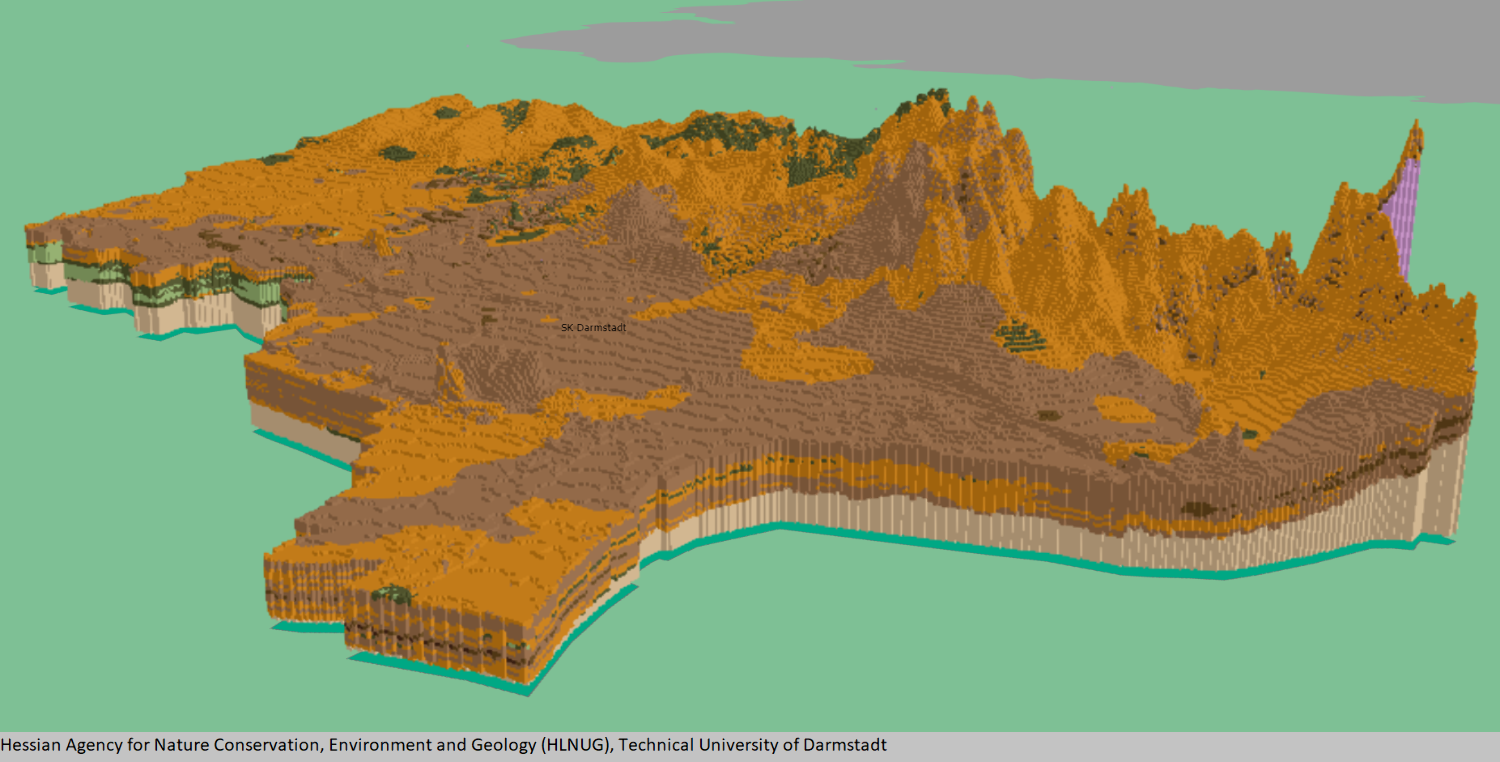
* A voxel layer represents multidimensional volumetric data. For example, atmospheric or oceanic data,
* geological underground models, or space-time cubes can be visualized as voxel layer.
* The VoxelLayer can be visualized in a [SceneView](https://developers.arcgis.com/javascript/latest/references/core/views/SceneView/) with the [viewingMode](https://developers.arcgis.com/javascript/latest/references/core/views/SceneView/#viewingMode) set to local.
*
* Use voxel layers to explore spatial relationships with other content.
* For example, an underground model visualized as a voxel layer can be viewed together with buildings
* or subterrain utilities to evaluate the underground for planned construction or maintenance.
*
* 
*
* > [!WARNING]
* >
* > **Known Limitations**
* >
* > * VoxelLayer requires the `EXT_color_buffer_float` extension.
* > * Visualizing voxels with data type `INT16` or `UINT16` additionally requires the `EXT_texture_norm16` extension, which is currently only supported by the Chrome browser.
* > * Visualizing voxels with data type `FLOAT32` additionally requires the `OES_texture_float_linear` extension.
* > * For best performance, use Chrome browser and a dedicated graphics card.
* > * Mobile support differs across devices. Voxel scene layers are not recommended for use on mobile.
* > * Measurement widget for both distance and area allows you to choose a point in a voxel layer. However, the point selection and measurement may not be accurate.
*
* <span id="creating-a-voxel-layer"></span>
* ## Creating a VoxelLayer
* From ArcGIS Pro, you can [author](https://pro.arcgis.com/en/pro-app/latest/help/mapping/layer-properties/voxel-scene-layer.htm) a
* voxel layer and [publish](https://enterprise.arcgis.com/en/server/latest/publish-services/windows/scene-services.htm#ESRI_SECTION1_94A47D5E8CBA49E792365AA8A781C44B)
* it as a [Scene Service](https://enterprise.arcgis.com/en/server/latest/publish-services/windows/scene-services.htm).
* Scene Services can be hosted on ArcGIS Online or ArcGIS Enterprise by uploading a Scene Layer Package (.slpk) or
* by [sharing](https://pro.arcgis.com/en/pro-app/latest/help/mapping/layer-properties/voxel-scene-layer.htm#ESRI_SECTION1_C30D73392D964D51A8B606128A8A6E8F)
* it from ArcGIS Pro.
*
* The Scene Service is identified by a [service URL](https://developers.arcgis.com/javascript/latest/references/core/layers/VoxelLayer/#url) or [portal item ID](https://developers.arcgis.com/javascript/latest/references/core/layers/VoxelLayer/#portalItem) and can be used to create an instance of a VoxelLayer.
*
* <details>
* <summary>Read More</summary>
*
* ### Reference a service URL
* To create a VoxelLayer instance from a service, you must set the [url](https://developers.arcgis.com/javascript/latest/references/core/layers/VoxelLayer/#url) property to the REST endpoint of a VoxelLayer. For a layer to be visible in a view, it must be added to the Map.
*
* ```js
* const voxelLayer = new VoxelLayer({
* url: "https://tiles.arcgis.com/tiles/z2tnIkrLQ2BRzr6P/arcgis/rest/services/EMU_Caribbean_Voxel/SceneServer"
* });
* const map = new Map({
* layers: [voxelLayer],
* basemap: {
* baseLayers: [
* new VectorTileLayer({
* url: "https://basemaps.arcgis.com/arcgis/rest/services/OpenStreetMap_GCS_v2/VectorTileServer"
* })
* ]
* }
* });
* ```
* If the voxel service is requested from a different domain, a [CORS enabled server](https://developers.arcgis.com/javascript/latest/cors/) or a [proxy](https://developers.arcgis.com/javascript/latest/proxies/) is required.
*
* ### Reference an ArcGIS portal Item ID
* You can also create a VoxelLayer from the [portal item ID](https://developers.arcgis.com/javascript/latest/references/core/layers/VoxelLayer/#portalItem).
*
* ```js
* const voxelLayer = new VoxelLayer({
* portalItem: {
* id: "3a922ed0c7a8489ea4fbe8747ac560ba"
* },
* });
* ```
*
* </details>
*
* <span id="data-visualization"></span>
* ## Data Visualization
* Voxel layers can be visualized as volumes or surfaces using the property
* [renderMode](https://developers.arcgis.com/javascript/latest/references/core/layers/VoxelLayer/#renderMode). When set to `surfaces`, only isosurfaces and sections are displayed,
* whereas `volume` draws the full volume.
*
* A voxel layer contains [variables](https://developers.arcgis.com/javascript/latest/references/core/layers/VoxelLayer/#variables) representing continuous or discrete data.
* For example, permeability could be defined as a continuous variable and soil type as a discrete variable.
* Voxel layer only visualizes one variable at a time.
* A [VoxelVariable](https://developers.arcgis.com/javascript/latest/references/core/layers/voxel/VoxelVariable/) describes a single variable in the VoxelLayer.
* The [currentVariableId](https://developers.arcgis.com/javascript/latest/references/core/layers/VoxelLayer/#currentVariableId) controls which variable is being rendered.
*
* You can define how a continuous or discrete variable can be rendered.
* You can apply a data filter to, modify the color scheme of, or add transparency to a continuous variable
* by using [VoxelTransferFunctionStyle](https://developers.arcgis.com/javascript/latest/references/core/layers/voxel/VoxelTransferFunctionStyle/).
* For a discrete variable, you can modify the color and label by using [uniqueValues](https://developers.arcgis.com/javascript/latest/references/core/layers/voxel/VoxelVariableStyle/#uniqueValues).
*
* <span id="exploring-a-voxel-layer"></span>
* ## Exploring a Voxel Layer
* Voxel layers often cover large areas. There are various capabilities you can use to explore the voxel layer in detail.
*
* ### VoxelSlice
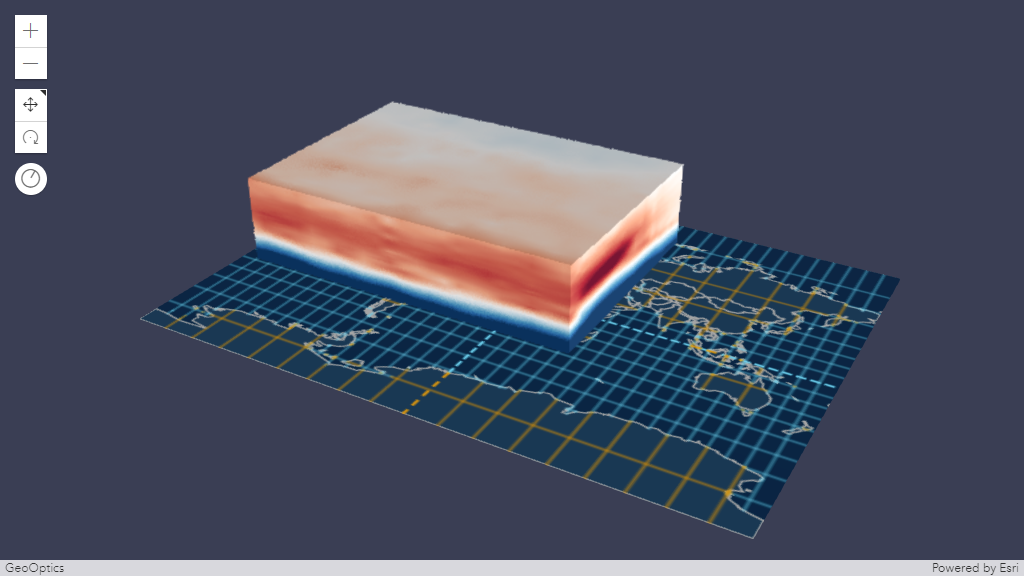
* Use [VoxelSlice](https://developers.arcgis.com/javascript/latest/references/core/layers/voxel/VoxelSlice/) to
* define an area of interest. You can slice a voxel layer vertically to show a smaller volume,
* or horizontally slice to reduce the voxel layer to a specific height.
*
* It is possible to have multiple slices in a VoxelLayer
* by modifying the [VoxelVolumeStyle's slices](https://developers.arcgis.com/javascript/latest/references/core/layers/voxel/VoxelVolumeStyle/#slices) or
* by authoring [slices](https://pro.arcgis.com/en/pro-app/latest/help/mapping/layer-properties/voxel-layer-slices.htm) in ArcGIS Pro
* before [publishing](https://enterprise.arcgis.com/en/server/latest/publish-services/windows/scene-services.htm#ESRI_SECTION1_94A47D5E8CBA49E792365AA8A781C44B)
* the voxel layer as a [scene service](https://enterprise.arcgis.com/en/server/latest/publish-services/windows/scene-services.htm).
*
* Slices modified using [VoxelVolumeStyle's slices](https://developers.arcgis.com/javascript/latest/references/core/layers/voxel/VoxelVolumeStyle/#slices)
* and the [slices](https://pro.arcgis.com/en/pro-app/latest/help/mapping/layer-properties/voxel-layer-slices.htm) authored from ArcGIS Pro
* are persistent in the web scene or layer definition respectively.
*
* [Position](https://developers.arcgis.com/javascript/latest/references/core/layers/voxel/VoxelSlice/#point),
* [tilt](https://developers.arcgis.com/javascript/latest/references/core/layers/voxel/VoxelSlice/#tilt) and
* [orientation](https://developers.arcgis.com/javascript/latest/references/core/layers/voxel/VoxelSlice/#orientation) of a
* [VoxelSlice](https://developers.arcgis.com/javascript/latest/references/core/layers/voxel/VoxelSlice/) can be modified with
* real-time rendering updates.
*
* 
*
* ### VoxelDynamicSection
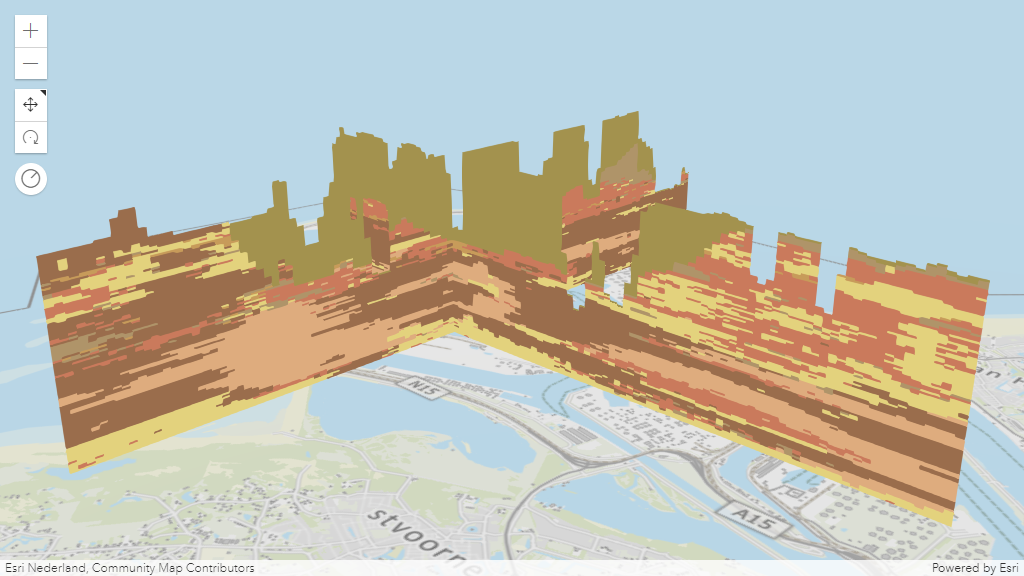
* A section is a plane which cuts through a voxel volume. Sections can reveal valuable information,
* such as soil composition and contamination across a subsurface profile.
* The [VoxelDynamicSection](https://developers.arcgis.com/javascript/latest/references/core/layers/voxel/VoxelDynamicSection/)
* allows you to define the properties of an individual dynamic section.
* You can create [VoxelDynamicSection](https://developers.arcgis.com/javascript/latest/references/core/layers/voxel/VoxelDynamicSection/) to understand structures in the voxel layer.
* For example, you can create a cross section diagram to explore an underground model
* at locations where new construction is planned.
* [VoxelDynamicSection](https://developers.arcgis.com/javascript/latest/references/core/layers/voxel/VoxelDynamicSection/) can only be visualized when the
* [renderMode](https://developers.arcgis.com/javascript/latest/references/core/layers/VoxelLayer/#renderMode) is set to `surfaces`.
*
* [Position](https://developers.arcgis.com/javascript/latest/references/core/layers/voxel/VoxelDynamicSection/#point),
* [tilt](https://developers.arcgis.com/javascript/latest/references/core/layers/voxel/VoxelDynamicSection/#tilt) and
* [orientation](https://developers.arcgis.com/javascript/latest/references/core/layers/voxel/VoxelDynamicSection/#orientation) of a
* [VoxelDynamicSection](https://developers.arcgis.com/javascript/latest/references/core/layers/voxel/VoxelDynamicSection/) can be modified with
* real-time rendering updates.
*
* 
*
* ### VoxelIsosurface
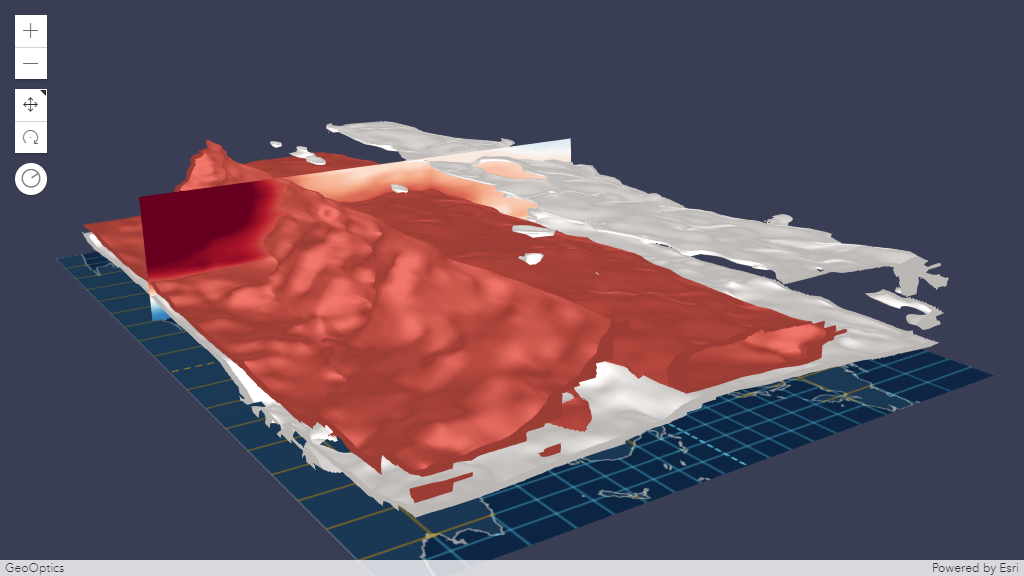
* A [VoxelIsosurface](https://developers.arcgis.com/javascript/latest/references/core/layers/voxel/VoxelIsosurface/)
* is a surface representing a specific value within a continuous variable.
* For example, you can visualize a threshold value for pollutants in the atmosphere as an isosurface.
* This allows you to identify the location of key values. You can visualize isosurfaces together with sections.
* [VoxelIsosurface](https://developers.arcgis.com/javascript/latest/references/core/layers/voxel/VoxelIsosurface/) can only be visualized when the [renderMode](https://developers.arcgis.com/javascript/latest/references/core/layers/VoxelLayer/#renderMode)
* is set to `surfaces`.
*
* By default, the color of an isosurface matches the color in the
* [colorStops](https://developers.arcgis.com/javascript/latest/references/core/layers/voxel/VoxelTransferFunctionStyle/#colorStops) for the specific value.
* You can choose a different `color` and lock the color by using the property `colorLocked`
* in [VoxelIsosurface](https://developers.arcgis.com/javascript/latest/references/core/layers/voxel/VoxelIsosurface/).
* You can have up to four isosurfaces in a voxel layer.
*
* 
*
* ### Analysis Tool
* The [Slice](https://developers.arcgis.com/javascript/latest/references/core/widgets/Slice/), [DirectLineMeasurement3D](https://developers.arcgis.com/javascript/latest/references/core/widgets/DirectLineMeasurement3D/)
* and [AreaMeasurement3D](https://developers.arcgis.com/javascript/latest/references/core/widgets/AreaMeasurement3D/) works with VoxelLayer.
*
* **Slice**
*
* The VoxelLayer treats the slice as an infinite plane and ignores the slice plane extent.
*
* [Slice](https://developers.arcgis.com/javascript/latest/references/core/widgets/Slice/) widget allows you to interactively modify a single slice.
* The visualization created using the [Slice](https://developers.arcgis.com/javascript/latest/references/core/widgets/Slice/) widget are temporary and
* cannot be persisted in a [WebScene](https://developers.arcgis.com/javascript/latest/references/core/WebScene/) or in [slides](https://developers.arcgis.com/javascript/latest/references/core/webscene/Slide/).
*
* <details>
* <summary>Read More</summary>
*
* Below is a comparison between the [VoxelSlice](https://developers.arcgis.com/javascript/latest/references/core/layers/voxel/VoxelSlice/) and the [Slice](https://developers.arcgis.com/javascript/latest/references/core/widgets/Slice/) widget.
*
* | | [VoxelSlice](https://developers.arcgis.com/javascript/latest/references/core/layers/voxel/VoxelSlice/) | [Slice widget](https://developers.arcgis.com/javascript/latest/references/core/widgets/Slice/) |
* |---|---|---|
* | Persisted | yes | no |
* | Editable | yes (by modifying the properties of the [VoxelSlice](https://developers.arcgis.com/javascript/latest/references/core/layers/voxel/VoxelSlice/)) | yes |
* | Multiple slices | yes (by modifying [VoxelVolumeStyle's slices](https://developers.arcgis.com/javascript/latest/references/core/layers/voxel/VoxelVolumeStyle/#slices)) | no |
*
* </details>
*
* **Measurement**
*
* The [DirectLineMeasurementAnalysis](https://developers.arcgis.com/javascript/latest/references/core/analysis/DirectLineMeasurementAnalysis/) and [AreaMeasurementAnalysis](https://developers.arcgis.com/javascript/latest/references/core/analysis/AreaMeasurementAnalysis/)
* and their related components allow selecting points on the VoxelLayer to measure. However, the selection of the points
* and the measurement results may not be accurate. The measurement results include the
* [verticalExaggeration](https://developers.arcgis.com/javascript/latest/references/core/layers/voxel/VoxelVolumeStyle/#verticalExaggeration) applied to the VoxelLayer.
*
* ### Popup
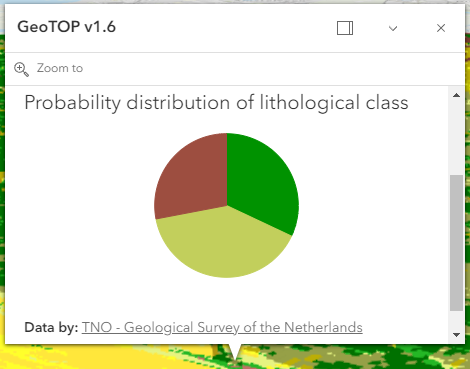
* You can explore the properties of individual voxels by creating a customized popup using the [popupTemplate](https://developers.arcgis.com/javascript/latest/references/core/layers/VoxelLayer/#popupTemplate).
* Use the [fields](https://developers.arcgis.com/javascript/latest/references/core/layers/VoxelLayer/#fields) to list all available fields that can be used to customize the popup
* of a VoxelLayer.
*
* 
*
* <span id="voxellayer-volume"></span>
* ## VoxelLayer Volume
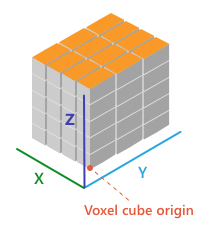
* The voxel layer is structured in dimensional regularly gridded cubes that store one or many variables.
*
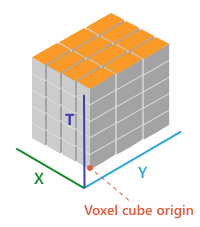
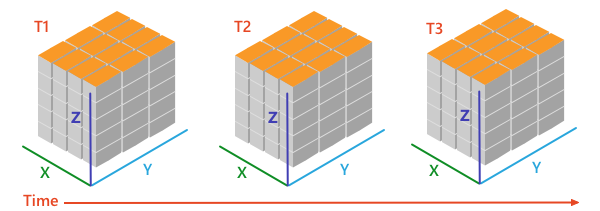
* A voxel layer can represent different dimensions. The `volumeType` property in [VoxelVolume](https://developers.arcgis.com/javascript/latest/references/core/layers/voxel/VoxelVolume/) defines the dimension of the voxel layer.
*
* * X, Y, Z in which each dimension represents a geographic coordinate
*
* 
*
* * X, Y, T in which X and Y represent a geographic coordinate and T represents time as a level
*
* 
*
* * X, Y, Z, T in which each dimension represents geographic coordinates and includes a fourth dimension representing time.
*
* 
*
* <span id="voxellayer-time"></span>
* ## VoxelLayer and time
* A VoxelLayer enables the visualization of time as the fourth dimension if the [volumeType](https://developers.arcgis.com/javascript/latest/references/core/layers/voxel/VoxelVolume/#volumeType) is "xyzt". A [volumeType](https://developers.arcgis.com/javascript/latest/references/core/layers/voxel/VoxelVolume/#volumeType) of "xyt" is not a time-aware layer. The time is represented along the z dimension.
*
* You can access the temporal data of a VoxelLayer by using the `stops` in the [TimeInfo](https://developers.arcgis.com/javascript/latest/references/core/layers/support/TimeInfo/).
* The `stops` indicates time instants that a layer has data for.
* You can use the `stops` with the [TimeSlider](https://developers.arcgis.com/javascript/latest/references/core/widgets/TimeSlider/) widget or use it to configure the VoxelLayer's [timeExtent](https://developers.arcgis.com/javascript/latest/references/core/layers/VoxelLayer/#timeExtent).
*
* The layer and the view can have a different [TimeExtent](https://developers.arcgis.com/javascript/latest/references/core/time/TimeExtent/).
* The [useViewTime](https://developers.arcgis.com/javascript/latest/references/core/layers/VoxelLayer/#useViewTime) determines if the VoxelLayer will show the data based on the view's timeExtent or the layer's timeExtent.
*
* <details>
* <summary>Read More</summary>
*
* The table below shows an example of how the VoxelLayer chooses the data to draw
* when the [useViewTime](https://developers.arcgis.com/javascript/latest/references/core/layers/VoxelLayer/#useViewTime) is used in conjunction with the view's and the layer's [timeExtent](https://developers.arcgis.com/javascript/latest/references/core/layers/VoxelLayer/#timeExtent).
*
* For example, a VoxelLayer has the following `stops` on the [timeInfo](https://developers.arcgis.com/javascript/latest/references/core/layers/VoxelLayer/#timeInfo):
*
* [0] 2019-06-01 12:00 AM
*
* [1] 2019-07-01 12:00 AM
*
* [2] 2019-08-01 12:00 AM
*
* | useViewTime | view's timeExtent | VoxelLayer's timeExtent | VoxelLayer will draw the data |
* | -- | -- | -- | -- |
* | true | not set | not set | [0] 2019-06-01 12:00 AM |
* | true | not set | From 2019-07-01 12:00 AM to 2019-07-01 12:00 AM | [1] 2019-07-01 12:00 AM |
* | true | From 2019-06-15 12:00 AM to 2019-07-15 12:00 AM | not set | [1] 2019-07-01 12:00 AM |
* | true | From 2019-06-15 12:00 AM to 2019-07-15 12:00 AM | From 2019-08-01 12:00 AM to 2019-08-01 12:00 AM | VoxelLayer will not draw because the view's timeExtent does not intersect the VoxelLayer's timeExtent |
* | false | not set | not set | [0] 2019-06-01 12:00 AM |
* | false | not set | From 2019-07-01 12:00 AM to 2019-07-01 12:00 AM | [1] 2019-07-01 12:00 AM |
* | false | From 2019-06-15 12:00 AM to 2019-07-15 12:00 AM | not set | [0] 2019-06-01 12:00 AM |
* | false | From 2019-06-15 12:00 AM to 2019-07-15 12:00 AM | From 2019-08-01 12:00 AM to 2019-08-01 12:00 AM | [2] 2019-08-01 12:00 AM |
*
* </details>
*
* @since 4.22
* @see [SceneLayer](https://developers.arcgis.com/javascript/latest/references/core/layers/SceneLayer/)
* @see [SceneView](https://developers.arcgis.com/javascript/latest/references/core/views/SceneView/)
* @see [Map](https://developers.arcgis.com/javascript/latest/references/core/Map/)
* @see [Sample - Intro to Voxel Layer](https://developers.arcgis.com/javascript/latest/sample-code/layers-voxel/)
* @see [Sample - VoxelLayer variable and render mode](https://developers.arcgis.com/javascript/latest/sample-code/layers-voxel-variable)
* @see [Sample - Create area of interest for VoxelLayer](https://developers.arcgis.com/javascript/latest/sample-code/layers-voxel-slices)
* @see [Sample - VoxelLayer Isosurface](https://developers.arcgis.com/javascript/latest/sample-code/layers-voxel-isosurface)
* @see [Sample - VoxelLayer Dynamic Sections](https://developers.arcgis.com/javascript/latest/sample-code/layers-voxel-dynamic-sections)
* @see [Sample - VoxelLayer Discrete Variable](https://developers.arcgis.com/javascript/latest/sample-code/layers-voxel-discrete-variable)
* @see [Sample - VoxelLayer Color Stops](https://developers.arcgis.com/javascript/latest/sample-code/layers-voxel-color-stops)
* @see [Sample - VoxelLayer Opacity Stops](https://developers.arcgis.com/javascript/latest/sample-code/layers-voxel-opacity-stops)
* @see [Sample - VoxelLayer and time](https://developers.arcgis.com/javascript/latest/sample-code/layers-voxel-time)
* @see [Sample - Configuring the popup of a VoxelLayer](https://developers.arcgis.com/javascript/latest/sample-code/layers-voxel-popup-config)
*/
export default class VoxelLayer extends VoxelLayerSuperclass {
/**
* @example
* // Typical usage
* let layer = new VoxelLayer({
* // URL to the service
* url: "your voxel service url"
* });
*/
constructor(properties?: VoxelLayerProperties);
/**
* The variable that is being displayed. The `currentVariableId` must be the id of a [VoxelVariable](https://developers.arcgis.com/javascript/latest/references/core/layers/voxel/VoxelVariable/) that is
* in the variables collection of the [VoxelLayer](https://developers.arcgis.com/javascript/latest/references/core/layers/VoxelLayer/).
*
* @default 0
* @since 4.24
*/
accessor currentVariableId: number;
/**
* Controls whether or not to globally disable all dynamic sections in the current [VoxelVolumeStyle](https://developers.arcgis.com/javascript/latest/references/core/layers/voxel/VoxelVolumeStyle/).
*
* @default true
* @since 4.25
*/
accessor enableDynamicSections: boolean;
/**
* Controls whether or not to globally disable all isosurfaces in the current [VoxelVariableStyle](https://developers.arcgis.com/javascript/latest/references/core/layers/voxel/VoxelVariableStyle/).
*
* @default true
* @since 4.25
*/
accessor enableIsosurfaces: boolean;
/**
* Controls whether or not to globally disable all slices in the current [VoxelVolumeStyle](https://developers.arcgis.com/javascript/latest/references/core/layers/voxel/VoxelVolumeStyle/).
*
* @default true
* @since 4.25
*/
accessor enableSlices: boolean;
/**
* A complete list of fields that consists of fixed voxel fields and the voxel variables. This list is used for the layer's [popupTemplate](https://developers.arcgis.com/javascript/latest/references/core/layers/VoxelLayer/#popupTemplate).
*
* The fixed voxel fields used in popups represent the voxel's position, current variable being displayed, depth and time. These fields are prefixed with `Voxel.`
* to indicate that they are special fields and to avoid any potential conflict with voxel variable fields.
*
* Below is a list of fixed fields that exists for all VoxelLayer depending on the [voxel's volume](https://developers.arcgis.com/javascript/latest/references/core/layers/VoxelLayer/#voxellayer-volume).
*
* ##### Fixed voxel fields
* * The `Voxel.CurrentVariable` field returns the current variable being displayed.
* * The `Voxel.Position` field returns the clicked voxel's position.
* * The `Voxel.Depth` field returns the depth of the clicked voxel. (Only applicable for `XYZ` and `XYZT` [volumeType](https://developers.arcgis.com/javascript/latest/references/core/layers/voxel/VoxelVolume/#volumeType)).
* * The `Voxel.LocalTime` field returns the local date and/or time of the clicked voxel if the VoxelLayer has a time dimension. (Only applicable for `XYT` and `XYZT` [volumeType](https://developers.arcgis.com/javascript/latest/references/core/layers/voxel/VoxelVolume/#volumeType)).
* * The `Voxel.SourceTime` field returns the source time of the clicked voxel if the VoxelLayer has a time dimension. (Only applicable for `XYT` and `XYZT` [volumeType](https://developers.arcgis.com/javascript/latest/references/core/layers/voxel/VoxelVolume/#volumeType)).
*
* @since 4.31
* @example
* layer.when(() => {
* // print out field names returned in layer.fields
* layer.fields.forEach((field) => {
* console.log(field.name);
* });
* });
*/
get fields(): Field[];
/**
* Indicates whether the layer will be included in the legend.
*
* @default true
*/
accessor legendEnabled: boolean;
/**
* Indicates whether to display popups when voxels in the layer are clicked. The layer needs to have a [popupTemplate](https://developers.arcgis.com/javascript/latest/references/core/layers/VoxelLayer/#popupTemplate) to define what
* information should be displayed in the popup. Alternatively, a default popup template may be automatically used if
* [defaultPopupTemplateEnabled](https://developers.arcgis.com/javascript/latest/references/core/widgets/Popup/#defaultPopupTemplateEnabled) is set to `true`.
*
* @default false
* @since 4.26
*/
accessor popupEnabled: boolean;
/**
* The popup template for the layer. When set on the layer, the popupTemplate
* allows users to access attributes and display their values using text and/or charts
* in the view's popup when a voxel is clicked.
* See [this sample](https://developers.arcgis.com/javascript/latest/sample-code/layers-voxel-popup-config/)
* for an example of how [PopupTemplate](https://developers.arcgis.com/javascript/latest/references/core/PopupTemplate/) interacts with a
* [VoxelLayer](https://developers.arcgis.com/javascript/latest/references/core/layers/VoxelLayer/).
*
* A default popup template is automatically used if no `popupTemplate` has been defined when
* [defaultPopupTemplateEnabled](https://developers.arcgis.com/javascript/latest/references/core/widgets/Popup/#defaultPopupTemplateEnabled)
* is set to `true`.
*
* @since 4.31
* @see [createPopupTemplate()](https://developers.arcgis.com/javascript/latest/references/core/layers/VoxelLayer/#createPopupTemplate)
* @see [popup](https://developers.arcgis.com/javascript/latest/references/core/views/SceneView/#popup)
* @see [popup](https://developers.arcgis.com/javascript/latest/references/core/views/View2D/#popup)
*/
get popupTemplate(): PopupTemplate | null | undefined;
set popupTemplate(value: PopupTemplateProperties | null | undefined);
/**
* Current rendering mode for the [VoxelLayer](https://developers.arcgis.com/javascript/latest/references/core/layers/VoxelLayer/). The `volume` mode draws the full voxel layer volume whereas the `surfaces` mode draws
* dynamic sections and isosurfaces only.
*
* @default "volume"
* @since 4.24
*/
accessor renderMode: VoxelRenderMode;
/**
* The layer's time extent. When the layer's [useViewTime](https://developers.arcgis.com/javascript/latest/references/core/layers/VoxelLayer/#useViewTime) is `false`, the layer
* instructs the view to show data from the layer based on this time extent.
* You can choose the layer's time extent from the voxel layer's [timeInfo.stops](https://developers.arcgis.com/javascript/latest/references/core/layers/VoxelLayer/#timeInfo).
*
* @since 4.30
* @example
* // Configure the layer to ignore the view's time and instead
* // draw using the data from its last time stop
* vxlLayer.useViewTime = false;
* const lastStopTime = vxlLayer.timeInfo.stops.at(-1);
* vxlLayer.timeExtent = new TimeExtent({
* start: lastStopTime,
* end: lastStopTime,
* });
*/
get timeExtent(): TimeExtent | null | undefined;
set timeExtent(value: TimeExtentProperties | null | undefined);
/**
* TimeInfo provides information such as [stops](https://developers.arcgis.com/javascript/latest/references/core/layers/support/TimeInfo/#stops) the layer has data for
* and the [fullTimeExtent](https://developers.arcgis.com/javascript/latest/references/core/layers/support/TimeInfo/#fullTimeExtent) for the layer.
*
* @since 4.30
* @example
* // Configure the timeSlider to use the layer's timeInfo.stops
* const vxlLayer = new VoxelLayer({
* url: url,
* });
* const map = new Map({
* layers: [vxlLayer]
* });
* const view = new SceneView({
* map: map,
* container: "viewDiv"
* });
* const timeSlider = new TimeSlider({
* container: "timeSlider",
* view: view,
* mode: "instant",
* playRate: 3000
* });
* view.whenLayerView(vxlLayer).then((vxlLayerView) => {
* timeSlider.fullTimeExtent = vxlLayer.timeInfo.fullTimeExtent;
* timeSlider.stops = {
* dates: vxlLayer.timeInfo.stops
* };
* });
*/
get timeInfo(): TimeInfo | null | undefined;
/**
* A temporary offset of the time data based on a certain [TimeInterval](https://developers.arcgis.com/javascript/latest/references/core/time/TimeInterval/). This allows
* users to overlay data from two or more time-aware layers with different time extents.
* For example, if a layer has data recorded for the year 1970, an offset value of 2 years would temporarily shift the data to
* 1972. You can then overlay this data with data recorded in 1972.
* A time offset can be used for display purposes only. The data shown in popups are not affected by the offset.
*
* @since 4.30
* @example
* // Offset a Voxel layer, adding 2 years
* let vxlLayer = new VoxelLayer({
* url: url,
* timeOffset: {
* unit: "years",
* value: 2
* }
* })
*/
get timeOffset(): TimeInterval | null | undefined;
set timeOffset(value: TimeIntervalProperties | null | undefined);
/** The layer type provides a convenient way to check the type of the layer without the need to import specific layer modules. */
get type(): "voxel";
/**
* Determines if the layer will update its temporal data based on the view's
* [timeExtent](https://developers.arcgis.com/javascript/latest/references/core/views/View/#timeExtent). When `false`, the layer will display its temporal
* data based on the layer's [timeExtent](https://developers.arcgis.com/javascript/latest/references/core/layers/VoxelLayer/#timeExtent), regardless of changes to the view.
* If both view and layer time extents are set while this property is `true`, then the data that fall within
* the intersection of the view and layer time extents will be displayed.
* For example, if a layer's time extent is set to display the data between 1970 and 1975 and
* the view has a time extent set to 1972-1980, the effective time on the voxel layer will be 1972-1975.
*
* @default true
* @since 4.30
* @example
* if (vxlLayer.useViewTime) {
* console.log("Displaying data between:", view.timeExtent.start, " - ", view.timeExtent.end)
* }
*/
accessor useViewTime: boolean;
/**
* The collection of variables that the VoxelLayer has data for.
*
* @since 4.24
*/
get variables(): Collection<VoxelVariable>;
/**
* The collection of variable styles, containing exactly one [VoxelVariableStyle](https://developers.arcgis.com/javascript/latest/references/core/layers/voxel/VoxelVariableStyle/) for each [VoxelVariable](https://developers.arcgis.com/javascript/latest/references/core/layers/voxel/VoxelVariable/).
*
* @since 4.25
*/
get variableStyles(): Collection<VoxelVariableStyle>;
set variableStyles(value: ReadonlyArrayOrCollection<VoxelVariableStyleProperties>);
/**
* The collection of volumes that the VoxelLayer has variables for. Currently only a single volume is supported.
*
* @since 4.25
*/
get volumes(): Collection<VoxelVolume>;
/**
* The collection of volume styles. There is currently only one volume and thus also only one [VoxelVolumeStyle](https://developers.arcgis.com/javascript/latest/references/core/layers/voxel/VoxelVolumeStyle/).
*
* @since 4.24
*/
get volumeStyles(): Collection<VoxelVolumeStyle>;
set volumeStyles(value: ReadonlyArrayOrCollection<VoxelVolumeStyleProperties>);
/**
* Creates a default popup template for the layer, populated with the default voxel fields and a field for each variable in the layer.
*
* @param options - Options for creating the popup template.
* @returns The popup template, or `null` if the layer does not
* have any fields.
* @since 4.31
*/
createPopupTemplate(options?: CreatePopupTemplateOptions): PopupTemplate | null | undefined;
/**
* Returns a [Color](https://developers.arcgis.com/javascript/latest/references/core/Color/) for a given value for the continuous [VoxelVariable](https://developers.arcgis.com/javascript/latest/references/core/layers/voxel/VoxelVariable/) identified by variableId using
* the variable's [VoxelTransferFunctionStyle](https://developers.arcgis.com/javascript/latest/references/core/layers/voxel/VoxelTransferFunctionStyle/). The applyOpacityStops parameter determines whether the transfer function's
* opacity stops are applied or not. Returns null if the variable is not a continuous variable or if the transfer function is not configured correctly.
*
* @param variableId - Voxel variable id for a continuous variable.
* @param dataValue - The continuous data value to get a color for.
* @param applyOpacityStops - Whether or not to apply the opacity stops to the returned color.
* @returns The color or null if an invalid variableId was passed in.
* @since 4.25
*/
getColorForContinuousDataValue(variableId: number, dataValue: number, applyOpacityStops: boolean): Color | null | undefined;
/**
* Returns the [Field](https://developers.arcgis.com/javascript/latest/references/core/layers/support/Field/) instance for a field name (case-insensitive).
*
* @param fieldName - Name of the field.
* @returns the matching field or `undefined`
* @since 4.31
* @see [fields](https://developers.arcgis.com/javascript/latest/references/core/layers/VoxelLayer/#fields)
*/
getField(fieldName: string): Field | null | undefined;
/**
* Returns a [VoxelVariable](https://developers.arcgis.com/javascript/latest/references/core/layers/voxel/VoxelVariable/) based on an id. If you call `getVariable(null)`
* the current VoxelVariable is returned.
*
* @param variableId - Voxel variable id.
* @returns The variable or null if an invalid variableId was passed in.
* @since 4.24
*/
getVariable(variableId: number | null | undefined): VoxelVariable | null | undefined;
/**
* Returns a [VoxelVariableStyle](https://developers.arcgis.com/javascript/latest/references/core/layers/voxel/VoxelVariableStyle/) based on an id. If you call `getVariableStyle(null)`
* the current VoxelVariableStyle is returned.
*
* @param variableId - Voxel variable id.
* @returns The variable style or null if an invalid variableId was passed in.
* @since 4.25
*/
getVariableStyle(variableId: number | null | undefined): VoxelVariableStyle | null | undefined;
/**
* Returns a [VoxelVolume](https://developers.arcgis.com/javascript/latest/references/core/layers/voxel/VoxelVolume/) based on the id of a [VoxelVariable](https://developers.arcgis.com/javascript/latest/references/core/layers/voxel/VoxelVariable/). If you call `getVolume(null)`
* the current variable's VoxelVolume is returned.
*
* @param variableId - Voxel variable id.
* @returns The volume or null if an invalid variableId was passed in.
* @since 4.25
*/
getVolume(variableId: number | null | undefined): VoxelVolume | null | undefined;
/**
* Returns a [VoxelVolumeStyle](https://developers.arcgis.com/javascript/latest/references/core/layers/voxel/VoxelVolumeStyle/) based on the id of a [VoxelVariable](https://developers.arcgis.com/javascript/latest/references/core/layers/voxel/VoxelVariable/). If you call `getVolumeStyle(null)`
* the current variable's VoxelVolumeStyle is returned.
*
* @param variableId - Voxel variable id.
* @returns The volume style or null if an invalid variableId was passed in.
* @since 4.25
*/
getVolumeStyle(variableId: number | null | undefined): VoxelVolumeStyle | null | undefined;
}
declare const VoxelLayerSuperclass: typeof Layer & typeof APIKeyMixin & typeof CustomParametersMixin & typeof MultiOriginJSONSupportMixin & typeof ScaleRangeLayer & typeof PortalLayer & typeof OperationalLayer & typeof SceneService