@arcgis/core
Version:
ArcGIS Maps SDK for JavaScript: A complete 2D and 3D mapping and data visualization API
852 lines (850 loc) • 56.9 kB
TypeScript
import type PopupTemplate from "../PopupTemplate.js";
import type Extent from "../geometry/Extent.js";
import type SpatialReference from "../geometry/SpatialReference.js";
import type Layer from "./Layer.js";
import type Field from "./support/Field.js";
import type FieldsIndex from "./support/FieldsIndex.js";
import type LabelClass from "./support/LabelClass.js";
import type PurgeOptions from "./support/PurgeOptions.js";
import type StreamConnection from "./support/StreamConnection.js";
import type PortalItem from "../portal/PortalItem.js";
import type ElevationInfo from "../symbols/support/ElevationInfo.js";
import type { ClonableMixin } from "../core/Clonable.js";
import type { MultiOriginJSONSupportMixin } from "../core/MultiOriginJSONSupport.js";
import type { FieldDomainOptions, LayerSaveAsOptions, LayerSaveOptions } from "./types.js";
import type { BlendLayer, BlendLayerProperties } from "./mixins/BlendLayer.js";
import type { CustomParametersMixin, CustomParametersMixinProperties } from "./mixins/CustomParametersMixin.js";
import type { DisplayFilteredLayer, DisplayFilteredLayerProperties } from "./mixins/DisplayFilteredLayer.js";
import type { FeatureEffectLayer, FeatureEffectLayerProperties } from "./mixins/FeatureEffectLayer.js";
import type { FeatureReductionLayer, FeatureReductionLayerProperties } from "./mixins/FeatureReductionLayer.js";
import type { OperationalLayer, OperationalLayerProperties } from "./mixins/OperationalLayer.js";
import type { PortalLayer, PortalLayerProperties } from "./mixins/PortalLayer.js";
import type { RefreshableLayer, RefreshableLayerProperties } from "./mixins/RefreshableLayer.js";
import type { ScaleRangeLayer, ScaleRangeLayerProperties } from "./mixins/ScaleRangeLayer.js";
import type { TemporalLayer, TemporalLayerProperties } from "./mixins/TemporalLayer.js";
import type { TrackableLayer, TrackableLayerProperties } from "./mixins/TrackableLayer.js";
import type { Message } from "./support/StreamConnection.js";
import type { DomainUnion } from "./support/types.js";
import type { PortalItemProperties } from "../portal/PortalItem.js";
import type { RendererUnion } from "../renderers/types.js";
import type { CreatePopupTemplateOptions } from "../support/popupUtils.js";
import type { ElevationInfoProperties } from "../symbols/support/ElevationInfo.js";
import type { FieldProperties } from "./support/Field.js";
import type { ExtentProperties } from "../geometry/Extent.js";
import type { LabelClassProperties } from "./support/LabelClass.js";
import type { PopupTemplateProperties } from "../PopupTemplate.js";
import type { PurgeOptionsProperties } from "./support/PurgeOptions.js";
import type { HeatmapRendererProperties } from "../renderers/HeatmapRenderer.js";
import type { PieChartRendererProperties } from "../renderers/PieChartRenderer.js";
import type { DictionaryRendererProperties } from "../renderers/DictionaryRenderer.js";
import type { DotDensityRendererProperties } from "../renderers/DotDensityRenderer.js";
import type { UniqueValueRendererProperties } from "../renderers/UniqueValueRenderer.js";
import type { ClassBreaksRendererProperties } from "../renderers/ClassBreaksRenderer.js";
import type { SimpleRendererProperties } from "../renderers/SimpleRenderer.js";
import type { SpatialReferenceProperties } from "../geometry/SpatialReference.js";
import type { LayerProperties } from "./Layer.js";
export interface StreamLayerProperties extends LayerProperties, CustomParametersMixinProperties, PortalLayerProperties, OperationalLayerProperties, RefreshableLayerProperties, ScaleRangeLayerProperties, TrackableLayerProperties, TemporalLayerProperties, BlendLayerProperties, FeatureEffectLayerProperties, FeatureReductionLayerProperties, DisplayFilteredLayerProperties, Partial<Pick<StreamLayer, "copyright" | "definitionExpression" | "displayField" | "geometryType" | "labelsVisible" | "legendEnabled" | "maxReconnectionAttempts" | "maxReconnectionInterval" | "objectIdField" | "popupEnabled" | "screenSizePerspectiveEnabled" | "sourceJSON" | "updateInterval" | "url" | "webSocketUrl">> {
/**
* Specifies how features are placed on the vertical axis (z). This property may only be used
* in a [SceneView](https://developers.arcgis.com/javascript/latest/references/core/views/SceneView/). See the [ElevationInfo sample](https://developers.arcgis.com/javascript/latest/sample-code/scene-elevationinfo/)
* for an example of how this property may be used.
*
* > [!WARNING]
* >
* > If the elevation info is not specified, the effective elevation depends on the context and could vary per graphic.
*/
elevationInfo?: ElevationInfoProperties | null;
/**
* An array of fields in the layer.
* Certain characters are not supported in field names. See [field naming guidelines](https://support.esri.com/en-us/knowledge-base/what-characters-should-not-be-used-in-arcgis-for-field--000005588)
* for details.
*
* @since 4.15
* @example
* // define each field's schema
* let fields = [
* new Field({
* "name": "ObjectID",
* "alias": "ObjectID",
* "type": "oid"
* }), new Field({
* "name": "description",
* "alias": "Description",
* "type": "string"
* }), new Field ({
* "name": "title",
* "alias": "Title",
* "type": "string"
* })
* ];
*/
fields?: FieldProperties[];
/**
* An [Extent](https://developers.arcgis.com/javascript/latest/references/core/geometry/Extent/) object used to filter features. Only features that intersect the
* extent object are displayed in the view. For example, the `geometryDefinition` can be set to a city boundary extent
* to display features only intersect this extent.
*
* > [!WARNING]
* >
* > **Notes**
* >
* > To filter client-side stream layers or stream layers pointing to custom web sockets, use the [StreamLayerView.filter](https://developers.arcgis.com/javascript/latest/references/core/views/layers/StreamLayerView/#filter) or
* > [StreamLayerView.featureEffect](https://developers.arcgis.com/javascript/latest/references/core/views/layers/StreamLayerView/#featureEffect) property.
* > The [definitionExpression](https://developers.arcgis.com/javascript/latest/references/core/layers/StreamLayer/#definitionExpression) and [geometryDefinition](https://developers.arcgis.com/javascript/latest/references/core/layers/StreamLayer/#geometryDefinition) properties are only meant to be used with stream layers
* > that point to geoevent or velocity steam services.
*
* @example
* // Get the current extent of the map view and expand the extent by factor of 0.9
* // Then apply this extent to stream layer's geometryDefinition.
* // Only features that intersect this extent will be displayed on the view.
* let extent = mapView.extent.clone().expand(0.9);
* streamLayer.geometryDefinition = extent;
*/
geometryDefinition?: ExtentProperties | null;
/**
* The label definition for this layer, specified as an array of
* [LabelClass](https://developers.arcgis.com/javascript/latest/references/core/layers/support/LabelClass/). Use this property to specify
* labeling properties for the layer such as label expression, placement, and size.
*
* Multiple Label classes with different `where` clauses can be used to define several
* labels with varying styles on the same feature. Likewise, multiple label classes
* may be used to label different types of features (for example blue labels
* for boats and green labels for trucks).
*
* > [!WARNING]
* >
* > **Known Limitations**
* >
* > 3D [SceneViews](https://developers.arcgis.com/javascript/latest/references/core/views/SceneView/) only support displaying one [LabelClass](https://developers.arcgis.com/javascript/latest/references/core/layers/support/LabelClass/) per feature.
*
* @see [Sample: Flat vs. volumetric 3D symbol layers](https://developers.arcgis.com/javascript/latest/sample-code/symbols-points-3d/)
* @see [Sample: Add multiple label classes to a layer](https://developers.arcgis.com/javascript/latest/sample-code/labels-multiple-classes/)
* @see [Sample: Multi-line labels](https://developers.arcgis.com/javascript/latest/sample-code/labels-multiline/)
* @example
* const boatLabelClass = new LabelClass({
* labelExpressionInfo: { expression: "$feature.NAME" },
* symbol: {
* type: "label-3d", // autocasts as new LabelSymbol3D()
* symbolLayers: [{
* type: "text", // autocasts as new TextSymbol3DLayer()
* material: { color: [ 49,163,84 ] },
* size: 12 // points
* }]
* }
* });
*
* streamLayer.labelingInfo = [ boatLabelClass ];
*/
labelingInfo?: LabelClassProperties[] | null;
/**
* The popup template for the layer. When set on the layer, the `popupTemplate`
* allows users to access attributes and display their values in the
* view's Popup when a feature is selected
* using text and/or charts. See the [PopupTemplate sample](https://developers.arcgis.com/javascript/latest/sample-code/intro-popuptemplate/)
* for an example of how [PopupTemplate](https://developers.arcgis.com/javascript/latest/references/core/PopupTemplate/) interacts with a
* [FeatureLayer](https://developers.arcgis.com/javascript/latest/references/core/layers/FeatureLayer/).
*
* A default popup template is automatically used if no `popupTemplate` has been defined when
* [Popup.defaultPopupTemplateEnabled](https://developers.arcgis.com/javascript/latest/references/core/widgets/Popup/#defaultPopupTemplateEnabled)
* is set to `true`.
*
* @see [createPopupTemplate()](https://developers.arcgis.com/javascript/latest/references/core/layers/StreamLayer/#createPopupTemplate)
* @see [SceneView.popup](https://developers.arcgis.com/javascript/latest/references/core/views/SceneView/#popup)
* @see [View2D.popup](https://developers.arcgis.com/javascript/latest/references/core/views/View2D/#popup)
*/
popupTemplate?: PopupTemplateProperties | null;
/**
* Options for purging stale features. The purge options controls how much data is removed from
* [StreamLayerView](https://developers.arcgis.com/javascript/latest/references/core/views/layers/StreamLayerView/) and how often.
* Choosing the right purge rule for your stream layer is critical for maximizing functionality and performance.
* Cannot be changed after the layer has been loaded.
*
* @example
* // show last 5 known locations of per flight
* // but only show 100,000 locations overall
* streamLayer = new StreamLayer({
* url: url,
* purgeOptions: {
* displayCount: 100000,
* maxObservations: 5
* }
* });
*/
purgeOptions?: PurgeOptionsProperties;
/**
* The renderer assigned to the layer. The renderer defines how to
* visualize each feature in the layer. Depending on the renderer type,
* features may be visualized with the same symbol, or with varying symbols
* based on the values of provided attribute fields or functions. If not specified,
* a default renderer will be generated based on the geometry type.
*
* @see [Styles and data visualization](https://developers.arcgis.com/javascript/latest/visualization/)
*/
renderer?: (((SimpleRendererProperties & { type: "simple" }) | (ClassBreaksRendererProperties & { type: "class-breaks" }) | (UniqueValueRendererProperties & { type: "unique-value" }) | (DotDensityRendererProperties & { type: "dot-density" }) | (DictionaryRendererProperties & { type: "dictionary" }) | (PieChartRendererProperties & { type: "pie-chart" })) | (HeatmapRendererProperties & { type: "heatmap" })) | null;
/**
* The spatial reference of the layer. When creating the layer from a
* [url](https://developers.arcgis.com/javascript/latest/references/core/layers/StreamLayer/#url), the spatial reference is read from the service.
*
* When creating a StreamLayer from client-side features, this property is
* inferred from the geometries of the features provided in the [sendMessageToClient()](https://developers.arcgis.com/javascript/latest/references/core/layers/StreamLayer/#sendMessageToClient)
* method.
*/
spatialReference?: SpatialReferenceProperties;
}
/**
* * [Overview](https://developers.arcgis.com/javascript/latest/references/core/layers/StreamLayer/#overview)
* * [Creating a StreamLayer](https://developers.arcgis.com/javascript/latest/references/core/layers/StreamLayer/#creating-a-streamlayer)
* * [Track-aware StreamLayer](https://developers.arcgis.com/javascript/latest/references/core/layers/StreamLayer/#track-aware)
* * [The purge rules](https://developers.arcgis.com/javascript/latest/references/core/layers/StreamLayer/#purge-rules)
* * [Additional information](https://developers.arcgis.com/javascript/latest/references/core/layers/StreamLayer/#additional-info)
*
* <span id="overview"></span>
* ### Overview
*
* StreamLayer connects to a [stream service](https://enterprise.arcgis.com/en/geoevent) or
* a [custom WebSocket service](https://developers.arcgis.com/javascript/latest/references/core/layers/StreamLayer/#streamlayer-from-websocket),
* displaying the observation streams associated with a set of [tracked objects](https://developers.arcgis.com/javascript/latest/references/core/layers/StreamLayer/#track-aware)
* in real-time. Observations can include changes to location, attributes, or both. Stream layers can contain point, polyline, or polygon features.
*
* When a stream layer is added to a map, users are able to see real-time updates pushed out by the server.
* Unlike [feature layers](https://developers.arcgis.com/javascript/latest/references/core/layers/FeatureLayer/) where you make explicit calls to the service to get updates,
* stream layers actively listen to the stream of data broadcast by the stream service. Stream layers update their display accordingly,
* refreshing dynamically in response to this broadcast of data. This means that you cannot work with or view any features that were
* streamed prior to the beginning of your subscription.
*
* <span id="creating-a-streamlayer"></span>
* ### Creating a StreamLayer
*
* StreamLayers may be created in one of three ways: from a [service URL](https://developers.arcgis.com/javascript/latest/references/core/layers/StreamLayer/#url), a stand alone web socket by setting
* [webSocketUrl](https://developers.arcgis.com/javascript/latest/references/core/layers/StreamLayer/#webSocketUrl), or from client-side features.
*
* #### Reference a service URL
*
* StreamLayer can consume a [stream service](https://enterprise.arcgis.com/en/server/latest/publish-services/windows/stream-services.htm) published by
* [The ArcGIS GeoEvent Extension for Server](https://enterprise.arcgis.com/en/geoevent/latest/get-started/what-is-arcgis-geoevent-server.htm).
* To create a StreamLayer instance from a service, you must set the [url](https://developers.arcgis.com/javascript/latest/references/core/layers/StreamLayer/#url) property of the layer to point to
* the REST endpoint of a stream service. For a layer to be visible in a view, it must be added to the [Map](https://developers.arcgis.com/javascript/latest/references/core/Map/)
* referenced by the view. See [Map.add()](https://developers.arcgis.com/javascript/latest/references/core/Map/#add) for information about adding layers to a map.
*
* ```js
* // Construct Stream Layer
* streamLayer = new StreamLayer({
* url: "https://geoeventsample1.esri.com:6443/arcgis/rest/services/LABus/StreamServer",
* purgeOptions: {
* displayCount: 10000
* },
* maxReconnectionAttempts: 100,
* maxReconnectionInterval: 10,
* renderer: renderer
* }
* map.add(streamLayer);
* ```
*
* #### Reference a custom stream service
* <span id="streamlayer-from-websocket"></span>
*
* StreamLayer can consume a custom stream service by setting its [webSocketUrl](https://developers.arcgis.com/javascript/latest/references/core/layers/StreamLayer/#webSocketUrl) property to point to the websocket of a custom service.
* Since the StreamLayer requires a schema, several properties need to be set when creating a layer from a custom stream service.
* The geometry type of the features must be set using the [geometryType](https://developers.arcgis.com/javascript/latest/references/core/layers/StreamLayer/#geometryType) property since only one geometry type is allowed per layer.
* An [objectId field](https://developers.arcgis.com/javascript/latest/references/core/layers/StreamLayer/#objectIdField) and [TimeInfo.trackIdField](https://developers.arcgis.com/javascript/latest/references/core/layers/support/TimeInfo/#trackIdField) must be set along with an
* array of [field](https://developers.arcgis.com/javascript/latest/references/core/layers/StreamLayer/#fields) objects, providing the schema of each field. The [spatialReference](https://developers.arcgis.com/javascript/latest/references/core/layers/StreamLayer/#spatialReference) of the custom stream service must
* match the view's [View.spatialReference](https://developers.arcgis.com/javascript/latest/references/core/views/View/#spatialReference). Check out [this repo](https://github.com/mmgeorge/node-stream-service)
* for more information on how to create custom stream services.
*
* Starting at version 4.26, you can use the [sendMessageToSocket()](https://developers.arcgis.com/javascript/latest/references/core/layers/StreamLayer/#sendMessageToSocket) method to send messages to the server over the web socket.
*
* ```js
* const layer = new StreamLayer({
* popupTemplate: {
* content: "OBJECTID={OBJECTID}, TRACKID={TRACKID}",
* },
* webSocketUrl: "ws://localhost:8000",
* fields: [
* {
* name: "OBJECTID",
* alias: "ObjectId",
* type: "oid",
* },
* {
* name: "TRACKID",
* alias: "TrackId",
* type: "long",
* }
* ],
* timeInfo: {
* trackIdField: "TRACKID"
* },
* geometryType: "point"
* maxReconnectionAttempts: 100,
* maxReconnectionInterval: 10,
* renderer: renderer
* });
* map.add(layer);
* ```
*
* #### Add an array of client-side features
* <span id="clientside-streamlayer"></span>
*
* Starting at version 4.26, client-side features may also be used to create a StreamLayer. Since the StreamLayer requires a schema, several
* properties need to be set when creating a layer purely on the client-side.
*
* The following are the properties must be set when creating a client-side StreamLayer.
* If any of the required parameters are missing at the time of the layer loading, the API will throw an error.
*
* * The geometry type of the features must be indicated (since only one geometry type is allowed per layer) using
* the [geometryType](https://developers.arcgis.com/javascript/latest/references/core/layers/StreamLayer/#geometryType) property.
* * StreamLayer requires an [objectId field](https://developers.arcgis.com/javascript/latest/references/core/layers/StreamLayer/#objectIdField). This must be indicated along with an
* array of [field](https://developers.arcgis.com/javascript/latest/references/core/layers/StreamLayer/#fields) objects, providing the schema of each field. Each field schema in the fields array should match the feature attributes
* being added to the layer to ensure data accuracy.
* * The StreamLayer also requires the [TimeInfo.trackIdField](https://developers.arcgis.com/javascript/latest/references/core/layers/support/TimeInfo/#trackIdField)
* to be set in the layer's [timeInfo](https://developers.arcgis.com/javascript/latest/references/core/layers/StreamLayer/#timeInfo) property and the field must exist in the fields array.
*
* Geometries of features added to the StreamLayer must be in the spatial reference of the view, because the layer's [spatialReference](https://developers.arcgis.com/javascript/latest/references/core/layers/StreamLayer/#spatialReference)
* is always set to the spatial reference of the view. To avoid overhead, the stream layer does not do any additional processing or reprojecting on features
* as they arrive.
*
* To filter client-side stream layers, use the [StreamLayerView.filter](https://developers.arcgis.com/javascript/latest/references/core/views/layers/StreamLayerView/#filter) or
* [StreamLayerView.featureEffect](https://developers.arcgis.com/javascript/latest/references/core/views/layers/StreamLayerView/#featureEffect) property.
* The [definitionExpression](https://developers.arcgis.com/javascript/latest/references/core/layers/StreamLayer/#definitionExpression) and [geometryDefinition](https://developers.arcgis.com/javascript/latest/references/core/layers/StreamLayer/#geometryDefinition) properties are only meant to be used with stream layers
* that point to geoevent or velocity steam services.
*
* The following code snippet shows how to initialize a client-side StreamLayer.
*
* ```js
* // create a client-side streamlayer by setting its required properties
* // and additional desired properties. Do not set url or websocketUrl.
* const layer = new StreamLayer({
* objectIdField: "OBJECTID",
* fields: [
* {
* name: "OBJECTID", // required
* alias: "ObjectId",
* type: "oid",
* },
* {
* name: "TRACKID",
* alias: "TrackId",
* type: "long",
* },
* {
* name: "STATUS",
* alias: "STATUS",
* type: "string",
* }
* ],
* timeInfo: {
* trackIdField: "TRACKID" // required
* },
* geometryType: "point", // required
* updateInterval: 100,
* popupTemplate: {
* title: "{status}",
* content: "{TRACKID}, {this}"
* },
* renderer: {
* type: "simple",
* symbol: {
* type: "simple-marker",
* size: "10px",
* color: [255, 0, 0, .4],
* }
* }
* });
* ```
*
* To start streaming features to a client-side StreamLayer, call the [sendMessageToClient()](https://developers.arcgis.com/javascript/latest/references/core/layers/StreamLayer/#sendMessageToClient) method with `features` message.
* The `sendMessageToClient` method sends client-side only messages to the StreamLayer. The following code snippet demonstrates how to start streaming
* features to the client-side stream layer.
*
* ```js
* // call the sendMessageToClient method every 100 milliseconds with
* // "features" message to keep moving positions of features.
* setInterval(() => {
* lastY += 500;
*
* // send "features" message to the client to update
* // positions of features on the map.
* layer.sendMessageToClient({
* type: "features",
* features: [
* {
* attributes: {
* TRACKID: 1,
* OBJECTID: objectIdCounter++,
* STATUS: "red"
* },
* geometry: {
* x: lastX,
* y: lastY,
* }
* },
* {
* attributes: {
* TRACKID: 2,
* OBJECTID: objectIdCounter++,
* STATUS: "green"
* },
* geometry: {
* x: lastX + 100000,
* y: lastY + 100000,
* }
* },
* {
* attributes: {
* TRACKID: 3,
* OBJECTID: objectIdCounter++,
* STATUS: "blue"
* },
* geometry: {
* x: lastX - 100000,
* y: lastY - 100000,
* }
* }
* ]
* })
* }, 100);
* ```
*
* <span id="track-aware"></span>
* ### Track-aware StreamLayer
*
* A track-aware stream layer is one where the streaming features that correspond to a single object in the real world are linked together by a common attribute
* called a [trackId field](https://developers.arcgis.com/javascript/latest/references/core/layers/support/TimeInfo/#trackIdField). For example, a stream layer representing airplanes may use a `trackId` field
* to group together all observations of a single plane to distinguish them from the observations of a nearby plane. When a stream layer is track aware, you specify
* the [expiration of objects](https://developers.arcgis.com/javascript/latest/references/core/layers/StreamLayer/#purgeOptions) by track rather than by the total number of observations in the view.
*
* <span id="purge-rules"></span>
* ### Purge rules
*
* The number of features coming from a real-time feed can overload the browser and make the browser unresponsive.
* To limit the amount of memory consumed, real-time data must occasionally be removed, or purged from the memory.
* Use the [purgeOptions](https://developers.arcgis.com/javascript/latest/references/core/layers/StreamLayer/#purgeOptions) in the layer constructor to define rules that specify how to remove data
* when new messages are received and the layer is refreshed. Choosing the right purge rule for your stream layer is critical
* for maximizing functionality and performance.
*
* <span id="additional-info"></span>
* ### Additional information
*
* The API down throttles the update rate on the client when a stream service pushes updates faster than the client can handle.
* This will prevent fast updating stream services from overloading the browser. You can listen to the
* [StreamLayerView.@update-rate](https://developers.arcgis.com/javascript/latest/references/core/views/layers/StreamLayerView/#event-update-rate) event on the
* [StreamLayerView](https://developers.arcgis.com/javascript/latest/references/core/views/layers/StreamLayerView/) to check the websocket and client update rates.
*
* The [maxReconnectionAttempts](https://developers.arcgis.com/javascript/latest/references/core/layers/StreamLayer/#maxReconnectionAttempts) and [maxReconnectionInterval](https://developers.arcgis.com/javascript/latest/references/core/layers/StreamLayer/#maxReconnectionInterval)
* properties can be used to specify how many times you attempt to reconnect and how long to wait between attempts when the layer
* loses its connection to the stream service.
*
* @since 4.0
* @see [Sample - Add StreamLayer to your Map](https://developers.arcgis.com/javascript/latest/sample-code/layers-streamlayer/)
* @see [StreamLayerView](https://developers.arcgis.com/javascript/latest/references/core/views/layers/StreamLayerView/)
*/
export default class StreamLayer extends StreamLayerSuperclass {
/**
* @example
* let streamLayer = new StreamLayer({
* url: "https://geoeventsample3.esri.com:6080/arcgis/rest/services/SeattleBus/StreamServer",
* purgeOptions: {
* displayCount: 1000
* }
* });
*/
constructor(properties?: StreamLayerProperties);
/**
* Copyright information for the layer.
*
* @since 4.15
*/
accessor copyright: string | null | undefined;
/**
* The SQL where clause used to filter features based on their attributes. Only the features that satisfy the definition
* expression are displayed in the [View](https://developers.arcgis.com/javascript/latest/references/core/views/View/). Setting a definition expression is useful
* when the dataset is large and you don't want to bring all features to the client for analysis.
* Definition expressions may be set when a layer is constructed prior to it loading in the view or
* after it has been added to the map. If the definition expression is set after the layer has been added to the map,
* the view will automatically refresh itself to display the features that satisfy the new definition expression.
*
* > **Notes**
* >
* > To filter client-side stream layers or stream layers pointing to custom web sockets, use the [StreamLayerView.filter](https://developers.arcgis.com/javascript/latest/references/core/views/layers/StreamLayerView/#filter) or
* > [StreamLayerView.featureEffect](https://developers.arcgis.com/javascript/latest/references/core/views/layers/StreamLayerView/#featureEffect) property.
* > The [definitionExpression](https://developers.arcgis.com/javascript/latest/references/core/layers/StreamLayer/#definitionExpression) and [geometryDefinition](https://developers.arcgis.com/javascript/latest/references/core/layers/StreamLayer/#geometryDefinition) properties are only meant to be used with stream layers
* > that point to geoevent or velocity steam services.
*
* @example
* // Set a definition expression in a constructor to only display features that
* // "region = 'central'". Also only keep the latest 10 features per track id.
* const streamLayer = new StreamLayer({
* url: svcUrl,
* definitionExpression: "region = 'central'",
* purgeOptions: {
* displayCount: 10000,
* maxObservations: 10
* }
* });
* @example
* // Set the definition expression directly on layer instance to
* // only display buses going on route 70.
* streamLayer.definitionExpression = "route_id = '70'";
*/
accessor definitionExpression: string | null | undefined;
/**
* The name of the layer's primary display field.
* The value of this property matches the name of one of the fields of the layer.
*
* @since 4.15
*/
accessor displayField: string | null | undefined;
/**
* Specifies how features are placed on the vertical axis (z). This property may only be used
* in a [SceneView](https://developers.arcgis.com/javascript/latest/references/core/views/SceneView/). See the [ElevationInfo sample](https://developers.arcgis.com/javascript/latest/sample-code/scene-elevationinfo/)
* for an example of how this property may be used.
*
* > [!WARNING]
* >
* > If the elevation info is not specified, the effective elevation depends on the context and could vary per graphic.
*/
get elevationInfo(): ElevationInfo | null | undefined;
set elevationInfo(value: ElevationInfoProperties | null | undefined);
/**
* An array of fields in the layer.
* Certain characters are not supported in field names. See [field naming guidelines](https://support.esri.com/en-us/knowledge-base/what-characters-should-not-be-used-in-arcgis-for-field--000005588)
* for details.
*
* @since 4.15
* @example
* // define each field's schema
* let fields = [
* new Field({
* "name": "ObjectID",
* "alias": "ObjectID",
* "type": "oid"
* }), new Field({
* "name": "description",
* "alias": "Description",
* "type": "string"
* }), new Field ({
* "name": "title",
* "alias": "Title",
* "type": "string"
* })
* ];
*/
get fields(): Field[];
set fields(value: FieldProperties[]);
/**
* A convenient property that can be used to make case-insensitive lookups for a field by name.
* It can also provide a list of the [date fields](https://developers.arcgis.com/javascript/latest/references/core/layers/support/FieldsIndex/#dateFields) in a layer.
*
* @since 4.12
* @example
* // lookup a field by name. name is case-insensitive
* const field = layer.fieldsIndex.get("SoMeFiEld");
*
* if (field) {
* console.log(field.name); // SomeField
* }
*/
get fieldsIndex(): FieldsIndex<Field>;
/**
* An [Extent](https://developers.arcgis.com/javascript/latest/references/core/geometry/Extent/) object used to filter features. Only features that intersect the
* extent object are displayed in the view. For example, the `geometryDefinition` can be set to a city boundary extent
* to display features only intersect this extent.
*
* > [!WARNING]
* >
* > **Notes**
* >
* > To filter client-side stream layers or stream layers pointing to custom web sockets, use the [StreamLayerView.filter](https://developers.arcgis.com/javascript/latest/references/core/views/layers/StreamLayerView/#filter) or
* > [StreamLayerView.featureEffect](https://developers.arcgis.com/javascript/latest/references/core/views/layers/StreamLayerView/#featureEffect) property.
* > The [definitionExpression](https://developers.arcgis.com/javascript/latest/references/core/layers/StreamLayer/#definitionExpression) and [geometryDefinition](https://developers.arcgis.com/javascript/latest/references/core/layers/StreamLayer/#geometryDefinition) properties are only meant to be used with stream layers
* > that point to geoevent or velocity steam services.
*
* @example
* // Get the current extent of the map view and expand the extent by factor of 0.9
* // Then apply this extent to stream layer's geometryDefinition.
* // Only features that intersect this extent will be displayed on the view.
* let extent = mapView.extent.clone().expand(0.9);
* streamLayer.geometryDefinition = extent;
*/
get geometryDefinition(): Extent | null | undefined;
set geometryDefinition(value: ExtentProperties | null | undefined);
/** The geometry type of features in the layer. All features must be of the same type. */
accessor geometryType: "point" | "polygon" | "polyline" | "multipoint" | null | undefined;
/**
* The label definition for this layer, specified as an array of
* [LabelClass](https://developers.arcgis.com/javascript/latest/references/core/layers/support/LabelClass/). Use this property to specify
* labeling properties for the layer such as label expression, placement, and size.
*
* Multiple Label classes with different `where` clauses can be used to define several
* labels with varying styles on the same feature. Likewise, multiple label classes
* may be used to label different types of features (for example blue labels
* for boats and green labels for trucks).
*
* > [!WARNING]
* >
* > **Known Limitations**
* >
* > 3D [SceneViews](https://developers.arcgis.com/javascript/latest/references/core/views/SceneView/) only support displaying one [LabelClass](https://developers.arcgis.com/javascript/latest/references/core/layers/support/LabelClass/) per feature.
*
* @see [Sample: Flat vs. volumetric 3D symbol layers](https://developers.arcgis.com/javascript/latest/sample-code/symbols-points-3d/)
* @see [Sample: Add multiple label classes to a layer](https://developers.arcgis.com/javascript/latest/sample-code/labels-multiple-classes/)
* @see [Sample: Multi-line labels](https://developers.arcgis.com/javascript/latest/sample-code/labels-multiline/)
* @example
* const boatLabelClass = new LabelClass({
* labelExpressionInfo: { expression: "$feature.NAME" },
* symbol: {
* type: "label-3d", // autocasts as new LabelSymbol3D()
* symbolLayers: [{
* type: "text", // autocasts as new TextSymbol3DLayer()
* material: { color: [ 49,163,84 ] },
* size: 12 // points
* }]
* }
* });
*
* streamLayer.labelingInfo = [ boatLabelClass ];
*/
get labelingInfo(): LabelClass[] | null | undefined;
set labelingInfo(value: LabelClassProperties[] | null | undefined);
/**
* Indicates whether to display labels for this layer. If `true`, labels will
* appear as defined in the [labelingInfo](https://developers.arcgis.com/javascript/latest/references/core/layers/StreamLayer/#labelingInfo) property.
*
* @default true
*/
accessor labelsVisible: boolean;
/**
* Indicates whether the layer will be included in the legend.
*
* @default true
*/
accessor legendEnabled: boolean;
/**
* The maximum number of attempts to reconnect. If the value is 0, the client will always continue to try to reconnect. The [maxReconnectionAttempts](https://developers.arcgis.com/javascript/latest/references/core/layers/StreamLayer/#maxReconnectionAttempts) set on the layer is returned when [createConnectionParameters()](https://developers.arcgis.com/javascript/latest/references/core/layers/StreamLayer/#createConnectionParameters) is called.
*
* @default 0
* @since 4.17
*/
accessor maxReconnectionAttempts: number;
/**
* The maximum time to wait in seconds between attempts to reconnect. The [maxReconnectionInterval](https://developers.arcgis.com/javascript/latest/references/core/layers/StreamLayer/#maxReconnectionInterval) set on the layer is returned when the [createConnectionParameters()](https://developers.arcgis.com/javascript/latest/references/core/layers/StreamLayer/#createConnectionParameters) is called.
*
* @default 20
* @since 4.17
*/
accessor maxReconnectionInterval: number;
/**
* The name of an `oid` [field](https://developers.arcgis.com/javascript/latest/references/core/layers/StreamLayer/#fields) containing
* a unique value or identifier for each feature in the layer.
*
* @see [fields](https://developers.arcgis.com/javascript/latest/references/core/layers/StreamLayer/#fields)
*/
accessor objectIdField: string;
/**
* Indicates whether to display popups when features in the layer are clicked.
* The layer needs to have a [popupTemplate](https://developers.arcgis.com/javascript/latest/references/core/layers/StreamLayer/#popupTemplate) to define what
* information should be displayed in the popup. Alternatively, a default popup template may be automatically used if
* [Popup.defaultPopupTemplateEnabled](https://developers.arcgis.com/javascript/latest/references/core/widgets/Popup/#defaultPopupTemplateEnabled) is set to `true`.
*
* @default true
* @see [createPopupTemplate()](https://developers.arcgis.com/javascript/latest/references/core/layers/StreamLayer/#createPopupTemplate)
* @see [SceneView.popup](https://developers.arcgis.com/javascript/latest/references/core/views/SceneView/#popup)
* @see [View2D.popup](https://developers.arcgis.com/javascript/latest/references/core/views/View2D/#popup)
*/
accessor popupEnabled: boolean;
/**
* The popup template for the layer. When set on the layer, the `popupTemplate`
* allows users to access attributes and display their values in the
* view's Popup when a feature is selected
* using text and/or charts. See the [PopupTemplate sample](https://developers.arcgis.com/javascript/latest/sample-code/intro-popuptemplate/)
* for an example of how [PopupTemplate](https://developers.arcgis.com/javascript/latest/references/core/PopupTemplate/) interacts with a
* [FeatureLayer](https://developers.arcgis.com/javascript/latest/references/core/layers/FeatureLayer/).
*
* A default popup template is automatically used if no `popupTemplate` has been defined when
* [Popup.defaultPopupTemplateEnabled](https://developers.arcgis.com/javascript/latest/references/core/widgets/Popup/#defaultPopupTemplateEnabled)
* is set to `true`.
*
* @see [createPopupTemplate()](https://developers.arcgis.com/javascript/latest/references/core/layers/StreamLayer/#createPopupTemplate)
* @see [SceneView.popup](https://developers.arcgis.com/javascript/latest/references/core/views/SceneView/#popup)
* @see [View2D.popup](https://developers.arcgis.com/javascript/latest/references/core/views/View2D/#popup)
*/
get popupTemplate(): PopupTemplate | null | undefined;
set popupTemplate(value: PopupTemplateProperties | null | undefined);
/**
* Options for purging stale features. The purge options controls how much data is removed from
* [StreamLayerView](https://developers.arcgis.com/javascript/latest/references/core/views/layers/StreamLayerView/) and how often.
* Choosing the right purge rule for your stream layer is critical for maximizing functionality and performance.
* Cannot be changed after the layer has been loaded.
*
* @example
* // show last 5 known locations of per flight
* // but only show 100,000 locations overall
* streamLayer = new StreamLayer({
* url: url,
* purgeOptions: {
* displayCount: 100000,
* maxObservations: 5
* }
* });
*/
get purgeOptions(): PurgeOptions;
set purgeOptions(value: PurgeOptionsProperties);
/**
* The renderer assigned to the layer. The renderer defines how to
* visualize each feature in the layer. Depending on the renderer type,
* features may be visualized with the same symbol, or with varying symbols
* based on the values of provided attribute fields or functions. If not specified,
* a default renderer will be generated based on the geometry type.
*
* @see [Styles and data visualization](https://developers.arcgis.com/javascript/latest/visualization/)
*/
get renderer(): RendererUnion | null | undefined;
set renderer(value: (((SimpleRendererProperties & { type: "simple" }) | (ClassBreaksRendererProperties & { type: "class-breaks" }) | (UniqueValueRendererProperties & { type: "unique-value" }) | (DotDensityRendererProperties & { type: "dot-density" }) | (DictionaryRendererProperties & { type: "dictionary" }) | (PieChartRendererProperties & { type: "pie-chart" })) | (HeatmapRendererProperties & { type: "heatmap" })) | null | undefined);
/**
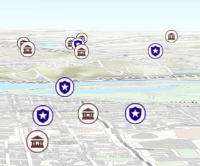
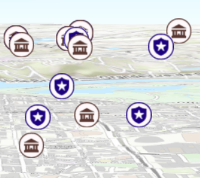
* Apply perspective scaling to screen-size symbols in a [SceneView](https://developers.arcgis.com/javascript/latest/references/core/views/SceneView/).
* When `true`, screen sized objects such as [icons](https://developers.arcgis.com/javascript/latest/references/core/symbols/IconSymbol3DLayer/),
* [labels](https://developers.arcgis.com/javascript/latest/references/core/symbols/LabelSymbol3D/) or [callouts](https://developers.arcgis.com/javascript/latest/references/core/symbols/callouts/Callout3D/) integrate
* better in the 3D scene by applying a certain perspective projection to the
* sizing of features. This only applies when using a [SceneView](https://developers.arcgis.com/javascript/latest/references/core/views/SceneView/).
*
* `layer.screenSizePerspectiveEnabled = true`
*
* 
*
* `layer.screenSizePerspectiveEnabled = false`
*
* 
*
* > [!WARNING]
* >
* > **Known Limitations**
* >
* > Screen size perspective is currently not optimized for situations where the camera is very near the ground, or for scenes
* > with visual elements located far from the ground surface. In these cases it may be better to turn off screen size perspective.
* > As screen size perspective changes the size based on distance to the camera, it should be set to false when using
* > [size visual variables](https://developers.arcgis.com/javascript/latest/references/core/renderers/visualVariables/SizeVariable/).
*
* @default true
* @since 4.4
* @see [Sample: Point styles for cities](https://developers.arcgis.com/javascript/latest/sample-code/visualization-point-styles/)
*/
accessor screenSizePerspectiveEnabled: boolean;
/**
* The [stream service's metadata JSON](https://developers.arcgis.com/rest/services-reference/stream-service.htm)
* exposed by the ArcGIS REST API. While most commonly used properties
* are exposed on the StreamLayer class directly, this property gives access to all information returned
* by the stream service. This property is useful if working in an application built using an older version of the API
* which requires access to stream service properties from a more recent version.
*
* @since 4.13
*/
accessor sourceJSON: any;
/**
* The spatial reference of the layer. When creating the layer from a
* [url](https://developers.arcgis.com/javascript/latest/references/core/layers/StreamLayer/#url), the spatial reference is read from the service.
*
* When creating a StreamLayer from client-side features, this property is
* inferred from the geometries of the features provided in the [sendMessageToClient()](https://developers.arcgis.com/javascript/latest/references/core/layers/StreamLayer/#sendMessageToClient)
* method.
*/
get spatialReference(): SpatialReference;
set spatialReference(value: SpatialReferenceProperties);
/** For [StreamLayer](https://developers.arcgis.com/javascript/latest/references/core/layers/StreamLayer/) the type is `stream`. */
get type(): "stream";
/**
* The minimum rate (ms) at which to poll for updates over the websocket connection. Increasing
* the `updateInterval` reduces the speed at which feature updates are applied.
*
* @default 300
* @since 4.18
*/
accessor updateInterval: number;
/**
* The URL of the stream service. This is set in the `url` parameter of the [constructor](https://developers.arcgis.com/javascript/latest/references/core/layers/StreamLayer/#StreamLayerProperties).
*
* @example
* let layer = new StreamLayer({
* url: "https://geoeventsample3.esri.com:6443/arcgis/rest/services/SeattleBus/StreamServer"
* });
*/
accessor url: string;
/**
* The URL of a websocket connection. Can be used instead of [url](https://developers.arcgis.com/javascript/latest/references/core/layers/StreamLayer/#url) to specify a standalone WebSocket connection.
* See the section on [StreamLayer from a custom stream service](https://developers.arcgis.com/javascript/latest/references/core/layers/StreamLayer/#streamlayer-from-websocket)
* for more information.
*
* > [!WARNING]
* >
* > **Notes**
* >
* > To filter stream layers pointing to custom web sockets, use the [StreamLayerView.filter](https://developers.arcgis.com/javascript/latest/references/core/views/layers/StreamLayerView/#filter) or
* > [StreamLayerView.featureEffect](https://developers.arcgis.com/javascript/latest/references/core/views/layers/StreamLayerView/#featureEffect) property.
* > The [definitionExpression](https://developers.arcgis.com/javascript/latest/references/core/layers/StreamLayer/#definitionExpression) and [geometryDefinition](https://developers.arcgis.com/javascript/latest/references/core/layers/StreamLayer/#geometryDefinition) properties are only meant to be used with stream layers
* > that point to geoevent or velocity steam services.
*
* @since 4.17
* @see [StreamLayer from a custom stream service](https://developers.arcgis.com/javascript/latest/references/core/layers/StreamLayer/#streamlayer-from-websocket)
* @see [Creating a custom stream service](https://github.com/mmgeorge/node-stream-service)
*/
accessor webSocketUrl: string | null | undefined;
/**
* Establishes a connection to a web socket that satisfy the specified connection parameters. The layer's configuration is used to establish the connection if the `connectionParameters` is not specified.
* Call the [createConnectionParameters()](https://developers.arcgis.com/javascript/latest/references/core/layers/StreamLayer/#createConnectionParameters) method to get the connection parameters that match the layer's configuration.
*
* @param parameters - Specifies the connection parameters. If no parameters are specified, the connection will use the layer's configuration.
* @returns When resolved, an instance of [StreamConnection](https://developers.arcgis.com/javascript/latest/references/core/layers/support/StreamConnection/) is returned.
* @since 4.25
* @see [createConnectionParameters()](https://developers.arcgis.com/javascript/latest/references/core/layers/StreamLayer/#createConnectionParameters)
* @example
* // get layer's connection configurations
* const parameters = layer.createConnectionParameters();
*
* // set the spatial reference of the service geometries
* parameters.spatialReference = new SpatialReference({
* wkid: 2154
* });
*
* const connection = await layer.connect(parameters);
*
* // listen to date-received event once the connection is established
* // create a graphic from the JSON object returned and add them to view
* connection.on("data-received", (feature) => {
* const graphic = Graphic.fromJSON(feature);
* graphic.symbol = myPointSymbol;
* view.graphics.push(graphic);
* });
*
* // close the connection when it is not needed anymore
* connection.destroy();
*/
connect(parameters?: ConnectionParameters): Promise<StreamConnection>;
/**
* Creates a [ConnectionParameters](https://developers.arcgis.com/javascript/latest/references/core/layers/StreamLayer/#ConnectionParameters) object that can be used to establish a connection to a web socket that
* satisfies the layer's configuration.
*
* @returns The connection parameters representing the layer's current configuration.
* @since 4.25
* @see [connect()](https://developers.arcgis.com/javascript/latest/references/core/layers/StreamLayer/#connect)
*/
createConnectionParameters(): ConnectionParameters;
/**
* Creates a popup template for the layer, populated with all the fields of the layer.
*
* @param options - Options for creating the popup template.
* @returns The popup template, or `null` if the layer does not
* have any fields.
* @since 4.11
*/
createPopupTemplate(options?: CreatePopupTemplateOptions): PopupTemplate | null | undefined;
/**
* Returns the [Field](https://developers.arcgis.com/javascript/latest/references/core/layers/support/Field/) instance for a field name (case-insensitive).
*
* @param fieldName - Name of the field.
* @returns the matching field or `undefined`
* @since 4.15
* @see [fields](https://developers.arcgis.com/javascript/latest/references/core/layers/StreamLayer/#fields)
*/
getField(fieldName: string): Field | null | undefined;
/**
* Returns the [Domain](https://developers.arcgis.com/javascript/latest/references/core/layers/support/Domain/) associated with the given field name. The domain can be either a
* [CodedValueDomain](https://developers.arcgis.com/javascript/latest/references/core/layers/support/CodedValueDomain/) or [RangeDomain](https://developers.arcgis.com/javascript/latest/references/