@arcgis/core
Version:
ArcGIS Maps SDK for JavaScript: A complete 2D and 3D mapping and data visualization API
678 lines (675 loc) • 97.1 kB
TypeScript
import type PopupTemplate from "../PopupTemplate.js";
import type Collection from "../core/Collection.js";
import type Extent from "../geometry/Extent.js";
import type Mesh from "../geometry/Mesh.js";
import type Point from "../geometry/Point.js";
import type Layer from "./Layer.js";
import type FeatureReductionSelection from "./support/FeatureReductionSelection.js";
import type Field from "./support/Field.js";
import type FieldsIndex from "./support/FieldsIndex.js";
import type LabelClass from "./support/LabelClass.js";
import type LayerFloorInfo from "./support/LayerFloorInfo.js";
import type Relationship from "./support/Relationship.js";
import type SceneFilter from "./support/SceneFilter.js";
import type TimeInfo from "./support/TimeInfo.js";
import type PortalItem from "../portal/PortalItem.js";
import type AttachmentInfo from "../rest/query/support/AttachmentInfo.js";
import type FeatureSet from "../rest/support/FeatureSet.js";
import type Query from "../rest/support/Query.js";
import type ElevationInfo from "../symbols/support/ElevationInfo.js";
import type AttributeTableTemplate from "../tables/AttributeTableTemplate.js";
import type TimeExtent from "../time/TimeExtent.js";
import type TimeInterval from "../time/TimeInterval.js";
import type { ClonableMixin } from "../core/Clonable.js";
import type { MultiOriginJSONSupportMixin } from "../core/MultiOriginJSONSupport.js";
import type { AbortOptions } from "../core/promiseUtils.js";
import type { EditOptions, Edits, EditsResult } from "../editing/types.js";
import type { LayerEvents, LayerProperties } from "./Layer.js";
import type { FieldDomainOptions, SceneLayerCapabilities } from "./types.js";
import type { APIKeyMixin, APIKeyMixinProperties } from "./mixins/APIKeyMixin.js";
import type { CustomParametersMixin, CustomParametersMixinProperties } from "./mixins/CustomParametersMixin.js";
import type { EditBusLayerEvents, EditBusLayer } from "./mixins/EditBusLayer.js";
import type { OperationalLayer, OperationalLayerProperties } from "./mixins/OperationalLayer.js";
import type { PortalLayer, PortalLayerProperties } from "./mixins/PortalLayer.js";
import type { ScaleRangeLayer, ScaleRangeLayerProperties } from "./mixins/ScaleRangeLayer.js";
import type { SceneService, SceneServiceProperties } from "./mixins/SceneService.js";
import type { SaveAsOptions } from "./scene/types.js";
import type { DomainUnion, I3SGeometryType } from "./support/types.js";
import type { RendererUnion } from "../renderers/types.js";
import type { RequestOptions } from "../request/types.js";
import type { AttachmentQueryProperties } from "../rest/support/AttachmentQuery.js";
import type { QueryProperties } from "../rest/support/Query.js";
import type { RelationshipQueryProperties } from "../rest/support/RelationshipQuery.js";
import type { CreatePopupTemplateOptions } from "../support/popupUtils.js";
import type { FeatureReductionSelectionProperties } from "./support/FeatureReductionSelection.js";
import type { LayerFloorInfoProperties } from "./support/LayerFloorInfo.js";
import type { ReadonlyArrayOrCollection } from "../core/Collection.js";
import type { SceneFilterProperties } from "./support/SceneFilter.js";
import type { ElevationInfoProperties } from "../symbols/support/ElevationInfo.js";
import type { LabelClassProperties } from "./support/LabelClass.js";
import type { HeatmapRendererProperties } from "../renderers/HeatmapRenderer.js";
import type { PieChartRendererProperties } from "../renderers/PieChartRenderer.js";
import type { DictionaryRendererProperties } from "../renderers/DictionaryRenderer.js";
import type { DotDensityRendererProperties } from "../renderers/DotDensityRenderer.js";
import type { UniqueValueRendererProperties } from "../renderers/UniqueValueRenderer.js";
import type { ClassBreaksRendererProperties } from "../renderers/ClassBreaksRenderer.js";
import type { SimpleRendererProperties } from "../renderers/SimpleRenderer.js";
import type { PopupTemplateProperties } from "../PopupTemplate.js";
import type { AttributeTableTemplateProperties } from "../tables/AttributeTableTemplate.js";
import type { TimeInfoProperties } from "./support/TimeInfo.js";
import type { TimeExtentProperties } from "../time/TimeExtent.js";
import type { TimeIntervalProperties } from "../time/TimeInterval.js";
export interface SceneLayerProperties extends LayerProperties, APIKeyMixinProperties, CustomParametersMixinProperties, ScaleRangeLayerProperties, PortalLayerProperties, OperationalLayerProperties, SceneServiceProperties, Partial<Pick<SceneLayer, "definitionExpression" | "labelsVisible" | "legendEnabled" | "objectIdField" | "outFields" | "popupEnabled" | "screenSizePerspectiveEnabled">> {
/**
* This property is used to configure the associated layer's [FeatureTable](https://developers.arcgis.com/javascript/latest/references/core/widgets/FeatureTable/). It is meant to configure how the columns display within the table in regard to visibility, column order, and sorting.
*
* > [!WARNING]
* >
* > This property differs from a [FeatureTable's tableTemplate](https://developers.arcgis.com/javascript/latest/references/core/widgets/FeatureTable/support/TableTemplate/) property. The `TableTemplate` provides more fine-grained control over how the table is rendered within the application by offering more advanced configurations such as custom cell rendering, column formatting, and more. `TableTemplate` is useful for application-level development that remains within an application. Use the `attributeTableTemplate` property to access the table's settings across different applications. By using this property, the settings can be saved within a webmap or layer. Please refer to the [AttributeTableTemplate](https://developers.arcgis.com/javascript/latest/references/core/tables/AttributeTableTemplate/) and [TableTemplate](https://developers.arcgis.com/javascript/latest/references/core/widgets/FeatureTable/support/TableTemplate/) documentation for more information.
*
* @since 4.31
* @see [Sample - FeatureTable Component](https://developers.arcgis.com/javascript/latest/sample-code/feature-table/)
*/
attributeTableTemplate?: AttributeTableTemplateProperties | null;
/**
* Specifies how features are placed on the vertical axis (z). See the [ElevationInfo sample](https://developers.arcgis.com/javascript/latest/sample-code/scene-elevationinfo/)
* for an example of how this property may be used.
*
* > [!WARNING]
* >
* > The `relative-to-scene` mode does not affect 3D Object [SceneLayers](https://developers.arcgis.com/javascript/latest/references/core/layers/SceneLayer/). [SceneLayers](https://developers.arcgis.com/javascript/latest/references/core/layers/SceneLayer/) with
* > [Point](https://developers.arcgis.com/javascript/latest/references/core/geometry/Point/) geometries support all the elevation modes listed in the [ElevationInfo](https://developers.arcgis.com/javascript/latest/references/core/symbols/support/ElevationInfo/).
* > [ElevationInfo.featureExpressionInfo](https://developers.arcgis.com/javascript/latest/references/core/symbols/support/ElevationInfo/#featureExpressionInfo) is not supported when the elevation info is specified for this class.
* > If the elevation info is not specified, the effective elevation depends on the context and could vary per point.
*/
elevationInfo?: ElevationInfoProperties | null;
/**
* List of ObjectIDs not being displayed in the view.
*
* @since 4.23
*/
excludeObjectIds?: ReadonlyArrayOrCollection<number>;
/**
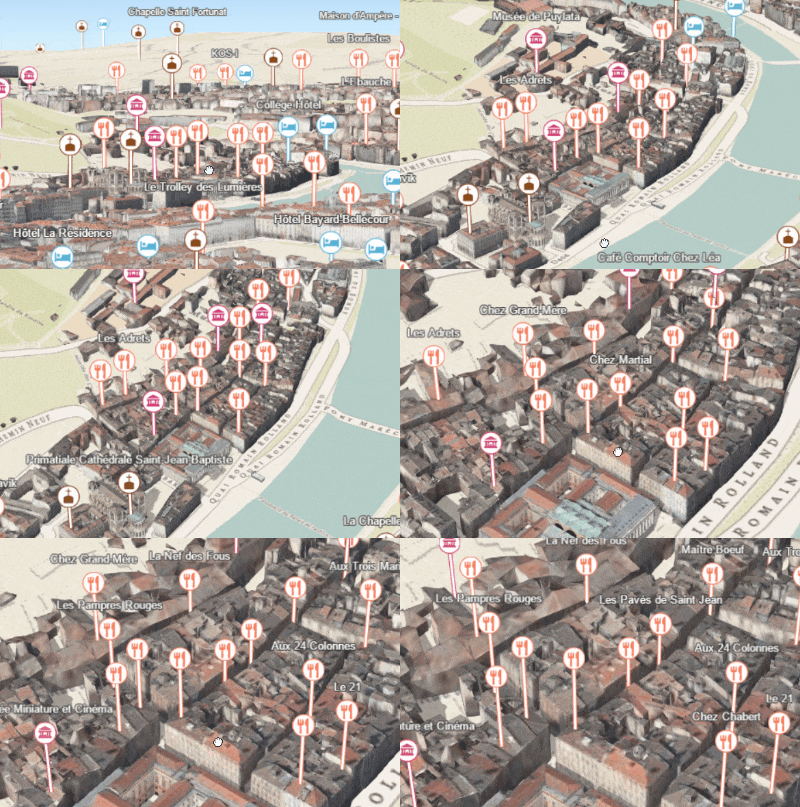
* Configures the method for decluttering overlapping features in the view. If this property is not set (or set to `null`),
* every feature is drawn individually.
*
* This property is only supported for point scene layers with non-draped [Icon](https://developers.arcgis.com/javascript/latest/references/core/symbols/IconSymbol3DLayer/)
* or [Text](https://developers.arcgis.com/javascript/latest/references/core/symbols/TextSymbol3DLayer/) symbol layers.
*
* [](https://developers.arcgis.com/javascript/latest/sample-code/visualization-point-styles/)
*
* > [!WARNING]
* >
* > **Known Limitation**
* >
* > When applying featureReduction on a point SceneLayer layer updates are slow. This will be addressed in upcoming releases.
*
* @since 4.4
* @see [Sample: Point styles for cities](https://developers.arcgis.com/javascript/latest/sample-code/visualization-point-styles/)
* @example
* layer.featureReduction = {
* type: "selection"
* };
*/
featureReduction?: (FeatureReductionSelectionProperties & { type: "selection" }) | null;
/**
* A collection of polygons [SceneFilter.geometries](https://developers.arcgis.com/javascript/latest/references/core/layers/support/SceneFilter/#geometries) which will mask out different parts of the layer. With the [SceneFilter.spatialRelationship](https://developers.arcgis.com/javascript/latest/references/core/layers/support/SceneFilter/#spatialRelationship) property you can define if the content inside or outside of the polygons should be masked.
*
* @since 4.24
* @see [SceneFilter](https://developers.arcgis.com/javascript/latest/references/core/layers/support/SceneFilter/)
* @example
* const layer = new SceneLayer({ ... })
*
* // create a polygon
* const polygon = new Polygon({ ... });
*
* // create the masking
* const filter = new SceneFilter({ geometries: [polygon], spatialRelationship: "contains" });
*
* // add the mask to the SceneLayer
* layer.filter = filter;
*/
filter?: SceneFilterProperties | null;
/**
* When a scene layer is configured as floor-aware, it has a floorInfo property defined.
* A floor-aware layer is a layer that contains indoor GIS data representing features that
* can be located on a specific floor of a building.
*
* @since 4.19
*/
floorInfo?: LayerFloorInfoProperties | null;
/**
* The label definition for this layer, specified as an array of
* [LabelClass](https://developers.arcgis.com/javascript/latest/references/core/layers/support/LabelClass/). Use this property to specify
* labeling properties for the layer such as label expression, placement, and size.
*
* > [!WARNING]
* >
* > **Known Limitations**
* >
* > Each feature can have only one label. Multiple [Label classes](https://developers.arcgis.com/javascript/latest/references/core/layers/support/LabelClass/)
* > with different [LabelClass.where](https://developers.arcgis.com/javascript/latest/references/core/layers/support/LabelClass/#where)
* > clauses can be used to have different label styles on different features that belong to the
* > same layer (for example blue labels for lakes and green labels for parks).
*
* @see [labelsVisible](https://developers.arcgis.com/javascript/latest/references/core/layers/SceneLayer/#labelsVisible)
* @example
* let statesLabelClass = new LabelClass({
* labelExpressionInfo: { expression: "$feature.NAME" },
* symbol: {
* type: "label-3d", // autocasts as new LabelSymbol3D()
* symbolLayers: [{
* type: "text", // autocasts as new TextSymbol3DLayer()
* material: { color: [ 49,163,84 ] },
* size: 12 // points
* }]
* }
* });
*
* sceneLayer.labelingInfo = [ statesLabelClass ];
*/
labelingInfo?: LabelClassProperties[] | null;
/**
* The popup template for the layer. When set on the layer, the `popupTemplate`
* allows users to access attributes and display their values in the
* view's Popup when a feature is selected
* using text and/or charts. See the [PopupTemplate sample](https://developers.arcgis.com/javascript/latest/sample-code/intro-popuptemplate/)
* for an example of how [PopupTemplate](https://developers.arcgis.com/javascript/latest/references/core/PopupTemplate/) interacts with a
* [FeatureLayer](https://developers.arcgis.com/javascript/latest/references/core/layers/FeatureLayer/). Setting a [PopupTemplate](https://developers.arcgis.com/javascript/latest/references/core/PopupTemplate/)
* on this layer type is done in the same way as a FeatureLayer.
*
* A default popup template is automatically used if no `popupTemplate` has been defined when
* [Popup.defaultPopupTemplateEnabled](https://developers.arcgis.com/javascript/latest/references/core/widgets/Popup/#defaultPopupTemplateEnabled)
* is set to `true`.
*
* @see [createPopupTemplate()](https://developers.arcgis.com/javascript/latest/references/core/layers/SceneLayer/#createPopupTemplate)
* @see [SceneView.popup](https://developers.arcgis.com/javascript/latest/references/core/views/SceneView/#popup)
* @see [View2D.popup](https://developers.arcgis.com/javascript/latest/references/core/views/View2D/#popup)
*/
popupTemplate?: PopupTemplateProperties | null;
/**
* The renderer assigned to the layer. The renderer defines how to
* visualize each feature in the layer. Depending on the renderer type,
* features may be visualized with the same symbol, or with varying symbols
* based on the values of provided attribute fields or functions.
*
* @see [Styles and data visualization](https://developers.arcgis.com/javascript/latest/visualization/)
* @example
* // all features in the layer will be visualized with
* // a blue color
* layer.renderer = {
* type: "simple", // autocasts as new SimpleRenderer()
* symbol: {
* type: "mesh-3d", // autocasts as new MeshSymbol3D()
* symbolLayers: [{
* type: "fill", // autocasts as new FillSymbol3DLayer()
* material: { color: "blue" }
* }]
* }
* };
*/
renderer?: (((SimpleRendererProperties & { type: "simple" }) | (ClassBreaksRendererProperties & { type: "class-breaks" }) | (UniqueValueRendererProperties & { type: "unique-value" }) | (DotDensityRendererProperties & { type: "dot-density" }) | (DictionaryRendererProperties & { type: "dictionary" }) | (PieChartRendererProperties & { type: "pie-chart" })) | (HeatmapRendererProperties & { type: "heatmap" }));
/**
* The layer's time extent. When the layer's [useViewTime](https://developers.arcgis.com/javascript/latest/references/core/layers/SceneLayer/#useViewTime) is `false`, the layer
* instructs the view to show data from the layer based on this time extent.
* If the `useViewTime` is `true`, and both layer and view time extents are set, then features that fall within
* the intersection of the view and layer time extents will be displayed.
* For example, if the layer's time extent is set to display features between 1970 and 1975 and
* the view has a time extent set to 1972-1980, the effective time on the feature layer will be 1972-1975.
*
* @since 4.30
* @example
* if (!layer.useViewTime) {
* if (layer.timeExtent) {
* console.log("Current timeExtent:", layer.timeExtent.start, " - ", layer.timeExtent.end);
* } else {
* console.log("The layer will display data within the view's timeExtent.");
* console.log("Current view.timeExtent:", view.timeExtent.start, " - ", view.timeExtent.end);
* }
* }
* @example
* // set the timeExtent on the layer and useViewTime false
* // In this case, the layer will honor its timeExtent and ignore
* // the view's timeExtent
* const layer = new SceneLayer({
* url: "https://services.arcgis.com/V6ZHFr6zdgNZuVG0/arcgis/rest/services/Paris_3D_Local_WSL2/SceneServer",
* timeExtent: {
* start: new Date(2014, 4, 18),
* end: new Date(2014, 4, 19)
* },
* useViewTime: false
* });
* @example
* // timeExtent is set on the layer and the view
* // In this case, the layer will display features that fall
* // within the intersection of view and layer time extents
* // features within Jan 1, 1976 - Jan 1, 1981 will be displayed
* const view = new SceneView({
* timeExtent: {
* start: new Date(1976, 0, 1),
* end: new Date(2002, 0, 1)
* }
* });
* const layer = new SceneLayer({
* url: myUrl,
* timeExtent: {
* start: new Date(1974, 0, 1),
* end: new Date(1981, 0, 1)
* }
* });
*/
timeExtent?: TimeExtentProperties | null;
/**
* TimeInfo provides information such as date fields that store
* [start](https://developers.arcgis.com/javascript/latest/references/core/layers/support/TimeInfo/#startField)
* and [end](https://developers.arcgis.com/javascript/latest/references/core/layers/support/TimeInfo/#endField) time
* for each feature and the [TimeInfo.fullTimeExtent](https://developers.arcgis.com/javascript/latest/references/core/layers/support/TimeInfo/#fullTimeExtent)
* for the layer.
*
* If timeInfo configuration exists on the service it gets read and used from there. A developer
* can overwrite or create a timeInfo configuration on initialization.
* The timeInfo parameters cannot be changed after the layer is [loaded](https://developers.arcgis.com/javascript/latest/references/core/layers/SceneLayer/#load).
*
* TimeInfo's [startField](https://developers.arcgis.com/javascript/latest/references/core/layers/support/TimeInfo/#startField) and [endField](https://developers.arcgis.com/javascript/latest/references/core/layers/support/TimeInfo/#endField)
* can be `date`, `date-only` or `timestamp-offset` [field type](https://developers.arcgis.com/javascript/latest/references/core/layers/support/Field/#type) for [SceneLayer](https://developers.arcgis.com/javascript/latest/references/core/layers/SceneLayer/)
* and [BuildingComponentSublayer](https://developers.arcgis.com/javascript/latest/references/core/layers/buildingSublayers/BuildingComponentSublayer/).
*
* @since 4.30
*/
timeInfo?: TimeInfoProperties | null;
/**
* A temporary offset of the time data based on a certain [TimeInterval](https://developers.arcgis.com/javascript/latest/references/core/time/TimeInterval/). This allows
* users to overlay features from two or more time-aware layers with different time extents.
* For example, if a layer has data recorded for the year 1970, an offset value of 2 years would temporarily shift the data to
* 1972. You can then overlay this data with data recorded in 1972.
* A time offset can be used for display purposes only. The query and selection are not affected by the offset.
*
* @since 4.30
*/
timeOffset?: TimeIntervalProperties | null;
/**
* The title of the layer used to identify it in places such as the [Legend](https://developers.arcgis.com/javascript/latest/references/map-components/components/arcgis-legend/)
* and [LayerList](https://developers.arcgis.com/javascript/latest/references/core/widgets/LayerList/).
*
* When loading a layer by service url, the title is derived from the service name.
* If the service has several layers, then the title of each layer will be the concatenation of the service name
* and the layer name.
* When the layer is loaded from a portal item, the title of the portal item will be used instead.
* Finally, if a layer is loaded as part of a webmap or a webscene, then the title of the layer as stored in the webmap/webscene will be used.
*/
title?: string | null;
/**
* Determines if the layer will update its temporal data based on the view's
* [View.timeExtent](https://developers.arcgis.com/javascript/latest/references/core/views/View/#timeExtent). When `false`, the layer will display its temporal
* data based on the layer's [timeExtent](https://developers.arcgis.com/javascript/latest/references/core/layers/SceneLayer/#timeExtent), regardless of changes to the view.
* If both view and layer time extents are set while this property is `true`, then the features that fall within
* the intersection of the view and layer time extents will be displayed.
* For example, if a layer's time extent is set to display features between 1970 and 1975 and
* the view has a time extent set to 1972-1980, the effective time on the feature layer will be 1972-1975.
*
* @default true
* @since 4.30
* @example
* if (layer.useViewTime) {
* console.log("Displaying data between:", view.timeExtent.start, " - ", view.timeExtent.end);
* }
*/
useViewTime?: boolean;
}
export interface SceneLayerEvents extends EditBusLayerEvents, LayerEvents {}
/**
* * [Overview](https://developers.arcgis.com/javascript/latest/references/core/layers/SceneLayer/#overview)
* * [Publishing a SceneLayer](https://developers.arcgis.com/javascript/latest/references/core/layers/SceneLayer/#publishing-a-scenelayer)
* * [Data Visualization](https://developers.arcgis.com/javascript/latest/references/core/layers/SceneLayer/#data-visualization)
* * [Filtering data](https://developers.arcgis.com/javascript/latest/references/core/layers/SceneLayer/#filtering-data)
* * [Popups](https://developers.arcgis.com/javascript/latest/references/core/layers/SceneLayer/#popups)
* * [Querying](https://developers.arcgis.com/javascript/latest/references/core/layers/SceneLayer/#querying)
* * [Get geometry/extent of SceneLayers](https://developers.arcgis.com/javascript/latest/references/core/layers/SceneLayer/#get-geometry-extent)
* * [Editing](https://developers.arcgis.com/javascript/latest/references/core/layers/SceneLayer/#editing)
*
* <span id="overview"></span>
* ## Overview
*
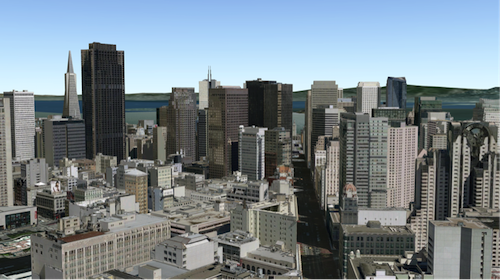
* The SceneLayer is a layer type designed for on-demand streaming and displaying large
* amounts of data in a [SceneView](https://developers.arcgis.com/javascript/latest/references/core/views/SceneView/). SceneLayers support two geometry types:
* [Point](https://developers.arcgis.com/javascript/latest/references/core/geometry/Point/) and 3D Objects (e.g. Buildings).
*
* [](https://tiles.arcgis.com/tiles/z2tnIkrLQ2BRzr6P/arcgis/rest/services/SanFrancisco_Bldgs/SceneServer)
*
* You can find many samples of SceneLayers in ArcGIS Online by
* [searching the gallery](https://www.arcgis.com/home/search.html?start=1&sortOrder=desc&sortField=relevance&q=&focus=layers-weblayers-scenelayers).
*
* [](https://www.arcgis.com/home/search.html?start=1&sortOrder=desc&sortField=relevance&q=&focus=layers-weblayers-scenelayers)
*
* <span id="publishing-a-scenelayer"></span>
* ## Publishing a SceneLayer
*
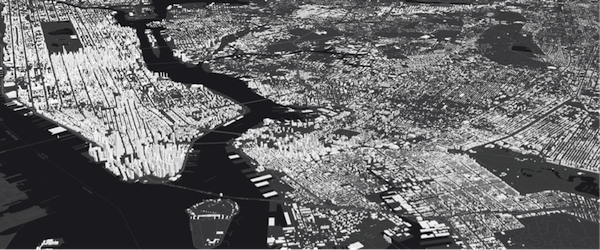
* The SceneLayer displays data coming from a
* [Scene Service](https://enterprise.arcgis.com/en/server/latest/publish-services/windows/scene-services.htm).
* Scene Services can hold large volumes of features in an open format that is suitable for web streaming.
* The SceneLayer loads these features progressively, starting from coarse representations and refines them to
* higher detail as necessary for close-up views.
*
* <details>
* <summary>Read More</summary>
*
* [](https://tiles.arcgis.com/tiles/z2tnIkrLQ2BRzr6P/arcgis/rest/services/New_York_LoD2_3D_Buildings/SceneServer/layers/0)
*
* Scene Services can be hosted on [ArcGIS Online](https://www.arcgis.com/home/) or [ArcGIS Enterprise](https://enterprise.arcgis.com/) by uploading a Scene Layer Package (.slpk) or by
* publishing it from ArcGIS Pro. Depending on how you publish a SceneLayer, there are two types of layers: **SceneLayers with an associated feature layer** and **SceneLayers with cached attributes only**.
* For more information see the [Publishing section of the Scene layer guide topic](https://developers.arcgis.com/javascript/latest/working-with-scene-layers/#publishing).
*
*
* The Scene Service is identified by the [url](https://developers.arcgis.com/javascript/latest/references/core/layers/SceneLayer/#url) or [portalItem](https://developers.arcgis.com/javascript/latest/references/core/layers/SceneLayer/#portalItem) of the ArcGIS Server REST resource:
*
* ```js
* let sceneLayer = new SceneLayer({
* url: "https://services.arcgis.com/V6ZHFr6zdgNZuVG0/arcgis/rest/services/Paris_3D_Local_WSL2/SceneServer/layers/0"
* });
* ```
*
* ```js
* let sceneLayer = new SceneLayer({
* portalItem: {
* id: "b8138adb2ba7479cadba52d382b34c3b"
* }
* });
* ```
*
* Most of the times it's better to create the SceneLayer from a [portal item](https://developers.arcgis.com/javascript/latest/references/core/layers/SceneLayer/#portalItem)
* rather than a [scene service url](https://developers.arcgis.com/javascript/latest/references/core/layers/SceneLayer/#url), because the information about an associated
* feature service is stored at the item level and not at the service level.
*
* If the scene service is requested from a different domain, a [CORS enabled server](https://developers.arcgis.com/javascript/latest/cors/) or a [proxy](https://developers.arcgis.com/javascript/latest/proxies/) is
* required.
*
* Although the internal logic of displaying a SceneLayer is technically advanced, its usage within
* the API follows the same model as other layers. You can use [renderers](https://developers.arcgis.com/javascript/latest/references/core/layers/SceneLayer/#renderer) to style the
* SceneLayer and [popups](https://developers.arcgis.com/javascript/latest/references/core/layers/SceneLayer/#popupTemplate) to retrieve attribute information and display it to the user.
*
* </details>
*
* <span id="data-visualization"></span>
* ## Data Visualization
*
* Just like other layers, SceneLayers can be visualized using renderers. 3D Objects in a SceneLayer can be styled
* using [MeshSymbol3D](https://developers.arcgis.com/javascript/latest/references/core/symbols/MeshSymbol3D/) with a [FillSymbol3DLayer](https://developers.arcgis.com/javascript/latest/references/core/symbols/FillSymbol3DLayer/).
*
* ```js
* let symbol = {
* type: "mesh-3d", // autocasts as new MeshSymbol3D()
* symbolLayers: [{
* type: "fill", // autocasts as new FillSymbol3DLayer()
* material: { color: "red" }
* }]
* };
*
* sceneLayer.renderer = {
* type: "simple", // autocasts as new SimpleRenderer()
* symbol: symbol
* };
* ```
*
* <details>
* <summary>Read More</summary>
*
* SceneLayers also support [visual variables](https://developers.arcgis.com/javascript/latest/references/core/renderers/SimpleRenderer/#visualVariables), which allow
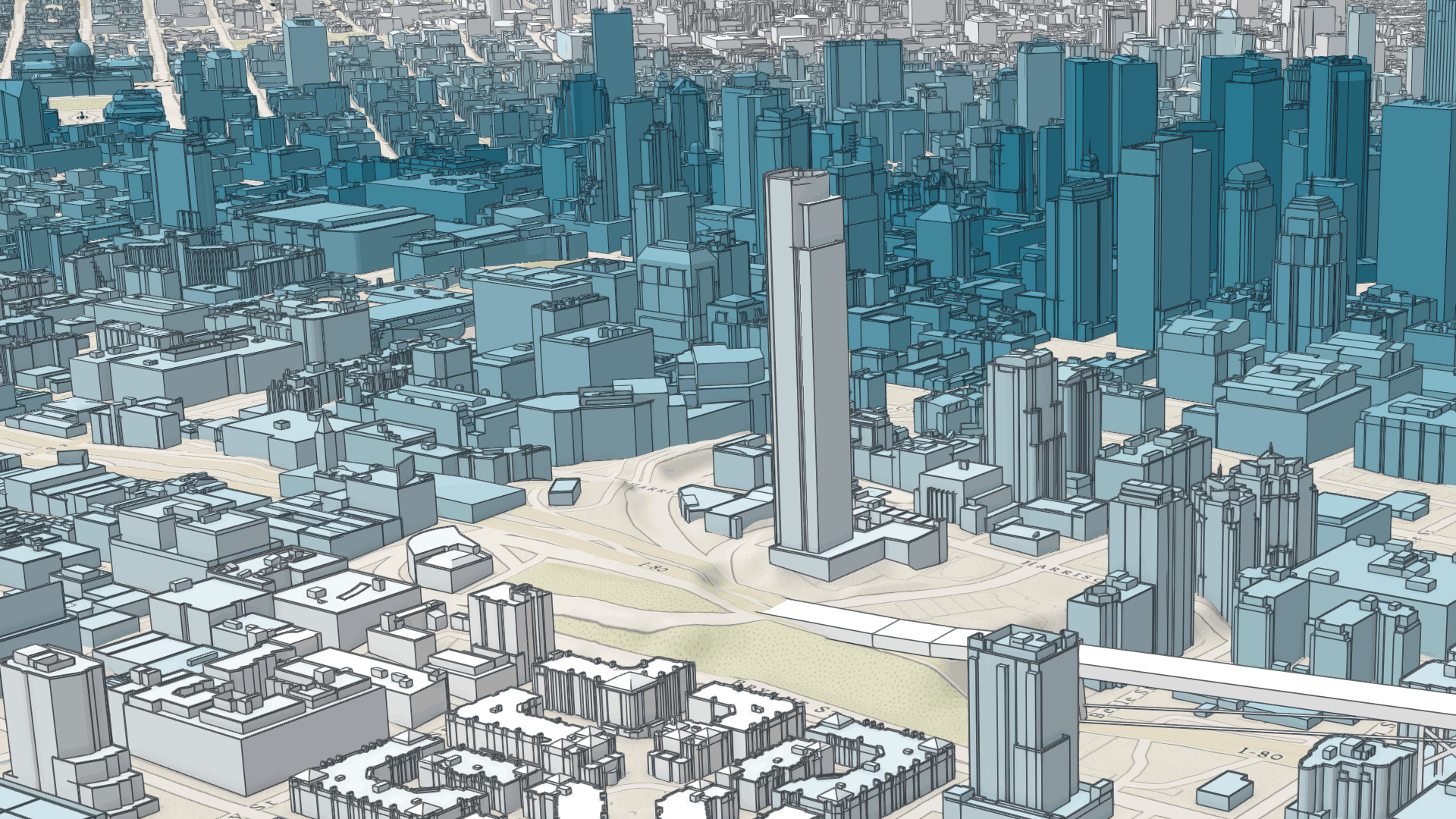
* you to easily map continuous ramps of color, size, and/or opacity to minimum and maximum data values of one of the
* layer's numeric attribute fields. In the example below, the renderer for the layer uses the
* [color visual variable](https://developers.arcgis.com/javascript/latest/references/core/renderers/visualVariables/ColorVariable/) to shade each
* feature along a continuous white to blue color ramp. White features represent buildings that are farther away from
* a public transport station and deep blue features represent buildings that are very close to one
* (less than 1 minute walking time). Buildings with values between the low and high values are assigned intermediate
* colors. To improve the perception of shapes of 3D Object SceneLayers, they can also be visualized with
* [edges](https://developers.arcgis.com/javascript/latest/references/core/symbols/edges/Edges3D/). See this
* [sample](https://developers.arcgis.com/javascript/latest/sample-code/layers-scenelayer-edges/) to explore this example further, or read the
* [visualization overview](https://developers.arcgis.com/javascript/latest/visualization-overview/) to learn more about data visualization techniques.
*
* [](https://developers.arcgis.com/javascript/latest/sample-code/layers-scenelayer-edges/)
*
* Attributes used in data-driven visualizations with [visual variables](https://developers.arcgis.com/javascript/latest/references/core/renderers/SimpleRenderer/#visualVariables) must be accessible to a
* [SceneLayer's cache](https://pro.arcgis.com/en/pro-app/latest/help/sharing/overview/web-scene-layer.htm).
* For both SceneLayers with cached attributes only and SceneLayer with associated feature layer the attribute values come from the cache.
* Therefore if the attributes on the feature layer change, the visualization will not update.
* Keeping the number of cached attributes to a minimum improves the performance of the SceneLayer. Therefore it is best practice to be judicious with the attributes
* you make available through the layer's cache.
*
* </details>
*
* <span id="filtering-data"></span>
* ## Filtering data
*
* SceneLayers can be filtered using an SQL where clause. Filtering is implemented with the [definitionExpression](https://developers.arcgis.com/javascript/latest/references/core/layers/SceneLayer/#definitionExpression) property.
* This property is evaluated on the client using SceneLayer cached attributes and it only supports
* [standardized SQL](https://doc.arcgis.com/en/arcgis-online/reference/sql-agol.htm).
*
* ```js
* let layer = new SceneLayer({
* url: "https://services.arcgis.com/V6ZHFr6zdgNZuVG0/arcgis/rest/services/Paris_3D_Local_WSL2/SceneServer/layers/0",
* definitionExpression: "Type_Toit = 'plat' AND H_MAX <= 20"
* });
* ```
*
* Another way to filter data is to use a [FeatureFilter](https://developers.arcgis.com/javascript/latest/references/core/layers/support/FeatureFilter/)
* on the SceneLayerView. This will only display the features that satisfy the filter conditions.
* Setting a [FeatureFilter.geometry](https://developers.arcgis.com/javascript/latest/references/core/layers/support/FeatureFilter/#geometry) and a
* [FeatureFilter.spatialRelationship](https://developers.arcgis.com/javascript/latest/references/core/layers/support/FeatureFilter/#spatialRelationship) allows you to filter
* features based on the spatialRelationship with the geometry you pass in. Currently only spatial
* relationships of type `contains`, `intersects` or `disjoint` are supported.
*
* Alternatively you can also use a [SceneFilter](https://developers.arcgis.com/javascript/latest/references/core/layers/support/SceneFilter/) on the [filter](https://developers.arcgis.com/javascript/latest/references/core/layers/SceneLayer/#filter) property directly on the layer. It works similar to the [FeatureFilter](https://developers.arcgis.com/javascript/latest/references/core/layers/support/FeatureFilter/), but you can define more than just one geometry object. This filter is also persisted in [WebScenes](https://developers.arcgis.com/javascript/latest/references/core/WebScene/) and when the layer is saved.
*
* For more information see the [Filter SceneLayer with FeatureFilter](https://developers.arcgis.com/javascript/latest/sample-code/layers-scenelayer-feature-masking/) or the [Filter SceneLayer with SceneFilter](https://developers.arcgis.com/javascript/latest/sample-code/layers-scenelayer-scene-masking/)
* sample.
*
* <span id="popups"></span>
* ## Popups
*
* Point and 3D Object SceneLayers can have customized popup content using the
* [popupTemplate](https://developers.arcgis.com/javascript/latest/references/core/layers/SceneLayer/#popupTemplate) property. A SceneLayer with associated feature layer
* will query the associated feature layer for attributes. For a SceneLayer with cached attributes only, attributes come from the cache.
* Arcade expressions for `expressionInfo` in a [popupTemplate](https://developers.arcgis.com/javascript/latest/references/core/layers/SceneLayer/#popupTemplate) are also supported.
*
* 
*
* <span id="querying"></span>
* ## Querying
*
* The SceneLayer and the [SceneLayerView](https://developers.arcgis.com/javascript/latest/references/core/views/layers/SceneLayerView/) both support queries, but act differently.
*
* Querying a SceneLayer retrieves results from the attributes in the associated feature layer.
* If the layer doesn't have an associated feature layer, then the query will be rejected with an error. Queries on the layer are powerful because they
* are made on all the features in the SceneLayer and they also support advanced queries. Spatial queries are supported when the
* [Query.spatialRelationship](https://developers.arcgis.com/javascript/latest/references/core/rest/support/Query/#spatialRelationship) is set to `intersects`, `contains`, or `disjoint`.
*
* <details>
* <summary>Read More</summary>
*
* For making attribute based queries on a [SceneLayerView](https://developers.arcgis.com/javascript/latest/references/core/views/layers/SceneLayerView/) you need to specify the required fields
* in the [outFields](https://developers.arcgis.com/javascript/latest/references/core/layers/SceneLayer/#outFields) property of the SceneLayer to ensure that attribute values are
* available on the client for querying. You can use [SceneLayerView.availableFields](https://developers.arcgis.com/javascript/latest/references/core/views/layers/SceneLayerView/#availableFields)
* to inspect which fields are available on the client.
* On a [SceneLayerView](https://developers.arcgis.com/javascript/latest/references/core/views/layers/SceneLayerView/) spatial queries are possible by setting the
* [Query.geometry](https://developers.arcgis.com/javascript/latest/references/core/rest/support/Query/#geometry) and the [Query.spatialRelationship](https://developers.arcgis.com/javascript/latest/references/core/rest/support/Query/#spatialRelationship)
* of the query. Note that for 3D Object SceneLayers these spatial relationships are evaluated based on the
* [Extent](https://developers.arcgis.com/javascript/latest/references/core/geometry/Extent/) and not the footprint of the feature.
* The queries on the [SceneLayerView](https://developers.arcgis.com/javascript/latest/references/core/views/layers/SceneLayerView/) return results for features that are currently loaded in the view.
*
* | Query method | [queryExtent()](https://developers.arcgis.com/javascript/latest/references/core/layers/SceneLayer/#queryExtent) (only works if it has an associated feature layer) | [SceneLayerView.queryExtent()](https://developers.arcgis.com/javascript/latest/references/core/views/layers/SceneLayerView/#queryExtent) (works on all scene layers) |
* |---|---|---|
* | queryExtent | returns the **2D** extent of **all** features that satisfy the query | returns the **3D** extent of **currently loaded** features that satisfy the query |
* | queryFeatureCount | returns the number of **all** features that satisfy the query | returns the number of **currently loaded** features that satisfy the query |
* | queryFeatures | returns **all** the features that satisfy the query | returns the **currently loaded** features that satisfy the query |
* | queryObjectIds | returns objectIds of **all** the features that satisfy the query | returns the objectIds of **currently loaded** features that satisfy the query |
*
* > [!WARNING]
* >
* > **Known Limitations**
* >
* > Spatial queries have the same limitations as those listed in the [projectOperator](https://developers.arcgis.com/javascript/latest/references/core/geometry/operators/projectOperator/)
* > documentation.
* > Spatial queries use the [Extent](https://developers.arcgis.com/javascript/latest/references/core/geometry/Extent/) of the feature and
* > not the footprint when calculating the spatial relationship with the [query geometry](https://developers.arcgis.com/javascript/latest/references/core/rest/support/Query/#geometry).
* > This means that a feature might be returned from the query, even though its footprint is not in a spatial relationship with the geometry.
* > Currently only `intersects`, `contains`, and `disjoint` [spatialRelationships](https://developers.arcgis.com/javascript/latest/references/core/rest/support/Query/#spatialRelationship) are supported on spatial
* > [queries](https://developers.arcgis.com/javascript/latest/references/core/rest/support/Query/).
* > Spatial queries are not currently supported if the SceneLayer has any of the following [SpatialReferences](https://developers.arcgis.com/javascript/latest/references/core/geometry/SpatialReference/):
* > - GDM 2000 (4742) - Malaysia
* > - Gsterberg (Ferro) (8042) - Austria/Czech Republic
* > - ISN2016 (8086) - Iceland
* > - SVY21 (4757) - Singapore
*
* </details>
*
* <span id="get-geometry-extent"></span>
* ## Get geometry/extent of SceneLayers
*
* 3D Object SceneLayers do not return the raw geometry as this is a binary format. To obtain spatial information you can query the 2D extent or 3D extent of features in a SceneLayer.
* The 2D extent can be retrieved for all features (even the ones that are not loaded yet) with [queryExtent()](https://developers.arcgis.com/javascript/latest/references/core/layers/SceneLayer/#queryExtent) method on the SceneLayer.
* This method only succeeds if the layer has an associated feature layer.
* The 3D extent can only be queried for the features that are already loaded, by using the [SceneLayerView.queryExtent()](https://developers.arcgis.com/javascript/latest/references/core/views/layers/SceneLayerView/#queryExtent) method on the
* [SceneLayerView](https://developers.arcgis.com/javascript/latest/references/core/views/layers/SceneLayerView/).
*
* Point SceneLayers return geometry when setting [Query.returnGeometry](https://developers.arcgis.com/javascript/latest/references/core/rest/support/Query/#returnGeometry) to `true` on any of the query methods.
* Additionally, the 2D extent of multiple points can be retrieved using [queryExtent()](https://developers.arcgis.com/javascript/latest/references/core/layers/SceneLayer/#queryExtent) on the SceneLayer.
* It is not possible to get the extent for a SceneLayer with cached attributes only.
*
* <span id="editing"></span>
* ## Editing
* Scene Layers support full editing of both attributes and geometry, including adding, updating, and deleting 3D models.
* For geometry editing operations, geometry is represented using [Mesh](https://developers.arcgis.com/javascript/latest/references/core/geometry/Mesh/) objects.
*
* The simplest way to use this functionality is with the [Editor](https://developers.arcgis.com/javascript/latest/references/core/widgets/Editor/) widget,
* which includes all the necessary workflows out of the box, see: [Using the Editor widget](https://developers.arcgis.com/javascript/latest/3d-object-workflows/#using-the-editor-widget).
*
* ### Prerequisites
*
* The prerequisite for an editable SceneLayer is an associated FeatureLayer with editing and change tracking enabled. Geometry can be edited when in global [SceneView.viewingMode](https://developers.arcgis.com/javascript/latest/references/core/views/SceneView/#viewingMode)
* and the layer spatial reference is a GCS or when in local [SceneView.viewingMode](https://developers.arcgis.com/javascript/latest/references/core/views/SceneView/#viewingMode) and the layer spatial reference is a PCS and matches the spatial reference of the view.
* For detailed information on publishing, sharing and working with 3D object layers, see the [3D Object Layer: A Comprehensive Overview](https://www.esri.com/arcgis-blog/products/arcgis-online/3d-gis/3d-object-layer-a-comprehensive-overview) blog post.
*
* ### Applying Edits and Cache Management
* For customized editing workflows, the [applyEdits()](https://developers.arcgis.com/javascript/latest/references/core/layers/SceneLayer/#applyEdits) methods can be called directly on the SceneLayer. For
* more details see the [3D object workflows in the SDK - Essential aspects of the editing workflow](https://developers.arcgis.com/javascript/latest/3d-object-workflows/#essential-aspects-of-the-editing-workflow).
*
* Edits to a scene layer are applied directly to its associated feature service. However, there are limits to how many
* live edits can be displayed before the scene layer cache must be rebuilt, see [Caching 3D object layers](https://www.esri.com/arcgis-blog/products/arcgis-online/3d-gis/3d-object-layer-a-comprehensive-overview#caching)
*
* For example, features with edited attributes are rendered with the updates until the number of edited features exceeds
* 50,000. After that, the live edits are no longer retrieved, and features are rendered with the older, cached attributes
* until the cache is rebuilt. Similarly, limits for uploading new models to create features depend on the complexity and
* size of the models.
*
* ### Samples and use cases
* - Updating attributes such as status or type: [Sample - SceneLayer attribute editing](https://developers.arcgis.com/javascript/latest/sample-code/widgets-editor-3d-scenelayer/).
* - Uploading and editing 3D models directly in the scene: [Sample - SceneLayer upload 3D models and applyEdits](https://developers.arcgis.com/javascript/latest/sample-code/editing-scenelayer-applyedits/).
*
* ### Editing Feature Release History
* | Version | Key Feature Introduced |
* | :------ | :--------------------------------------------------- |
* | 4.18 | introduced Attribute editing |
* | 4.27 | introduced Geometry (model) add, update, and delete |
* | 4.34 | introduced `convertMesh` for georeferenced models |
*
*
* <details>
* <summary>Read More</summary>
*
* ## Troubleshooting mesh georeferencing
*
* If meshes are not being displayed, then chances are that this is due a configuration which the API does not support for display and editing.
*
* - First check the [SceneView.viewingMode](https://developers.arcgis.com/javascript/latest/references/core/views/SceneView/#viewingMode), [Scene Layers spatialReference](https://developers.arcgis.com/javascript/latest/references/core/layers/SceneLayer/#spatialReference) and [vertex space](https://developers.arcgis.com/javascript/latest/references/core/geometry/Mesh/#vertexSpace) of the mesh geometry involved and consult the console of the javascript debugger. If the API rejects display of SceneLayer edits, a warning message is printed.
* - If it is determined that an unsupported configuration is used, consider switching the [SceneView.viewingMode](https://developers.arcgis.com/javascript/latest/references/core/views/SceneView/#viewingMode) in your application.
* - Alternatively, consider rebuilding the cache. Rebuilding the I3S cache will do some of the projects we won't allow on the client and extent the cases in which 3D object feature edits are displayed.
* - If there is no other option, consider changing the data by switching to a supported spatial reference for the required [SceneView.viewingMode](https://developers.arcgis.com/javascript/latest/references/core/views/SceneView/#viewingMode).
*
* </details>
*
* @since 4.0
* @see [Sample - Intro to SceneLayer](https://developers.arcgis.com/javascript/latest/sample-code/layers-scenelayer/)
* @see [Sample - SceneLayer filter and query](https://developers.arcgis.com/javascript/latest/sample-code/layers-scenelayer-filter-query/)
* @see [Sample - Highlight SceneLayer](https://developers.arcgis.com/javascript/latest/sample-code/highlight-scenelayer/)
* @see [Sample - Realistic buildings with SceneLayer](https://developers.arcgis.com/javascript/latest/sample-code/layers-scenelayer-texture/)
* @see [Sample - Generate continuous color visualization for 3D buildings](https://developers.arcgis.com/javascript/latest/sample-code/visualization-sm-color-mesh/)
* @see [Sample - Add edges to a SceneLayer](https://developers.arcgis.com/javascript/latest/sample-code/layers-scenelayer-edges/)
* @see [Sample - Coloring options for texture buildings](https://developers.arcgis.com/javascript/latest/sample-code/layers-scenelayer-color-mix-mode/)
* @see [Sample - SceneLayer attribute editing](https://developers.arcgis.com/javascript/latest/sample-code/widgets-editor-3d-scenelayer/)
* @see [Sample - SceneLayer upload 3D models and applyEdits](https://developers.arcgis.com/javascript/latest/sample-code/editing-scenelayer-applyedits/)
* @see [Working with scene layers guide](https://developers.arcgis.com/javascript/latest/working-with-scene-layers/)
* @see [3D object workflows in the SDK](https://developers.arcgis.com/javascript/latest/3d-object-workflows/)
* @see [ArcGIS Blog - Scene Layers and the I3S specification](https://blogs.esri.com/esri/arcgis/2016/09/14/i3s-scene-layers/)
* @see [3D Object Layer: A Comprehensive Overview](https://www.esri.com/arcgis-blog/products/arcgis-online/3d-gis/3d-object-layer-a-comprehensive-overview) blog post.
* @see [3D Object Layer in ArcGIS Maps SDK for JavaScript](https://www.esri.com/arcgis-blog/products/js-api-arcgis/developers/3d-object-layer-in-arcgis-maps-sdk-for-javascript)
* @see [SceneLayerView](https://developers.arcgis.com/javascript/latest/references/core/views/layers/SceneLayerView/)
* @see [SceneView](https://developers.arcgis.com/javascript/latest/references/core/views/SceneView/)
* @see [SimpleRenderer](https://developers.arcgis.com/javascript/latest/references/core/renderers/SimpleRenderer/)
* @see [Map](https://developers.arcgis.com/javascript/latest/references/core/Map/)
*/
export default class SceneLayer extends SceneLayerSuperclass {
/**
* @deprecated
* Do not directly reference this property.
* Use EventNames and EventTypes helpers from \@arcgis/core/Evented
*/
"@eventTypes": SceneLayerEvents;
/**
* @example
* // Typical usage
* let layer = new SceneLayer({
* // URL to the service
* url: "https://services.arcgis.com/V6ZHFr6zdgNZuVG0/arcgis/rest/services/Paris_3D_Local_WSL2/SceneServer/layers/0"
* });
* modifications?: nil | SceneModifications;
* modifications?: nil | SceneModifications;
* modifications?: nil | SceneModifications;
*/
constructor(properties?: SceneLayerProperties);
/**
* This property is used to configure the associated layer's [FeatureTable](https://developers.arcgis.com/javascript/latest/references/core/widgets/FeatureTable/). It is meant to configure how the columns display within the table in regard to visibility, column order, and sorting.
*
* > [!WARNING]
* >
* > This property differs from a [FeatureTable's tableTemplate](https://developers.arcgis.com/javascript/latest/references/core/widgets/FeatureTable/support/TableTemplate/) property. The `TableTemplate` provides more fine-grained control over how the table is rendered within the application by offering more advanced configurations such as custom cell rendering, column formatting, and more. `TableTemplate` is useful for application-level development that remains within an application. Use the `attributeTableTemplate` property to access the table's settings across different applications. By using this property, the settings can be saved within a webmap or layer. Please refer to the [AttributeTableTemplate](https://developers.arcgis.com/javascript/latest/references/core/tables/AttributeTableTemplate/) and [TableTemplate](https://developers.arcgis.com/javascript/latest/references/core/widgets/FeatureTable/support/TableTemplate/) documentation for more information.
*
* @since 4.31
* @see [Sample - FeatureTable Component](https://developers.arcgis.com/javascript/latest/sample-code/feature-table/)
*/
get attributeTableTemplate(): AttributeTableTemplate | null | undefined;
set attributeTableTemplate(value: AttributeTableTemplateProperties | null | undefined);
/** Describes the layer's supported capabilities. */
get capabilities(): SceneLayerCapabilities;
/**
* The SQL where clause used to filter features. Only the features that satisfy the definition expression are kept
* on the client and displayed in the [View](https://developers.arcgis.com/javascript/latest/references/core/views/View/). Setting a definition expression is useful
* when only a subset of the data in the layer should be displayed.
*
* Setting the definition expression of a layer automatically updates all layer views.
*
* If the definition expression is set after the layer has been added to the map, the view will
* automatically refresh itself to display the features that satisfy the new definition expression.
*
*
* > [!WARNING]
* >
* > **Deprecation warning**
* >
* > In the future, setting `definitionExpression` will load all the nodes on the client
* > and discard the features that don't match the filter. This uses less memory, but the filter
* > updates will be slower than in the current version.
* > A `definitionExpression` should only be used if the filter changes rarely, and removing the filtered
* > features is desired to free up memory for other data in the scene.
* >
* > For fast client-side filters use the `where` property of
* > [SceneLayerView.filter](https://developers.arcgis.com/javascript/latest/references/core/views/layers/SceneLayerView/#filter) instead.
*
* @since 4.3
* @example
* let layer = new SceneLayer({
* url: "https://services.arcgis.com/V6ZHFr6zdgNZuVG0/arcgis/rest/services/Paris_3D_Local_WSL2/SceneServer/layers/0",
* definitionExpression: "Type_Toit = 'plat' AND H_MAX <= 20"
* });
*/
accessor definitionExpression: string | null | undefined;
/**
* Describes effective capabilities of the layer taking in to consideration privileg