@arcgis/core
Version:
ArcGIS Maps SDK for JavaScript: A complete 2D and 3D mapping and data visualization API
447 lines (445 loc) • 26.1 kB
TypeScript
import type PopupTemplate from "../PopupTemplate.js";
import type SpatialReference from "../geometry/SpatialReference.js";
import type Layer from "./Layer.js";
import type Field from "./support/Field.js";
import type FieldsIndex from "./support/FieldsIndex.js";
import type LabelClass from "./support/LabelClass.js";
import type ElevationInfo from "../symbols/support/ElevationInfo.js";
import type { MultiOriginJSONSupportMixin } from "../core/MultiOriginJSONSupport.js";
import type { FeatureGeometryType } from "../geometry/types.js";
import type { APIKeyMixin, APIKeyMixinProperties } from "./mixins/APIKeyMixin.js";
import type { BlendLayer, BlendLayerProperties } from "./mixins/BlendLayer.js";
import type { CustomParametersMixin, CustomParametersMixinProperties } from "./mixins/CustomParametersMixin.js";
import type { DisplayFilteredLayer, DisplayFilteredLayerProperties } from "./mixins/DisplayFilteredLayer.js";
import type { FeatureEffectLayer, FeatureEffectLayerProperties } from "./mixins/FeatureEffectLayer.js";
import type { FeatureReductionLayer, FeatureReductionLayerProperties } from "./mixins/FeatureReductionLayer.js";
import type { OperationalLayer, OperationalLayerProperties } from "./mixins/OperationalLayer.js";
import type { OrderedLayer, OrderedLayerProperties } from "./mixins/OrderedLayer.js";
import type { PortalLayer, PortalLayerProperties } from "./mixins/PortalLayer.js";
import type { RefreshableLayer, RefreshableLayerProperties } from "./mixins/RefreshableLayer.js";
import type { ScaleRangeLayer, ScaleRangeLayerProperties } from "./mixins/ScaleRangeLayer.js";
import type { TemporalLayer, TemporalLayerProperties } from "./mixins/TemporalLayer.js";
import type { TrackableLayer, TrackableLayerProperties } from "./mixins/TrackableLayer.js";
import type { RendererUnion } from "../renderers/types.js";
import type { CreatePopupTemplateOptions } from "../support/popupUtils.js";
import type { ElevationInfoProperties } from "../symbols/support/ElevationInfo.js";
import type { FieldProperties } from "./support/Field.js";
import type { LabelClassProperties } from "./support/LabelClass.js";
import type { PopupTemplateProperties } from "../PopupTemplate.js";
import type { HeatmapRendererProperties } from "../renderers/HeatmapRenderer.js";
import type { PieChartRendererProperties } from "../renderers/PieChartRenderer.js";
import type { DictionaryRendererProperties } from "../renderers/DictionaryRenderer.js";
import type { DotDensityRendererProperties } from "../renderers/DotDensityRenderer.js";
import type { UniqueValueRendererProperties } from "../renderers/UniqueValueRenderer.js";
import type { ClassBreaksRendererProperties } from "../renderers/ClassBreaksRenderer.js";
import type { SimpleRendererProperties } from "../renderers/SimpleRenderer.js";
import type { LayerProperties } from "./Layer.js";
export interface OGCFeatureLayerProperties extends LayerProperties, RefreshableLayerProperties, PortalLayerProperties, OperationalLayerProperties, ScaleRangeLayerProperties, TrackableLayerProperties, TemporalLayerProperties, OrderedLayerProperties, BlendLayerProperties, FeatureEffectLayerProperties, FeatureReductionLayerProperties, CustomParametersMixinProperties, APIKeyMixinProperties, DisplayFilteredLayerProperties, Partial<Pick<OGCFeatureLayer, "collectionId" | "copyright" | "displayField" | "geometryType" | "labelsVisible" | "legendEnabled" | "maxRecordCount" | "objectIdField" | "popupEnabled" | "screenSizePerspectiveEnabled" | "url">> {
/**
* Specifies how features are placed on the vertical axis (z). This property may only be used
* in a [SceneView](https://developers.arcgis.com/javascript/latest/references/core/views/SceneView/). See the [ElevationInfo sample](https://developers.arcgis.com/javascript/latest/sample-code/scene-elevationinfo/)
* for an example of how this property may be used.
*
* > [!WARNING]
* >
* > If the elevation info is not specified, the effective elevation depends on the context and could vary per graphic.
*/
elevationInfo?: ElevationInfoProperties | null;
/** An array of fields in the layer. */
fields?: FieldProperties[];
/**
* The label definition for this layer, specified as an array of
* [LabelClass](https://developers.arcgis.com/javascript/latest/references/core/layers/support/LabelClass/). Use this property to specify
* labeling properties for the layer such as label expression, placement, and size.
*
* Multiple Label classes with different `where` clauses can be used to define several
* labels with varying styles on the same feature. Likewise, multiple label classes
* may be used to label different types of features (for example blue labels
* for lakes and green labels for parks).
*
* > [!WARNING]
* >
* > **Known Limitations**
* >
* > 3D [SceneViews](https://developers.arcgis.com/javascript/latest/references/core/views/SceneView/) only support displaying one [LabelClass](https://developers.arcgis.com/javascript/latest/references/core/layers/support/LabelClass/) per feature.
*
* @see [Sample: Add multiple label classes to a layer](https://developers.arcgis.com/javascript/latest/sample-code/labels-multiple-classes/)
* @see [Sample: Multi-line labels](https://developers.arcgis.com/javascript/latest/sample-code/labels-multiline/)
* @see [Sample: Flat vs. volumetric 3D symbol layers](https://developers.arcgis.com/javascript/latest/sample-code/symbols-points-3d/)
* @example
* ogcFeatureLayer.labelingInfo = [
* new LabelClass({
* labelExpressionInfo: {
* expression: "$feature.NAME"
* },
* symbol: {
* type: "text",
* color: "black",
* haloSize: 1,
* haloColor: "white"
* }
* })
* ];
*/
labelingInfo?: LabelClassProperties[] | null;
/**
* The popup template for the layer. When set on the layer, the `popupTemplate`
* allows users to access attributes and display their values in the
* view's Popup when a feature is selected
* using text and/or charts. See the [PopupTemplate sample](https://developers.arcgis.com/javascript/latest/sample-code/intro-popuptemplate/)
* for an example of how [PopupTemplate](https://developers.arcgis.com/javascript/latest/references/core/PopupTemplate/) interacts with a
* [FeatureLayer](https://developers.arcgis.com/javascript/latest/references/core/layers/FeatureLayer/).
*
* A default popup template is automatically used if no `popupTemplate` has been defined when
* [Popup.defaultPopupTemplateEnabled](https://developers.arcgis.com/javascript/latest/references/core/widgets/Popup/#defaultPopupTemplateEnabled)
* is set to `true`.
*
* @see [createPopupTemplate()](https://developers.arcgis.com/javascript/latest/references/core/layers/OGCFeatureLayer/#createPopupTemplate)
* @see [SceneView.popup](https://developers.arcgis.com/javascript/latest/references/core/views/SceneView/#popup)
* @see [View2D.popup](https://developers.arcgis.com/javascript/latest/references/core/views/View2D/#popup)
*/
popupTemplate?: PopupTemplateProperties | null;
/**
* The renderer assigned to the layer. The renderer defines how to
* visualize each feature in the layer. Depending on the renderer type,
* features may be visualized with the same symbol, or with varying symbols
* based on the values of provided attribute fields or functions. If not specified,
* a default renderer will be generated based on the geometry type.
*/
renderer?: (((SimpleRendererProperties & { type: "simple" }) | (ClassBreaksRendererProperties & { type: "class-breaks" }) | (UniqueValueRendererProperties & { type: "unique-value" }) | (DotDensityRendererProperties & { type: "dot-density" }) | (DictionaryRendererProperties & { type: "dictionary" }) | (PieChartRendererProperties & { type: "pie-chart" })) | (HeatmapRendererProperties & { type: "heatmap" }));
/**
* The title of the layer used to identify it in places such as the [Legend](https://developers.arcgis.com/javascript/latest/references/map-components/components/arcgis-legend/)
* and [LayerList](https://developers.arcgis.com/javascript/latest/references/core/widgets/LayerList/). If unspecified, the `title` will be the title associated
* with the OGC feature layer.
*
* @example
* // Display the title of the layer.
* const ogcFeatureLayer = new OGCFeatureLayer({
* url: "http://myserver/geoserver/ogc/features",
* collectionId: "topp:states"
* });
* ogcFeatureLayer.then(function(){
* const title = ogcFeatureLayer.title;
* console.log(title ? title : "No title available");
* // output: "california Band 3 mosaic indexes"
* });
*/
title?: string | null;
}
/**
* The OGCFeatureLayer class is used to create a layer based on individual collections from a
* [OGC API Features](https://ogcapi.ogc.org/features/) service.
*
* The following snippet shows how to add a new OGCFeatureLayer to the map.
* The [url](https://developers.arcgis.com/javascript/latest/references/core/layers/OGCFeatureLayer/#url) and [collectionId](https://developers.arcgis.com/javascript/latest/references/core/layers/OGCFeatureLayer/#collectionId) _must_ be specified in order for the layer to be loaded properly.
*
* ```js
* // Add the "countries" collection from an OGC API Feature server.
* const countries = new OGCFeatureLayer({
* url: "https://vtp2.geo-solutions.it/geoserver/ogc/features",
* collectionId: "ne:countries50m"
* });
* map.add(countries);
* ```
*
* > [!WARNING]
* >
* > **Known Limitations**
* >
* > OGCFeatureLayer only supports collection items encoded in [GeoJSON](https://geojson.org).
* > A layer will not load if the server's [conformance](https://docs.opengeospatial.org/is/17-069r3/17-069r3.html#_declaration_of_conformance_classes)
* > declaration does not include GeoJSON support. For a detailed explanation on Esri's support for GeoJSON
* > consult documentation for [GeoJSONLayer](https://developers.arcgis.com/javascript/latest/references/core/layers/GeoJSONLayer/).
* > Empty OGC API Features services are not supported. If there are no features in the service, the layer will not load.
*
* @since 4.16
* @see [Sample - OGCFeatureLayer](https://developers.arcgis.com/javascript/latest/sample-code/layers-ogcfeaturelayer/)
* @see [OGCFeatureLayerView](https://developers.arcgis.com/javascript/latest/references/core/views/layers/OGCFeatureLayerView/)
*/
export default class OGCFeatureLayer extends OGCFeatureLayerSuperclass {
/**
* @example
* // Add a new OGC Feature Layer to a map.
* const layer = new OGCFeatureLayer({
* url: "https://demo.pygeoapi.io/stable",
* collectionId: "dutch_windmills"
* });
* const map = new Map();
* map.add(layer);
*/
constructor(properties?: OGCFeatureLayerProperties);
/**
* The unique identifier of the collection on the server.
* Identifiers can be discovered by browsing the html representation of the OGC API Feature [landing page](https://docs.opengeospatial.org/is/17-069r3/17-069r3.html#_api_landing_page).
*
* @example
* // Create a layer from the "topp:states" collection.
* const ogcFeatureLayer = new OGCFeatureLayer({
* url: "http://myserver/geoserver/ogc/features",
* collectionId: "topp:states"
* });
*/
accessor collectionId: string;
/** Copyright information for the layer. */
accessor copyright: string | null | undefined;
/**
* Description of the features in the collection.
*
* @example
* // Display the description of the layer.
* const ogcFeatureLayer = new OGCFeatureLayer({
* url: "http://cloudsdi.geo-solutions.it/geoserver/wfs3",
* collectionId: "topp:states"
* });
* ogcFeatureLayer.then(function(){
* const description = ogcFeatureLayer.description;
* console.log(description ? description : "No description available");
* });
*/
get description(): string | null | undefined;
/** The name of the layer's primary display field. The value of this property matches the name of one of the fields of the layer. */
accessor displayField: string | null | undefined;
/**
* Specifies how features are placed on the vertical axis (z). This property may only be used
* in a [SceneView](https://developers.arcgis.com/javascript/latest/references/core/views/SceneView/). See the [ElevationInfo sample](https://developers.arcgis.com/javascript/latest/sample-code/scene-elevationinfo/)
* for an example of how this property may be used.
*
* > [!WARNING]
* >
* > If the elevation info is not specified, the effective elevation depends on the context and could vary per graphic.
*/
get elevationInfo(): ElevationInfo | null | undefined;
set elevationInfo(value: ElevationInfoProperties | null | undefined);
/** An array of fields in the layer. */
get fields(): Field[];
set fields(value: FieldProperties[]);
/**
* A convenient property that can be used to make case-insensitive lookups for a field by name.
* It can also provide a list of the [date fields](https://developers.arcgis.com/javascript/latest/references/core/layers/support/FieldsIndex/#dateFields) in a layer.
*
* @example
* // Lookup a field by name. The search ignores case.
* const field = layer.fieldsIndex.get("SoMeFiEld");
*
* if (field) {
* console.log(field.name); // SomeField
* }
*/
get fieldsIndex(): FieldsIndex<Field>;
/**
* The geometry type of features in the layer. All features must be of the same type.
*
* @example
* // Create a new polygon OGC Feature Layer
* const ogcFeatureLayer = new OGCFeatureLayer({
* url: "http://myserver/geoserver/ogc/features",
* collectionId: "topp:states",
* geometryType: "polygon"
* });
*/
accessor geometryType: FeatureGeometryType;
/**
* The label definition for this layer, specified as an array of
* [LabelClass](https://developers.arcgis.com/javascript/latest/references/core/layers/support/LabelClass/). Use this property to specify
* labeling properties for the layer such as label expression, placement, and size.
*
* Multiple Label classes with different `where` clauses can be used to define several
* labels with varying styles on the same feature. Likewise, multiple label classes
* may be used to label different types of features (for example blue labels
* for lakes and green labels for parks).
*
* > [!WARNING]
* >
* > **Known Limitations**
* >
* > 3D [SceneViews](https://developers.arcgis.com/javascript/latest/references/core/views/SceneView/) only support displaying one [LabelClass](https://developers.arcgis.com/javascript/latest/references/core/layers/support/LabelClass/) per feature.
*
* @see [Sample: Add multiple label classes to a layer](https://developers.arcgis.com/javascript/latest/sample-code/labels-multiple-classes/)
* @see [Sample: Multi-line labels](https://developers.arcgis.com/javascript/latest/sample-code/labels-multiline/)
* @see [Sample: Flat vs. volumetric 3D symbol layers](https://developers.arcgis.com/javascript/latest/sample-code/symbols-points-3d/)
* @example
* ogcFeatureLayer.labelingInfo = [
* new LabelClass({
* labelExpressionInfo: {
* expression: "$feature.NAME"
* },
* symbol: {
* type: "text",
* color: "black",
* haloSize: 1,
* haloColor: "white"
* }
* })
* ];
*/
get labelingInfo(): LabelClass[] | null | undefined;
set labelingInfo(value: LabelClassProperties[] | null | undefined);
/**
* Indicates whether to display labels for this layer. If `true`, labels will
* appear as defined in the [labelingInfo](https://developers.arcgis.com/javascript/latest/references/core/layers/OGCFeatureLayer/#labelingInfo) property.
*
* > [!WARNING]
* >
* > **Known Limitations**
* >
* > - Currently 3D [SceneViews](https://developers.arcgis.com/javascript/latest/references/core/views/SceneView/) only support displaying one [LabelClass](https://developers.arcgis.com/javascript/latest/references/core/layers/support/LabelClass/) per feature.
*
* @default true
*/
accessor labelsVisible: boolean;
/**
* Indicates whether the layer will be included in the legend.
*
* @default true
*/
accessor legendEnabled: boolean;
/**
* Explicitly set the maximum number of features that can be returned in a single request. This is sometimes referred
* to as the "paging limit". The property is derived from information in the server's OpenApi page, if specified, and
* 5,000 otherwise.
*
* @since 4.25
* @see [limit](https://docs.opengeospatial.org/is/17-069r3/17-069r3.html#_parameter_limit)
*/
accessor maxRecordCount: number | null | undefined;
/**
* The OGCFeatureLayer requires that each feature be uniquely identified with an object id. By default, the
* OGCFeatureLayer will use the geojson feature id if present. OGCFeatureLayer supports both numeric
* and string object ids.
*
* When the OGCFeatureLayer uses the geojson feature id, the name of the objectIdField will be `OBJECTID`.
*
* When creating an OGCFeatureLayer you can choose to use a property as the source of unique identifiers. This is
* particularly useful if the geojson returned by the server does not contain feature ids. In the example below,
* a collection called `ne:countries50m` containing sequential geojson feature ids starting with `countries50m.1`.
* While perfectly fine, the snippet demonstrates how you can use a geojson property as the source of unique ids, in
* this case `WOE_ID` that represents a country's [Where On Earth Identifier](https://en.wikipedia.org/wiki/WOEID).
*
* The OGCFeatureLayer will fail to load if unique id source is not identified.
*
* @see [fields](https://developers.arcgis.com/javascript/latest/references/core/layers/OGCFeatureLayer/#fields)
* @example
* // Create a new OGC Feature Layer using the existing GeoJSON field "WOE_ID" as the object id.
* const countries = new OGCFeatureLayer({
* url: "https://vtp2.geo-solutions.it/geoserver/ogc/features",
* collectionId: "ne:countries50m",
* objectIdField: "WOE_ID" // uses the "where on earth id" numeric field
* });
*/
accessor objectIdField: string;
/**
* Indicates whether to display popups when features in the layer are clicked. The layer needs to have a [popupTemplate](https://developers.arcgis.com/javascript/latest/references/core/layers/OGCFeatureLayer/#popupTemplate) to define what
* information should be displayed in the popup. Alternatively, a default popup template may be automatically used if
* [Popup.defaultPopupTemplateEnabled](https://developers.arcgis.com/javascript/latest/references/core/widgets/Popup/#defaultPopupTemplateEnabled) is set to `true`.
*
* @default true
* @see [createPopupTemplate()](https://developers.arcgis.com/javascript/latest/references/core/layers/OGCFeatureLayer/#createPopupTemplate)
* @see [SceneView.popup](https://developers.arcgis.com/javascript/latest/references/core/views/SceneView/#popup)
* @see [View2D.popup](https://developers.arcgis.com/javascript/latest/references/core/views/View2D/#popup)
*/
accessor popupEnabled: boolean;
/**
* The popup template for the layer. When set on the layer, the `popupTemplate`
* allows users to access attributes and display their values in the
* view's Popup when a feature is selected
* using text and/or charts. See the [PopupTemplate sample](https://developers.arcgis.com/javascript/latest/sample-code/intro-popuptemplate/)
* for an example of how [PopupTemplate](https://developers.arcgis.com/javascript/latest/references/core/PopupTemplate/) interacts with a
* [FeatureLayer](https://developers.arcgis.com/javascript/latest/references/core/layers/FeatureLayer/).
*
* A default popup template is automatically used if no `popupTemplate` has been defined when
* [Popup.defaultPopupTemplateEnabled](https://developers.arcgis.com/javascript/latest/references/core/widgets/Popup/#defaultPopupTemplateEnabled)
* is set to `true`.
*
* @see [createPopupTemplate()](https://developers.arcgis.com/javascript/latest/references/core/layers/OGCFeatureLayer/#createPopupTemplate)
* @see [SceneView.popup](https://developers.arcgis.com/javascript/latest/references/core/views/SceneView/#popup)
* @see [View2D.popup](https://developers.arcgis.com/javascript/latest/references/core/views/View2D/#popup)
*/
get popupTemplate(): PopupTemplate | null | undefined;
set popupTemplate(value: PopupTemplateProperties | null | undefined);
/**
* The renderer assigned to the layer. The renderer defines how to
* visualize each feature in the layer. Depending on the renderer type,
* features may be visualized with the same symbol, or with varying symbols
* based on the values of provided attribute fields or functions. If not specified,
* a default renderer will be generated based on the geometry type.
*/
get renderer(): RendererUnion;
set renderer(value: (((SimpleRendererProperties & { type: "simple" }) | (ClassBreaksRendererProperties & { type: "class-breaks" }) | (UniqueValueRendererProperties & { type: "unique-value" }) | (DotDensityRendererProperties & { type: "dot-density" }) | (DictionaryRendererProperties & { type: "dictionary" }) | (PieChartRendererProperties & { type: "pie-chart" })) | (HeatmapRendererProperties & { type: "heatmap" })));
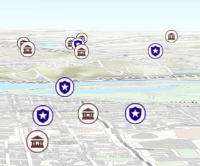
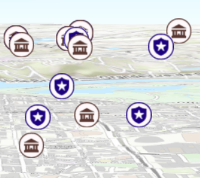
/**
* Apply perspective scaling to screen-size symbols in a [SceneView](https://developers.arcgis.com/javascript/latest/references/core/views/SceneView/).
* When `true`, screen sized objects such as [icons](https://developers.arcgis.com/javascript/latest/references/core/symbols/IconSymbol3DLayer/),
* [labels](https://developers.arcgis.com/javascript/latest/references/core/symbols/LabelSymbol3D/) or [callouts](https://developers.arcgis.com/javascript/latest/references/core/symbols/callouts/Callout3D/) integrate
* better in the 3D scene by applying a certain perspective projection to the
* sizing of features. This only applies when using a [SceneView](https://developers.arcgis.com/javascript/latest/references/core/views/SceneView/).
*
* `layer.screenSizePerspectiveEnabled = true`
*
* 
*
* `layer.screenSizePerspectiveEnabled = false`
*
* 
*
* > [!WARNING]
* >
* > **Known Limitations**
* >
* > Screen size perspective is currently not optimized for situations where the camera is very near the ground, or for scenes
* > with visual elements located far from the ground surface. In these cases it may be better to turn off screen size perspective.
* > As screen size perspective changes the size based on distance to the camera, it should be set to false when using
* > [size visual variables](https://developers.arcgis.com/javascript/latest/references/core/renderers/visualVariables/SizeVariable/).
*
* @default true
*/
accessor screenSizePerspectiveEnabled: boolean;
/** The spatial reference the source data is stored in. */
get spatialReference(): SpatialReference;
/**
* The title of the layer used to identify it in places such as the [Legend](https://developers.arcgis.com/javascript/latest/references/map-components/components/arcgis-legend/)
* and [LayerList](https://developers.arcgis.com/javascript/latest/references/core/widgets/LayerList/). If unspecified, the `title` will be the title associated
* with the OGC feature layer.
*
* @example
* // Display the title of the layer.
* const ogcFeatureLayer = new OGCFeatureLayer({
* url: "http://myserver/geoserver/ogc/features",
* collectionId: "topp:states"
* });
* ogcFeatureLayer.then(function(){
* const title = ogcFeatureLayer.title;
* console.log(title ? title : "No title available");
* // output: "california Band 3 mosaic indexes"
* });
*/
accessor title: string | null | undefined;
/** The layer type provides a convenient way to check the type of the layer without the need to import specific layer modules. */
get type(): "ogc-feature";
/**
* The URL to the server.
*
* @example
* // Add the "topp:states" OGC feature collection to a map.
* const ogcFeatureLayer = new OGCFeatureLayer({
* url: "http://myserver/geoserver/ogc/features",
* collectionId: "topp:states"
* });
*/
accessor url: string;
/**
* Creates a popup template for the layer, populated with all the fields of the layer.
*
* @param options - Options for creating the popup template.
* @returns The popup template, or `null` if the layer does not
* have any fields.
*/
createPopupTemplate(options?: CreatePopupTemplateOptions): PopupTemplate | null | undefined;
/**
* Returns the [Field](https://developers.arcgis.com/javascript/latest/references/core/layers/support/Field/) instance for a field name (case-insensitive).
*
* @param fieldName - Name of the field.
* @returns the matching field or `undefined`
* @see [fields](https://developers.arcgis.com/javascript/latest/references/core/layers/OGCFeatureLayer/#fields)
*/
getField(fieldName: string): Field | null | undefined;
}
declare const OGCFeatureLayerSuperclass: typeof Layer & typeof MultiOriginJSONSupportMixin & typeof RefreshableLayer & typeof PortalLayer & typeof OperationalLayer & typeof ScaleRangeLayer & typeof TrackableLayer & typeof TemporalLayer & typeof OrderedLayer & typeof BlendLayer & typeof FeatureEffectLayer & typeof FeatureReductionLayer & typeof CustomParametersMixin & typeof APIKeyMixin & typeof DisplayFilteredLayer