@arcgis/core
Version:
ArcGIS Maps SDK for JavaScript: A complete 2D and 3D mapping and data visualization API
208 lines (206 loc) • 14.5 kB
TypeScript
import type Collection from "../core/Collection.js";
import type Extent from "../geometry/Extent.js";
import type SpatialReference from "../geometry/SpatialReference.js";
import type Layer from "./Layer.js";
import type ImageElement from "./support/ImageElement.js";
import type LocalMediaElementSource from "./support/LocalMediaElementSource.js";
import type VideoElement from "./support/VideoElement.js";
import type PortalItem from "../portal/PortalItem.js";
import type { MultiOriginJSONSupportMixin } from "../core/MultiOriginJSONSupport.js";
import type { LayerSaveAsOptions, LayerSaveOptions } from "./types.js";
import type { MediaElement } from "./media/types.js";
import type { BlendLayer, BlendLayerProperties } from "./mixins/BlendLayer.js";
import type { OperationalLayer, OperationalLayerProperties } from "./mixins/OperationalLayer.js";
import type { PortalLayer, PortalLayerProperties } from "./mixins/PortalLayer.js";
import type { ScaleRangeLayer, ScaleRangeLayerProperties } from "./mixins/ScaleRangeLayer.js";
import type { ImageElementProperties } from "./support/ImageElement.js";
import type { LocalMediaElementSourceProperties } from "./support/LocalMediaElementSource.js";
import type { VideoElementProperties } from "./support/VideoElement.js";
import type { PortalItemProperties } from "../portal/PortalItem.js";
import type { SpatialReferenceProperties } from "../geometry/SpatialReference.js";
import type { LayerProperties } from "./Layer.js";
export interface MediaLayerProperties extends LayerProperties, PortalLayerProperties, OperationalLayerProperties, ScaleRangeLayerProperties, BlendLayerProperties, Partial<Pick<MediaLayer, "copyright">> {
/**
* The source for the MediaLayer that will be displayed on the map. This property can be autocast with an array or [Collection](https://developers.arcgis.com/javascript/latest/references/core/core/Collection/) of
* [image](https://developers.arcgis.com/javascript/latest/references/core/layers/support/ImageElement/) and [video](https://developers.arcgis.com/javascript/latest/references/core/layers/support/VideoElement/) elements. The source can also be set to an individual image or video element. The default source is a [LocalMediaElementSource](https://developers.arcgis.com/javascript/latest/references/core/layers/support/LocalMediaElementSource/).
*
* @example
* // add a new imageElement to the media layer at runtime
* const imageElement = new ImageElement({
* image: "https://arcgis.github.io/arcgis-samples-javascript/sample-data/media-layer/new-orleans/neworleans1891.png",
* georeference: new ExtentAndRotationGeoreference({
* extent: new Extent({
* spatialReference: {
* wkid: 102100
* },
* xmin: -10047456.27662979,
* ymin: 3486722.2723874687,
* xmax: -10006982.870152846,
* ymax: 3514468.91365495
* })
* })
* });
* layer.source = imageElement;
*/
source?: (ImageElementProperties & { type: "image"; }) | (VideoElementProperties & { type: "video"; }) | LocalMediaElementSourceProperties | Collection<MediaElement> | MediaElement[] | null;
/**
* The spatial reference of the layer and defines the spatial reference of the layer's [fullExtent](https://developers.arcgis.com/javascript/latest/references/core/layers/MediaLayer/#fullExtent).
*
* This property is inferred from the elements provided in the [source](https://developers.arcgis.com/javascript/latest/references/core/layers/MediaLayer/#source) property.
*/
spatialReference?: SpatialReferenceProperties;
}
/**
* The MediaLayer class is used to add [image](https://developers.arcgis.com/javascript/latest/references/core/layers/support/ImageElement/) and [video](https://developers.arcgis.com/javascript/latest/references/core/layers/support/VideoElement/)
* elements to the map at a specified geographic [location](https://developers.arcgis.com/javascript/latest/references/core/layers/support/ImageElement/#georeference).
* This layer can be used to display old scanned maps, weather data, satellite imagery, aerial and drone images, fantasy images and video feedback, etc.
* The geographic location of the image or video can be set using the [extent and rotation](https://developers.arcgis.com/javascript/latest/references/core/layers/support/ExtentAndRotationGeoreference/),
* [corner points](https://developers.arcgis.com/javascript/latest/references/core/layers/support/CornersGeoreference/) or [control points](https://developers.arcgis.com/javascript/latest/references/core/layers/support/ControlPointsGeoreference/).
*
* Coordinates of the image and video elements can be specified in any spatial reference and are projected to the view's [spatial reference](https://developers.arcgis.com/javascript/latest/references/core/views/MapView/#spatialReference).
* The content is stretched linearly between the coordinates, therefore it is recommended for the image or video to match the view's spatial reference to align correctly, especially for content
* covering large areas like the entire earth.
*
* MediaLayer can display images and videos supported by web browsers. Refer to [common image file types](https://developer.mozilla.org/en-US/docs/Web/Media/Formats/Image_types#common_image_file_types)
* and [common codecs](https://developer.mozilla.org/en-US/docs/Web/Media/Formats/Video_codecs) documents for supported image and video types.
*
* Image and video elements can be added to and removed from the MediaLayer using its [source](https://developers.arcgis.com/javascript/latest/references/core/layers/MediaLayer/#source) property after the layer is initialized.
*
* > [!WARNING]
* >
* > **Notes**
* >
* > Limitations on image size depend on the specific machine's GPU. The safest maximum image size is 2048 x 2048 pixels. The larger the image size, the longer it will take to be fetched and displayed. Due to WebGL limitations, the image can become so large that it may not be displayed.
* > The [blendMode](https://developers.arcgis.com/javascript/latest/references/core/layers/MediaLayer/#blendMode) and [effect](https://developers.arcgis.com/javascript/latest/references/core/layers/MediaLayer/#effect) properties are not supported in 3D [SceneView](https://developers.arcgis.com/javascript/latest/references/core/views/SceneView/).
* > Elements have an implicit [elevation mode](https://developers.arcgis.com/javascript/latest/references/core/layers/GraphicsLayer/#elevationInfo) of `"on-the-ground"` in 3D [SceneView](https://developers.arcgis.com/javascript/latest/references/core/views/SceneView/). Any z-values of the georeference are ignored.
* > Added support for animated images, such as GIF or APNG, at version 4.28.
* > For best performance use a dedicated graphics card.
*
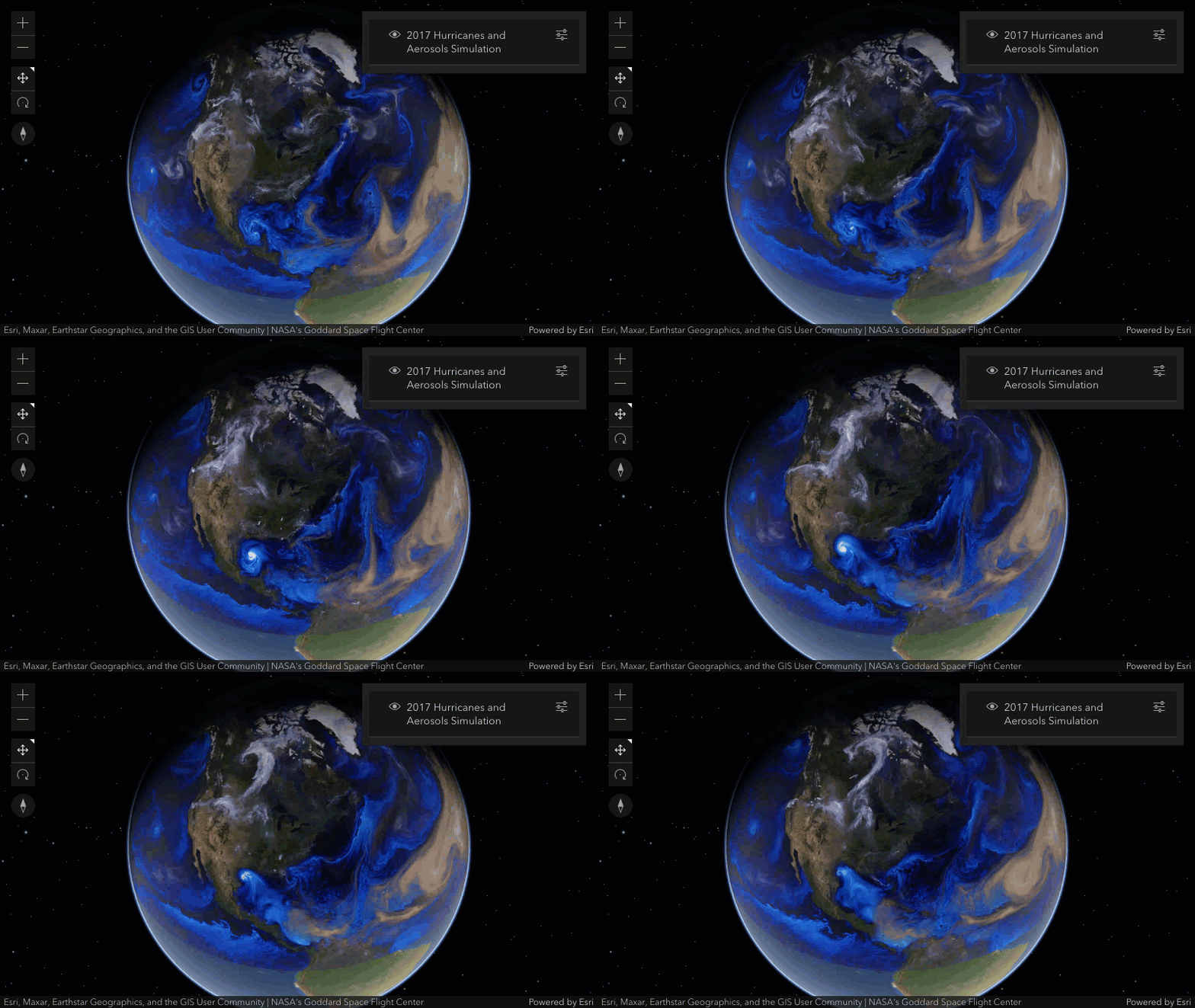
* ```js
* // create a video element by setting video param to point to the video file url
* // set the geographic location of the video file on the map using an extent
* const element = new VideoElement({
* video: "https://arcgis.github.io/arcgis-samples-javascript/sample-data/media-layer/videos/hurricanes_aerosol-aug.mp4",
* georeference: new ExtentAndRotationGeoreference({
* extent: new Extent({
* xmin: -150,
* ymin: 1,
* xmax: 20,
* ymax: 80,
* spatialReference: {
* wkid: 4326
* }
* })
* })
* });
*
* // add the video element to the media layer
* const layer = new MediaLayer({
* source: [element],
* title: "2017 Hurricanes and Aerosols Simulation",
* copyright: "NASA's Goddard Space Flight Center"
* });
* ```
*
* 
*
* @since 4.24
* @see [Sample - MediaLayer with images](https://developers.arcgis.com/javascript/latest/sample-code/layers-medialayer-images/)
* @see [Sample - MediaLayer with video](https://developers.arcgis.com/javascript/latest/sample-code/layers-medialayer-video/)
* @see [Sample - MediaLayer with control points](https://developers.arcgis.com/javascript/latest/sample-code/layers-medialayer-control-points/)
*/
export default class MediaLayer extends MediaLayerSuperclass {
constructor(properties?: MediaLayerProperties);
/** Copyright information for the layer. */
accessor copyright: string | null | undefined;
/**
* The full extent of the layer. It is the extent of all the elements in the layer's [source](https://developers.arcgis.com/javascript/latest/references/core/layers/MediaLayer/#source) and is in the
* [spatial reference](https://developers.arcgis.com/javascript/latest/references/core/layers/MediaLayer/#spatialReference) of the layer.
*
* @example
* // Once the layer loads, set the view's extent to the layer's full extent
* layer.when(function(){
* view.extent = layer.fullExtent;
* });
*/
get fullExtent(): Extent | null | undefined;
/**
* Indicates whether the layer instance has loaded.
* When `true`, all the properties of the object can be accessed.
*
* @default false
*/
get loaded(): boolean;
/**
* The source for the MediaLayer that will be displayed on the map. This property can be autocast with an array or [Collection](https://developers.arcgis.com/javascript/latest/references/core/core/Collection/) of
* [image](https://developers.arcgis.com/javascript/latest/references/core/layers/support/ImageElement/) and [video](https://developers.arcgis.com/javascript/latest/references/core/layers/support/VideoElement/) elements. The source can also be set to an individual image or video element. The default source is a [LocalMediaElementSource](https://developers.arcgis.com/javascript/latest/references/core/layers/support/LocalMediaElementSource/).
*
* @example
* // add a new imageElement to the media layer at runtime
* const imageElement = new ImageElement({
* image: "https://arcgis.github.io/arcgis-samples-javascript/sample-data/media-layer/new-orleans/neworleans1891.png",
* georeference: new ExtentAndRotationGeoreference({
* extent: new Extent({
* spatialReference: {
* wkid: 102100
* },
* xmin: -10047456.27662979,
* ymin: 3486722.2723874687,
* xmax: -10006982.870152846,
* ymax: 3514468.91365495
* })
* })
* });
* layer.source = imageElement;
*/
get source(): ImageElement | VideoElement | LocalMediaElementSource | null | undefined;
set source(value: (ImageElementProperties & { type: "image"; }) | (VideoElementProperties & { type: "video"; }) | LocalMediaElementSourceProperties | Collection<MediaElement> | MediaElement[] | null | undefined);
/**
* The spatial reference of the layer and defines the spatial reference of the layer's [fullExtent](https://developers.arcgis.com/javascript/latest/references/core/layers/MediaLayer/#fullExtent).
*
* This property is inferred from the elements provided in the [source](https://developers.arcgis.com/javascript/latest/references/core/layers/MediaLayer/#source) property.
*/
get spatialReference(): SpatialReference;
set spatialReference(value: SpatialReferenceProperties);
/** The layer type provides a convenient way to check the type of the layer without the need to import specific layer modules. */
get type(): "media";
/**
* Saves the layer to its existing portal item in the [Portal](https://developers.arcgis.com/javascript/latest/references/core/portal/Portal/)
* authenticated within the user's current session. If the layer is not saved to a
* [PortalItem](https://developers.arcgis.com/javascript/latest/references/core/portal/PortalItem/), then you should use [saveAs()](https://developers.arcgis.com/javascript/latest/references/core/layers/MediaLayer/#saveAs).
*
* > [!WARNING]
* >
* > **Known Limitations**
* >
* > The [source](https://developers.arcgis.com/javascript/latest/references/core/layers/MediaLayer/#source) property must be set to a single [ImageElement](https://developers.arcgis.com/javascript/latest/references/core/layers/support/ImageElement/).
* > As defined by the [web map specification](https://developers.arcgis.com/web-map-specification/objects/mediaLayer_georeference/), the [ImageElement.georeference](https://developers.arcgis.com/javascript/latest/references/core/layers/support/ImageElement/#georeference) property of the ImageElement must be a [ControlPointsGeoreference](https://developers.arcgis.com/javascript/latest/references/core/layers/support/ControlPointsGeoreference/).
*
* @param options - Various options for saving the layer.
* @returns When resolved, returns the portal item to which the layer is saved.
* @since 4.29
* @example const portalItem = await layer.save();
*/
save(options?: LayerSaveOptions): Promise<PortalItem>;
/**
* Saves the layer to a new portal item in the [Portal](https://developers.arcgis.com/javascript/latest/references/core/portal/Portal/)
* authenticated within the user's current session.
*
* > [!WARNING]
* >
* > **Known Limitations**
* >
* > The [source](https://developers.arcgis.com/javascript/latest/references/core/layers/MediaLayer/#source) property must be set to a single [ImageElement](https://developers.arcgis.com/javascript/latest/references/core/layers/support/ImageElement/).
* > As defined by the [web map specification](https://developers.arcgis.com/web-map-specification/objects/mediaLayer_georeference/), the [ImageElement.georeference](https://developers.arcgis.com/javascript/latest/references/core/layers/support/ImageElement/#georeference) property of the ImageElement must be a [ControlPointsGeoreference](https://developers.arcgis.com/javascript/latest/references/core/layers/support/ControlPointsGeoreference/).
*
* @param portalItem - The portal item to which the layer will be saved.
* @param options - Various options for saving the layer.
* @returns When resolved, returns the portal item to which the layer is saved.
* @since 4.29
* @example
* const portalItem = new PortalItem();
* await layer.saveAs(portalItem);
*/
saveAs(portalItem: PortalItemProperties, options?: LayerSaveAsOptions): Promise<PortalItem>;
}
declare const MediaLayerSuperclass: typeof Layer & typeof MultiOriginJSONSupportMixin & typeof PortalLayer & typeof OperationalLayer & typeof ScaleRangeLayer & typeof BlendLayer