@arcgis/core
Version:
ArcGIS Maps SDK for JavaScript: A complete 2D and 3D mapping and data visualization API
958 lines (955 loc) • 65.9 kB
TypeScript
import type PopupTemplate from "../PopupTemplate.js";
import type Extent from "../geometry/Extent.js";
import type SpatialReference from "../geometry/SpatialReference.js";
import type Layer from "./Layer.js";
import type Field from "./support/Field.js";
import type FieldsIndex from "./support/FieldsIndex.js";
import type LabelClass from "./support/LabelClass.js";
import type LayerFloorInfo from "./support/LayerFloorInfo.js";
import type PortalItem from "../portal/PortalItem.js";
import type AttributeBinsFeatureSet from "../rest/support/AttributeBinsFeatureSet.js";
import type FeatureSet from "../rest/support/FeatureSet.js";
import type Query from "../rest/support/Query.js";
import type ElevationInfo from "../symbols/support/ElevationInfo.js";
import type AttributeTableTemplate from "../tables/AttributeTableTemplate.js";
import type { MultiOriginJSONSupportMixin } from "../core/MultiOriginJSONSupport.js";
import type { LayerEvents, LayerProperties } from "./Layer.js";
import type { FeatureLayerCapabilities, FieldDomainOptions } from "./types.js";
import type { BlendLayer, BlendLayerProperties } from "./mixins/BlendLayer.js";
import type { CustomParametersMixin, CustomParameters, CustomParametersMixinProperties } from "./mixins/CustomParametersMixin.js";
import type { DisplayFilteredLayer, DisplayFilteredLayerProperties } from "./mixins/DisplayFilteredLayer.js";
import type { FeatureEffectLayer, FeatureEffectLayerProperties } from "./mixins/FeatureEffectLayer.js";
import type { FeatureReductionLayer, FeatureReductionLayerProperties } from "./mixins/FeatureReductionLayer.js";
import type { OperationalLayer, OperationalLayerProperties } from "./mixins/OperationalLayer.js";
import type { OrderedLayer, OrderedLayerProperties } from "./mixins/OrderedLayer.js";
import type { PortalLayer, PortalLayerProperties } from "./mixins/PortalLayer.js";
import type { RefreshableLayer, RefreshableLayerEvents, RefreshableLayerProperties } from "./mixins/RefreshableLayer.js";
import type { ScaleRangeLayer, ScaleRangeLayerProperties } from "./mixins/ScaleRangeLayer.js";
import type { TemporalLayer, TemporalLayerProperties } from "./mixins/TemporalLayer.js";
import type { TrackableLayer, TrackableLayerProperties } from "./mixins/TrackableLayer.js";
import type { DomainUnion } from "./support/types.js";
import type { PortalItemProperties } from "../portal/PortalItem.js";
import type { RendererUnion } from "../renderers/types.js";
import type { RequestOptions } from "../request/types.js";
import type { AttributeBinsQueryProperties } from "../rest/support/AttributeBinsQuery.js";
import type { QueryProperties } from "../rest/support/Query.js";
import type { CreatePopupTemplateOptions } from "../support/popupUtils.js";
import type { TimeZone } from "../time/types.js";
import type { AttributeTableTemplateProperties } from "../tables/AttributeTableTemplate.js";
import type { ElevationInfoProperties } from "../symbols/support/ElevationInfo.js";
import type { FieldProperties } from "./support/Field.js";
import type { LayerFloorInfoProperties } from "./support/LayerFloorInfo.js";
import type { LabelClassProperties } from "./support/LabelClass.js";
import type { PopupTemplateProperties } from "../PopupTemplate.js";
import type { HeatmapRendererProperties } from "../renderers/HeatmapRenderer.js";
import type { PieChartRendererProperties } from "../renderers/PieChartRenderer.js";
import type { DictionaryRendererProperties } from "../renderers/DictionaryRenderer.js";
import type { DotDensityRendererProperties } from "../renderers/DotDensityRenderer.js";
import type { UniqueValueRendererProperties } from "../renderers/UniqueValueRenderer.js";
import type { ClassBreaksRendererProperties } from "../renderers/ClassBreaksRenderer.js";
import type { SimpleRendererProperties } from "../renderers/SimpleRenderer.js";
import type { SpatialReferenceProperties } from "../geometry/SpatialReference.js";
export interface CSVLayerProperties extends LayerProperties, PortalLayerProperties, OperationalLayerProperties, RefreshableLayerProperties, ScaleRangeLayerProperties, TrackableLayerProperties, TemporalLayerProperties, BlendLayerProperties, FeatureEffectLayerProperties, FeatureReductionLayerProperties, CustomParametersMixinProperties, DisplayFilteredLayerProperties, OrderedLayerProperties, Partial<Pick<CSVLayer, "copyright" | "definitionExpression" | "delimiter" | "displayField" | "labelsVisible" | "latitudeField" | "legendEnabled" | "longitudeField" | "objectIdField" | "outFields" | "popupEnabled" | "screenSizePerspectiveEnabled" | "url">> {
/**
* This property is used to configure the associated layer's [FeatureTable](https://developers.arcgis.com/javascript/latest/references/core/widgets/FeatureTable/). It is meant to configure how the columns display within the table in regard to visibility, column order, and sorting.
*
* > [!WARNING]
* >
* > This property differs from the [FeatureTable's tableTemplate](https://developers.arcgis.com/javascript/latest/references/core/widgets/FeatureTable/support/TableTemplate/) property. The `TableTemplate` provides more fine-grained control over how the table is rendered within the application by offering more advanced configurations such as custom cell rendering, column formatting, and more. `TableTemplate` is useful for application-level development that remains within an application. Use the `attributeTableTemplate` property to access the table's settings across different applications. By using this property, the settings can be saved within a webmap or layer. Please refer to the [AttributeTableTemplate](https://developers.arcgis.com/javascript/latest/references/core/tables/AttributeTableTemplate/) and [TableTemplate](https://developers.arcgis.com/javascript/latest/references/core/widgets/FeatureTable/support/TableTemplate/) documentation for more information.
*
* @since 4.31
*/
attributeTableTemplate?: AttributeTableTemplateProperties | null;
/**
* A list of custom parameters appended to the URL of all resources fetched by the layer.
* It's an object with key-value pairs where value is a string.
* The layer's `refresh()` method needs to be called if the customParameters are updated at runtime.
*
* @since 4.22
* @example
* // set customParameters to request the top 3 earthquakes since 1900.
* // The USGS earthquakes catalog returns earthquakes with specified query parameters.
* const csvLayer = new CSVLayer({
* url: "https://earthquake.usgs.gov/fdsnws/event/1/query",
* customParameters: {
* format: "csv",
* starttime: "1900-01-01",
* endtime: "2021-01-01",
* minmagnitude: "8",
* orderby:"magnitude",
* limit: "3"
* }
* });
* @example
* // send a custom parameter to your special service
* let layer = new MapImageLayer({
* url: serviceUrl,
* customParameters: {
* "key": "my-special-key"
* }
* });
*/
customParameters?: CustomParameters | null;
/**
* Specifies how features are placed on the vertical axis (z). This property may only be used
* in a [SceneView](https://developers.arcgis.com/javascript/latest/references/core/views/SceneView/). See the [ElevationInfo sample](https://developers.arcgis.com/javascript/latest/sample-code/scene-elevationinfo/)
* for an example of how this property may be used.
*
* > [!WARNING]
* >
* > If the elevation info is not specified, the effective elevation depends on the context and could vary per graphic.
*/
elevationInfo?: ElevationInfoProperties | null;
/**
* An array of fields in the layer.
*
* @example
* // define each field's schema
* let fields = [
* new Field({
* "name": "ObjectID",
* "alias": "ObjectID",
* "type": "oid"
* }),
* new Field({
* "name": "description",
* "alias": "Description",
* "type": "string"
* }),
* new Field ({
* "name": "title",
* "alias": "Title",
* "type": "string"
* })
* ];
*/
fields?: FieldProperties[];
/**
* When a layer is configured as floor-aware, it has a `floorInfo` property defined.
* A floor-aware layer is a layer that contains indoor GIS data representing features that
* can be located on a specific floor of a building.
*
* @since 4.19
*/
floorInfo?: LayerFloorInfoProperties | null;
/**
* The full extent of the layer.
*
* @example
* // Once the layer loads, set the view's extent to the layer's full extent
* layer.when(function(){
* view.extent = layer.fullExtent;
* });
*/
fullExtent?: Extent | null;
/**
* The label definition for this layer, specified as an array of
* [LabelClass](https://developers.arcgis.com/javascript/latest/references/core/layers/support/LabelClass/). Use this property to specify
* labeling properties for the layer such as label expression, placement, and size.
*
* Multiple Label classes with different `where` clauses can be used to define several
* labels with varying styles on the same feature. Likewise, multiple label classes
* may be used to label different types of features
*
* > [!WARNING]
* >
* > **Known Limitations**
* >
* > 3D [SceneViews](https://developers.arcgis.com/javascript/latest/references/core/views/SceneView/) only support displaying one [LabelClass](https://developers.arcgis.com/javascript/latest/references/core/layers/support/LabelClass/) per feature.
*/
labelingInfo?: LabelClassProperties[] | null;
/**
* The popup template for the layer. When set on the layer, the `popupTemplate`
* allows users to access attributes and display their values in the view's Popup when a feature is selected
* using text and/or charts.
*
* A default popup template is automatically used if no `popupTemplate` has been defined when
* [Popup.defaultPopupTemplateEnabled](https://developers.arcgis.com/javascript/latest/references/core/widgets/Popup/#defaultPopupTemplateEnabled)
* is set to `true`.
*
* @see [createPopupTemplate()](https://developers.arcgis.com/javascript/latest/references/core/layers/CSVLayer/#createPopupTemplate)
* @see [SceneView.popup](https://developers.arcgis.com/javascript/latest/references/core/views/SceneView/#popup)
* @see [View2D.popup](https://developers.arcgis.com/javascript/latest/references/core/views/View2D/#popup)
*/
popupTemplate?: PopupTemplateProperties | null;
/**
* The portal item referencing the CSV file from which the CSVLayer is loaded.
*
* @since 4.25
* @example
* // Initialize CSVLayer by referencing a portalItem id pointing to csv file.
* const layer = new CSVLayer({
* portalItem: { // autocasts as new PortalItem()
* id: "efda94edccb74f16b47b3d6e5ace9a57"
* }
* });
* @example
* // Initialize GeoJSONLayer by referencing a portalItem id pointing to geojson file.
* const layer = new CSVLayer({
* portalItem: new PortalItem({
* id: "efda94edccb74f16b47b3d6e5ace9a57",
* // optionally define the portal, of the item.
* // if not specified, the default portal defined is used.
* // see https://developers.arcgis.com/javascript/latest/references/core/config/#portalUrl
* portal: new Portal({
* url: "https://jsapi.maps.arcgis.com/"
* })
* }
* });
* @example
* // While this example uses FeatureLayer, this same pattern can be
* // used for other layers that may be loaded from portalItem ids.
* const layer = new FeatureLayer({
* portalItem: { // autocasts as new PortalItem()
* id: "caa9bd9da1f4487cb4989824053bb847"
* } // the first layer in the service is returned
* });
* @example
* // Set hostname when using an on-premise portal (default is ArcGIS Online)
* // esriConfig.portalUrl = "http://myHostName.esri.com/arcgis";
*
* // While this example uses FeatureLayer, this same pattern can be
* // used for SceneLayers.
* const layer = new FeatureLayer({
* portalItem: { // autocasts as new PortalItem()
* id: "8d26f04f31f642b6828b7023b84c2188"
* },
* // loads the third item in the given feature service
* layerId: 2
* });
* @example
* // Initialize GeoJSONLayer by referencing a portalItem id pointing to geojson file.
* const layer = new GeoJSONLayer({
* portalItem: new PortalItem({
* id: "81e769cd7031482797e1b0768f23c7e1",
* // optionally define the portal, of the item.
* // if not specified, the default portal defined is used.
* // see https://developers.arcgis.com/javascript/latest/references/core/config/#portalUrl
* portal: new Portal({
* url: "https://jsapi.maps.arcgis.com/"
* })
* }
* });
* @example
* // This snippet loads a table hosted in ArcGIS Online.
* const table = new FeatureLayer({
* portalItem: { // autocasts as esri/portal/PortalItem
* id: "123f4410054b43d7a0bacc1533ceb8dc"
* }
* });
*
* // Before adding the table to the map, it must first be loaded and confirm it is the right type.
* table.load().then(() => {
* if (table.isTable) {
* map.tables.add(table);
* }
* });
* @example
* // While this example uses FeatureLayer, this same pattern can be
* // used for other layers that may be loaded from portalItem ids.
* const layer = new FeatureLayer({
* portalItem: { // autocasts as esri/portal/PortalItem
* id: "caa9bd9da1f4487cb4989824053bb847",
* // Set an API key to access a secure portal item configured with API key authentication.
* apiKey: "APIKEY"
* }
* });
*/
portalItem?: PortalItemProperties | null;
/**
* The renderer assigned to the layer. The renderer defines how to
* visualize each feature in the layer. Depending on the renderer type,
* features may be visualized with the same symbol, or with varying symbols
* based on the values of provided attribute fields or functions.
*
* @see [Visualization guide pages](https://developers.arcgis.com/javascript/latest/visualization/)
* @see [Data driven styles](https://developers.arcgis.com/javascript/latest/visualization/data-driven-styles)
* @example
* // all features in the layer will be visualized with
* // a 6pt black marker symbol and a thin, white outline
* layer.renderer = {
* type: "simple", // autocasts as new SimpleRenderer()
* symbol: {
* type: "simple-marker", // autocasts as new SimpleMarkerSymbol()
* size: 6,
* color: "black",
* outline: { // autocasts as new SimpleLineSymbol()
* width: 0.5,
* color: "white"
* }
* }
* };
*/
renderer?: (((SimpleRendererProperties & { type: "simple" }) | (ClassBreaksRendererProperties & { type: "class-breaks" }) | (UniqueValueRendererProperties & { type: "unique-value" }) | (DotDensityRendererProperties & { type: "dot-density" }) | (DictionaryRendererProperties & { type: "dictionary" }) | (PieChartRendererProperties & { type: "pie-chart" })) | (HeatmapRendererProperties & { type: "heatmap" })) | null;
/**
* The spatial reference of the layer. The default value is WGS84.
* This property can be set explicitly to project the longitude and latitude
* coordinates when the layer parses the CSV file. While not required, explicitly setting
* the spatial reference of the layer will improve the performance
* when projecting to a spatial reference other than the one used by the
* coordinates in the raw data.
*
* > [!WARNING]
* >
* > **Known Limitations**
* >
* > The browser must support [WebAssembly](https://caniuse.com/#feat=wasm)
* > if a spatial reference other than WGS84 or Web Mercator is specified.
*
* @since 4.7
* @see [SpatialReference.WGS84](https://developers.arcgis.com/javascript/latest/references/core/geometry/SpatialReference/#WGS84)
* @example
* const csvLayer = new CSVLayer({
* url: "example.csv",
* spatialReference: {
* wkid: 5936
* }
* });
*/
spatialReference?: SpatialReferenceProperties;
/**
* The title of the layer used to identify it in places such as the [Legend](https://developers.arcgis.com/javascript/latest/references/map-components/components/arcgis-legend/)
* and [LayerList](https://developers.arcgis.com/javascript/latest/references/core/widgets/LayerList/).
*
* When the layer is loaded from a portal item, the title of the portal item will be used.
* If a layer is loaded as part of a webmap or a webscene, then the title of the layer as stored in the webmap/webscene will be used.
*/
title?: string | null;
}
export interface CSVLayerEvents extends RefreshableLayerEvents, LayerEvents {}
/**
* * [Overview](https://developers.arcgis.com/javascript/latest/references/core/layers/CSVLayer/#overview)
* * [Creating a CSVLayer](https://developers.arcgis.com/javascript/latest/references/core/layers/CSVLayer/#creating-a-csvlayer)
* * [Notes](https://developers.arcgis.com/javascript/latest/references/core/layers/CSVLayer/#notes)
*
* <span id="overview"></span>
* ## Overview
*
* The CSVLayer is a point layer based on a CSV file (.csv, .txt). CSV is a plain-text file format used to represent tabular data,
* including geographic point features (latitude, longitude). Typically the latitude coordinate is the Y value, and the
* longitude coordinate is the X value. The X, Y coordinates must be stored in [SpatialReference.WGS84](https://developers.arcgis.com/javascript/latest/references/core/geometry/SpatialReference/#WGS84) in csv feed.
*
* CSVLayer fetches all of its data once and store them on the client-side when it loads. CSVLayer, however, will make server-side requests
* to fetch updated data if its [refreshInterval](https://developers.arcgis.com/javascript/latest/references/core/layers/CSVLayer/#refreshInterval) is set or [refresh()](https://developers.arcgis.com/javascript/latest/references/core/layers/CSVLayer/#refresh) method is called.
* Refer to FeatureLayer's [querying your data](https://developers.arcgis.com/javascript/latest/references/core/layers/FeatureLayer/#querying) section to learn more about how to query your csv data, and
* the [data visualization](https://developers.arcgis.com/javascript/latest/references/core/layers/FeatureLayer/#data-visualization) section to learn how to change the CSVLayer's visualization.
*
* <span id="creating-a-csvlayer"></span>
* ## Creating a CSVLayer
*
* CSVLayer is created by setting its [url](https://developers.arcgis.com/javascript/latest/references/core/layers/CSVLayer/#url) property to point to csv feed or to a blob url for in memory csv data. Specify names of your latitude and longitude fields
* by setting [latitudeField](https://developers.arcgis.com/javascript/latest/references/core/layers/CSVLayer/#latitudeField) and [longitudeField](https://developers.arcgis.com/javascript/latest/references/core/layers/CSVLayer/#longitudeField) properties if the csv data does not contain x, y coordinates in one of the predefined fields.
* Values of latitude and longitude fields must be stored in WGS84 in csv feed. Hence CSVLayer's [spatialReference](https://developers.arcgis.com/javascript/latest/references/core/layers/CSVLayer/#spatialReference) will default to WGS84. However, you can
* specify the layer's spatial reference to match the [View.spatialReference](https://developers.arcgis.com/javascript/latest/references/core/views/View/#spatialReference) of the view to improve the performance.
*
* ### Reference a csv feed URL
*
* To create a CSVLayer instance from a csv feed, you must set the [url](https://developers.arcgis.com/javascript/latest/references/core/layers/CSVLayer/#url) property
* to the url of the csv feed. If CSV feeds are not on the same domain as the application, a [CORS enabled server](https://developers.arcgis.com/javascript/latest/cors/) or a [proxy](https://developers.arcgis.com/javascript/latest/proxies/)
* is required.
*
* ```js
* const CSVLayer = await $arcgis.import("@arcgis/core/layers/CSVLayer.js");
* // points to the states layer in a service storing U.S. census data
* const csvLayer = new CSVLayer({
* url: "https://earthquake.usgs.gov/earthquakes/feed/v1.0/summary/2.5_week.csv",
* copyright: "USGS Earthquakes"
* });
* map.add(csvLayer); // adds the layer to the map
* ```
*
* ### Reference in memory csv data by a blob url
*
* You can also create a CSVLayer from in memory csv data by passing a [blob url](https://developer.mozilla.org/en-US/docs/Web/API/URL/createObjectURL) to the
* [url](https://developers.arcgis.com/javascript/latest/references/core/layers/CSVLayer/#url) property of the layer.
* The following snippet shows how to create a new CSVLayer from a blob url.
*
* ```js
* // Pass data by a blob url to create a CSV layer.
* const csv = `name|year|latitude|Longitude
* aspen|2020|40.418|20.553
* birch|2018|-118.123|35.888`;
*
* const blob = new Blob([csv], {
* type: "plain/text"
* });
* let url = URL.createObjectURL(blob);
*
* const layer = new CSVLayer({
* url: url
* });
* ```
* > [!WARNING]
* >
* > <span id="notes"></span>
* > **Notes**
* >
* > Starting at version 4.28, date fields are stored in the `UTC` time zone instead of the local time zone of the device. This may cause some date values defined without a time zone offset to be inaccurate.
* > For example, at version 4.27 and earlier, if your CSV file has date values without the time zone offset such as below, these values would be interpreted in the local time zone of the device.
* > At 4.28, these values are interpreted in the `UTC` time zone. The following table shows how dates may be interpreted in 4.27 and 4.28.
* >
* > | CSV file value | 4.27 and earlier value | 4.28 value |
* > | -------------- | ---------------------- | ---------- |
* > | `01/01/2021` | Interpreted as `1/1/2022, 12:00 AM` in the device's local time zone | `1/1/2022, 12:00 AM` in UTC |
* > | `01/01/2021 08:00:00` | Interpreted as `1/1/2021 08:00:00 AM` in the device's local time zone | `1/1/2021 08:00:00 AM` in UTC |
* > | `2021/01/01 10:00:00` | Interpreted as `1/1/2021 10:00:00 AM` in the device's local time zone | `1/1/2021 10:00:00 AM` in UTC |
* > | `2021-01-01T00:00:00-08:00` | Interpreted as `1/1/2021, 08:00 AM` in UTC time zone | `1/1/2021, 08:00 AM` in UTC time zone |
* > | `2021-01-01T00:00:00.000Z` | Interpreted as `1/1/2021, 08:00 AM` in UTC time zone | `1/1/2021, 08:00 AM` in UTC time zone |
* > | `2021-01-01T00:00Z` | Interpreted as `1/1/2021, 08:00 AM` in UTC time zone | `1/1/2021, 08:00 AM` in UTC time zone |
* >
* > To ensure the accuracy of date field values, use ISO8601 string date values with the time zone offset (e.g. `2021-01-01T00:00:00-08:00`, `2021-01-01T00:00:00.000Z`) in your CSV file.
*
* @since 4.1
* @see [Sample - Intro to CSVLayer](https://developers.arcgis.com/javascript/latest/sample-code/layers-csv/)
* @see [Sample - CSVLayer - Project points on the fly](https://developers.arcgis.com/javascript/latest/sample-code/layers-csv-projection/)
* @see [Sample - Select features by rectangle](https://developers.arcgis.com/javascript/latest/sample-code/highlight-features-by-geometry/)
* @see [Querying your data](https://developers.arcgis.com/javascript/latest/references/core/layers/FeatureLayer/#querying)
* @see [Data Visualization](https://developers.arcgis.com/javascript/latest/references/core/layers/FeatureLayer/#data-visualization)
* @see [Query and filter guide](https://developers.arcgis.com/javascript/latest/query-filter/)
* @see [Map](https://developers.arcgis.com/javascript/latest/references/core/Map/)
*/
export default class CSVLayer extends CSVLayerSuperclass {
/**
* @deprecated
* Do not directly reference this property.
* Use EventNames and EventTypes helpers from \@arcgis/core/Evented
*/
"@eventTypes": CSVLayerEvents;
/**
* @example
* // Typical usage
* let layer = new CSVLayer({
* // URL to the CSV file
* url: "https://mydomain.com/files/POIs.csv"
* });
*/
constructor(properties?: CSVLayerProperties);
/**
* This property is used to configure the associated layer's [FeatureTable](https://developers.arcgis.com/javascript/latest/references/core/widgets/FeatureTable/). It is meant to configure how the columns display within the table in regard to visibility, column order, and sorting.
*
* > [!WARNING]
* >
* > This property differs from the [FeatureTable's tableTemplate](https://developers.arcgis.com/javascript/latest/references/core/widgets/FeatureTable/support/TableTemplate/) property. The `TableTemplate` provides more fine-grained control over how the table is rendered within the application by offering more advanced configurations such as custom cell rendering, column formatting, and more. `TableTemplate` is useful for application-level development that remains within an application. Use the `attributeTableTemplate` property to access the table's settings across different applications. By using this property, the settings can be saved within a webmap or layer. Please refer to the [AttributeTableTemplate](https://developers.arcgis.com/javascript/latest/references/core/tables/AttributeTableTemplate/) and [TableTemplate](https://developers.arcgis.com/javascript/latest/references/core/widgets/FeatureTable/support/TableTemplate/) documentation for more information.
*
* @since 4.31
*/
get attributeTableTemplate(): AttributeTableTemplate | null | undefined;
set attributeTableTemplate(value: AttributeTableTemplateProperties | null | undefined);
/**
* Describes the layer's supported capabilities.
*
* @example
* // Once the layer loads, check if the supportsStatistics operations is enabled on the layer
* await layer.load();
* if (layer.capabilities.query.supportsStatistics) {
* // query for the sum of the population in all features
* let sumPopulation = {
* onStatisticField: "POP_2015", // service field for 2015 population
* outStatisticFieldName: "Pop_2015_sum",
* statisticType: "sum"
* }
* let query = layer.createQuery();
* query.outStatistics = [ sumPopulation ];
* const { features } = await layer.queryFeatures(query);
* // display the total population
* console.log(`Total Population: ${features.at(0).attributes.Pop_2015_sum}`);
*
* }
*/
get capabilities(): FeatureLayerCapabilities;
/** Copyright information for the layer. */
accessor copyright: string | null | undefined;
/**
* A list of custom parameters appended to the URL of all resources fetched by the layer.
* It's an object with key-value pairs where value is a string.
* The layer's `refresh()` method needs to be called if the customParameters are updated at runtime.
*
* @since 4.22
* @example
* // set customParameters to request the top 3 earthquakes since 1900.
* // The USGS earthquakes catalog returns earthquakes with specified query parameters.
* const csvLayer = new CSVLayer({
* url: "https://earthquake.usgs.gov/fdsnws/event/1/query",
* customParameters: {
* format: "csv",
* starttime: "1900-01-01",
* endtime: "2021-01-01",
* minmagnitude: "8",
* orderby:"magnitude",
* limit: "3"
* }
* });
* @example
* // send a custom parameter to your special service
* let layer = new MapImageLayer({
* url: serviceUrl,
* customParameters: {
* "key": "my-special-key"
* }
* });
*/
accessor customParameters: CustomParameters | null | undefined;
/**
* The time zone that dates are stored in. Time zone is always `UTC` for CSVLayer.
* This property may be useful when constructing date or time [where clauses](https://developers.arcgis.com/javascript/latest/references/core/rest/support/Query/#date-query).
*
* @since 4.28
*/
get dateFieldsTimeZone(): TimeZone | null | undefined;
/**
* The SQL where clause used to filter features on the client. Only the features that satisfy the definition
* expression are displayed in the [View](https://developers.arcgis.com/javascript/latest/references/core/views/View/). Setting a definition expression is useful
* when the dataset is large and you don't want to bring all features to the client for analysis.
* Definition expressions may be set when a layer is constructed prior to it loading in the view or
* after it has been added to the map. If the definition expression is set after the layer has been added to the map, the view will
* automatically refresh itself to display the features that satisfy the new definition expression.
*
* @since 4.7
* @example
* // Set definition expression in constructor to only display earthquakes magnitude 5.0 and greater
* const layer = new CSVLayer({
* url: "https://earthquake.usgs.gov/earthquakes/feed/v1.0/summary/2.5_week.csv",
* definitionExpression: "mag >= 5"
* });
* @example
* // Set the definition expression directly on layer instance after it has loaded
* layer.definitionExpression = "mag >= 5";
*/
accessor definitionExpression: string | null | undefined;
/**
* The column delimiter. See the table below for possible values.
*
* | Value | Description|
* | --- | --- |
* | `,` | comma |
* | ` ` | space |
* | `;` | semicolon |
* | `\|` | pipe |
* | `\t` | tab-delimited |
*/
accessor delimiter: "," | " " | ";" | "|" | "\t";
/**
* The name of the layer's primary display field. The value of this property matches the name of one of the fields of the layer.
*
* @since 4.13
*/
accessor displayField: string | null | undefined;
/**
* Specifies how features are placed on the vertical axis (z). This property may only be used
* in a [SceneView](https://developers.arcgis.com/javascript/latest/references/core/views/SceneView/). See the [ElevationInfo sample](https://developers.arcgis.com/javascript/latest/sample-code/scene-elevationinfo/)
* for an example of how this property may be used.
*
* > [!WARNING]
* >
* > If the elevation info is not specified, the effective elevation depends on the context and could vary per graphic.
*/
get elevationInfo(): ElevationInfo | null | undefined;
set elevationInfo(value: ElevationInfoProperties | null | undefined);
/**
* An array of fields in the layer.
*
* @example
* // define each field's schema
* let fields = [
* new Field({
* "name": "ObjectID",
* "alias": "ObjectID",
* "type": "oid"
* }),
* new Field({
* "name": "description",
* "alias": "Description",
* "type": "string"
* }),
* new Field ({
* "name": "title",
* "alias": "Title",
* "type": "string"
* })
* ];
*/
get fields(): Field[];
set fields(value: FieldProperties[]);
/**
* A convenient property that can be used to make case-insensitive lookups for a field by name.
* It can also provide a list of the [date fields](https://developers.arcgis.com/javascript/latest/references/core/layers/support/FieldsIndex/#dateFields) in a layer.
*
* @since 4.12
* @example
* // lookup a field by name. name is case-insensitive
* const field = layer.fieldsIndex.get("SoMeFiEld");
*
* if (field) {
* console.log(field.name); // SomeField
* }
*/
get fieldsIndex(): FieldsIndex<Field>;
/**
* When a layer is configured as floor-aware, it has a `floorInfo` property defined.
* A floor-aware layer is a layer that contains indoor GIS data representing features that
* can be located on a specific floor of a building.
*
* @since 4.19
*/
get floorInfo(): LayerFloorInfo | null | undefined;
set floorInfo(value: LayerFloorInfoProperties | null | undefined);
/**
* The full extent of the layer.
*
* @example
* // Once the layer loads, set the view's extent to the layer's full extent
* layer.when(function(){
* view.extent = layer.fullExtent;
* });
*/
accessor fullExtent: Extent | null | undefined;
/**
* The geometry type of features in the CSVLayer. CSVLayer only supports [Point](https://developers.arcgis.com/javascript/latest/references/core/geometry/Point/) geometry type.
* The geometry type is `null` if [isTable](https://developers.arcgis.com/javascript/latest/references/core/layers/CSVLayer/#isTable) is `true`.
*
* @since 4.24
*/
get geometryType(): "point";
/**
* Returns `true` if the layer is loaded from a non-spatial table in a service. Non-spatial tables do not have
* [latitudeField](https://developers.arcgis.com/javascript/latest/references/core/layers/CSVLayer/#latitudeField) and [longitudeField](https://developers.arcgis.com/javascript/latest/references/core/layers/CSVLayer/#longitudeField) columns that represent geographic features.
* The [geometryType](https://developers.arcgis.com/javascript/latest/references/core/layers/CSVLayer/#geometryType) of the layer will be `null` if the `isTable` is true.
*
* Non-spatial table instance can be created from the [url](https://developers.arcgis.com/javascript/latest/references/core/layers/CSVLayer/#url) and the table must be loaded by calling [load()](https://developers.arcgis.com/javascript/latest/references/core/layers/CSVLayer/#load) method.
*
* @since 4.24
* @see [Map.tables](https://developers.arcgis.com/javascript/latest/references/core/Map/#tables)
* @see [WebMap.tables](https://developers.arcgis.com/javascript/latest/references/core/WebMap/#tables)
* @see [Map.allTables](https://developers.arcgis.com/javascript/latest/references/core/Map/#allTables)
* @see [WebMap.allTables](https://developers.arcgis.com/javascript/latest/references/core/WebMap/#allTables)
*/
get isTable(): boolean;
/**
* The label definition for this layer, specified as an array of
* [LabelClass](https://developers.arcgis.com/javascript/latest/references/core/layers/support/LabelClass/). Use this property to specify
* labeling properties for the layer such as label expression, placement, and size.
*
* Multiple Label classes with different `where` clauses can be used to define several
* labels with varying styles on the same feature. Likewise, multiple label classes
* may be used to label different types of features
*
* > [!WARNING]
* >
* > **Known Limitations**
* >
* > 3D [SceneViews](https://developers.arcgis.com/javascript/latest/references/core/views/SceneView/) only support displaying one [LabelClass](https://developers.arcgis.com/javascript/latest/references/core/layers/support/LabelClass/) per feature.
*/
get labelingInfo(): LabelClass[] | null | undefined;
set labelingInfo(value: LabelClassProperties[] | null | undefined);
/**
* Indicates whether to display labels for this layer. If `true`, labels will
* appear as defined in the [labelingInfo](https://developers.arcgis.com/javascript/latest/references/core/layers/CSVLayer/#labelingInfo) property.
*
* > [!WARNING]
* >
* > **Known Limitations**
* >
* > 3D [SceneViews](https://developers.arcgis.com/javascript/latest/references/core/views/SceneView/) only support displaying one [LabelClass](https://developers.arcgis.com/javascript/latest/references/core/layers/support/LabelClass/) per feature.
*
* @default true
* @see [labelingInfo](https://developers.arcgis.com/javascript/latest/references/core/layers/CSVLayer/#labelingInfo)
*/
accessor labelsVisible: boolean;
/**
* The latitude field name.
* If not specified, the API will look for the following field names in the CSV source:
* "lat", "latitude", "y", "ycenter", "latitude83", "latdecdeg", "point-y".
*/
accessor latitudeField: string | null | undefined;
/**
* Indicates whether the layer will be included in the legend.
*
* @default true
*/
accessor legendEnabled: boolean;
/**
* The longitude field name.
* If not specified, the API will look for the following field names in the CSV source:
* "lon", "lng", "long", "longitude", "x", "xcenter", "longitude83", "longdecdeg", "point-x".
*/
accessor longitudeField: string | null | undefined;
/**
* The name of the layer's `oid` [field](https://developers.arcgis.com/javascript/latest/references/core/layers/support/Field/) containing
* a unique value or identifier for each feature in the layer.
*
* @since 4.11
* @see [fields](https://developers.arcgis.com/javascript/latest/references/core/layers/CSVLayer/#fields)
*/
accessor objectIdField: string;
/**
* An array of field names to include in the CSVLayer.
*
* @example
* // Use all fields
* layer.outFields = ["*"];
* @example
* // Use a subset of fields
* layer.outFields = ["NAME", "POP_2016", "FIPS"];
*/
accessor outFields: string[] | null | undefined;
/**
* Indicates whether to display popups when features in the layer are clicked. The layer needs to have a [popupTemplate](https://developers.arcgis.com/javascript/latest/references/core/layers/CSVLayer/#popupTemplate) to define what
* information should be displayed in the popup. Alternatively, a default popup template may be automatically used if
* [Popup.defaultPopupTemplateEnabled](https://developers.arcgis.com/javascript/latest/references/core/widgets/Popup/#defaultPopupTemplateEnabled) is set to `true`.
*
* @default true
* @see [SceneView.popup](https://developers.arcgis.com/javascript/latest/references/core/views/SceneView/#popup)
* @see [View2D.popup](https://developers.arcgis.com/javascript/latest/references/core/views/View2D/#popup)
*/
accessor popupEnabled: boolean;
/**
* The popup template for the layer. When set on the layer, the `popupTemplate`
* allows users to access attributes and display their values in the view's Popup when a feature is selected
* using text and/or charts.
*
* A default popup template is automatically used if no `popupTemplate` has been defined when
* [Popup.defaultPopupTemplateEnabled](https://developers.arcgis.com/javascript/latest/references/core/widgets/Popup/#defaultPopupTemplateEnabled)
* is set to `true`.
*
* @see [createPopupTemplate()](https://developers.arcgis.com/javascript/latest/references/core/layers/CSVLayer/#createPopupTemplate)
* @see [SceneView.popup](https://developers.arcgis.com/javascript/latest/references/core/views/SceneView/#popup)
* @see [View2D.popup](https://developers.arcgis.com/javascript/latest/references/core/views/View2D/#popup)
*/
get popupTemplate(): PopupTemplate | null | undefined;
set popupTemplate(value: PopupTemplateProperties | null | undefined);
/**
* The portal item referencing the CSV file from which the CSVLayer is loaded.
*
* @since 4.25
* @example
* // Initialize CSVLayer by referencing a portalItem id pointing to csv file.
* const layer = new CSVLayer({
* portalItem: { // autocasts as new PortalItem()
* id: "efda94edccb74f16b47b3d6e5ace9a57"
* }
* });
* @example
* // Initialize GeoJSONLayer by referencing a portalItem id pointing to geojson file.
* const layer = new CSVLayer({
* portalItem: new PortalItem({
* id: "efda94edccb74f16b47b3d6e5ace9a57",
* // optionally define the portal, of the item.
* // if not specified, the default portal defined is used.
* // see https://developers.arcgis.com/javascript/latest/references/core/config/#portalUrl
* portal: new Portal({
* url: "https://jsapi.maps.arcgis.com/"
* })
* }
* });
* @example
* // While this example uses FeatureLayer, this same pattern can be
* // used for other layers that may be loaded from portalItem ids.
* const layer = new FeatureLayer({
* portalItem: { // autocasts as new PortalItem()
* id: "caa9bd9da1f4487cb4989824053bb847"
* } // the first layer in the service is returned
* });
* @example
* // Set hostname when using an on-premise portal (default is ArcGIS Online)
* // esriConfig.portalUrl = "http://myHostName.esri.com/arcgis";
*
* // While this example uses FeatureLayer, this same pattern can be
* // used for SceneLayers.
* const layer = new FeatureLayer({
* portalItem: { // autocasts as new PortalItem()
* id: "8d26f04f31f642b6828b7023b84c2188"
* },
* // loads the third item in the given feature service
* layerId: 2
* });
* @example
* // Initialize GeoJSONLayer by referencing a portalItem id pointing to geojson file.
* const layer = new GeoJSONLayer({
* portalItem: new PortalItem({
* id: "81e769cd7031482797e1b0768f23c7e1",
* // optionally define the portal, of the item.
* // if not specified, the default portal defined is used.
* // see https://developers.arcgis.com/javascript/latest/references/core/config/#portalUrl
* portal: new Portal({
* url: "https://jsapi.maps.arcgis.com/"
* })
* }
* });
* @example
* // This snippet loads a table hosted in ArcGIS Online.
* const table = new FeatureLayer({
* portalItem: { // autocasts as esri/portal/PortalItem
* id: "123f4410054b43d7a0bacc1533ceb8dc"
* }
* });
*
* // Before adding the table to the map, it must first be loaded and confirm it is the right type.
* table.load().then(() => {
* if (table.isTable) {
* map.tables.add(table);
* }
* });
* @example
* // While this example uses FeatureLayer, this same pattern can be
* // used for other layers that may be loaded from portalItem ids.
* const layer = new FeatureLayer({
* portalItem: { // autocasts as esri/portal/PortalItem
* id: "caa9bd9da1f4487cb4989824053bb847",
* // Set an API key to access a secure portal item configured with API key authentication.
* apiKey: "APIKEY"
* }
* });
*/
get portalItem(): PortalItem | null | undefined;
set portalItem(value: PortalItemProperties | null | undefined);
/**
* The renderer assigned to the layer. The renderer defines how to
* visualize each feature in the layer. Depending on the renderer type,
* features may be visualized with the same symbol, or with varying symbols
* based on the values of provided attribute fields or functions.
*
* @see [Visualization guide pages](https://developers.arcgis.com/javascript/latest/visualization/)
* @see [Data driven styles](https://developers.arcgis.com/javascript/latest/visualization/data-driven-styles)
* @example
* // all features in the layer will be visualized with
* // a 6pt black marker symbol and a thin, white outline
* layer.renderer = {
* type: "simple", // autocasts as new SimpleRenderer()
* symbol: {
* type: "simple-marker", // autocasts as new SimpleMarkerSymbol()
* size: 6,
* color: "black",
* outline: { // autocasts as new SimpleLineSymbol()
* width: 0.5,
* color: "white"
* }
* }
* };
*/
get renderer(): RendererUnion | null | undefined;
set renderer(value: (((SimpleRendererProperties & { type: "simple" }) | (ClassBreaksRendererProperties & { type: "class-breaks" }) | (UniqueValueRendererProperties & { type: "unique-value" }) | (DotDensityRendererProperties & { type: "dot-density" }) | (DictionaryRendererProperties & { type: "dictionary" }) | (PieChartRendererProperties & { type: "pie-chart" })) | (HeatmapRendererProperties & { type: "heatmap" })) | null | undefined);
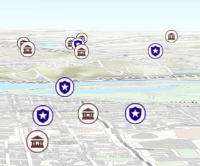
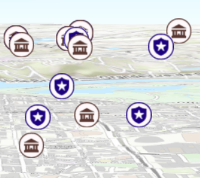
/**
* Apply perspective scaling to screen-size symbols in a [SceneView](https://developers.arcgis.com/javascript/latest/references/core/views/SceneView/).
* When `true`, screen sized objects such as [icons](https://developers.arcgis.com/javascript/latest/references/core/symbols/IconSymbol3DLayer/),
* [labels](https://developers.arcgis.com/javascript/latest/references/core/symbols/LabelSymbol3D/) or [callouts](https://developers.arcgis.com/javascript/latest/references/core/symbols/callouts/Callout3D/) integrate
* better in the 3D scene by applying a certain perspective projection to the
* sizing of features. This only applies when using a [SceneView](https://developers.arcgis.com/javascript/latest/references/core/views/SceneView/).
*
* `layer.screenSizePerspectiveEnabled = true`
*
* 
*
* `layer.screenSizePerspectiveEnabled = false`
*
* 
*
* > [!WARNING]
* >
* > **Known Limitations**
* >
* > Screen size perspective is currently not optimized for situations where the camera is very near the ground, or for scenes
* > with visual elements located far from the ground surface. In these cases it may be better to turn off screen size perspective.
* > As screen size perspective changes the size based on distance to the camera, it should be set to false when using [size visual variables](https://developers.arcgis.com/javascript/latest/references/core/renderers/visualVariables/SizeVariable/).
*
* @default true
* @since 4.4
*/
accessor screenSizePerspectiveEnabled: boolean;
/**
* The spatial reference of the layer. The default value is WGS84.
* This property can be set explicitly to project the longitude and latitude
* coordinates when the layer parses the CSV file. While not required, explicitly setting
* the spatial reference of the layer will improve the performance
* when projecting to a spatial reference other than the one used by the
* coordinates in the raw data.
*
* > [!WARNING]
* >
* > **Known Limitations**
* >
* > The browser must support [WebAssembly](https://caniuse.com/#feat=wasm)
* > if a spatial reference other than WGS84 or Web Mercator is specified.
*
* @since 4.7
* @see [SpatialReference.WGS84](https://developers.arcgis.com/javascript/latest/references/core/geometry/SpatialReference/#WGS84)
* @example
* const csvLayer = new CSVLayer({
* url: "example.csv",
* spatialReference: {
* wkid: 5936
* }
* });
*/
get spatialReference(): SpatialReference;
set spatialReference(value: SpatialReferenceProperties);
/**
* The title of the layer used to identify it in places such as the [Legend](https://developers.arcgis.com/javascript/latest/references/map-components/components/arcgis-legend/)
* and [LayerList](https://developers.arcgis.com/javascript/latest/references/core/widgets/LayerList/).
*
* When the layer is loaded from a portal item, the title of the portal item will be used.
* If a layer is loaded as part of a webmap or a webscene, then the title of the layer as stored in the webmap/webscene will be used.
*/
accessor title: string | null | undefined;
/** The layer type provides a convenient way to check the type of the layer without the need to import specific layer modules. */
get type(): "csv";
/**
* The URL of the CSV file.
*
* @example
* const csvLayer = new CSVLayer({
* url: "https://earthquake.usgs.gov/earthquakes/feed/v1.0/summary/2.5_week.csv",
* });
* @example
* // Pass data by a blob url to create a CSV layer.
* const csv = `name|year|latitude|Longitude
* aspen|2020|40.418|20.553
* birch|2018|-118.123|35.888`;
*
* const blob = new Blob([csv], {
* type: "plain/text"
* });
* let url = URL.createObjectURL(blob);
*
* const layer = new CSVLayer({
* url: url
* });
*/
accessor url: string | null | undefined;
/**
* Creates a popup template for the layer, populated with all the fields of the layer.
*
* @param options - Options for creating the popup template.
* @returns The popup template, or `null` if the layer does not
* have any fields.
*/
createPopupTemplate(options?: CreatePopupTemplateOptions): PopupTemplate | null | undefined;
/**
* Creates query parameter object that can be used to fetch features that
* satisfy the layer's configurations such as [definitionExpression](https://developers.arcgis.com/javascript/latest/references/core/layers/CSVLayer/#definitionExpression).
* It sets the query parameter's [Query.outFields](https://developers.arcgis.com/javascript/latest/references/core/rest/support/Query/#outFields) property to `["*"]`.
*
* @returns The query object representing the layer's definition expression
* and other configurations.
* @example
* // Get a query object for the layer's current configuration
* // queryParams.outFields will be set to ["*"] to get values
* // for all available fields.
* const queryParams = layer.createQuery();
* // set a geometry for filtering features by a region of interest
* queryParams.geometry = extentForRegionOfInterest;
* // Add to the layer's current definitionExpression
* queryParams.where = queryParams.where + " AND TYPE = 'Extreme'";
*
* // query the layer with the modified params object
* layer.queryFeatures(queryParams).then(function(results){
* // prints the array of result graphics to the console
* console.log(results.features);
* });
*/
createQuery(): Query;
/**
* Returns a [Field](https://developers.arcgis.com/javascript/latest/references/core/layers/support/Field/) based on a case-insensitive name search.
*
* @param fieldName - The name of the field.
* @returns The matching field or `undefined` if not found.
* @see [GeoJSONLayer.fields](https://developers.arcgis.com/javascript/latest/references/core/layers/GeoJSONLayer/#f