@arcgis/core
Version:
ArcGIS Maps SDK for JavaScript: A complete 2D and 3D mapping and data visualization API
405 lines (403 loc) • 31 kB
TypeScript
import type Collection from "../core/Collection.js";
import type Layer from "./Layer.js";
import type BuildingFilter from "./support/BuildingFilter.js";
import type BuildingSummaryStatistics from "./support/BuildingSummaryStatistics.js";
import type PortalItem from "../portal/PortalItem.js";
import type ElevationInfo from "../symbols/support/ElevationInfo.js";
import type { ReadonlyCollection, ReadonlyArrayOrCollection } from "../core/Collection.js";
import type { MultiOriginJSONSupportMixin } from "../core/MultiOriginJSONSupport.js";
import type { BuildingSublayerUnion } from "./buildingSublayers/types.js";
import type { APIKeyMixin, APIKeyMixinProperties } from "./mixins/APIKeyMixin.js";
import type { CustomParametersMixin, CustomParametersMixinProperties } from "./mixins/CustomParametersMixin.js";
import type { OperationalLayer, OperationalLayerProperties } from "./mixins/OperationalLayer.js";
import type { PortalLayer, PortalLayerProperties } from "./mixins/PortalLayer.js";
import type { ScaleRangeLayer, ScaleRangeLayerProperties } from "./mixins/ScaleRangeLayer.js";
import type { SceneService, SceneServiceProperties } from "./mixins/SceneService.js";
import type { SaveAsOptions } from "./scene/types.js";
import type { BuildingFilterProperties } from "./support/BuildingFilter.js";
import type { ElevationInfoProperties } from "../symbols/support/ElevationInfo.js";
import type { LayerProperties } from "./Layer.js";
export interface BuildingSceneLayerProperties extends LayerProperties, APIKeyMixinProperties, CustomParametersMixinProperties, ScaleRangeLayerProperties, PortalLayerProperties, OperationalLayerProperties, SceneServiceProperties, Partial<Pick<BuildingSceneLayer, "activeFilterId" | "legendEnabled" | "outFields">> {
/**
* Specifies how features are placed on the vertical axis (z).
* > [!WARNING]
* >
* > This property only affects [BuildingSceneLayer](https://developers.arcgis.com/javascript/latest/references/core/layers/BuildingSceneLayer/) when using the `absolute-height` mode.
* > [ElevationInfo.featureExpressionInfo](https://developers.arcgis.com/javascript/latest/references/core/symbols/support/ElevationInfo/#featureExpressionInfo) is not supported when the elevation info is specified for this class.
* > If the elevation info is not specified, the effective elevation depends on the context and could vary per point.
*/
elevationInfo?: ElevationInfoProperties<"absolute-height"> | null;
/**
* Collection of filters that can be used to show or hide specific features in the [SceneView](https://developers.arcgis.com/javascript/latest/references/core/views/SceneView/).
* Using filters is useful when only a subset of the data in the layer should be displayed.
* To activate a [BuildingFilter](https://developers.arcgis.com/javascript/latest/references/core/layers/support/BuildingFilter/) add it to this [Collection](https://developers.arcgis.com/javascript/latest/references/core/core/Collection/) and
* assign its [BuildingFilter.id](https://developers.arcgis.com/javascript/latest/references/core/layers/support/BuildingFilter/#id) to [activeFilterId](https://developers.arcgis.com/javascript/latest/references/core/layers/BuildingSceneLayer/#activeFilterId).
* Once activated, only the features that satisfy the conditions defined by the [BuildingFilter.filterBlocks](https://developers.arcgis.com/javascript/latest/references/core/layers/support/BuildingFilter/#filterBlocks)
* of the filter are displayed in the [SceneView](https://developers.arcgis.com/javascript/latest/references/core/views/SceneView/).
*
* @since 4.12
* @example
* // define a floor filter
* const buildingFilter = new BuildingFilter({
* filterBlocks: [{
* // an SQL expression that filters using the BldgLevel field
* filterExpression: "BldgLevel = 3"
* }]
* });
* // set the filter in the filters array on the layer
* buildingLayer.filters = [buildingFilter];
* // specify which filter is the one that should be applied
* buildingLayer.activeFilterId = buildingFilter.id;
*/
filters?: ReadonlyArrayOrCollection<BuildingFilterProperties>;
/**
* The title of the layer used to identify it in places such as the [Legend](https://developers.arcgis.com/javascript/latest/references/map-components/components/arcgis-legend/)
* and [LayerList](https://developers.arcgis.com/javascript/latest/references/core/widgets/LayerList/).
*
* When loading a layer by service url, the title is derived from the service name.
* If the service has several layers, then the title of each layer will be the concatenation of the service name
* and the layer name.
* When the layer is loaded from a portal item, the title of the portal item will be used instead.
* Finally, if a layer is loaded as part of a webmap or a webscene, then the title of the layer as stored in the webmap/webscene will be used.
*/
title?: string | null;
}
/**
* * [Overview](https://developers.arcgis.com/javascript/latest/references/core/layers/BuildingSceneLayer/#overview)
* * [Structure of a BuildingSceneLayer](https://developers.arcgis.com/javascript/latest/references/core/layers/BuildingSceneLayer/#structure-building-scene-layer)
* * [Publishing a BuildingSceneLayer](https://developers.arcgis.com/javascript/latest/references/core/layers/BuildingSceneLayer/#publishing-building-scene-layer)
* * [Visualization](https://developers.arcgis.com/javascript/latest/references/core/layers/BuildingSceneLayer/#visualization)
* * [Filtering](https://developers.arcgis.com/javascript/latest/references/core/layers/BuildingSceneLayer/#filtering)
* * [Popups](https://developers.arcgis.com/javascript/latest/references/core/layers/BuildingSceneLayer/#popups)
* * [Querying](https://developers.arcgis.com/javascript/latest/references/core/layers/BuildingSceneLayer/#querying)
* * [Get extent of features in a BuildingSceneLayer](https://developers.arcgis.com/javascript/latest/references/core/layers/BuildingSceneLayer/#get-extent)
*
* <span id="overview"></span>
* ## Overview
*
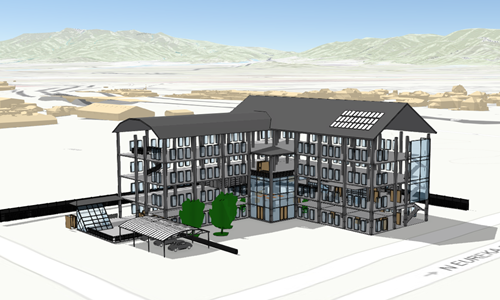
* The BuildingSceneLayer is designed for visualizing buildings with detailed interiors
* in a [SceneView](https://developers.arcgis.com/javascript/latest/references/core/views/SceneView/). These building models are usually exported
* from Building Information Modeling (BIM) projects. The data in a BuildingSceneLayer can represent
* walls, lighting fixtures, mechanical systems, furniture and so on.
*
* [](https://developers.arcgis.com/javascript/latest/sample-code/building-scene-layer-slice/)
*
* <span id="structure-building-scene-layer"></span>
* ## Structure of a BuildingSceneLayer
*
* BuildingSceneLayers visualize complex digital models of buildings and allow you to interact
* with all the components of the building. Because of the high complexity, the data in a BuildingSceneLayer
* is organized in [BuildingGroupSublayers](https://developers.arcgis.com/javascript/latest/references/core/layers/buildingSublayers/BuildingGroupSublayer/)
* which contain [BuildingComponentSublayers](https://developers.arcgis.com/javascript/latest/references/core/layers/buildingSublayers/BuildingComponentSublayer/).
*
* <details>
* <summary>Read More</summary>
*
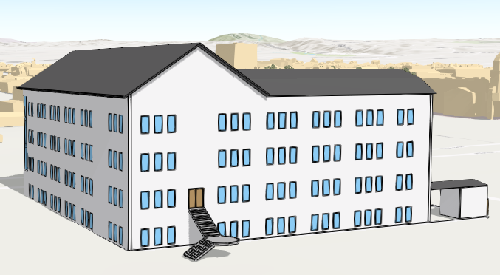
* Often, the BuildingSceneLayer contains an overview [BuildingComponentSublayer](https://developers.arcgis.com/javascript/latest/references/core/layers/buildingSublayers/BuildingComponentSublayer/)
* that can be loaded to display the exterior shell of a building.
*
* This helps to get a faster preview of the whole building without loading all interior features:
*
* 
*
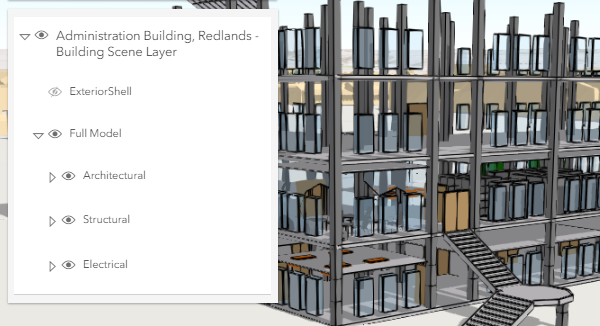
* The BuildingSceneLayer also contains a Full Model [BuildingGroupSublayer](https://developers.arcgis.com/javascript/latest/references/core/layers/buildingSublayers/BuildingGroupSublayer/)
* with all the features in a building grouped by disciplines: Architectural, Structural, Electrical and Mechanical.
* Each of the disciplines is a [BuildingGroupSublayer](https://developers.arcgis.com/javascript/latest/references/core/layers/buildingSublayers/BuildingGroupSublayer/) that contains
* [BuildingComponentSublayers](https://developers.arcgis.com/javascript/latest/references/core/layers/buildingSublayers/BuildingComponentSublayer/)
* with features such as rooftops, walls, doors, AC units, lighting fixtures, columns or foundations.
*
* You can see this layer structure in the [LayerList](https://developers.arcgis.com/javascript/latest/references/core/widgets/LayerList/) of the
* [BuildingSceneLayer with Slice widget](https://developers.arcgis.com/javascript/latest/sample-code/building-scene-layer-slice/) sample:
*
* 
*
* </details>
*
* <span id="publishing-building-scene-layer"></span>
* ## Publishing a BuildingSceneLayer
*
* Building data coming from a [Revit](https://pro.arcgis.com/en/pro-app/latest/help/data/revit/what-is-bim-data-.htm) file
* can be imported and published as a
* [Scene Service](https://enterprise.arcgis.com/en/server/latest/publish-services/windows/scene-services.htm)
* using ArcGIS Pro version 2.3.
*
* The Scene Service is identified by the [url](https://developers.arcgis.com/javascript/latest/references/core/layers/BuildingSceneLayer/#url) or [portalItem](https://developers.arcgis.com/javascript/latest/references/core/layers/BuildingSceneLayer/#portalItem) of the ArcGIS Server REST resource:
*
* ```js
* const buildingLayer = new BuildingSceneLayer({
* url: "https://tiles.arcgis.com/tiles/V6ZHFr6zdgNZuVG0/arcgis/rest/services/Esri_Admin_Building/SceneServer",
* title: "Administration Building, Redlands - Building Scene Layer"
* });
* ```
*
* <span id="visualization"></span>
* ## Visualization
*
* Being able to visualize detailed building information in its spatial context and landscape is a useful capability.
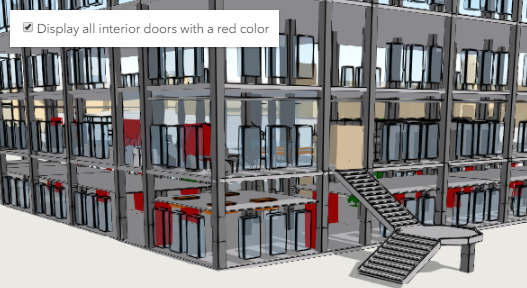
* To extract even more information from the visualization, attribute driven renderers and visual variables
* can be assigned to [BuildingComponentSublayer.renderer](https://developers.arcgis.com/javascript/latest/references/core/layers/buildingSublayers/BuildingComponentSublayer/#renderer).
* For example the Doors sublayer can use a [UniqueValueRenderer](https://developers.arcgis.com/javascript/latest/references/core/renderers/UniqueValueRenderer/) to render all the interior doors that need
* replacement with a red color:
*
* [](https://developers.arcgis.com/javascript/latest/sample-code/building-scene-layer-slice/)
*
* <span id="filtering"></span>
* ## Filtering data
*
* Often, the features in a BuildingSceneLayer might occlude one another. Attribute based filtering can be used to display only
* the features that satisfy a certain SQL expression. To filter features based on their attributes use the [filters](https://developers.arcgis.com/javascript/latest/references/core/layers/BuildingSceneLayer/#filters)
* collection. The [Filter BuildingScenelayer](https://developers.arcgis.com/javascript/latest/sample-code/building-scene-layer-filter/) sample shows how to filter floors
* in a BuildingSceneLayer.
*
* BuildingSceneLayers can also be filtered by applying client-side filters. Use the
* [BuildingComponentSublayerView.filter](https://developers.arcgis.com/javascript/latest/references/core/views/layers/BuildingComponentSublayerView/#filter) property on
* a [BuildingComponentSublayerView](https://developers.arcgis.com/javascript/latest/references/core/views/layers/BuildingComponentSublayerView/) to apply spatial or attribute based filters.
*
* <span id="popups"></span>
* ## Popups
*
* Sublayers in a BuildingSceneLayer can have customized popup content using the
* [BuildingComponentSublayer.popupTemplate](https://developers.arcgis.com/javascript/latest/references/core/layers/buildingSublayers/BuildingComponentSublayer/#popupTemplate) property. Arcade expressions in a
* [BuildingComponentSublayer.popupTemplate](https://developers.arcgis.com/javascript/latest/references/core/layers/buildingSublayers/BuildingComponentSublayer/#popupTemplate) are also supported.
*
* <span id="querying"></span>
* ## Querying
*
* The [component sublayers](https://developers.arcgis.com/javascript/latest/references/core/layers/buildingSublayers/BuildingComponentSublayer/) of a [BuildingSceneLayer](https://developers.arcgis.com/javascript/latest/references/core/layers/BuildingSceneLayer/)
* and their [sublayer views](https://developers.arcgis.com/javascript/latest/references/core/views/layers/BuildingComponentSublayerView/) can be queried, but they return different results.
* Queries on a [BuildingComponentSublayer](https://developers.arcgis.com/javascript/latest/references/core/layers/buildingSublayers/BuildingComponentSublayer/) return results from all the features in the sublayer,
* while queries on the [BuildingComponentSublayerView](https://developers.arcgis.com/javascript/latest/references/core/views/layers/BuildingComponentSublayerView/) return results for features that are currently loaded in the view.
*
* <details>
* <summary>Read More</summary>
*
* Querying a [BuildingComponentSublayer](https://developers.arcgis.com/javascript/latest/references/core/layers/buildingSublayers/BuildingComponentSublayer/) retrieves results from the attributes in the associated feature layer.
* If the layer doesn't have an associated feature layer, then the query will be rejected with an error. Queries on the component sublayer are powerful because they
* are made on all the features in the component sublayer.
*
* For making attribute based queries on a [BuildingComponentSublayerView](https://developers.arcgis.com/javascript/latest/references/core/views/layers/BuildingComponentSublayerView/) the required fields need to be specified
* in the [outFields](https://developers.arcgis.com/javascript/latest/references/core/layers/BuildingSceneLayer/#outFields) property of the BuildingSceneLayer to ensure that attribute values are
* available on the client for querying. You can use [BuildingComponentSublayerView.availableFields](https://developers.arcgis.com/javascript/latest/references/core/views/layers/BuildingComponentSublayerView/#availableFields)
* to inspect which fields are available on the client.
* On a [BuildingComponentSublayerView](https://developers.arcgis.com/javascript/latest/references/core/views/layers/BuildingComponentSublayerView/) spatial queries are possible by setting the
* [Query.geometry](https://developers.arcgis.com/javascript/latest/references/core/rest/support/Query/#geometry) and the [Query.spatialRelationship](https://developers.arcgis.com/javascript/latest/references/core/rest/support/Query/#spatialRelationship)
* of the query. Note that for this type of layer the spatial relationships are evaluated based on the
* [Extent](https://developers.arcgis.com/javascript/latest/references/core/geometry/Extent/) and not the footprint of the feature. Spatial queries are supported only when the
* [Query.spatialRelationship](https://developers.arcgis.com/javascript/latest/references/core/rest/support/Query/#spatialRelationship) is set to `intersects`, `contains`, or `disjoint`.
*
* | Query method | [BuildingComponentSublayer](https://developers.arcgis.com/javascript/latest/references/core/layers/buildingSublayers/BuildingComponentSublayer/) (only works if the BuildingSceneLayer has an associated feature layer) | [BuildingComponentSublayerView](https://developers.arcgis.com/javascript/latest/references/core/views/layers/BuildingComponentSublayerView/) (works on all BuildingSceneLayers) |
* |---|---|---|
* | queryExtent | returns the **2D** extent of **all** features in the sublayer that satisfy the query | returns the **3D** extent of **currently loaded** features in the sublayer that satisfy the query |
* | queryFeatureCount | returns the number of **all** features in the sublayer that satisfy the query | returns the number of **currently loaded** features in the sublayer that satisfy the query |
* | queryFeatures | returns **all** the features in the sublayer that satisfy the query | returns the **currently loaded** features in the sublayer that satisfy the query |
* | queryObjectIds | returns objectIds of **all** the features in the sublayer that satisfy the query | returns the objectIds of **currently loaded** features in the sublayer that satisfy the query |
*
* > [!WARNING]
* >
* > **Known Limitations**
* >
* > Spatial queries have the same limitations as those listed in the [projectOperator](https://developers.arcgis.com/javascript/latest/references/core/geometry/operators/projectOperator/) documentation.
* > Spatial queries use the [Extent](https://developers.arcgis.com/javascript/latest/references/core/geometry/Extent/) of the feature and
* > not the footprint when calculating the spatial relationship with the [query geometry](https://developers.arcgis.com/javascript/latest/references/core/rest/support/Query/#geometry).
* > This means that a feature might be returned from the query, even though its footprint is not in a spatial relationship with the geometry.
* > Currently only `intersects`, `contains`, and `disjoint` [spatialRelationships](https://developers.arcgis.com/javascript/latest/references/core/rest/support/Query/#spatialRelationship) are supported on spatial
* > [queries](https://developers.arcgis.com/javascript/latest/references/core/rest/support/Query/).
* > Spatial queries are currently not supported if the BuildingSceneLayer has any of the following [SpatialReferences](https://developers.arcgis.com/javascript/latest/references/core/geometry/SpatialReference/):
* > - GDM 2000 (4742) - Malaysia
* > - Gsterberg (Ferro) (8042) - Austria/Czech Republic
* > - ISN2016 (8086) - Iceland
* > - SVY21 (4757) - Singapore
*
* </details>
*
* <span id="get-extent"></span>
* ## Get extent of features in a BuildingSceneLayer
*
* BuildingSceneLayers do not return the raw geometry as this is a binary format. To obtain spatial information you can query the 2D extent or 3D extent of features in a
* [component sublayer](https://developers.arcgis.com/javascript/latest/references/core/layers/buildingSublayers/BuildingComponentSublayer/).
* The 2D extent can be retrieved for all features (even the ones that are not loaded yet) with the
* [BuildingComponentSublayer.queryExtent()](https://developers.arcgis.com/javascript/latest/references/core/layers/buildingSublayers/BuildingComponentSublayer/#queryExtent) method on the [BuildingComponentSublayer](https://developers.arcgis.com/javascript/latest/references/core/layers/buildingSublayers/BuildingComponentSublayer/).
* This method only succeeds if the BuildingSceneLayer has an associated feature layer.
* The 3D extent can only be queried for the features that are already loaded, by using the [BuildingComponentSublayerView.queryExtent()](https://developers.arcgis.com/javascript/latest/references/core/views/layers/BuildingComponentSublayerView/#queryExtent) method on the
* [BuildingComponentSublayerView](https://developers.arcgis.com/javascript/latest/references/core/views/layers/BuildingComponentSublayerView/).
*
* @since 4.10
* @see [Sample - BuildingSceneLayer with Slice widget](https://developers.arcgis.com/javascript/latest/sample-code/building-scene-layer-slice/)
* @see [Sample - Filter BuildingScenelayer](https://developers.arcgis.com/javascript/latest/sample-code/building-scene-layer-filter/)
* @see [BuildingComponentSublayer](https://developers.arcgis.com/javascript/latest/references/core/layers/buildingSublayers/BuildingComponentSublayer/)
* @see [BuildingGroupSublayer](https://developers.arcgis.com/javascript/latest/references/core/layers/buildingSublayers/BuildingGroupSublayer/)
* @see [SceneLayer](https://developers.arcgis.com/javascript/latest/references/core/layers/SceneLayer/)
* @see [SceneView](https://developers.arcgis.com/javascript/latest/references/core/views/SceneView/)
* @see [Map](https://developers.arcgis.com/javascript/latest/references/core/Map/)
*/
export default class BuildingSceneLayer extends BuildingSceneLayerSuperclass {
/**
* @example
* // Typical usage
* layer = new BuildingSceneLayer({
* url: // url to the service
* });
*/
constructor(properties?: BuildingSceneLayerProperties);
/**
* The id of the currently active filter.
* To activate one of the [filters](https://developers.arcgis.com/javascript/latest/references/core/layers/BuildingSceneLayer/#filters) assign its [BuildingFilter.id](https://developers.arcgis.com/javascript/latest/references/core/layers/support/BuildingFilter/#id) to this property.
*
* @since 4.12
*/
accessor activeFilterId: string | null | undefined;
/**
* A flat [Collection](https://developers.arcgis.com/javascript/latest/references/core/core/Collection/) of all the [sublayers](https://developers.arcgis.com/javascript/latest/references/core/layers/BuildingSceneLayer/#sublayers)
* in the BuildingSublayer.
*
* @example
* // finds the sublayer containing the doors
* // use modelName to identify each layer as this is a standard name
* const doorslayer = buildingSceneLayer.allSublayers.find(function(sublayer) {
* return sublayer.modelName === "Doors";
* });
*/
get allSublayers(): ReadonlyCollection<BuildingSublayerUnion>;
/**
* Specifies how features are placed on the vertical axis (z).
* > [!WARNING]
* >
* > This property only affects [BuildingSceneLayer](https://developers.arcgis.com/javascript/latest/references/core/layers/BuildingSceneLayer/) when using the `absolute-height` mode.
* > [ElevationInfo.featureExpressionInfo](https://developers.arcgis.com/javascript/latest/references/core/symbols/support/ElevationInfo/#featureExpressionInfo) is not supported when the elevation info is specified for this class.
* > If the elevation info is not specified, the effective elevation depends on the context and could vary per point.
*/
get elevationInfo(): ElevationInfo<"absolute-height"> | null | undefined;
set elevationInfo(value: ElevationInfoProperties<"absolute-height"> | null | undefined);
/**
* Collection of filters that can be used to show or hide specific features in the [SceneView](https://developers.arcgis.com/javascript/latest/references/core/views/SceneView/).
* Using filters is useful when only a subset of the data in the layer should be displayed.
* To activate a [BuildingFilter](https://developers.arcgis.com/javascript/latest/references/core/layers/support/BuildingFilter/) add it to this [Collection](https://developers.arcgis.com/javascript/latest/references/core/core/Collection/) and
* assign its [BuildingFilter.id](https://developers.arcgis.com/javascript/latest/references/core/layers/support/BuildingFilter/#id) to [activeFilterId](https://developers.arcgis.com/javascript/latest/references/core/layers/BuildingSceneLayer/#activeFilterId).
* Once activated, only the features that satisfy the conditions defined by the [BuildingFilter.filterBlocks](https://developers.arcgis.com/javascript/latest/references/core/layers/support/BuildingFilter/#filterBlocks)
* of the filter are displayed in the [SceneView](https://developers.arcgis.com/javascript/latest/references/core/views/SceneView/).
*
* @since 4.12
* @example
* // define a floor filter
* const buildingFilter = new BuildingFilter({
* filterBlocks: [{
* // an SQL expression that filters using the BldgLevel field
* filterExpression: "BldgLevel = 3"
* }]
* });
* // set the filter in the filters array on the layer
* buildingLayer.filters = [buildingFilter];
* // specify which filter is the one that should be applied
* buildingLayer.activeFilterId = buildingFilter.id;
*/
get filters(): Collection<BuildingFilter>;
set filters(value: ReadonlyArrayOrCollection<BuildingFilterProperties>);
/**
* Indicates whether the layer will be included in the legend.
*
* @default true
*/
accessor legendEnabled: boolean;
/**
* An array of field names from the service to include with each feature in all sublayers.
* To fetch the values from all fields in all sublayers, use `["*"]`. BuildingSceneLayers usually
* have a large number of fields, so fetching all the values might lead to slower load times.
* Fields specified in `outFields` will be requested alongside with required fields for
* [rendering](https://developers.arcgis.com/javascript/latest/references/core/layers/buildingSublayers/BuildingComponentSublayer/#renderer)
* and [filtering](https://developers.arcgis.com/javascript/latest/references/core/layers/BuildingSceneLayer/#filters) on all sublayers.
*
* To include fields only in a specific sublayer, use the
* [BuildingComponentSublayer.outFields](https://developers.arcgis.com/javascript/latest/references/core/layers/buildingSublayers/BuildingComponentSublayer/#outFields)
* property of the sublayer.
*
* @since 4.15
* @see [BuildingComponentSublayer.outFields](https://developers.arcgis.com/javascript/latest/references/core/layers/buildingSublayers/BuildingComponentSublayer/#outFields)
* @example
* // Get the specified fields from the service in all sublayers
* sl.outFields = ["CreatedPhase", "DemolishedPhase", "BldgLevel"];
*/
accessor outFields: string[] | null | undefined;
/**
* Hierarchical structure of sublayers in a BuildingSceneLayer.
* Usually contains an Overview [BuildingComponentSublayer](https://developers.arcgis.com/javascript/latest/references/core/layers/buildingSublayers/BuildingComponentSublayer/)
* and a Full Model [BuildingGroupSublayer](https://developers.arcgis.com/javascript/latest/references/core/layers/buildingSublayers/BuildingGroupSublayer/).
* However, some BuildingSceneLayers can contain only the Full Model [BuildingGroupSublayer](https://developers.arcgis.com/javascript/latest/references/core/layers/buildingSublayers/BuildingGroupSublayer/)
* or the discipline [BuildingGroupSublayers](https://developers.arcgis.com/javascript/latest/references/core/layers/buildingSublayers/BuildingGroupSublayer/) directly.
*/
get sublayers(): Collection<BuildingSublayerUnion>;
/**
* Summary statistics for all component layers in the building scene layer.
* This object has to be loaded before accessing its properties.
*
* @since 4.15
* @example
* // load the layer
* buildingLayer.load().then(function() {
* // load the statistics on the summaryStatistics property
* // to be able to access them
* buildingLayer.summaryStatistics.load().then(function() {
* console.log(buildingLayer.summaryStatistics);
* });
* });
*/
get summaryStatistics(): BuildingSummaryStatistics | null | undefined;
/**
* The title of the layer used to identify it in places such as the [Legend](https://developers.arcgis.com/javascript/latest/references/map-components/components/arcgis-legend/)
* and [LayerList](https://developers.arcgis.com/javascript/latest/references/core/widgets/LayerList/).
*
* When loading a layer by service url, the title is derived from the service name.
* If the service has several layers, then the title of each layer will be the concatenation of the service name
* and the layer name.
* When the layer is loaded from a portal item, the title of the portal item will be used instead.
* Finally, if a layer is loaded as part of a webmap or a webscene, then the title of the layer as stored in the webmap/webscene will be used.
*/
accessor title: string | null | undefined;
/** The layer type provides a convenient way to check the type of the layer without the need to import specific layer modules. */
get type(): "building-scene";
/**
* Loads the layer and all of its sublayers.
*
* @returns Resolves when all sublayers have been loaded.
* Rejects if at least one of the sublayers failed to load.
* @since 4.11
* @see [load()](https://developers.arcgis.com/javascript/latest/references/core/layers/BuildingSceneLayer/#load)
* @example
* // Print the names of all components in the building scene layer after ensuring that they have been loaded
* buildingSceneLayer.loadAll()
* .then(function() {
* const allComponentNames = buildingSceneLayer.allSublayers
* .filter(function(sublayer) { return sublayer.type === "building-component"; })
* .map(function(sublayer) { return sublayer.title; })
* console.log(allComponentNames.join("\n"));
* });
* .catch(function(error) {
* console.log("Error: one or more sublayer failed to load");
* });
*/
loadAll(): Promise<this>;
/**
* Saves the layer to its existing portal item in the [Portal](https://developers.arcgis.com/javascript/latest/references/core/portal/Portal/)
* authenticated within the user's current session. If the layer is not saved to a
* [PortalItem](https://developers.arcgis.com/javascript/latest/references/core/portal/PortalItem/), then you should use [saveAs()](https://developers.arcgis.com/javascript/latest/references/core/layers/BuildingSceneLayer/#saveAs).
*
* @returns When resolved, returns the portal item to which the layer is saved.
* @since 4.31
* @see [saveAs()](https://developers.arcgis.com/javascript/latest/references/core/layers/BuildingSceneLayer/#saveAs)
* @example const portalItem = await layer.save();
*/
save(): Promise<PortalItem>;
/**
* Saves the layer to a new portal item in the [Portal](https://developers.arcgis.com/javascript/latest/references/core/portal/Portal/) authenticated within the user's current session.
*
* @param portalItem - The portal item to which the layer will be saved.
* @param options - additional save options
* @returns When resolved, returns the portal item to which the layer is saved.
* @since 4.31
* @see [save()](https://developers.arcgis.com/javascript/latest/references/core/layers/BuildingSceneLayer/#save)
* @example
* const portalItem = new PortalItem();
* await layer.saveAs(portalItem);
*/
saveAs(portalItem: PortalItem, options?: SaveAsOptions): Promise<PortalItem>;
}
declare const BuildingSceneLayerSuperclass: typeof Layer & typeof APIKeyMixin & typeof CustomParametersMixin & typeof MultiOriginJSONSupportMixin & typeof ScaleRangeLayer & typeof PortalLayer & typeof OperationalLayer & typeof SceneService