@arcgis/core
Version:
ArcGIS Maps SDK for JavaScript: A complete 2D and 3D mapping and data visualization API
119 lines (115 loc) • 6.61 kB
TypeScript
/**
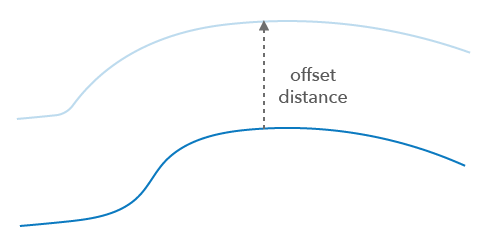
* Offset 2D geometries. The offset operation creates a geometry that is a constant distance from an input polyline or polygon.
* It is similar to buffering, but produces a one-sided result.
* Point and multipoint geometries are not supported.
*
* The offset distance can be positive or negative, and it will have the following effects based on the input geometry types. This is also dependent on the input polygon being [Esri simple](https://developers.arcgis.com/javascript/latest/references/core/geometry/operators/simplifyOGCOperator/#isSimple).
*
* | Geometry type | positive offset | negative offset |
* |---|---|---|
* | Polyline | To the right | To the left |
* | Extent | Expands | Contracts |
* | Polygon exterior ring (Esri simple) | Expands exterior | Contracts exterior |
* | Polygon interior ring (Esri simple) | Contracts interior | Expands interior |
*
* If the input polygon is not simple, then the offset geometry will be produced to the right or left as though the ring were a polyline and dependent on the ring's orientation.
* For a simple polygon, the orientation of outer rings is clockwise and for inner rings it is counter clockwise. So the right side of a simple polygon is always its inside.
*
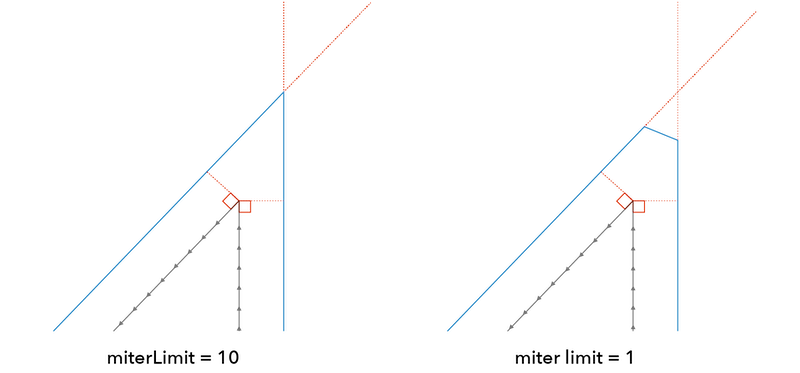
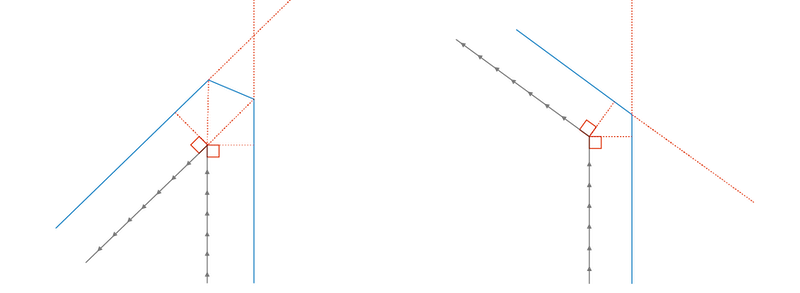
* The miter limit is multiplied by the offset distance and the result determines how far a mitered offset intersection can be from the input curve before it is beveled.
*
* 
*
* ### Join types
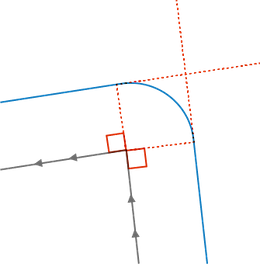
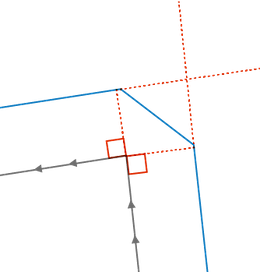
* The join type controls how corners in the offset geometry are represented.
* Inner corners are always mitered. The following join types are supported:
*
* * Round - a circular arc that is tangent to the ends of both offset line segments.
*
* 
*
* * Miter - the offset line segments are extended to their intersection point forming a sharp angle, unless that extension exceeds the `miterLimit`, in which case the result is a bevel.
*
* 
*
* * Bevel - the offset line segments are not extended; their endpoints are joined by a straight line.
*
* 
*
* * Square - same as `miter` for minor arcs greater than 90 degrees. For all other minor arcs, the offset line segments are extended by an extra `distance` before their endpoints are joined.
*
* 
*
* @since 4.31
* @see 
*/
import type { LengthUnit } from "../../core/units.js";
import type { GeometryUnion, GeometryWithoutMeshUnion } from "../types.js";
export interface Options {
/**
* The maximum distance of the resulting segments compared to the true circular arc (used only when joins is round).
* The algorithm never produces more than around 180 vertices for each round join.
*
* @default 0
*/
flattenError?: number;
/**
* Defines the join type of the offset geometry. Inner corners are always mitered.
* * Round - a circular arc that is tangent to the ends of both offset line segments.
* * Miter - the offset line segments are extended to their intersection point forming a sharp angle, unless that extension exceeds the `miterLimit`, in which case the result is a bevel.
* * Bevel - the offset line segments are not extended; their endpoints are joined by a straight line.
* * Square - same as `miter` for minor arcs greater than 90 degrees. For all other minor arcs, the offset line segments are extended by an extra `distance` before their endpoints are joined.
*
* @default "round"
*/
joins?: "round" | "miter" | "bevel" | "square";
/**
* Applicable only to mitered joins.
* Controls the appearance of angled lines to avoid excessively long and pointy corners.
* The miterLimit is multiplied by the offset distance
* and the result is the maximum mitered offset: joins which would result in a larger mitered offset will be beveled instead.
*
* @default 10
*/
miterLimit?: number;
/**
* The length unit of the offset distance.
* The default is the input geometries spatial reference unit.
* An error will be thrown if this is set for Geographic Coordinate Systems.
*/
unit?: LengthUnit;
}
/**
* Creates an offset version of the input geometry.
* This is not applicable to point geometries.
*
* @param geometry - The input geometry.
* Can be an extent, polyline, or polygon.
* Point and multipoint geometries are not supported.
* @param distance - The distance to offset the input geometry.
* Unless the `unit` option is set, the default is the geometry's spatial reference unit.
* @param options - Additional options.
* @returns Returns the offset geometry or null.
* Very acute angles can return null when an offset geometry segment cannot be created with the given parameters.
* @example
* // Create an offset polygon.
* const offsetPolygon = offsetOperator.execute(polygon, 100);
*/
export function execute(geometry: GeometryUnion, distance: number, options?: Options): GeometryWithoutMeshUnion | null | undefined;
/**
* Creates offset versions of the input geometries.
*
* @param geometries - The set of input geometries.
* Can be extents, polylines, or polygons.
* Point and multipoint geometries are not supported.
* All the geometries must have the same spatial reference.
* @param distance - The distance to offset the input geometries.
* Unless the `unit` option is set, the default is the geometries spatial reference unit.
* @param options - Additional options.
* @returns Returns the offset geometry results or null. Very acute angles can return null when an offset geometry segment cannot be created with the given parameters.
*/
export function executeMany(geometries: GeometryUnion[], distance: number, options?: Options): (GeometryWithoutMeshUnion | null | undefined)[];
/**
* Indicates if the operator supports input geometries that contain curves.
* The value will always be `true`. This will produce densified output geometries.
*/
export const supportsCurves: boolean;