@arcgis/core
Version:
ArcGIS Maps SDK for JavaScript: A complete 2D and 3D mapping and data visualization API
38 lines (36 loc) • 1.85 kB
TypeScript
/**
* Cut 2D geometries with a polyline.
*
* For polylines, all left cuts will be grouped together in the first
* geometry, right cuts and coincident cuts are grouped in the second geometry, and each undefined
* cut, along with any uncut parts, are output as separate polylines.
*
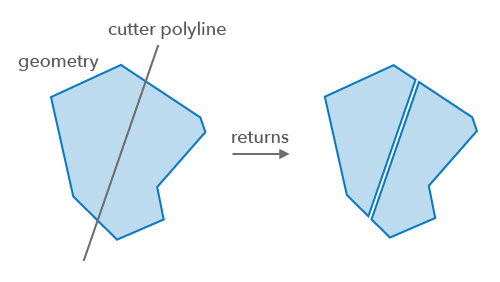
* For polygons, all left cuts are grouped in the first polygon, all right cuts are in the second
* polygon, and each undefined cut, along with any left-over parts after cutting, are output as a
* separate polygon. If there were no cuts then no geometry will be returned.
* If the left or right cut does not exist, the returned geometry will be empty for this type of cut.
* An undefined cut will only be produced if a left cut or right cut was produced, and there was a
* part left over after cutting or a cut is bounded to the left and right of the polyline that is used to cut.
*
* 
*
* @since 4.31
*/
import type Polyline from "../Polyline.js";
import type { GeometryUnion, GeometryWithoutMeshUnion } from "../types.js";
/**
* Performs the cut operation on a geometry.
*
* @param geometry - The input geometry to be cut.
* @param polyline - The polyline that will be used to divide the input `geometry` into pieces where they cross the `polyline`.
* @returns Returns an array of geometries created by cutting the input geometry with the `polyline`.
* @example
* // Cut a polygon with a polyline
* const cutGeometries = cutOperator.execute(polygon, polyline);
*/
export function execute(geometry: GeometryUnion, polyline: Polyline): GeometryWithoutMeshUnion[];
/**
* Indicates if the operator supports input geometries that contain curves.
* The value will always be `true`.
*/
export const supportsCurves: boolean;