@arcgis/core
Version:
ArcGIS Maps SDK for JavaScript: A complete 2D and 3D mapping and data visualization API
81 lines (76 loc) • 3.76 kB
TypeScript
/**
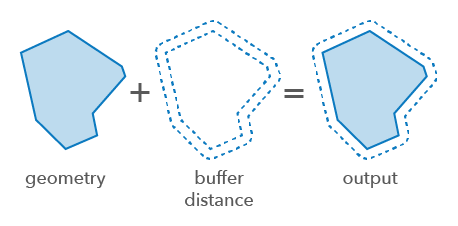
* Creates planar buffers around 2D geometries. A planar buffer calculates the area around a geometry using the straight line distance between points based on a flat, two-dimensional surface.
* This is suitable for rendering smaller areas within a projected coordinate system where the curvature of the Earth can be ignored, such as when all features are contained in one UTM zone.
* Planar buffers can introduce distortions and inaccuracies when applied over larger areas.
*
* 
*
* @since 4.31
* @see [How Buffer (Analysis) works](https://pro.arcgis.com/en/pro-app/latest/tool-reference/analysis/how-buffer-analysis-works.htm)
* @see [Sample - Geometry operator - using a worker for analysis](https://developers.arcgis.com/javascript/latest/sample-code/geometry-operator-worker/)
*/
import type Polygon from "../Polygon.js";
import type { LengthUnit } from "../../core/units.js";
import type { GeometryUnion } from "../types.js";
export interface ExecuteOptions {
/**
* The length unit of the buffer distances and max deviation.
* The default is the input geometry's spatial reference unit.
* An error will be thrown if this is set for Geographic Coordinate Systems.
*/
unit?: LengthUnit;
}
export interface ExecuteManyOptions extends ExecuteOptions {
/**
* The max deviation of the result buffer from the true buffer.
* When the value is NaN, internal logic is used to select deviation based on the buffer distance.
* Unless the `unit` option is set, the default is the geometries spatial reference unit.
*
* @default NaN
*/
maxDeviation?: number;
/**
* The maximum number of vertices in the polygon produced from a buffered point.
*
* @default 96
*/
maxVerticesInFullCircle?: number;
/**
* Indicates if the buffer geometries should be unioned. When set to `true`, the output will be a single geometry.
*
* @default false
*/
union?: boolean;
}
/**
* Creates a buffer around the input geometry.
*
* @param geometry - The input geometry to be buffered.
* @param distance - The buffer distance for the geometry. Unless the `unit` option is set, the default is the geometry's spatial reference unit.
* @param options - Additional options.
* @returns Returns the buffered geometry or null.
* @example
* // Buffer a polyline geometry
* const bufferGeometry = bufferOperator.execute(polyline, 1000);
*/
export function execute(geometry: GeometryUnion, distance: number, options?: ExecuteOptions): Polygon | null | undefined;
/**
* Creates a buffer around the input geometries.
*
* Both `maxDeviation` and `maxVerticesInFullCircle` control the quality of round joins that are in the buffers.
* The precision of each buffer is `maxDeviation` unless the number of required vertices is too large.
*
* @param geometries - The input geometries to be buffered.
* All the geometries must have the same spatial reference.
* @param distances - The buffer distances for the geometries.
* If the size of this array is less than the number of geometries in the input `geometries`, the last distance value is used for the rest of geometries.
* Unless the `unit` option is set, the default is the geometries spatial reference unit.
* @param options - Additional options.
* @returns Returns the buffered geometries.
*/
export function executeMany(geometries: GeometryUnion[], distances: number[], options?: ExecuteManyOptions): Polygon[];
/**
* Indicates if the operator supports input geometries that contain curves.
* The value will always be `true`. This will produce densified output geometries.
*/
export const supportsCurves: boolean;