@arcgis/core
Version:
ArcGIS Maps SDK for JavaScript: A complete 2D and 3D mapping and data visualization API
64 lines (59 loc) • 3.26 kB
TypeScript
/**
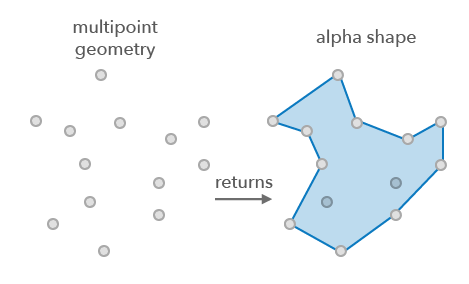
* Calculates the alpha shape of 2D points (concave hull).
* Alpha shapes are used to generalize bounding polygons containing sets of points or multipoints. Using this operator on other geometry types will produce results, however it is probably not what you are expecting.
*
* 
*
* @since 4.31
* @see [Alpha shape - wikipedia](https://en.wikipedia.org/wiki/Alpha_shape)
*/
import type Polygon from "../Polygon.js";
import type { GeometryUnion } from "../types.js";
/** Object returned by the [executeMany()](https://developers.arcgis.com/javascript/latest/references/core/geometry/operators/alphaShapeOperator/#executeMany) method. */
export interface ExecuteResult {
/** The alpha shape polygon. */
alphaShape: Polygon;
/** The calculated alpha value used to generate the alpha shape. */
calculatedAlpha: number;
}
export interface Options {
/**
* Indicates if the alpha shape polygons should be merged.
* Set to `true` to merge the polygons into a single polygon.
*/
merge?: boolean;
}
/**
* Calculates the alpha shape on the input geometry.
*
* @param geometry - The input geometry.
* Only geometry vertices are used to compute the alpha shape.
* @param alpha - Controls the level of detail and concavity of the boundary.
* The value represents the square of the alpha radius for the alpha shape. Values of 0.0 or small positive numbers will yield an empty alpha shape.
* A negative number or NaN will lead to the alpha shape being computed with the minimal alpha value necessary to produce a connected result.
* @returns Returns an object containing a polygon of the alpha shape and the calculated alpha value.
* The result polygon is not guaranteed to be simple in the sense that it may contain very short segments.
* @example
* // Calculate the alpha shape of a multipoint geometry
* const result = alphaShapeOperator.execute(geometry, 100);
*/
export function execute(geometry: GeometryUnion, alpha: number): ExecuteResult;
/**
* Calculates the alpha shape on a set of geometries with the option to aggregate the result.
*
* @param geometries - The input geometries.
* Only geometry vertices are used to compute the alpha shape.
* All the geometries must have the same spatial reference.
* @param alpha - Controls the level of detail and concavity of the boundary.
* The value represents the square of the alpha radius for the alpha shape. Values of 0.0 or small positive numbers will yield an empty alpha shape.
* A negative number or NaN will lead to the alpha shape being computed with the minimal alpha value necessary to produce a connected result.
* @param options - Additional options.
* @returns Returns the polygons of the alpha shapes or null.
* The result polygons are not guaranteed to be simple in the sense that they may contain very short segments.
*/
export function executeMany(geometries: GeometryUnion[], alpha: number, options?: Options): (Polygon | null | undefined)[];
/**
* Indicates if the operator supports input geometries that contain curves.
* The value will always be `false`.
*/
export const supportsCurves: boolean;