@arcgis/core
Version:
ArcGIS Maps SDK for JavaScript: A complete 2D and 3D mapping and data visualization API
41 lines (39 loc) • 2.59 kB
TypeScript
import type Input from "./Input.js";
import type CodedValue from "../../../layers/support/CodedValue.js";
import type { CodedValueProperties } from "../../../layers/support/CodedValue.js";
export interface SwitchInputProperties {
/** Coded value used when the switch state is turned off. This value can be of either a `string` or `number`. */
offValue?: CodedValueProperties["code"];
/** Coded value used when the switch state is turned on. This value can be of either a `string` or `number`. */
onValue?: CodedValueProperties["code"];
}
/**
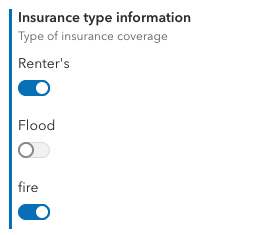
* The `SwitchInput` class defines the desired user interface for a binary switch or toggle. This should be used when selecting between two options. This [FieldElement.input](https://developers.arcgis.com/javascript/latest/references/core/form/elements/FieldElement/#input) is used in [field elements](https://developers.arcgis.com/javascript/latest/references/core/form/elements/FieldElement/) that are set within a [feature layer's](https://developers.arcgis.com/javascript/latest/references/core/layers/FeatureLayer/#formTemplate) or [FeatureForm's](https://developers.arcgis.com/javascript/latest/references/core/widgets/FeatureForm/#formTemplate) `formTemplate`. This is displayed within the [Editor](https://developers.arcgis.com/javascript/latest/references/core/widgets/Editor/) widget.
*
* > [!WARNING]
* >
* > Coded-value domains are required when using this input type.
*
* 
*
* @since 4.20
* @see [FieldElement](https://developers.arcgis.com/javascript/latest/references/core/form/elements/FieldElement/)
* @see [CodedValueDomain](https://developers.arcgis.com/javascript/latest/references/core/layers/support/CodedValueDomain/)
* @example
* // Creates a new Switch input for a field element within a form
* const switchInput = new SwitchInput({
* offValue: "No",
* onValue: "Yes"
* });
*/
export default class SwitchInput extends Input {
constructor(properties?: SwitchInputProperties);
/** Coded value used when the switch state is turned off. This value can be of either a `string` or `number`. */
get offValue(): CodedValue["code"];
set offValue(value: CodedValueProperties["code"]);
/** Coded value used when the switch state is turned on. This value can be of either a `string` or `number`. */
get onValue(): CodedValue["code"];
set onValue(value: CodedValueProperties["code"]);
/** The type of form element input. */
get type(): "switch";
}