@arcgis/core
Version:
ArcGIS Maps SDK for JavaScript: A complete 2D and 3D mapping and data visualization API
39 lines (37 loc) • 2.33 kB
TypeScript
import type Input from "./Input.js";
export interface ComboBoxInputProperties extends Partial<Pick<ComboBoxInput, "noValueOptionLabel" | "showNoValueOption">> {}
/**
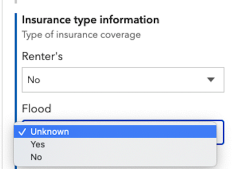
* The `ComboBoxInput` class defines the desired user interface for a combo box group input. This [FieldElement.input](https://developers.arcgis.com/javascript/latest/references/core/form/elements/FieldElement/#input) is used in [field elements](https://developers.arcgis.com/javascript/latest/references/core/form/elements/FieldElement/) that are set within a [feature layer's](https://developers.arcgis.com/javascript/latest/references/core/layers/FeatureLayer/#formTemplate) or [FeatureForm's](https://developers.arcgis.com/javascript/latest/references/core/widgets/FeatureForm/#formTemplate) `formTemplate`. This is displayed within the [Editor](https://developers.arcgis.com/javascript/latest/references/core/widgets/Editor/) widget.
*
* > [!WARNING]
* >
* > Coded-value domains are required when using this input type. Previously, fields containing values that weren't compatible with their associated coded-value domain(s) displayed the option and would remove it once a user updated the value. The `ComboBoxInput` will now display and keep the value but will disable it.
*
* 
*
* @since 4.19
* @see [FieldElement](https://developers.arcgis.com/javascript/latest/references/core/form/elements/FieldElement/)
* @see [CodedValueDomain](https://developers.arcgis.com/javascript/latest/references/core/layers/support/CodedValueDomain/)
* @example
* // Creates a new ComboBox input for a field element within a form
* const comboBoxInput = new ComboBoxInput({
* showNoValueOption: false
* });
*/
export default class ComboBoxInput extends Input {
constructor(properties?: ComboBoxInputProperties);
/** The text used to represent a null value. */
accessor noValueOptionLabel: string | null | undefined;
/**
* Determines whether a null value option is displayed.
*
* > [!WARNING]
* >
* > This only applies to fields that support null values.
*
* @default true
*/
accessor showNoValueOption: boolean;
/** The type of form element input. */
get type(): "combo-box";
}