@arcgis/core
Version:
ArcGIS Maps SDK for JavaScript: A complete 2D and 3D mapping and data visualization API
74 lines (72 loc) • 3.61 kB
TypeScript
import type Element from "./Element.js";
import type { ElementProperties } from "./Element.js";
import type { TextFormatType } from "../../portal/jsonTypes.js";
export interface TextElementProperties extends ElementProperties, Partial<Pick<TextElement, "text" | "textFormat">> {}
/**
* A `TextElement` form element is used to define descriptive text as an element within a layer or [FeatureForm](https://developers.arcgis.com/javascript/latest/references/core/widgets/FeatureForm/) [FormTemplate](https://developers.arcgis.com/javascript/latest/references/core/form/FormTemplate/) and can be used to aid those entering or updating information.
* The text may reference values returned from a field attribute or an
* [Arcade](https://developers.arcgis.com/javascript/latest/arcade/) expression defined in a FormTemplate's [FormTemplate.expressionInfos](https://developers.arcgis.com/javascript/latest/references/core/form/FormTemplate/#expressionInfos) property.
*
* [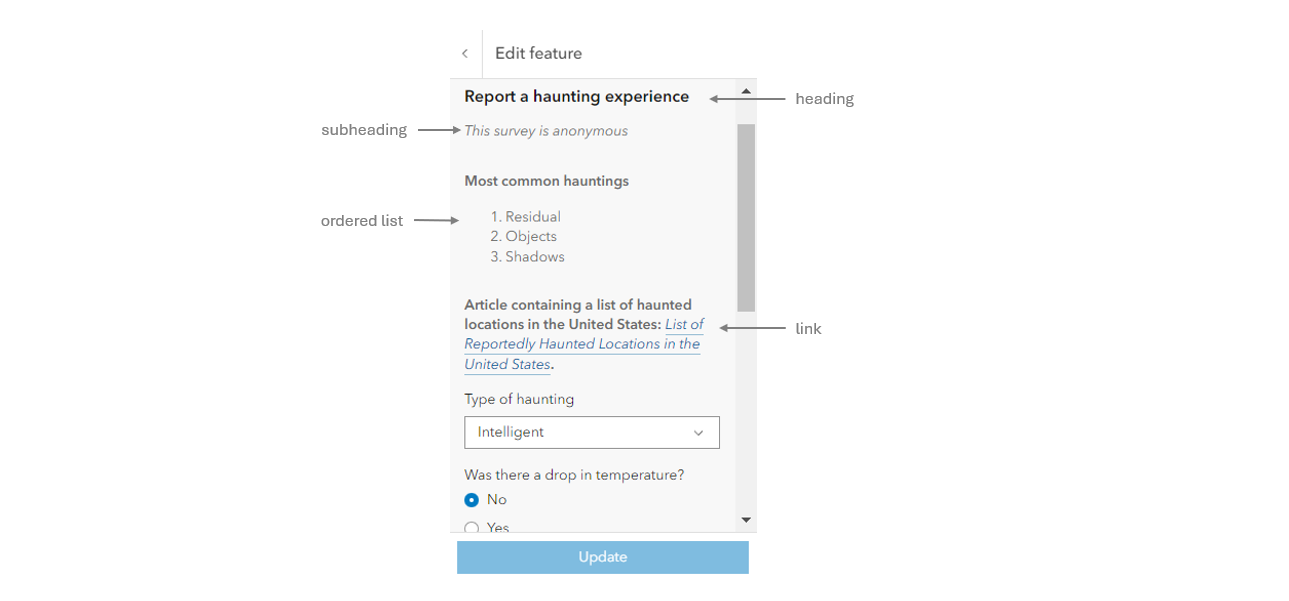](https://developers.arcgis.com/javascript/latest/sample-code/widgets-editor-form-elements/)
*
* @see [FormTemplate](https://developers.arcgis.com/javascript/latest/references/core/form/FormTemplate/)
* @see [FeatureForm](https://developers.arcgis.com/javascript/latest/references/core/widgets/FeatureForm/)
* @see [ExpressionInfo](https://developers.arcgis.com/javascript/latest/references/core/form/ExpressionInfo/)
* @see [Sample - Edit FeatureLayers with form elements](https://developers.arcgis.com/javascript/latest/sample-code/widgets-editor-form-elements/)
* @example
* // Create a plain-text element.
* const textElement = new TextElement({
* text: "Tree species: {COMMONNAME}."
* });
*
* // Create a markdown text element with italics and bold text.
* const markdownTextElement = new TextElement({
* textFormat: "markdown",
* text: "_This text is italicized_ & **This text is bold.**"
* });
*
* layer.formTemplate = new FormTemplate({
* title: "Plain-text and markdown text elements",
* elements: [ textElement, markdownTextElement ]
* });
*/
export default class TextElement extends Element {
constructor(properties?: TextElementProperties);
/**
* The formatted string content to display. This may contain a field
* name enclosed in `{}` (e.g. `{FIELDNAME}`), or an [Arcade](https://developers.arcgis.com/javascript/latest/arcade/)
* expression [ExpressionInfo.name](https://developers.arcgis.com/javascript/latest/references/core/form/ExpressionInfo/#name) (e.g. `{expression/EXPRESSIONNAME}`).
* Text content may also leverage Markdown formatting for these features:
*
* * Bold
* * Bullet lists
* * Headings
* * Italic
* * Links
* * Numbered lists
* * Quoting code
* * Strikethrough
*
* @example
* // This TextElement uses the markdown large heading.
* const textElement = new TextElement({
* textFormat: "markdown",
* text: "##### This tree type is {COMMONNAME}."
* });
*/
accessor text: string | null | undefined;
/**
* Defines the format of the `text` property.
*
* @default "plain-text"
*/
accessor textFormat: TextFormatType;
/** Indicates the type of form [Element](https://developers.arcgis.com/javascript/latest/references/core/form/elements/Element/). This will always be "text"; */
get type(): "text";
/**
* Creates a deep clone of the TextElement class.
*
* @returns A deep clone of the TextElement instance.
*/
clone(): TextElement;
}