@arcgis/core
Version:
ArcGIS Maps SDK for JavaScript: A complete 2D and 3D mapping and data visualization API
156 lines (154 loc) • 6.84 kB
TypeScript
import type Analysis from "./Analysis.js";
import type SlicePlane from "./SlicePlane.js";
import type Collection from "../core/Collection.js";
import type { SliceableLayer } from "./Slice/types.js";
import type { ReadonlyArrayOrCollection } from "../core/Collection.js";
import type { SlicePlaneProperties } from "./SlicePlane.js";
import type { AnalysisProperties } from "./Analysis.js";
export interface SliceAnalysisProperties extends AnalysisProperties, Partial<Pick<SliceAnalysis, "excludeGroundSurface" | "tiltEnabled">> {
/**
* A collection of layers that should be excluded from the slice analysis.
*
* @since 4.33
*/
excludedLayers?: ReadonlyArrayOrCollection<SliceableLayer>;
/**
* The shape used to slice elements in a 3D scene.
* Currently the only supported shape is a plane.
*/
shape?: (SlicePlaneProperties & { type?: "plane" }) | null;
}
/**
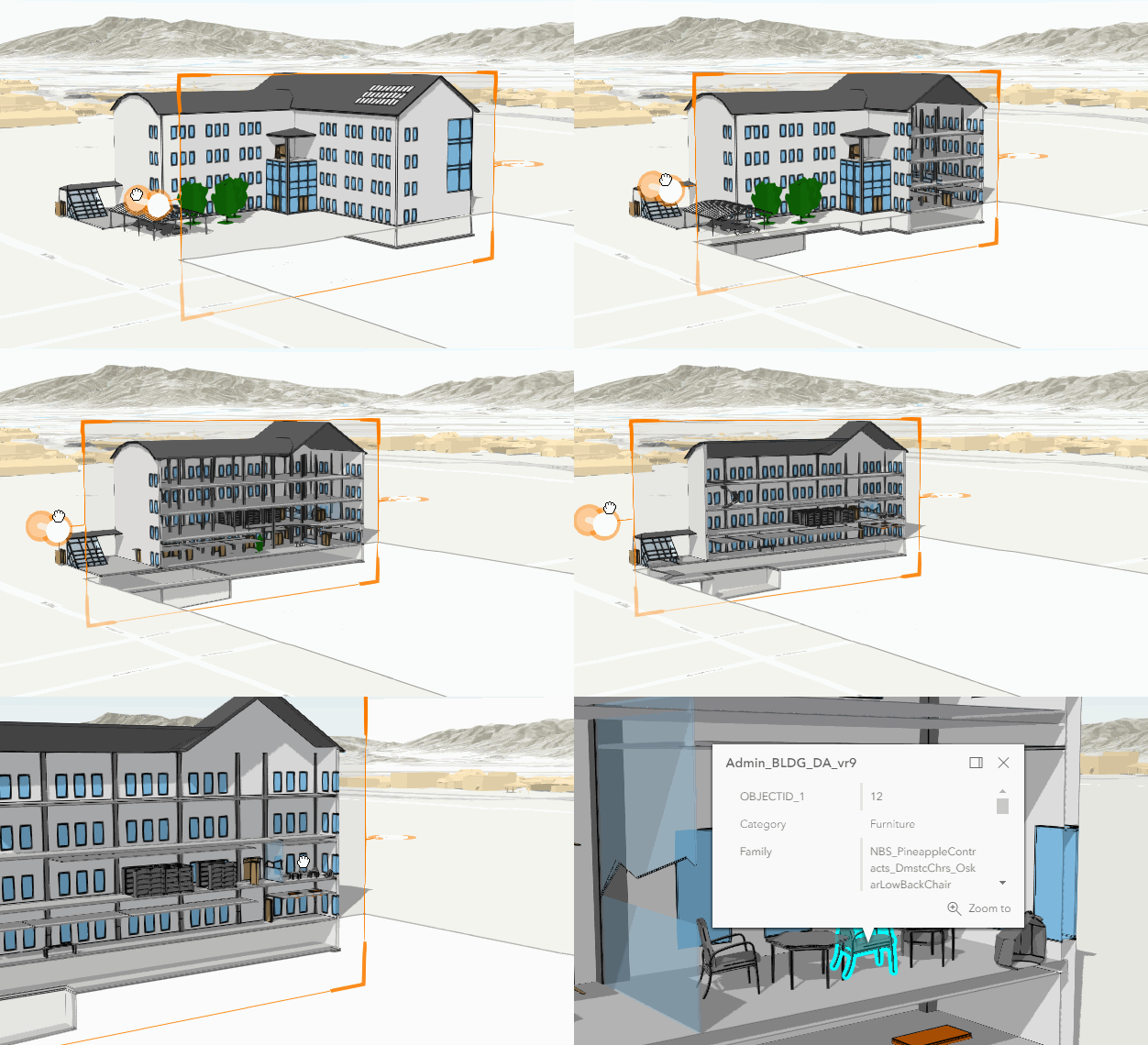
* SliceAnalysis can be used to programmatically create a plane that slices through 3D features in a
* 3D [SceneView](https://developers.arcgis.com/javascript/latest/references/core/views/SceneView/).
*
* 
*
* A slice takes a [SlicePlane](https://developers.arcgis.com/javascript/latest/references/core/analysis/SlicePlane/)
* as an input, which can be set through the [shape](https://developers.arcgis.com/javascript/latest/references/core/analysis/SliceAnalysis/#shape) property. If the shape has a tilt angle other than `0`, the angle
* is only considered if the [tiltEnabled](https://developers.arcgis.com/javascript/latest/references/core/analysis/SliceAnalysis/#tiltEnabled) property is set to `true`.
*
* ```js
* const sliceAnalysis = new SliceAnalysis({
* shape: new SlicePlane({
* position: new Point({ }),
* width: 50,
* height: 50,
* tilt: 45
* }),
* tiltEnabled: true
* });
*
* view.analyses.add(sliceAnalysis);
* ```
*
* [SceneView.analyses](https://developers.arcgis.com/javascript/latest/references/core/views/SceneView/#analyses) can contain multiple slice analyses, but only one of
* them can be active at a time. When working with multiple slices, set the [SliceAnalysisView3D.active](https://developers.arcgis.com/javascript/latest/references/core/views/3d/analysis/SliceAnalysisView3D/#active)
* property of a slice analysis view to `true` to occlude the parts of the 3D features that are in front of the slice
* plane. When a slice analysis view is activated, all other slice analysis views are automatically deactivated.
*
* ```js
* const sliceAnalysisView = await view.whenAnalysisView(sliceAnalysis);
*
* // make the slice active in the view (only one slice can be active at a time)
* sliceAnalysisView.active = true;
* ```
*
* To place a slice interactively, use the
* [SliceAnalysisView3D.place()](https://developers.arcgis.com/javascript/latest/references/core/views/3d/analysis/SliceAnalysisView3D/#place) method.
*
* ```js
* const abortController = new AbortController();
*
* try {
* await analysisView.place({ signal: abortController.signal });
* } catch (error) {
* if (error.name === "AbortError") {
* console.log("Placement operation was cancelled.");
* }
* }
*
* // cancel the placement operation at some later point
* abortController.abort();
* ```
*
* Similarly, to interactively exclude layers from the slicing, use the
* [SliceAnalysisView3D.pickLayerToExclude()](https://developers.arcgis.com/javascript/latest/references/core/views/3d/analysis/SliceAnalysisView3D/#pickLayerToExclude) method.
*
* ```js
* const abortController = new AbortController();
*
* try {
* await analysisView.pickLayerToExclude({ signal: abortController.signal });
* } catch (error) {
* if (error.name === "AbortError") {
* console.log("Picking excluded layers operation was cancelled.");
* }
* }
*
* // cancel the operation at some later point
* abortController.abort();
* ```
*
* Use the [Slice component](https://developers.arcgis.com/javascript/latest/references/map-components/components/arcgis-slice/) to display a user interface for the slice
* analysis. The component allows users to interactively place a slice and exclude layers from the analysis.
*
* > [!WARNING]
* >
* > **Known Limitations**
* >
* > This analysis is only supported in a 3D [SceneView](https://developers.arcgis.com/javascript/latest/references/core/views/SceneView/).
*
* @since 4.23
* @see [SliceAnalysisView3D](https://developers.arcgis.com/javascript/latest/references/core/views/3d/analysis/SliceAnalysisView3D/)
* @see [SlicePlane](https://developers.arcgis.com/javascript/latest/references/core/analysis/SlicePlane/)
* @see [Slice component](https://developers.arcgis.com/javascript/latest/references/map-components/components/arcgis-slice/)
* @see [Sample - Analysis objects](https://developers.arcgis.com/javascript/latest/sample-code/analysis-objects/)
*/
export default class SliceAnalysis extends Analysis {
constructor(properties?: SliceAnalysisProperties);
/**
* A collection of layers that should be excluded from the slice analysis.
*
* @since 4.33
*/
get excludedLayers(): Collection<SliceableLayer>;
set excludedLayers(value: ReadonlyArrayOrCollection<SliceableLayer>);
/**
* A flag that indicates whether the ground surface should be excluded from the slice analysis.
*
* @default false
* @since 4.33
*/
accessor excludeGroundSurface: boolean;
/**
* The shape used to slice elements in a 3D scene.
* Currently the only supported shape is a plane.
*/
get shape(): SlicePlane | null | undefined;
set shape(value: (SlicePlaneProperties & { type?: "plane" }) | null | undefined);
/**
* Whether the [shape](https://developers.arcgis.com/javascript/latest/references/core/analysis/SliceAnalysis/#shape) supports a tilt angle or not. If set to true, the
* [SlicePlane.tilt](https://developers.arcgis.com/javascript/latest/references/core/analysis/SlicePlane/#tilt) angle is respected.
* By default it is set to false, so the tilt value of the shape is not taken into
* consideration.
*
* @default false
*/
accessor tiltEnabled: boolean;
/** The type of analysis. For slice analysis, this is always "slice". */
get type(): "slice";
/**
* Indicates whether the analysis is ready to be computed and interacted with in the view.
* It requires a [shape](https://developers.arcgis.com/javascript/latest/references/core/analysis/SliceAnalysis/#shape) with a position to be set.
*
* @since 4.33
*/
get valid(): boolean;
/**
* Clears the analysis by resetting the [shape](https://developers.arcgis.com/javascript/latest/references/core/analysis/SliceAnalysis/#shape) property.
*
* @since 5.0
*/
clear(): void;
}