@arcgis/core
Version:
ArcGIS Maps SDK for JavaScript: A complete 2D and 3D mapping and data visualization API
238 lines (236 loc) • 14.1 kB
TypeScript
import type Analysis from "./Analysis.js";
import type DiscreteOptions from "./ShadowCast/DiscreteOptions.js";
import type MinDurationOptions from "./ShadowCast/MinDurationOptions.js";
import type TotalDurationOptions from "./ShadowCast/TotalDurationOptions.js";
import type { AnalysisProperties } from "./Analysis.js";
import type { DiscreteOptionsProperties } from "./ShadowCast/DiscreteOptions.js";
import type { MinDurationOptionsProperties } from "./ShadowCast/MinDurationOptions.js";
import type { TotalDurationOptionsProperties } from "./ShadowCast/TotalDurationOptions.js";
import type { ShadowCastMode } from "./ShadowCast/types.js";
/** @since 5.0 */
export interface ShadowCastAnalysisProperties extends AnalysisProperties, Partial<Pick<ShadowCastAnalysis, "endTimeOfDay" | "mode" | "startTimeOfDay" | "utcOffset">> {
/**
* The calendar date used to calculate the shadow cast. This date excludes the time.
* If a date with a time is set, the time value will be set to midnight (`00:00:00`) of that date in local system time.
* If no date is set, then it defaults to the current date in local system time.
*
* @since 5.0
*/
date?: (Date | number | string);
/**
* Options specific to the `discrete` mode.
*
* @since 5.0
*/
discreteOptions?: DiscreteOptionsProperties;
/**
* Options specific to the `min-duration` mode.
*
* @since 5.0
*/
minDurationOptions?: MinDurationOptionsProperties;
/**
* Options specific to the `total-duration` mode.
*
* @since 5.0
*/
totalDurationOptions?: TotalDurationOptionsProperties;
}
/**
* The ShadowCastAnalysis displays the cumulative shadows of 3D features in a
* [SceneView](https://developers.arcgis.com/javascript/latest/references/core/views/SceneView/). This type of analysis is helpful in urban development,
* where new projects have to satisfy certain shadow duration constraints.
*
* The analysis calculates the cumulative shadows for a time range during a single day. The user can
* configure the time range and select a calendar date. This time range and calendar date are only used
* for the shadow analysis and are not connected to the lighting in the scene.
* To control the lighting in the scene, use the [Daylight](https://developers.arcgis.com/javascript/latest/references/map-components/components/arcgis-daylight/) component.
* Changing the timezone in the analysis updates the visualization by interpreting the time range as being
* in that timezone. This behavior is different than for the [Daylight](https://developers.arcgis.com/javascript/latest/references/map-components/components/arcgis-daylight/)
* component where selecting a timezone updates the
* [environment lighting's](https://developers.arcgis.com/javascript/latest/references/map-components/components/arcgis-scene/#environment)
* date and time according to the camera position.
*
* The analysis provides three visualization modes.
*
* **Minimum duration** mode displays shadows only in areas where shading accumulates for longer than a specified duration
* within the selected time range. Areas that receive less shading than the minimum show no shadow. In the image below,
* on May 1, 2021, shadows are displayed only where shading exceeds 4 hours between 10AM and 4PM.
*
* [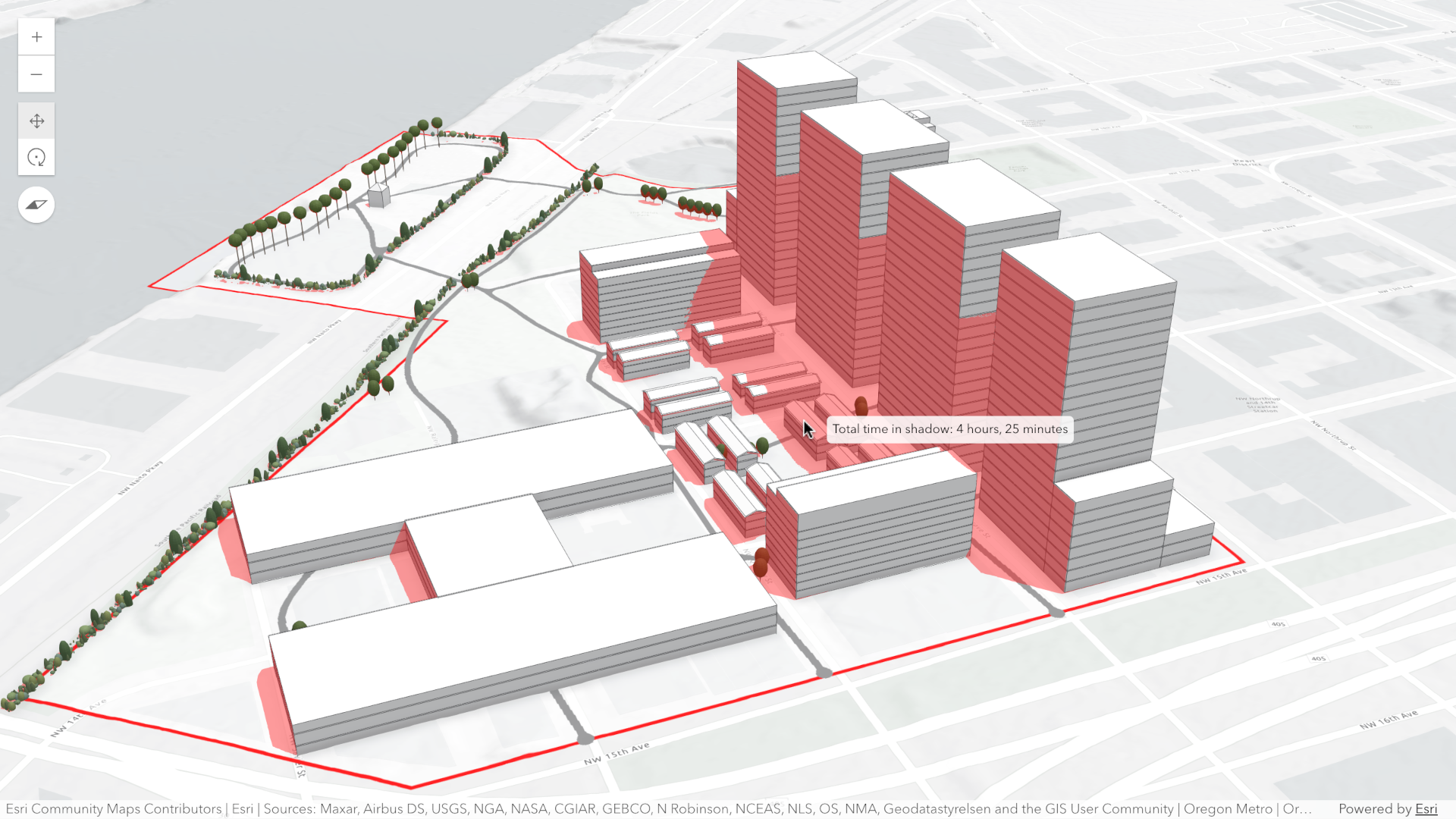](https://developers.arcgis.com/javascript/latest/sample-code/shadow-cast/)
*
* **Total shadow duration** mode displays the cumulative duration of shadow within the selected time range using opacity:
* areas that receive no shadow remain fully transparent, while areas receiving the highest accumulated shadow duration
* use a default opacity of 0.7. Intermediate values are interpolated. This mode can visualize shadows continuously or
* in 1-hour intervals.
*
* [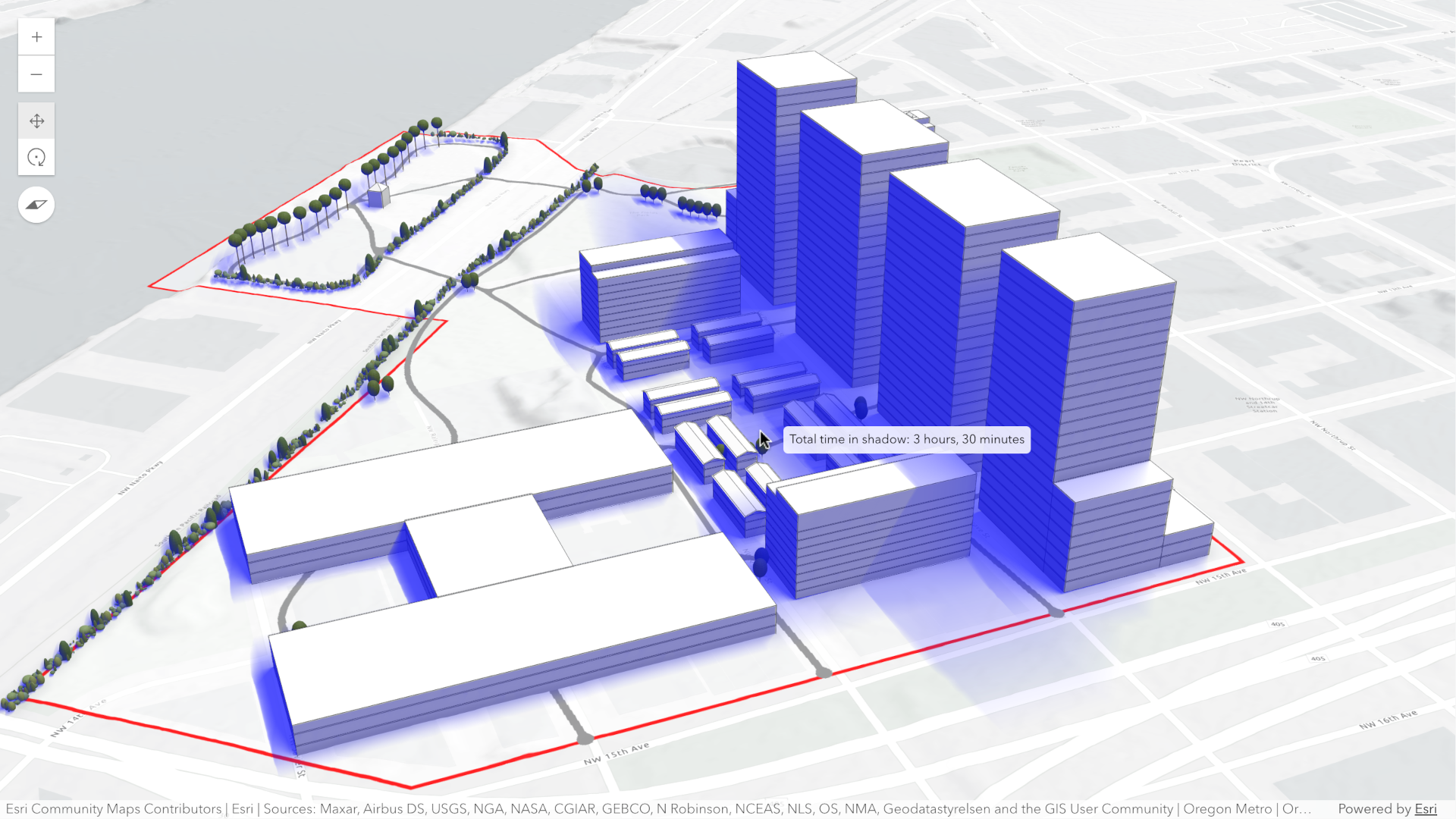](https://developers.arcgis.com/javascript/latest/sample-code/shadow-cast/)
*
* **Discrete shadows** mode displays individual shadows at regular intervals within the selected time range.
* For example, with a time range from 10AM to 11AM and an interval set to 30 minutes, the shadows at 10AM, 10:30AM and
* 11:00AM will be displayed.
*
* [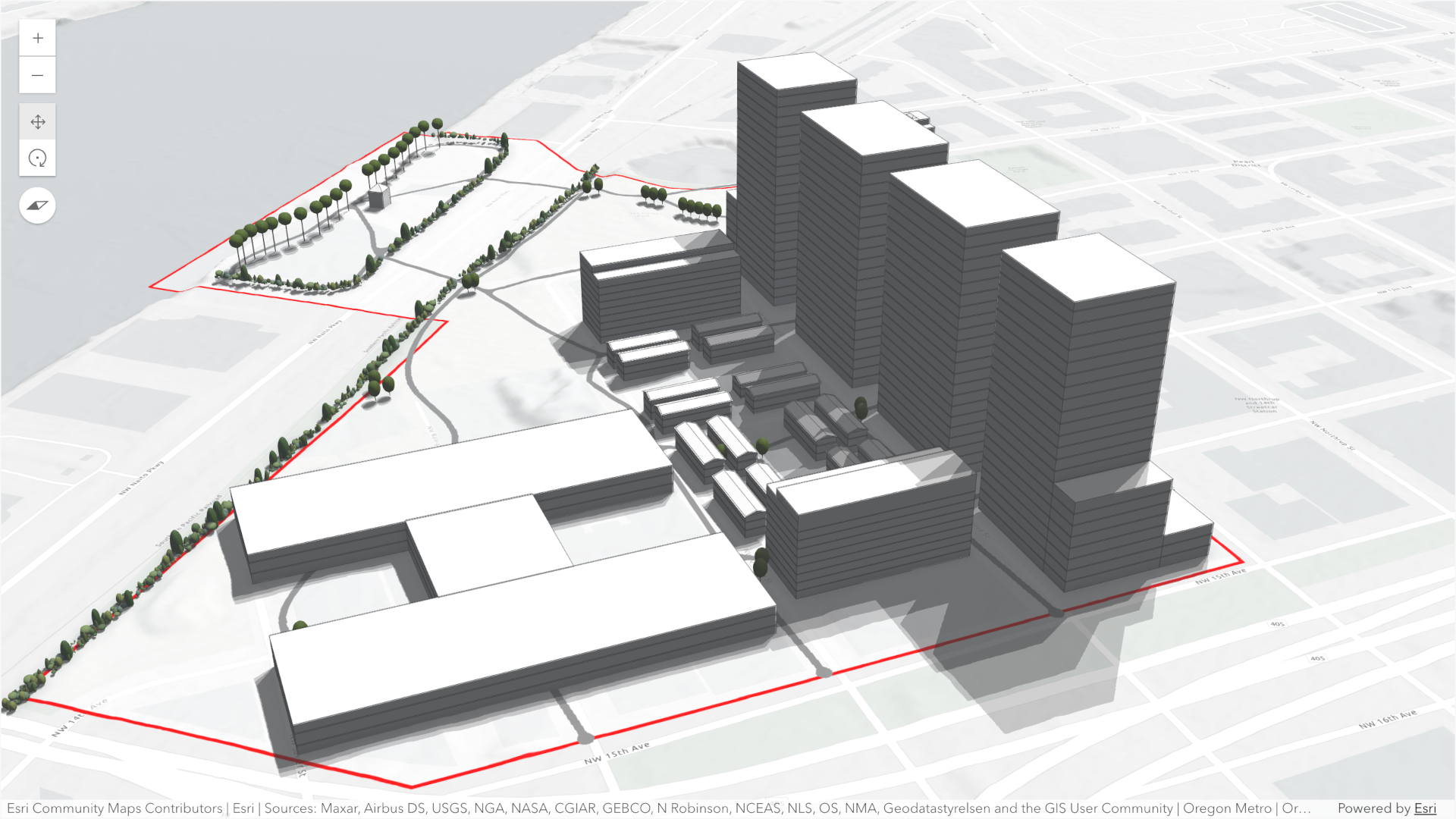](https://developers.arcgis.com/javascript/latest/sample-code/shadow-cast/)
*
* By default, the analysis also displays a tooltip next to the pointer that reports the total shadow duration at that
* location, rounded to 15‑minute increments. This allows you to inspect precise shadow durations anywhere within the
* view without additional configuration.
*
* To perform a shadow cast analysis in your [WebScene](https://developers.arcgis.com/javascript/latest/references/core/WebScene/):
* - Create a new instance of ShadowCastAnalysis.
* - Set the desired [mode](https://developers.arcgis.com/javascript/latest/references/core/analysis/ShadowCastAnalysis/#mode).
* - Configure the analysis time range using the [date](https://developers.arcgis.com/javascript/latest/references/core/analysis/ShadowCastAnalysis/#date), [startTimeOfDay](https://developers.arcgis.com/javascript/latest/references/core/analysis/ShadowCastAnalysis/#startTimeOfDay),
* and [endTimeOfDay](https://developers.arcgis.com/javascript/latest/references/core/analysis/ShadowCastAnalysis/#endTimeOfDay) properties.
* - Optionally set the [utcOffset](https://developers.arcgis.com/javascript/latest/references/core/analysis/ShadowCastAnalysis/#utcOffset) property to define the timezone used for the analysis.
* - If using the "discrete" [mode](https://developers.arcgis.com/javascript/latest/references/core/analysis/ShadowCastAnalysis/#mode), optionally set custom properties with [DiscreteOptions](https://developers.arcgis.com/javascript/latest/references/core/analysis/ShadowCast/DiscreteOptions/).
* - If using the "min-duration" [mode](https://developers.arcgis.com/javascript/latest/references/core/analysis/ShadowCastAnalysis/#mode), optionally set custom properties with [MinDurationOptions](https://developers.arcgis.com/javascript/latest/references/core/analysis/ShadowCast/MinDurationOptions/).
* - If using the "total-duration" [mode](https://developers.arcgis.com/javascript/latest/references/core/analysis/ShadowCastAnalysis/#mode), optionally set custom properties with [TotalDurationOptions](https://developers.arcgis.com/javascript/latest/references/core/analysis/ShadowCast/TotalDurationOptions/).
* - Add the ShadowCastAnalysis instance to [SceneView.analyses](https://developers.arcgis.com/javascript/latest/references/core/views/SceneView/#analyses).
*
* Use the [ShadowCastAnalysisView3D](https://developers.arcgis.com/javascript/latest/references/core/views/3d/analysis/ShadowCastAnalysisView3D/) class and its
* [ShadowCastAnalysisView3D.getDurationAtScreen()](https://developers.arcgis.com/javascript/latest/references/core/views/3d/analysis/ShadowCastAnalysisView3D/#getDurationAtScreen) method to
* obtain the shadow duration at a specific screen location programmatically.
* To disable the shadow tooltip next to the pointer set the [ShadowCastAnalysisView3D.interactive](https://developers.arcgis.com/javascript/latest/references/core/views/3d/analysis/ShadowCastAnalysisView3D/#interactive)
* property to `false`.
*
* ```js
* // create analysis
* const shadowCastAnalysis = new ShadowCastAnalysis({
* date: new Date("March 1, 2026"),
* startTimeOfDay: 10 * 3600 * 1000, // 10AM,
* endTimeOfDay: 16 * 3600 * 1000, // 4PM,
* mode: "min-duration",
* minDurationOptions: {
* minDuration: 3 * 3600 * 1000, // 3 hours
* color: [255, 0, 0, 0.4], // Transparent red
* },
* utcOffset: -8, // Pacific Standard Time
* });
*
* // add to scene view
* view.analyses.add(shadowCastAnalysis);
*
* // use getDurationAtScreen method from the analysis view once available
* const analysisView = await view.whenAnalysisView(shadowCastAnalysis);
*
* // get shadow duration at the pointer location
* view.on("pointer-move", async (event) => {
* // duration in milliseconds
* const duration = await analysisView.getDurationAtScreen({ x: event.x, y: event.y });
* // ... do something with the duration
* })
*
* ```
* > [!WARNING]
* >
* > **Known Limitations**
* >
* > - Terrain does not cast shadows in this analysis.
* > - As a result, to avoid incorrect shadow visualization, `startTimeOfDay` should be set after local sunrise and
* > `endTimeOfDay` before local sunset. If these times fall outside daylight hours, shadows may be missing in areas where
* > terrain would normally block sunlight.
* > - The analysis does not take daylight savings into account. Use the timezone dropdown to adjust the offset from
* > the Coordinated Universal Time (UTC) and account for the daylight
* > saving time.
* > - The timezone is automatically detected based on the camera location. In some situations this might
* > not be accurate. In case of an inaccurate timezone, users can set it manually using the [utcOffset](https://developers.arcgis.com/javascript/latest/references/core/analysis/ShadowCastAnalysis/#utcOffset).
*
* @since 5.0
* @see [ShadowCastAnalysisView3D](https://developers.arcgis.com/javascript/latest/references/core/views/3d/analysis/ShadowCastAnalysisView3D/)
* @see [DiscreteOptions](https://developers.arcgis.com/javascript/latest/references/core/analysis/ShadowCast/DiscreteOptions/)
* @see [TotalDurationOptions](https://developers.arcgis.com/javascript/latest/references/core/analysis/ShadowCast/TotalDurationOptions/)
* @see [MinDurationOptions](https://developers.arcgis.com/javascript/latest/references/core/analysis/ShadowCast/MinDurationOptions/)
* @see [Sample - Shadow Cast analysis object](https://developers.arcgis.com/javascript/latest/sample-code/analysis-shadow-cast/)
* @see [Sample - Analysis objects](https://developers.arcgis.com/javascript/latest/sample-code/analysis-objects/)
* @see [Shadow Cast component](https://developers.arcgis.com/javascript/latest/references/map-components/components/arcgis-shadow-cast/)
*/
export default class ShadowCastAnalysis extends Analysis {
/** @since 5.0 */
constructor(properties?: ShadowCastAnalysisProperties);
/**
* The calendar date used to calculate the shadow cast. This date excludes the time.
* If a date with a time is set, the time value will be set to midnight (`00:00:00`) of that date in local system time.
* If no date is set, then it defaults to the current date in local system time.
*
* @since 5.0
*/
get date(): Date;
set date(value: (Date | number | string));
/**
* Options specific to the `discrete` mode.
*
* @since 5.0
*/
get discreteOptions(): DiscreteOptions;
set discreteOptions(value: DiscreteOptionsProperties);
/**
* Time (in milliseconds from midnight of the [date](https://developers.arcgis.com/javascript/latest/references/core/analysis/ShadowCastAnalysis/#date)) when the shadow cast computation should stop.
* By default the shadow cast end time is set to 4PM (16 * 3600 * 1000ms).
*
* @default 57_600_000
* @since 5.0
*/
accessor endTimeOfDay: number;
/**
* Options specific to the `min-duration` mode.
*
* @since 5.0
*/
get minDurationOptions(): MinDurationOptions;
set minDurationOptions(value: MinDurationOptionsProperties);
/**
* Mode of analysis to use when computing and displaying shadows.
*
* - "discrete": Displays individual shadow snapshots at regular time intervals within the selected time range.
* - "min-duration": Displays shadows only in areas where accumulated shading exceeds a user‑defined minimum duration within the selected time range. Optional discrete shadow overlays can provide additional context.
* - "total-duration": Displays total shadow accumulation within the selected time range using opacity: areas with longer shadow duration appear more opaque. Supports continuous or 1‑hour aggregated modes.
*
* @default "min-duration"
* @since 5.0
*/
accessor mode: ShadowCastMode;
/**
* Time (in milliseconds from midnight of the [date](https://developers.arcgis.com/javascript/latest/references/core/analysis/ShadowCastAnalysis/#date)) when the shadow cast computation should start.
* By default the shadow cast start time is set to 10AM (10 * 3600 * 1000ms).
*
* @default 36_000_000
* @since 5.0
*/
accessor startTimeOfDay: number;
/**
* Options specific to the `total-duration` mode.
*
* @since 5.0
*/
get totalDurationOptions(): TotalDurationOptions;
set totalDurationOptions(value: TotalDurationOptionsProperties);
/**
* The analysis type.
*
* @since 5.0
*/
get type(): "shadow-cast";
/**
* The UTC offset in hours (e.g., `-8` for PST, `1` for CET). This value determines how the [date](https://developers.arcgis.com/javascript/latest/references/core/analysis/ShadowCastAnalysis/#date),
* [startTimeOfDay](https://developers.arcgis.com/javascript/latest/references/core/analysis/ShadowCastAnalysis/#startTimeOfDay), and [endTimeOfDay](https://developers.arcgis.com/javascript/latest/references/core/analysis/ShadowCastAnalysis/#endTimeOfDay) properties are interpreted when computing the
* shadow cast analysis.
*
* If not specified, the analysis will automatically determine an approximate UTC offset based on the longitude of the
* view's camera position.
*
* > [!WARNING]
* >
* > **Known Limitations**
* >
* > Full support for time zones with daylight saving time is not yet supported.
*
* @since 5.0
*/
accessor utcOffset: number | null | undefined;
/**
* Indicates whether the analysis is ready to be computed and interacted with in the view.
*
* @since 5.0
*/
get valid(): boolean;
}